
1. Introduzione
This manual provides detailed instructions for the installation, configuration, and operation of your NEWFAST AX1800 WiFi Extender Signal Booster, Model RE553. This device is designed to expand your existing WiFi network coverage, eliminate dead zones, and provide stable, high-speed internet access throughout your home or office. Please read this manual carefully before using the product to ensure proper setup and optimal performance.
2. Prodotto finitoview
The NEWFAST AX1800 WiFi Extender is a dual-band WiFi 6 (802.11ax) device featuring a Gigabit Ethernet port and four high-gain antennas. It supports speeds up to 1800 Mbps (574 Mbps on 2.4GHz and 1201 Mbps on 5.8GHz) and includes an LCD display for easy status monitoring. The device is equipped with WPA3 security for enhanced network protection.
Contenuto della confezione:
- 1 x NEWFAST AX1800 Dual Band WiFi Extender (RE553)
- 1 cavo Ethernet RJ-45
- 1 x Manuale utente (questo documento)
Componenti del dispositivo:
The extender features a user-friendly design with clearly labeled indicators and ports.

Immagine 2.1: Sopraview of the NEWFAST AX1800 WiFi Extender, highlighting the WPS Button, WAN/LAN Port, Network Port Indication, WPA Indication, Network Indication, WiFi Indication, and 4 High-Gain Antennas, along with a Powerful Central Processor.
3. Guida all'installazione
The NEWFAST AX1800 WiFi Extender offers a straightforward setup process, including a convenient WPS one-click option.
3.1. Posizionamento ottimale
For the best performance, place the extender in a location that is roughly halfway between your main router and the area where you need improved WiFi coverage. The smart signal indicator on the device will help you find an optimal spot by displaying signal strength.

Immagine 3.1: Illustration of the WiFi extender's coverage, showing how it extends the signal from the main router to cover up to 9600 sq.ft and support over 65 devices.
3.2. WPS One-Click Setup
- Plug the NEWFAST AX1800 WiFi Extender into a power outlet near your main router.
- Wait for the device to power on and the WiFi indicator light to stabilize.
- Premi il pulsante WPS sul router principale.
- Within two minutes, press the WPS button on the NEWFAST AX1800 WiFi Extender.
- The devices will automatically connect. The signal indicator on the extender will show a stable connection when successful.
- Once connected, you can unplug the extender and move it to your desired optimal location (refer to section 3.1).
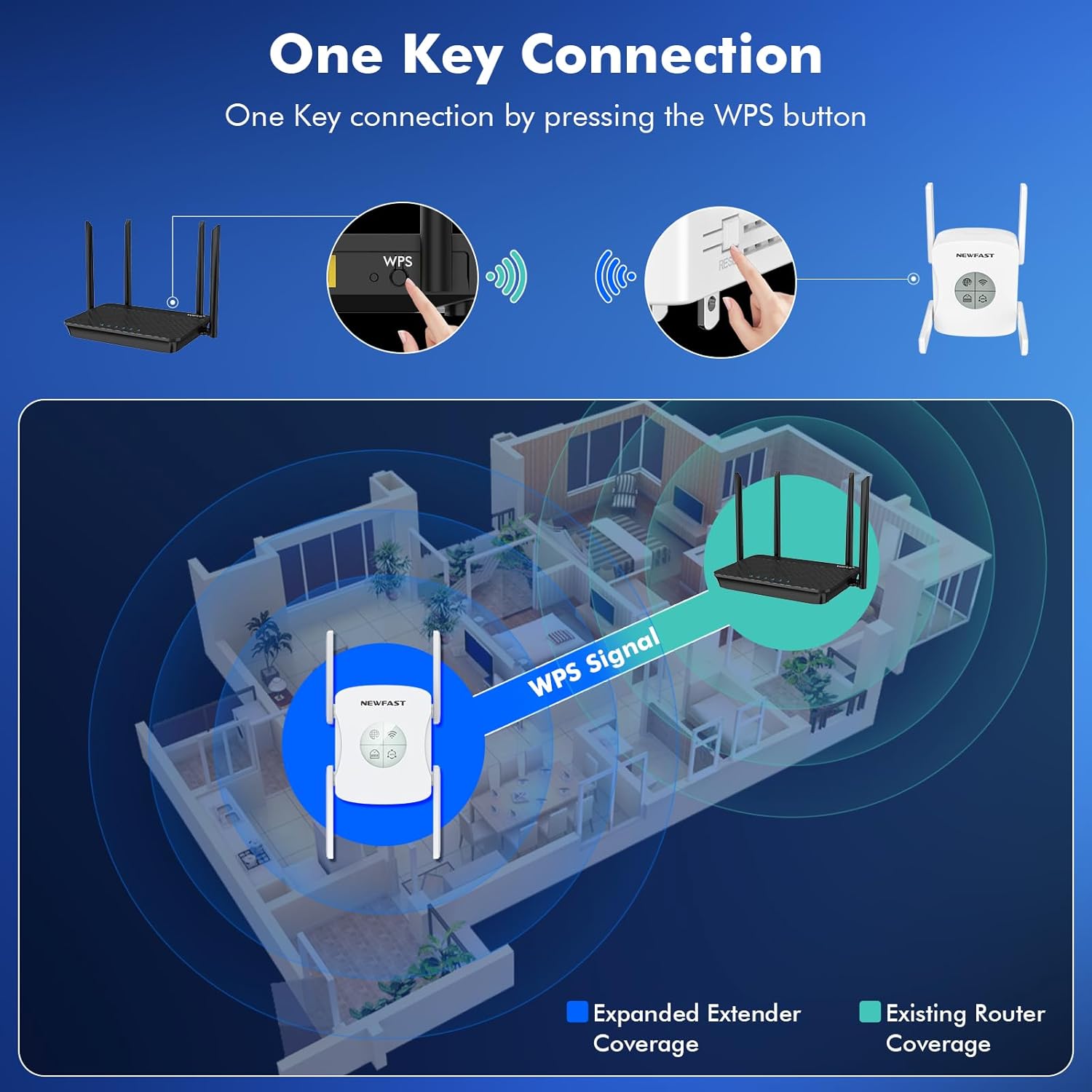
Immagine 3.2: Visual guide for WPS one-key connection, showing the process of pressing the WPS button on both the router and the extender to establish an expanded WiFi signal coverage.
3.3. Configurazione manuale (Web (navigatore)
If WPS setup is not preferred or available, you can configure the extender via a web browser. Refer to the full user manual for detailed steps on accessing the web interface and configuring the extender manually.
4. Modalità operative
The NEWFAST AX1800 WiFi Extender supports multiple operating modes to suit various networking requirements.

Immagine 4.1: Illustration of the three primary operating modes: Repeater Mode, Router Mode, and AP Mode, demonstrating how the extender functions in each configuration.
4.1. Modalità ripetitore
In Repeater Mode, the device extends the coverage of an existing wireless network. It connects wirelessly to your main router and rebroadcasts the signal, effectively expanding your WiFi range.
4.2. Modalità AP (punto di accesso)
In AP Mode, the device connects to your wired network via an Ethernet cable and transforms the wired connection into a wireless access point. This is useful for adding WiFi capability to a wired-only network or creating a new wireless network.
4.3. Modalità router
In Router Mode, the device acts as a primary router, connecting directly to your modem via an Ethernet cable to create a new private wireless network. This mode is suitable for small networks or as a replacement for an existing router.
5. Funzionalità avanzate
5.1. AX1800 Dual Band WiFi 6
The extender supports the latest WiFi 6 (802.11ax) standard, providing faster speeds and improved efficiency for multiple devices. It operates on both 2.4GHz (up to 574 Mbps) and 5.8GHz (up to 1201 Mbps) bands, allowing for flexible connectivity and reduced interference.

Immagine 5.1: Display illustrating the dual-band capabilities of the extender, showing 5GHz at 1200Mbps and 2.4GHz at 574Mbps, contributing to a total of 1800Mbps.
5.2. Porta Gigabit Ethernet
Equipped with a Gigabit Ethernet port, the extender allows for high-speed wired connections to devices such as smart TVs, gaming consoles, or desktop computers, ensuring stable and fast data transfer.
5.3. Schermo LCD
The integrated LCD display provides clear, real-time information about the device's working status, simplifying usage and configuration.

Immagine 5.2: Avvicinamento view emphasizing the LCD Intelligent Screen Display and the Wired Gigabit port, along with the four high-gain antennas for stable signal and stronger penetration.
5.4. WPA3 Security Protocol
The NEWFAST AX1800 WiFi Extender utilizes WPA3, the latest WiFi security protocol, to provide enhanced encryption and protection against network attacks, safeguarding your privacy and data.
5.5. Tecnologia MU-MIMO
MU-MIMO (Multi-User, Multiple-Input, Multiple-Output) technology allows the extender to communicate with multiple devices simultaneously, improving network efficiency and reducing latency, especially in environments with many connected devices.
6. Manutenzione
To ensure the longevity and optimal performance of your NEWFAST AX1800 WiFi Extender, follow these maintenance guidelines:
- Pulizia: Pulire delicatamente il dispositivo con un panno morbido e asciutto. Non utilizzare detergenti liquidi o materiali abrasivi.
- Ventilazione: Assicurarsi che il dispositivo sia posizionato in un luogo ben ventilato, lontano dalla luce solare diretta e da fonti di calore, per evitare il surriscaldamento.
- Aggiornamenti del firmware: Controllare periodicamente il sito ufficiale NEWFAST websito per gli aggiornamenti del firmware. Mantenere aggiornato il firmware del dispositivo può migliorare le prestazioni, aggiungere nuove funzionalità e aumentare la sicurezza.
- Condizioni ambientali: Evitare di esporre il dispositivo a temperature estreme, elevata umidità o ambienti polverosi.
7. Risoluzione Dei Problemi
If you encounter issues with your NEWFAST AX1800 WiFi Extender, refer to the following common troubleshooting steps:
7.1. No Internet Access or Weak Signal
- Controlla la potenza: Ensure the extender is properly plugged into a working power outlet.
- Reposition Extender: Move the extender closer to your main router. Use the signal indicator on the device to find a location with a strong signal from the router.
- Verifica la connessione del router: Ensure your main router is functioning correctly and providing internet access.
- Riavvia i dispositivi: Power cycle both your main router and the extender. Unplug them, wait 10 seconds, then plug them back in.
7.2. Cannot Connect to Extender's WiFi
- Check WiFi Name (SSID): Ensure you are selecting the correct extended WiFi network name (SSID), which is typically your main router's SSID with '_EXT' or similar appended.
- Password: Confirm you are entering the correct WiFi password. It is usually the same as your main router's password unless you changed it during setup.
- Reimposta Extender: If issues persist, perform a factory reset on the extender. Locate the reset button (usually a small pinhole) and press it for 5-10 seconds until the lights flash. After resetting, you will need to reconfigure the extender.
7.3. Velocità basse
- Posizionamento dell'estensore: Ensure the extender is not too far from the main router. A weak signal from the router will result in slower extended speeds.
- Interferenza: Minimize interference from other electronic devices (e.g., microwaves, cordless phones) by placing the extender away from them.
- Selezione della banda: For high-bandwidth activities (streaming, gaming), try connecting devices to the 5.8GHz band if available, as it generally offers faster speeds with less congestion.
8. Specifiche
| Caratteristica | Specificazione |
|---|---|
| Marca | NUOVO VELOCE |
| Modello | RE553 |
| standard wireless | 802.11a/b/g/n/ac, 802.11ax (WiFi 6) |
| Velocità di trasferimento dati | Up to 1800 Mbps (2.4GHz: 574 Mbps, 5.8GHz: 1201 Mbps) |
| Classe di banda di frequenza | Doppia banda (2.4 GHz e 5.8 GHz) |
| Porta Ethernet | 1 x Gigabit WAN/LAN Port |
| Antenne | 4 antenne esterne ad alto guadagno |
| Caratteristiche speciali | 1-Tap Setup (WPS), LCD Display Screen, MU-MIMO, Access Point Mode, Router Mode |
| Protocollo di sicurezza | WPA3 |
| Dispositivi compatibili | Internet Box, Router, Wireless Access Point |
| Dimensioni del prodotto | 8.79 x 3.96 x 9.19 cm; 422 g (88D x 40W x 92H millimeters) |
| Colore | Bianco |
9. Garanzia e supporto
Per informazioni sulla garanzia e supporto tecnico, fare riferimento alla documentazione inclusa con il prodotto o visitare il sito ufficiale NEWFAST webluogo. Conserva la ricevuta di acquisto per eventuali richieste di garanzia.
If you require further assistance, please contact NEWFAST customer support through the channels provided on their official websito.