
1. Introduzione
This user manual provides detailed instructions for the T&G Portable Bluetooth Speaker, model TG116C. Designed for exceptional audio performance, this compact speaker delivers crystal-clear sound and powerful bass, making it ideal for various indoor and outdoor environments. Please read this manual thoroughly before using the product to ensure proper operation and longevity.
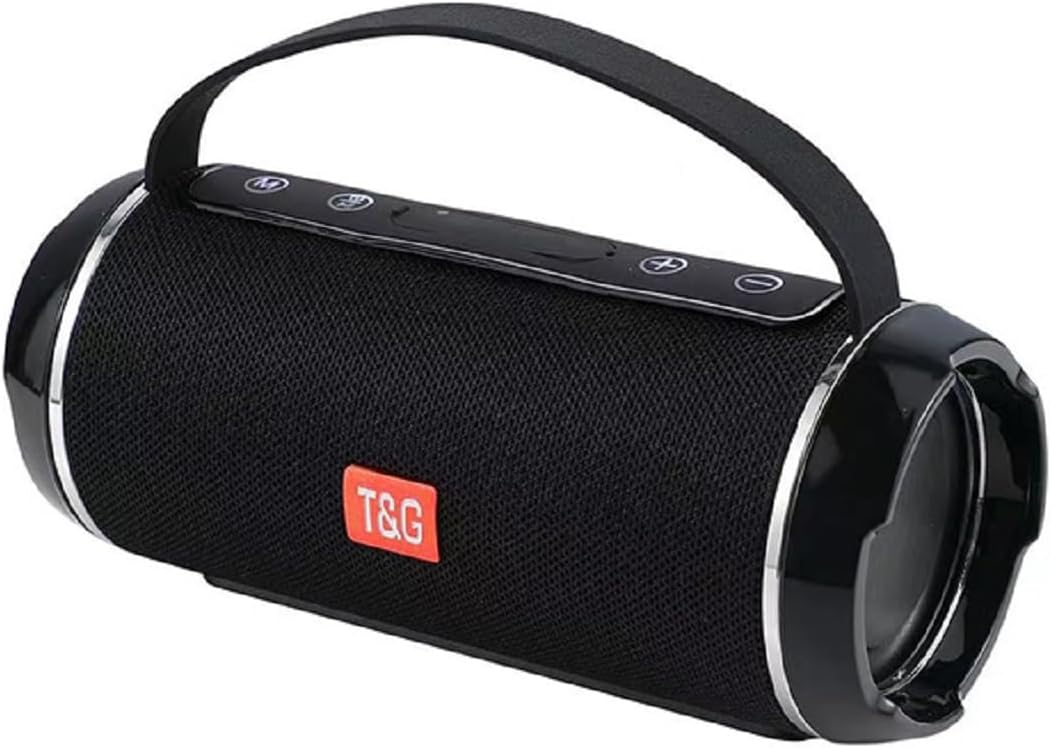
Figure 1: T&G Portable Bluetooth Speaker TG116C
2. Caratteristiche principali
- Immersive HD Sound with Deep Bass: Experience crystal-clear audio and powerful, distortion-free bass from this compact Bluetooth speaker. Advanced dual-driver technology and passive radiators deliver rich, balanced sound across all frequencies.
- Suono surround a 360°: Designed to fill any room with sound, providing an immersive listening experience.
- Design portatile e compatto: Measuring just 3.2" tall and 7.08" wide, this lightweight speaker fits easily in bags or backpacks. Features a convenient carry lanyard for on-the-go convenience.
- Batteria a lunga durata: Enjoy up to 50 hours of nonstop music with a high-capacity lithium battery. Smart power-saving technology auto-adjusts consumption and enables deep sleep when idle.
- Ricarica rapida: USB-C fast charging delivers 5 hours of playtime in just 10 minutes.
- Grado di impermeabilità IPX4: This speaker is splash-proof, making it suitable for outdoor adventures, beach trips, and poolside use. Note: IPX4 protects against splashes from any direction; it is not designed for full immersion.
- Connettività versatile: Supports Bluetooth for wireless freedom, as well as AUX input, USB, and MicroSD card playback.
- Accoppiamento True Wireless Stereo (TWS): Connect two TG116C speakers wirelessly for an enhanced stereo sound experience.

Figure 2: IPX4 Waterproof Grade - Splash Resistant

Figure 3: Compact Product Dimensions (7.08" x 3.14" x 3.14")
3. Contenuto della confezione
Si prega di controllare la confezione per verificare la presenza dei seguenti elementi:
- T&G Portable Bluetooth Speaker (TG116C)
- Cavo di ricarica USB-C
- Cavo audio da 3.5 mm (AUX)
- Manuale d'uso
4. Controlli e porte
Familiarizza con i controlli e le porte dell'altoparlante:
- Pulsante di accensione (⑂): Premere a lungo per accendere/spegnere. Premere brevemente per riprodurre/mettere in pausa.
- Pulsante Modalità (M): Short press to switch between Bluetooth, AUX, USB, and MicroSD modes.
- Volume giù / Traccia precedente (-): Pressione breve per abbassare il volume. Pressione prolungata per tornare alla traccia precedente.
- Volume su / Traccia successiva (+): Pressione breve per aumentare il volume. Pressione prolungata per passare alla traccia successiva.
- Porta di ricarica USB-C: Per caricare l'altoparlante.
- Porta USB-A: Per la riproduzione da unità USB.
- Slot per scheda MicroSD: Per la riproduzione su scheda MicroSD.
- Ingresso AUX (3.5 mm): Per la connessione audio cablata.
Figura 4: Oltreview of Speaker Controls and Ports (refer to product for exact layout)
5. Impostazione
5.1 Ricarica dell'altoparlante
- Collegare il cavo di ricarica USB-C in dotazione alla porta USB-C dell'altoparlante.
- Collegare l'altra estremità del cavo a un adattatore di alimentazione USB (non incluso) o alla porta USB di un computer.
- The charging indicator light will illuminate. Once fully charged, the light will change or turn off (refer to specific product behavior).
- A full charge provides up to 50 hours of playtime. For quick power, 10 minutes of charging can provide 5 hours of playtime.
5.2 Accensione/Spegnimento
- Per accendere: Premere a lungo il pulsante di accensione (⑂) until you hear a power-on prompt or see the indicator lights illuminate.
- Per spegnere: Premere a lungo il pulsante di accensione (⑂) again until you hear a power-off prompt or the indicator lights turn off.
5.3 Associazione Bluetooth
- Ensure the speaker is powered on and in Bluetooth mode (indicated by a flashing blue light or voice prompt "Bluetooth Mode"). If not, short press the Mode (M) button to switch.
- Sul tuo dispositivo mobile (smartphone, tablet, computer), attiva il Bluetooth.
- Cercare available Bluetooth devices. The speaker will appear as "TG116C" or similar.
- Select "TG116C" to connect. Once paired, you will hear a confirmation sound or voice prompt, and the Bluetooth indicator light will become solid.
- Una volta acceso, l'altoparlante tenterà automaticamente di riconnettersi all'ultimo dispositivo associato.
5.4 Accoppiamento True Wireless Stereo (TWS)
To achieve a true stereo sound experience, you can pair two TG116C speakers together:
- Ensure both TG116C speakers are powered on and in Bluetooth mode, but not connected to any device.
- On one of the speakers (this will be your primary speaker), long press the Mode (M) button until you hear a pairing sound, indicating TWS pairing mode.
- I due altoparlanti si cercheranno e si connetteranno automaticamente. Una volta stabilita la connessione, sentirai un suono di conferma.
- Ora collega il tuo dispositivo mobile all'altoparlante principale tramite Bluetooth come descritto nella Sezione 5.3. Entrambi gli altoparlanti riprodurranno l'audio in stereo.

Figure 5: TWS Pairing for 3D Stereo Sound

Figure 6: TWS Pairing for Enhanced Bass
6. Istruzioni per l'uso
6.1 Riproduzione di musica
- Modalità Bluetooth: After successful pairing, open your music app and start playback. Use the speaker's Power button for play/pause.
- Modalità AUX: Connect one end of the 3.5mm audio cable to the speaker's AUX input and the other end to your audio device's headphone jack. Short press the Mode (M) button to switch to AUX mode.
- USB/MicroSD Mode: Insert a USB drive into the USB-A port or a MicroSD card into its slot. The speaker will automatically switch to the respective mode and begin playing supported audio files. If not, short press the Mode (M) button.
6.2 Controllo del volume e navigazione delle tracce
- Aumenta volume: Premere brevemente il pulsante '+'.
- Volume basso: Premere brevemente il pulsante '-'.
- Traccia successiva: Premere a lungo il pulsante '+'.
- Traccia precedente: Premere a lungo il pulsante '-'.
6.3 Call Functionality (Bluetooth Mode)
- Rispondi alla chiamata: Premere brevemente il pulsante di accensione (⑂) quando squilla una chiamata in arrivo.
- Termina chiamata: Premere brevemente il pulsante di accensione (⑂) durante una chiamata.
- Rifiuta chiamata: Premere a lungo il pulsante di accensione (⑂) quando squilla una chiamata in arrivo.
7. Manutenzione e cura
- Pulizia: Per pulire l'altoparlante, utilizzare un panno morbido e asciutto. Non utilizzare detergenti abrasivi, alcol o solventi chimici.
- Resistenza all'acqua: The speaker is IPX4 rated, meaning it is protected against splashing water from any direction. Do not submerge the speaker in water or expose it to strong jets of water. Ensure the port cover is securely closed before exposing to water.
- Magazzinaggio: Store the speaker in a cool, dry place away from direct sunlight and extreme temperatures. If storing for a long period, charge the battery periodically to maintain its lifespan.
- Evitare gli impatti: Do not drop the speaker or subject it to strong impacts, as this may damage internal components.
8. Risoluzione Dei Problemi
| Problema | Possibile causa | Soluzione |
|---|---|---|
| L'altoparlante non si accende. | Batteria scarica; il pulsante di accensione non è stato premuto abbastanza a lungo. | Charge the speaker for at least 30 minutes. Long press the Power button for 3-5 seconds. |
| Impossibile accoppiarsi con il dispositivo Bluetooth. | Altoparlante non in modalità di associazione; Bluetooth del dispositivo disattivato; Troppo lontano dall'altoparlante; Già connesso a un altro dispositivo. | Ensure speaker is in Bluetooth mode (flashing light). Turn device Bluetooth off/on. Move device closer (within 10m). Disconnect from other devices. |
| Nessun suono o volume basso. | Volume too low on speaker/device; Incorrect mode selected; Cable not fully inserted (AUX). | Increase volume on both speaker and device. Press Mode (M) button to select correct input. Ensure AUX cable is fully inserted. |
| Distorsione del suono. | Volume troppo alto; Dispositivo troppo lontano dall'altoparlante; Interferenza. | Lower volume. Move device closer. Move away from other electronic devices. |
| L'associazione TWS non è riuscita. | Altoparlanti già associati a un dispositivo; non in modalità di associazione TWS. | Ensure both speakers are disconnected from any Bluetooth devices. Long press the Mode (M) button on one speaker to initiate TWS pairing. |
9. Specifiche
| Caratteristica | Dettaglio |
|---|---|
| Marca | T&G |
| Nome del modello | TG116C |
| Tecnologia di connettività | Wireless (Bluetooth) |
| Tecnologia di comunicazione wireless | Bluetooth |
| Tipo di altoparlante | All'aperto |
| Caratteristica speciale | Bass Boost, Hi Res Audio, Waterproof, auto speaker setup, dolby trueHD |
| Usi consigliati per il prodotto | Interno/Esterno |
| Fonte di alimentazione | Alimentato a batteria |
| Dimensioni del prodotto | 7.09"P x 3.15"L x 3.15"A |
| Peso dell'articolo | 1.22 libbre |
| Colore | Nero |
| Conteggio unità | 1.0 Conteggio |
| Produttore | T&G |
10. Garanzia e supporto
The T&G Portable Bluetooth Speaker TG116C comes with a standard manufacturer's warranty. Please refer to the product packaging or the official T&G websito per termini e condizioni di garanzia specifici.
For technical support, troubleshooting assistance, or warranty claims, please contact T&G customer service through their official channels. Contact information can typically be found on the product packaging or the brand's official websito.
Nota: conservare la ricevuta d'acquisto come prova d'acquisto ai fini della garanzia.