
1. Introduzione
This manual provides detailed instructions for the assembly, operation, and maintenance of your 5Rcom TF2402BWM TV Stand. This universal floor stand is designed to accommodate most televisions ranging from 32 to 70 inches, with a maximum weight capacity of 110 lbs (45 kg). It features hidden wheels for mobility, height adjustment, and a swivel function for optimal viewing.
2. Informazioni sulla sicurezza
Si prega di leggere attentamente tutte le avvertenze e le istruzioni di sicurezza prima del montaggio e dell'uso. La mancata osservanza di queste istruzioni può causare danni materiali, lesioni gravi o morte.
- Capacità di peso: Non superare la capacità di peso massima di 45 kg (110 libbre). Il sovraccarico può causare instabilità e potenziali lesioni.
- Dimensioni TV: This stand is designed for TVs between 32 and 70 inches. Ensure your TV's size and VESA pattern are compatible.
- Anti-Tip Safety Straps: Always install the provided anti-tip safety straps to securely anchor the TV stand and prevent accidental tipping, especially in households with children or pets.
- Stabilità: Ensure the stand is placed on a flat, stable, and level surface. Uneven surfaces can compromise stability.
- Montaggio: Montare il prodotto secondo le istruzioni. Non modificare la struttura né utilizzare parti non fornite dal produttore.
- Bambini: Tenere i bambini lontani dall'area di montaggio. Le parti di piccole dimensioni potrebbero rappresentare un rischio di soffocamento.
3. Contenuto della confezione
Verificare che tutti i componenti siano presenti e integri prima di iniziare il montaggio. Se qualche componente risulta mancante o danneggiato, contattare l'assistenza clienti.
(Note: A detailed parts list with diagrams is typically included in the physical manual. Please refer to your product's specific packaging for a complete list of components.)
4. Installazione e assemblaggio
Assembly is designed to be straightforward. Follow these steps carefully for a secure installation.
4.1 Attaching the TV Mount
Ensure your TV's VESA mounting pattern (the distance between the mounting holes on the back of your TV) falls within the supported range of 100x100mm to 400x400mm.

Image: Universal TV Stand compatibility details, including VESA patterns (100-400mm) and maximum load (110 lbs / 45 kg) for 32-70 inch TVs.
Attach the TV mounting brackets to the back of your television using the appropriate screws and spacers. Then, carefully lift and hook the TV onto the stand's main column.
4.2 Regolazione dell'altezza
The TV mount allows for height adjustment from 44.6 inches to 50.5 inches (from the floor to the top of the TV). Adjust the height to your preferred viewing level before securing the TV.

Image: Detailed diagram showing the height adjustment range of the TV stand, from 44.6 inches to 50.5 inches, and the dimensions of the shelves.
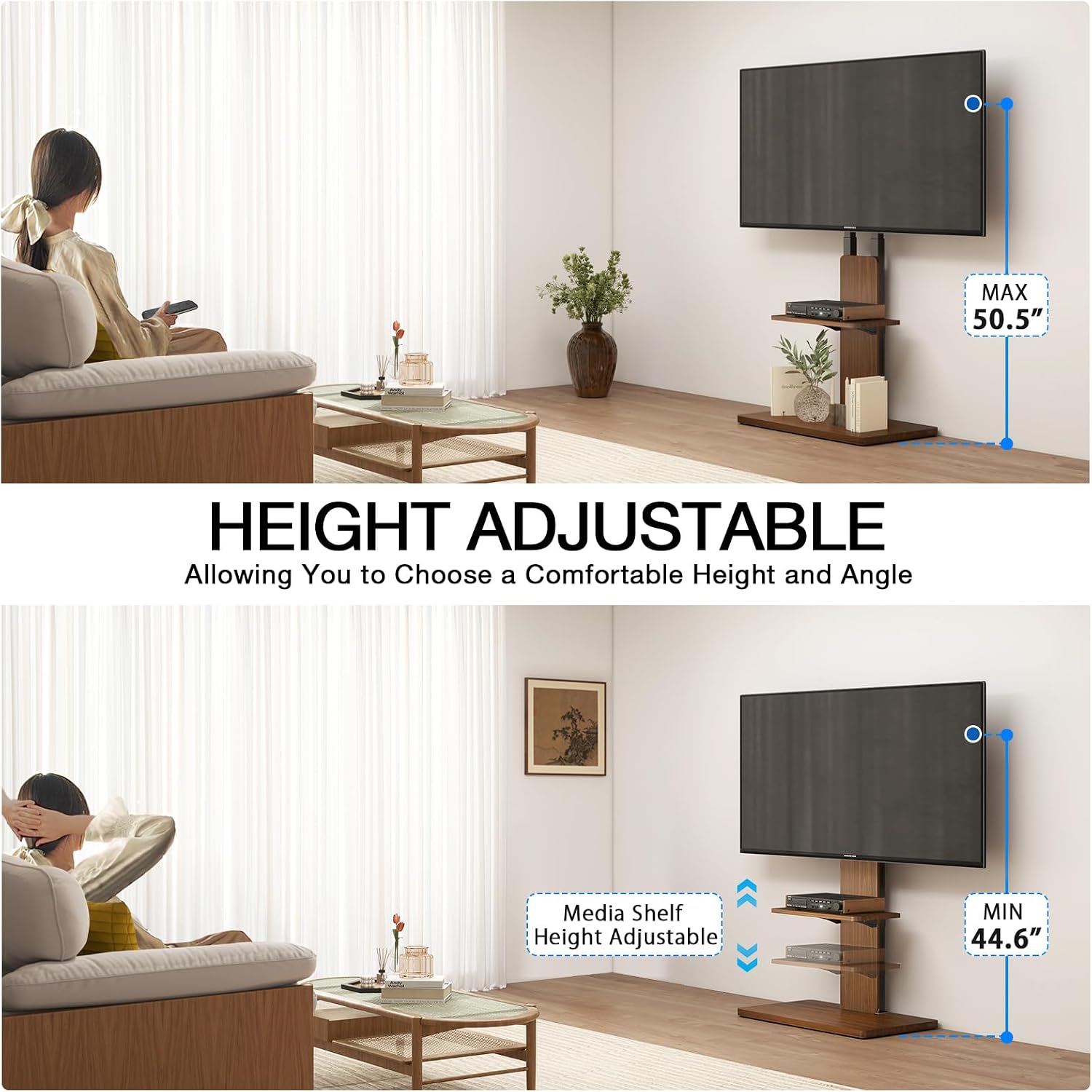
Image: A visual representation of the TV stand's height adjustability, demonstrating how the TV and the media shelf can be positioned at different heights for optimal viewing.
4.3 Installing Anti-Tip Safety Straps
For enhanced safety, especially in homes with children or pets, utilize the included anti-tip safety straps. Securely fasten one end to the TV stand and the other to a wall stud or furniture to prevent accidental tipping.

Image: Illustration demonstrating the use of safety ropes to fix the TV stand to the wall, preventing it from tipping over. It also highlights the maximum load capacity.
4.4 Gestione dei cavi
Use the integrated cable management system to organize and conceal cables for a tidy appearance and to prevent tripping hazards.

Immagine: un primo piano view of the cable management clips on the TV stand's central column, designed to keep wires organized and out of sight.
5. Istruzioni per l'uso
5.1 Funzione girevole
The TV mount allows for a swivel rotation of ±25 degrees, enabling you to adjust the viewing angle for optimal comfort from various positions in the room.

Image: This image illustrates the ±25 degree swivel capability of the TV, along with close-ups of the safety lock, safety rope, cable management, and the sturdy wooden base.

Immagine: una vista dall'alto view diagram illustrating the left and right swivel movement of the TV mount.
5.2 Mobility with Hidden Wheels
The stand is equipped with discreet hidden wheels, allowing for easy repositioning of your television without lifting. Gently push the stand to move it to your desired location.

Immagine: Un dettaglio view of the hidden wheels embedded within the base of the TV stand, designed for smooth and easy movement.

Image: The TV stand with hidden wheels, demonstrating its ease of movement across a room while maintaining a clean aesthetic.
5.3 Ripiani portaoggetti
Utilize the two integrated storage shelves to organize media devices, soundbars, gaming consoles, and other accessories. The shelves are designed for stability and convenience.

Immagine: un primo piano view of the TV stand's two shelves, showcasing their capacity to neatly store small items and media devices.
6. Manutenzione
- Pulizia: Wipe the stand with a soft, dry cloth. Avoid abrasive cleaners or harsh chemicals that may damage the finish.
- Ispezioni: Controllare periodicamente tutte le viti e i collegamenti per assicurarsi che siano ben serrati e sicuri. Serrare nuovamente se necessario.
- Evitare l'umidità: Keep the stand away from excessive moisture or direct sunlight to prevent warping or discoloration of the wood components.
7. Risoluzione Dei Problemi
- Issue: Stand feels unstable or wobbles.
Soluzione: Ensure all assembly screws are securely tightened. Verify the stand is placed on a flat, level surface. Re-check the installation of the anti-tip safety straps.
- Issue: TV does not swivel smoothly.
Soluzione: Check for any obstructions around the swivel mechanism. Ensure the TV is properly centered and balanced on the mount.
- Issue: Difficulty moving the stand.
Soluzione: Ensure the hidden wheels are not obstructed by debris. The stand is designed for smooth movement on most floor types; avoid moving over thick carpets if resistance is encountered.
- Issue: TV appears too low or too high.
Soluzione: Re-adjust the TV mount height according to the instructions in Section 4.2. The stand offers a range of height adjustments to suit different viewpreferenze.
8. Specifiche
| Caratteristica | Dettaglio |
|---|---|
| Numero di modello | TF2402BWM |
| Dimensioni TV compatibili | 32 - 70 pollici |
| Capacità di carico massima | 110 libbre (45 kg) |
| Compatibilità VESA | da 100x100mm a 400x400mm |
| Gamma di regolazione dell'altezza | 44.6" to 50.5" (floor to top of TV) |
| Angolo di rotazione | ±25 gradi |
| Materiale | Acciaio legato, legno |
| Dimensioni del prodotto (L x P x A) | 59.99 x 40.01 x 113.28 cm (circa 23.6 x 15.75 x 44.6 pollici) |
| Peso dell'articolo | 7.3 kg (16.1 libbre) |
| Tipo di montaggio | Montaggio a pavimento |
| Tipo di movimento | Girevole |
| Colore | Marrone |
| Produttore | 5R com |
| Paese di origine | Cina |
9. Garanzia e supporto
For warranty information or technical support, please refer to the documentation included with your purchase or contact 5Rcom customer service directly. Keep your purchase receipt for warranty claims.
Informazioni sui contatti: Please visit the official 5Rcom websito per i dettagli di contatto più aggiornati per l'assistenza clienti.