
1. Introduzione
Thank you for choosing the EWEADN F61 60% Wired RGB Backlit Gaming Keyboard. This compact keyboard is designed for efficiency and performance, offering a comfortable typing experience with vibrant RGB lighting. This manual provides essential information for setting up, operating, and maintaining your new keyboard.
2. Contenuto della confezione
- EWEADN F61 60% Gaming Keyboard
- Cavo USB di tipo C staccabile
- Manuale d'uso
3. Impostazione
- Collegare il cavo: Locate the Type-C port on the keyboard. Connect the detachable Type-C USB cable to the keyboard and the other end (USB-A) to an available USB port on your computer (PC, laptop, Mac) or compatible device (phone, tablet).

Image: Connecting the detachable Type-C USB cable to the keyboard for a stable, low-latency connection.
- Collega e usa: The keyboard is plug-and-play compatible with Windows and Mac dual systems. No additional drivers are typically required. Your computer should automatically recognize the device.
- Regola l'ergonomia: Flip out the dual-layer feet on the underside of the keyboard to adjust the typing angle for comfort. There are two angle options: 7 degrees and 15 degrees.

Image: The underside of the keyboard showing the dual-layer feet that can be adjusted for preferred typing angles.
4. Funzionamento
4.1 Controllo dell'illuminazione RGB
The EWEADN F61 keyboard features vibrant RGB backlighting with multiple effects and brightness levels. Use the following key combinations to customize your lighting:
- FN + Backspace: Switch backlight On/Off.
- FN+INS: Switch between 6 different lighting effects.
- FN + PGUP/PGDN: Adjust light brightness (5 levels).
- FN + O/L: Regola la velocità della luce.
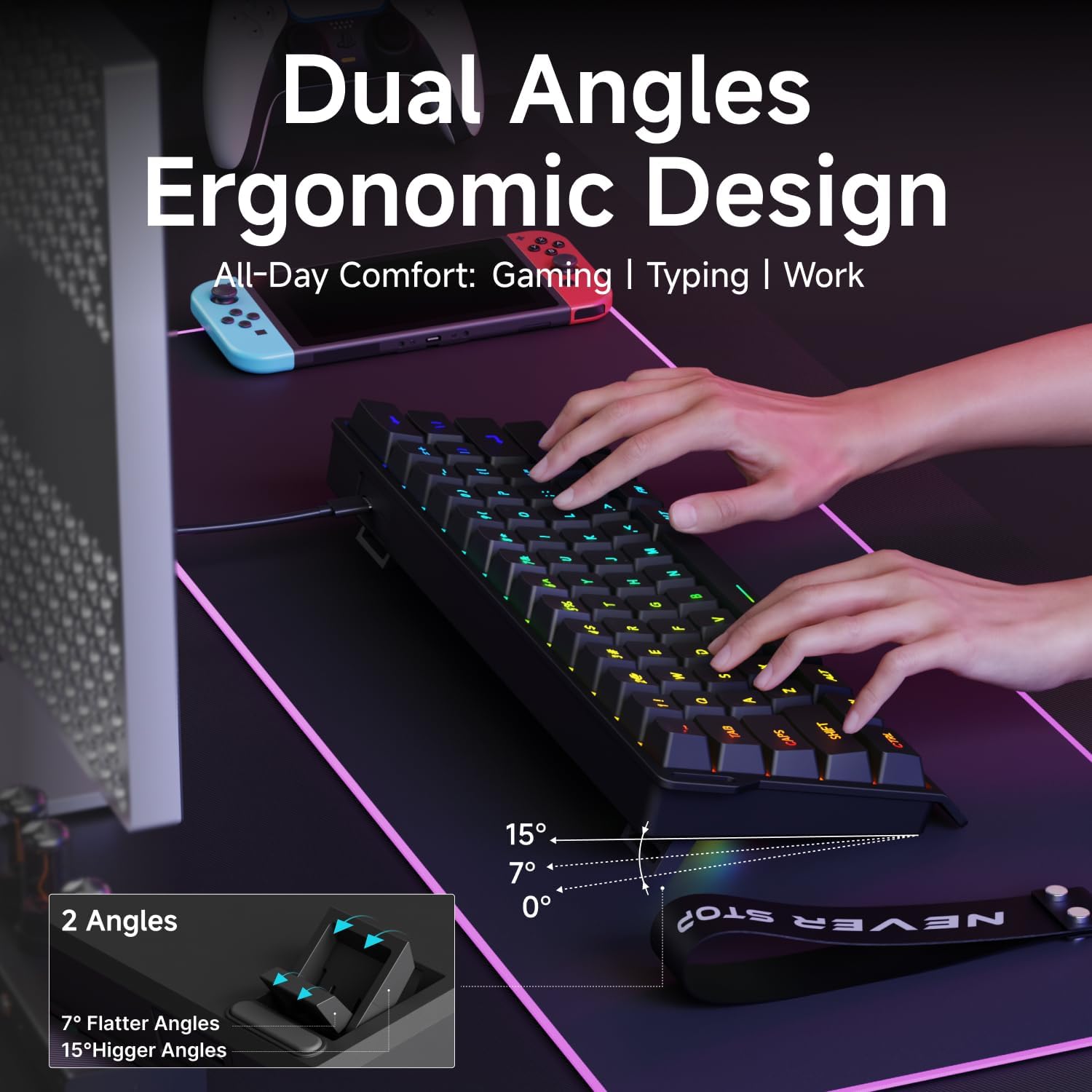
Image: The EWEADN F61 keyboard showcasing its 8 constant backlights and 5 dynamic lighting effects.
4.2 Combinazioni di tasti funzione
Due to its 60% compact design, many functions are accessed via the 'FN' key in combination with other keys. Refer to the table below for common shortcuts:
| Combinazione di tasti | Funzione |
|---|---|
| FN + VITTORIA | Blocca la chiave di Windows |
| FN+R | Stampa schermo |
| FN+T | Pausa |
| FN + Y | Inserire |
| FN+U | Casa |
| FN+I | FINE |
| FN+Z | Traccia precedente |
| FN+X | Traccia successiva |
| FN + DO | Fermare |
| FN+V | Riproduci/Pausa |
| FN + SI | Abbassa il volume |
| FN+N | Alza il volume |
| FN+M | Muto |
| FN + Backspace | Eliminare |
5 Caratteristiche
- Design compatto al 60%: The F61 features a space-saving layout, retaining essential keys while minimizing footprint. This makes it ideal for gaming, office use, or travel, freeing up desk space.

Image: Visual comparison highlighting the 60% compact design of the EWEADN F61 keyboard, saving significant desk space.
- Connessione cablata: Connects via a detachable Type-C cable, ensuring a stable, continuous, and ultra-low input delay. This wired connection is reliable for competitive gaming and precise typing.
Video: Demonstrates the wired connection of the EWEADN F61 60% RGB Backlit Gaming Keyboard, highlighting its plug-and-play functionality and compatibility.
- Retroilluminazione RGB: Offers 6 backlight effects and 5 brightness levels. Dual-layer injection PBT keycaps ensure characters are bright, translucent, and resistant to fading, enhancing visibility in dark environments.
Video: Showcases the vibrant RGB lighting and clear keycaps of the EWEADN F61 keyboard, ideal for dark environments.
- Ergonomic Design & Mechanical Feel: Designed for comfortable extended use, fitting perfectly to your fingertips. Advanced mechanical-like technology provides a satisfying typing feel while maintaining the quietness of a membrane keyboard.

Image: An illustration demonstrating the dual ergonomic angles (7° and 15°) of the EWEADN F61 keyboard for enhanced comfort during use.
- Ampia compatibilità: Supports WIN & MAC dual systems, connecting to laptops, PCs, mobile phones, and tablets. Its portable size makes it easy to carry.
Video: Highlights the compact 60% design of the EWEADN F61, emphasizing its space-saving benefits and portability for gaming and travel.
6. Specifiche
| Caratteristica | Dettaglio |
|---|---|
| Numero di modello | F61 |
| Tecnologia di connettività | USB-C (cablato) |
| Descrizione della tastiera | Membrana |
| Materiale del copritastiera | PBT (Dual-Layer Injection) |
| Retroilluminazione | RGB (6 effects, 5 brightness levels) |
| Dispositivi compatibili | Laptop, PC, Phone, Tablet |
| Sistemi operativi | Finestre, Mac |
| Peso dell'articolo | 1.3 libbre |
| Dimensioni del pacco | 13.39 x 6.34 x 1.85 pollici |
| Materiale | Metallo, Plastica |
7. Manutenzione
- Pulizia: Utilizzare un panno morbido e asciutto per pulire la superficie della tastiera. Per una pulizia più profonda, utilizzare aria compressa per rimuovere polvere e detriti dagli spazi tra i tasti. Evitare l'uso di prodotti chimici aggressivi o materiali abrasivi.
- Cura del cavo: Maneggiare con cura il cavo staccabile Type-C. Evitare piegature brusche o trazioni eccessive per evitare danni.
- Magazzinaggio: When not in use, store the keyboard in a clean, dry place away from extreme temperatures and direct sunlight.
8. Risoluzione Dei Problemi
- La tastiera non risponde:
- Assicurarsi che il cavo USB-C sia collegato saldamente sia alla tastiera che al computer.
- Prova a collegare la tastiera a una porta USB diversa del computer.
- Prova la tastiera su un altro computer per escludere un problema specifico del computer.
- Luci RGB non funzionanti/errate:
- Premere FN + Backspace per assicurarsi che la retroilluminazione sia accesa.
- Utilizzo FN+INS per alternare diversi effetti di luce.
- Regola la luminosità con FN + PGUP/PGDN.
- Tasti specifici non funzionanti:
- Controllare che non vi siano ostacoli fisici sotto il tasto.
- Assicurarsi che la tastiera sia pulita e priva di detriti.
9. Garanzia e supporto
The EWEADN F61 keyboard comes with a Garanzia del produttore di 360 giorni.
For any questions, troubleshooting assistance, or support, please contact us via email:
Supporto via e-mail: eweadnkeyboard@outlook.com