1. Introduzione
The SCULPFUN H1 Auto Heat Press Machine is designed for efficient and precise heat transfer applications on various materials. Featuring an innovative upward pressure mechanism, it ensures uniform heat and pressure distribution for optimal results across different projects, including DTF, HTV, Sublimation, and Vinyl transfers.
This manual provides essential information for setting up, operating, maintaining, and troubleshooting your SCULPFUN H1 machine to ensure safe and effective use.
2. Prodotto finitoview
The SCULPFUN H1 features a 15x15 inch heating plate, capable of reaching 180°C (356°F) in just 7 minutes. It offers adjustable pressure up to 80kg (176lb) with three preset levels, and an intuitive control panel for precise temperature and time settings.
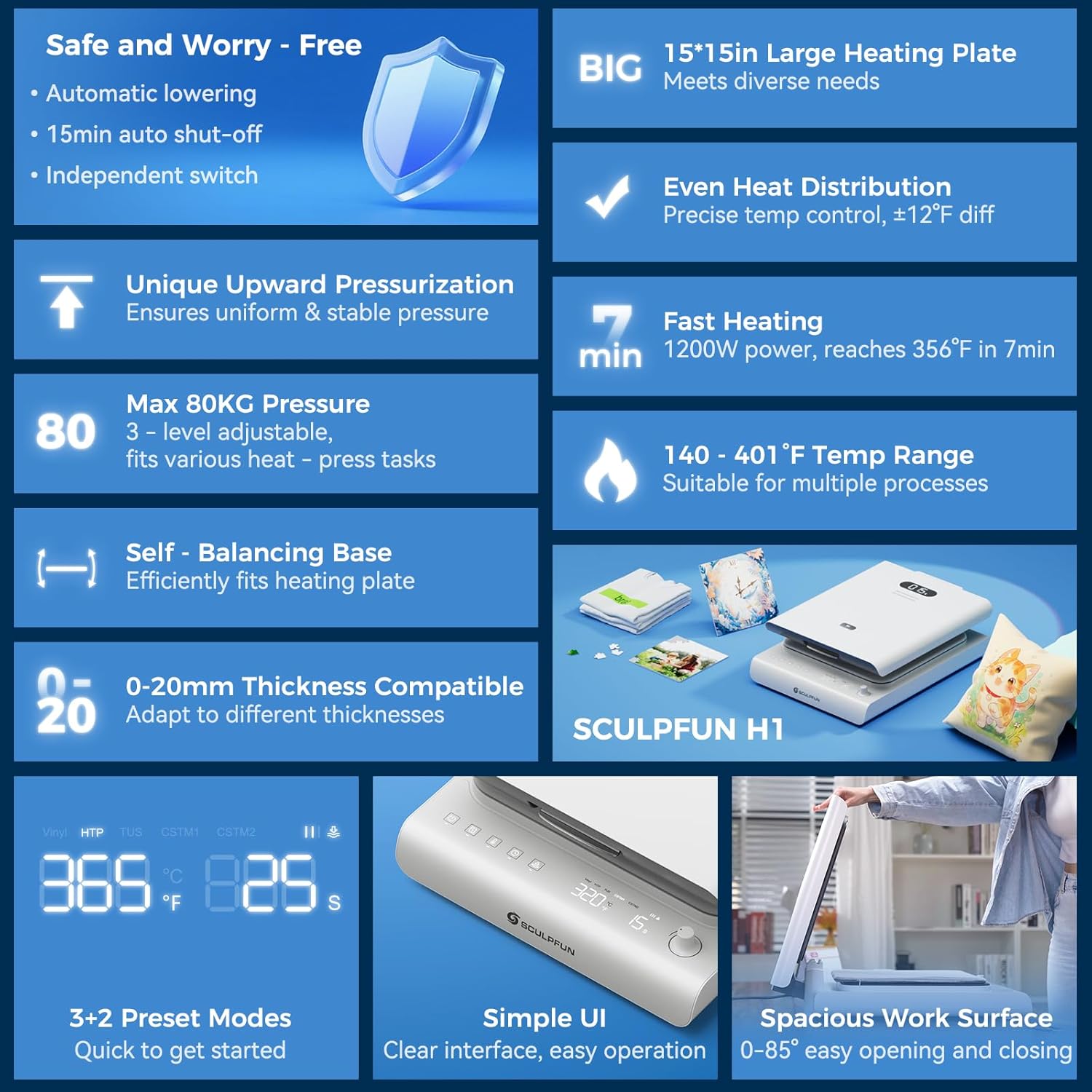
Figure 1: SCULPFUN H1 Auto Heat Press Machine highlighting key features like large heating plate, even heat distribution, fast heating, and smart control.
Caratteristiche principali:
- World's First Upward Pressure Design: Lifts the plate from below for stable, continuous, and even pressure distribution, ideal for various material thicknesses.
- Pressione regolabile: Offers three preset pressure levels (40kg/88lb, 60kg/132lb, 80kg/176lb) to suit different materials and transfer types.
- Riscaldamento rapido e uniforme: Dual-tube heating core and precise temperature control sensors allow the 15x15 inch plate to reach 180°C (356°F) in 7 minutes, ensuring uniform heat distribution.
- Controllo di precisione della temperatura: Real-time digital display provides accurate feedback on temperature, time, and pressure.
- Sicurezza di spegnimento automatico: Automatic shut-off after 15 minutes of inactivity prevents overheating and enhances safety.
- Sistema di raffreddamento avanzato: Built-in dual cooling fans reduce heat buildup and extend product lifespan.
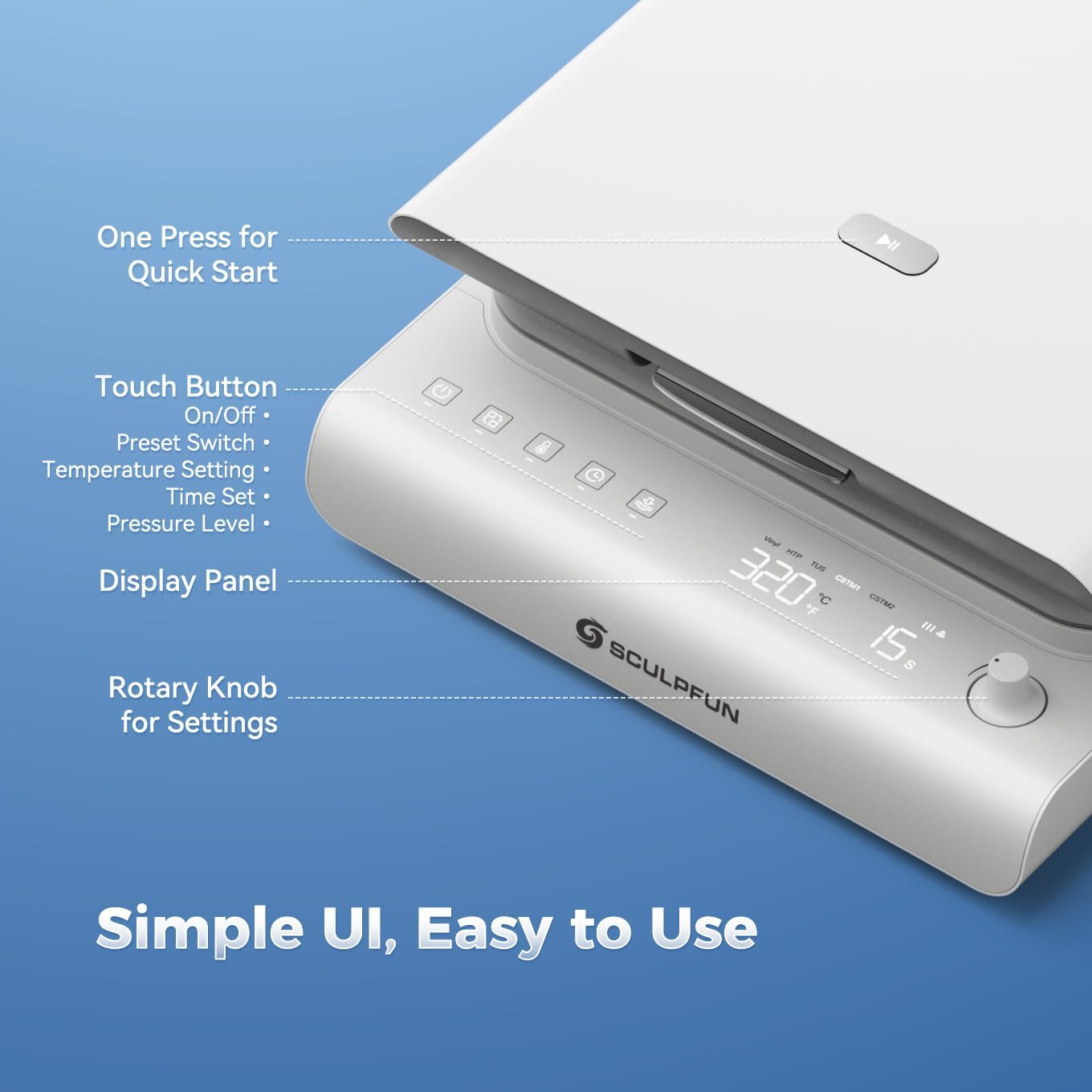
- Interfaccia intuitiva: Touch panel with preset modes for beginners and a rotary knob for expert customization.
3. Impostazione
- Disimballaggio: Carefully remove the heat press machine and all accessories from the packaging. Retain packaging for future storage or transport.
- Posizionamento: Place the machine on a stable, heat-resistant surface. Ensure adequate clearance around the machine for ventilation.
- Collegamento elettrico: Connect the power cable to the machine's power inlet located at the rear. Plug the power cable into a grounded electrical outlet.
- Accensione iniziale: Locate the main power switch at the rear of the machine and flip it to the 'ON' position. The control panel will illuminate.

Figure 2: Machine components and dimensions for proper setup.
4. Istruzioni per l'uso
4.1 Accensione e preriscaldamento
- Ensure the main power switch (at the rear) is ON.
- On the front control panel, long-press the power button for 2 seconds to fully activate the machine.
- Il display digitale mostrerà la temperatura e l'ora attuali.
- The machine will begin to preheat to the last used temperature or a preset mode.
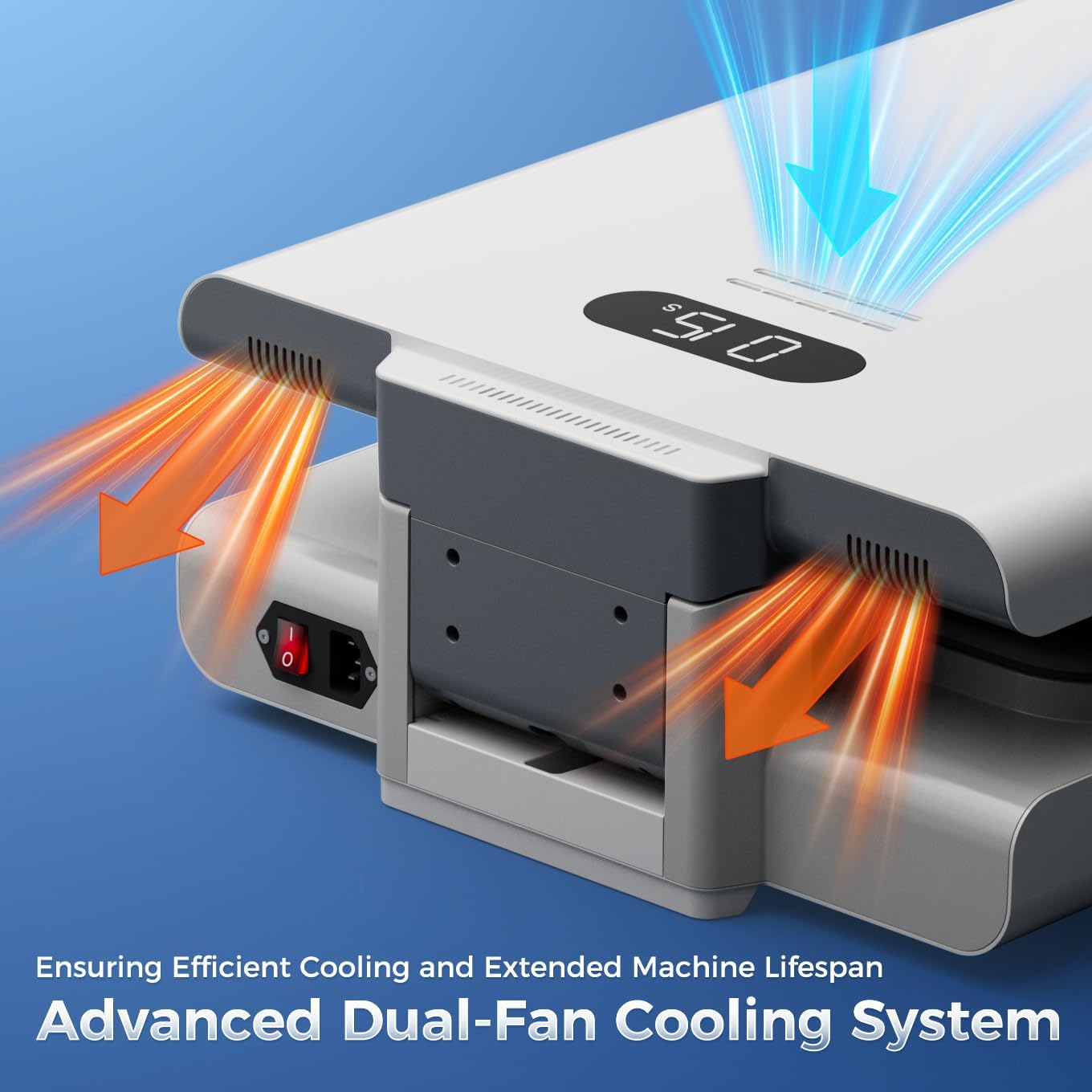
Figura 3: dettagliata view of the intuitive control panel for easy operation.
4.2 Setting Temperature, Time, and Pressure
- Selezione della modalità: Press the 'Mode' button to cycle through preset modes (Vinyl, HTP, TUS) or custom modes (CSTM1, CSTM2).
- Regolazione della temperatura: Press the 'Temperature' button. The temperature value on the display will flash. Rotate the rotary knob to adjust the temperature (140-401°F / 60-205°C). Press the 'Temperature' button again to confirm.
- Regolazione dell'ora: Press the 'Time' button. The time value on the display will flash. Rotate the rotary knob to adjust the time (1-999 seconds). Press the 'Time' button again to confirm.
- Regolazione della pressione: Press the 'Pressure' button. The pressure level indicator will flash. Rotate the rotary knob to select from three preset pressure levels (40kg/88lb, 60kg/132lb, 80kg/176lb). Press the 'Pressure' button again to confirm.
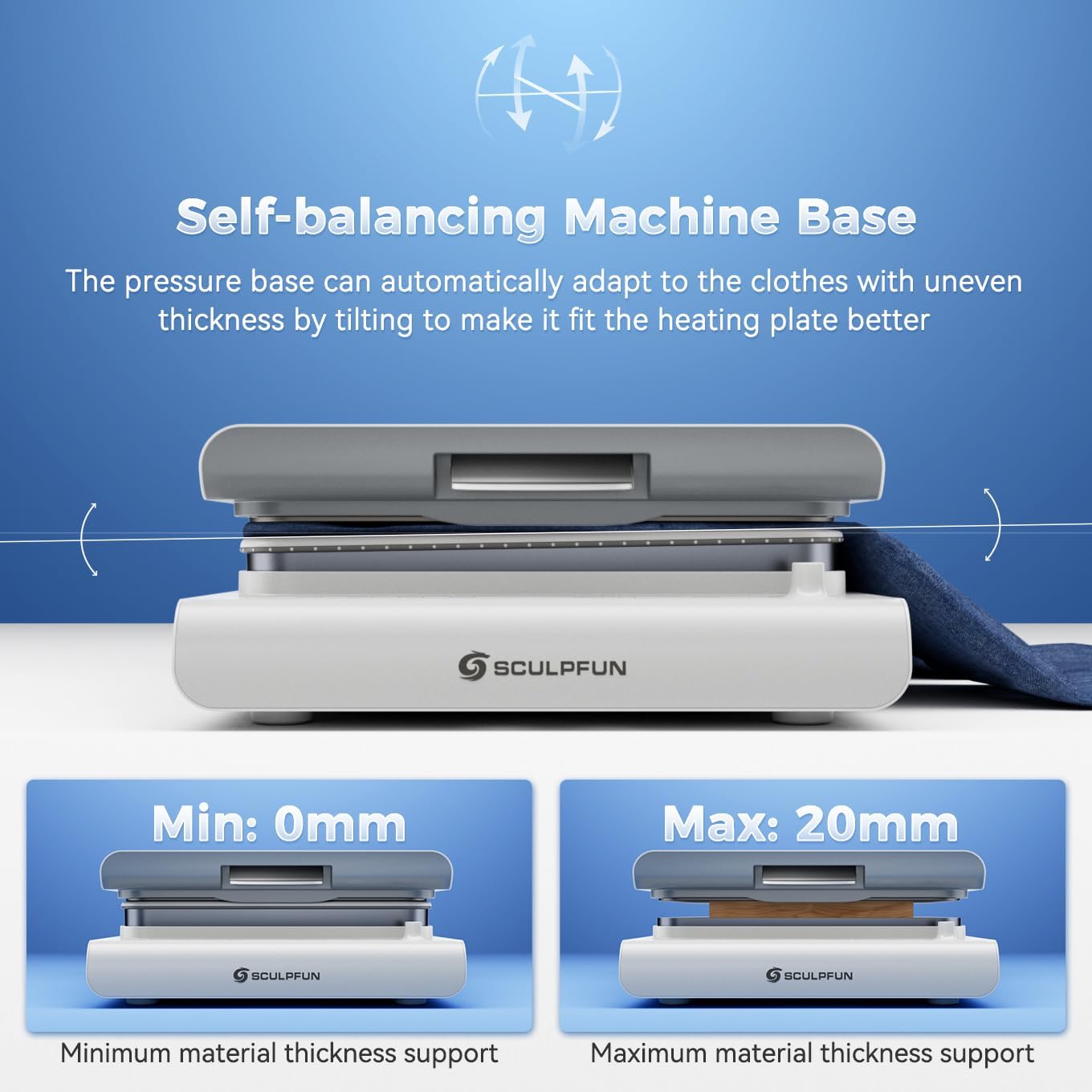
Figure 4: Upward pressure design and adjustable pressure levels for precise transfers.
4.3 Esecuzione di un trasferimento di calore
- Preparare il materiale: Place your garment or item flat on the pressure platform. Ensure it is smooth and free of wrinkles.
- Progettazione della posizione: Place your transfer design (DTF, HTV, Sublimation, Vinyl) onto the garment in the desired location.
- Cover with Protective Sheet: Place a PTFE Teflon sheet or parchment paper over your design to protect the heating plate.
- Close and Press: Gently lower the heating plate until it locks into position. The machine will automatically apply pressure and begin the countdown.
- Completamento: Once the timer reaches zero, the machine will beep and automatically release the pressure. Carefully lift the heating plate.
- Progettazione della buccia: Follow the specific peeling instructions for your transfer material (hot peel, warm peel, or cold peel).

Figura 5: Esample of a DTF transfer in progress using the SCULPFUN H1.
Video 1: Demonstration of the SCULPFUN H1 Heat Press Machine in action, showing the process of applying a design to a garment.
5. Manutenzione
5.1 Caratteristiche di sicurezza
- Funzione di spegnimento automatico: The machine automatically shuts off after 15 minutes of inactivity to prevent overheating and ensure safety.
- Doppie ventole di raffreddamento: Integrated fans help dissipate heat during extended use, protecting internal components and prolonging the machine's lifespan.

Figure 6: Illustration of the machine's safety features, including auto-off and dual cooling fans.
5.2 Pulizia e conservazione
- Scollegare sempre l'alimentazione prima della pulizia.
- Pulire la piastra riscaldante e le superfici esterne con un panno morbido e asciutto.amp panno. Non usare detergenti abrasivi.
- Conservare la macchina in un ambiente asciutto e privo di polvere quando non viene utilizzata.
6. Risoluzione Dei Problemi
- La macchina non si accende: Ensure the power cable is securely connected and the main power switch is ON. Long-press the front power button for 2 seconds.
- Uneven heat transfer: Verify that the temperature and pressure settings are appropriate for your material. Ensure the material is laid flat and free of wrinkles.
- Machine not closing/opening smoothly: Check for any obstructions on the pressure platform.
- Machine smoking slightly when heating: This is normal when using heat sublimation materials, as high temperatures heat sublimation ink to produce gases.
- Suono del cicalino: A buzzing sound is normal when the machine is powered on, turned off, or when parameter setting is completed.
If you encounter any issues not covered here, please contact SCULPFUN customer service for assistance.
7. Specifiche
| Caratteristica | Dettaglio |
|---|---|
| Marca | SCULPFUN |
| Modello | H1 |
| Materiale | Alluminio |
| Colore | Bianco |
| Dimensioni del prodotto | 22.7 cm L x 16.6 cm P x 6.6 cm A |
| Peso dell'articolo | 44 libbre |
| Codice UPC | 860014205323 |
| Valutazione della temperatura superiore | 180 gradi Celsius (356°F) |
| Voltage | 120 Volt |
| Cosatage | 1200 watt |
8. Garanzia e supporto
The SCULPFUN H1 Auto Heat Press Machine comes with a Garanzia di 1 anni. For warranty claims or technical support, please refer to the contact information provided in your product packaging or visit the official SCULPFUN websito.
Conservare la ricevuta d'acquisto come prova d'acquisto per la convalida della garanzia.
9. Additional Media
9.1 Immagini del prodotto