
Introduzione
This manual provides essential information for setting up, operating, maintaining, and troubleshooting your NIMO 17.3 Gaming Laptop. Designed for high performance with an AMD Ryzen 9 8945HS processor and Radeon 780M graphics, this laptop offers a powerful computing experience for gaming, creative work, and everyday tasks. Please read this manual thoroughly to ensure optimal use and longevity of your device.
1. Configurazione iniziale
1.1 Disimballaggio e prima accensione
Carefully remove your NIMO laptop and all accessories from the packaging. Place the laptop on a stable, flat surface. Before first use, it is recommended to fully charge the battery.

The NIMO 17.3 Gaming Laptop, ready for initial setup.
1.2 Caricamento della batteria
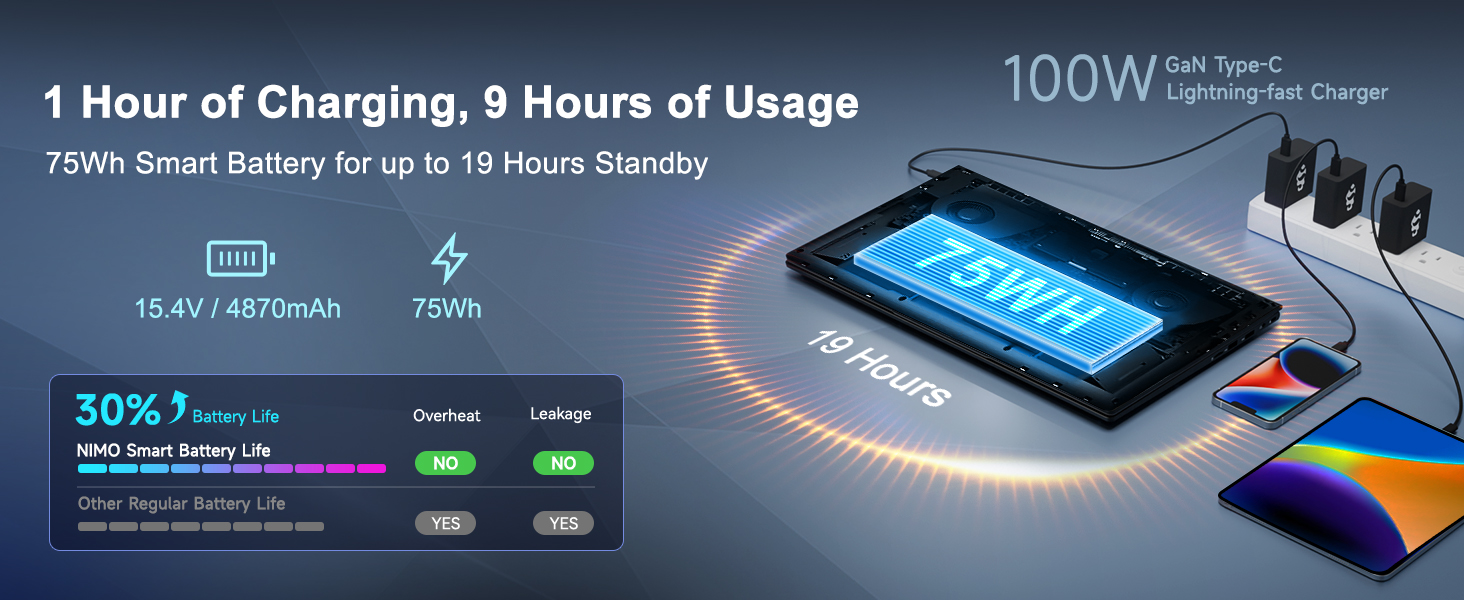
Connect the provided 100W PD Type-C fast charger to the USB-C port on your laptop and then to a power outlet. The charging indicator light will illuminate. Allow the laptop to charge fully before its first use for optimal battery calibration.

The 100W GaN Type-C charger connected to the laptop, illustrating fast charging capability.
1.3 Configurazione del sistema operativo
Upon first power-on, you will be guided through the Windows 11 setup process. Follow the on-screen instructions to configure language, region, network settings, and user accounts.
1.4 Configurazione del lettore di impronte digitali
For enhanced security and quick login, set up the integrated fingerprint reader during the Windows 11 setup or later via Windows Settings > Accounts > Sign-in options. Follow the prompts to register your fingerprints.

Close-up of the backlit keyboard and integrated fingerprint reader for secure access.
1.5 Collegamento delle periferiche
Your NIMO laptop features a comprehensive multi-port design for various peripherals:
- USB-C4.0: For ultra-fast data transfer, external displays, and eGPU support.
- Porta USB 3.2: Trasferimento dati ad alta velocità per dispositivi compatibili.
- Porta USB 2.0: Per dispositivi USB standard.
- HDMI: Collegamento a monitor o TV esterni.
- Slot per scheda SD: Per schede di memoria.
- Headphone Combo Jack: Per l'uscita audio e l'ingresso del microfono.
- Slot per blocco Kensington: Per la sicurezza fisica.
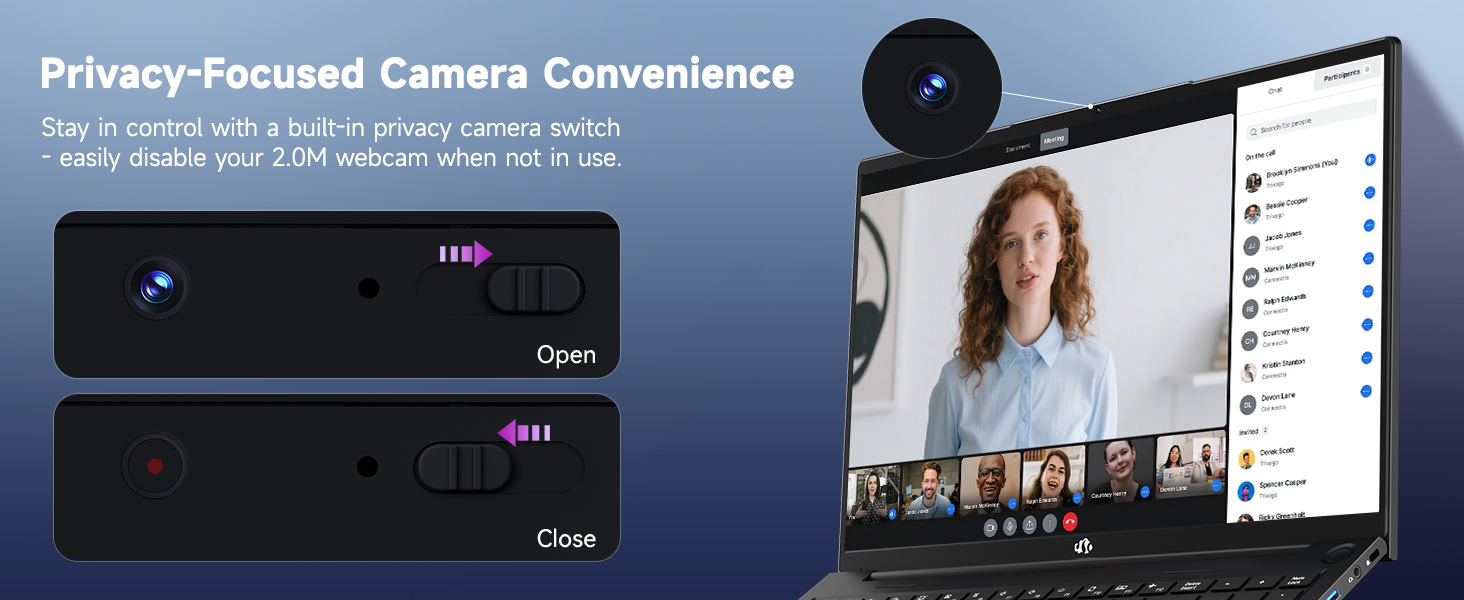
Diagram illustrating the comprehensive multi-port design of the NIMO laptop, including USB-C 4.0, HDMI, USB 3.2, USB 2.0, SD Card slot, Headphone Combo, and Kensington Lock.
2. Istruzioni per l'uso
2.1 Modalità di accensione/spegnimento e sospensione
- Accensione: Premere il pulsante di accensione situato sulla tastiera.
- Spegni: Fare clic sul pulsante Start, quindi su Arresta > Arresta il sistema.
- Modalità risparmio: Fare clic sul pulsante Start, quindi su Alimentazione > Sospensione oppure chiudere il coperchio del laptop.
2.2 Utilizzo della tastiera e del touchpad
The NIMO laptop features a full-size keyboard with a numeric keypad and adjustable backlighting. Press Tasto F10 (or similar function key depending on model) to cycle through backlight brightness levels. The large touchpad supports multi-touch gestures for navigation.
2.3 Funzionalità di visualizzazione
Experience clear visuals on the 17.3-inch Full HD (1920x1080) IPS display. This screen provides vibrant colors and wide viewing angles, suitable for various applications from productivity to entertainment.

The NIMO laptop displaying a vibrant image, highlighting its 17.3-inch Full HD IPS screen.
2.4 WebInterruttore privacy cam
For privacy, your laptop includes a physical webcam privacy switch. Slide the switch to the left to cover the camera lens and disable the webcam, or to the right to uncover and enable it.
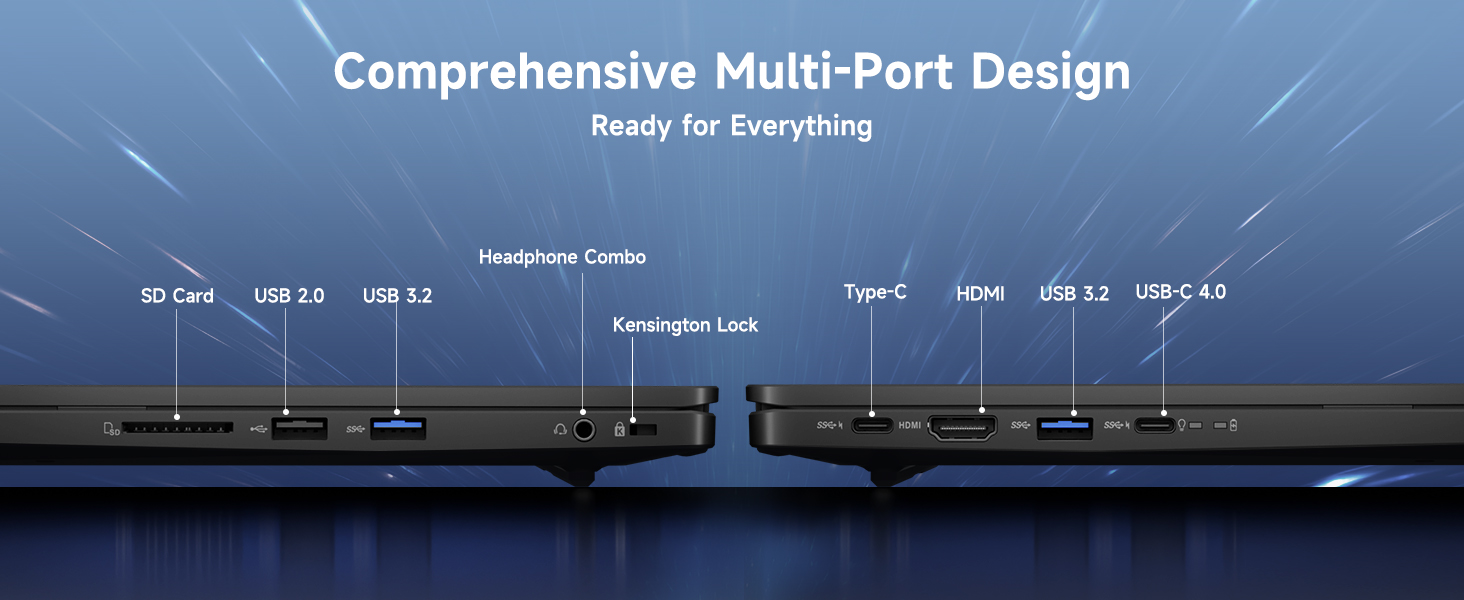
Illustrazione del webcam privacy switch in both open and closed positions, demonstrating how to control camera access.
2.5 Prestazioni superioriview
The NIMO laptop is powered by an AMD Ryzen 9 8945HS processor, offering 8 cores and 16 threads with a max boost clock of 5.2GHz. Integrated AMD Radeon 780M graphics provide capable performance for gaming and demanding creative applications.

Diagramma mostratoasing the AMD Ryzen 9 8945HS processor with its 8 cores/16 threads and integrated Ryzen AI NPU.

Visual representation of the AMD Radeon 780M graphics, emphasizing its capabilities for gaming and creative work.
3. Cura e manutenzione
3.1 Pulizia del portatile
- Schermo: Utilizzare leggermente un panno morbido e privo di lanugine dampcon acqua o un detergente per schermi. Non spruzzare il liquido direttamente sullo schermo.
- Tastiera e chassis: Utilizzare un panno morbido e asciutto. Per lo sporco ostinato, un panno leggermente damp è possibile utilizzare un panno. Evitare prodotti chimici aggressivi.
- Porte: Utilizzare aria compressa per rimuovere delicatamente la polvere dalle porte.
3.2 Gestione della batteria
The laptop is equipped with a 75Wh battery. To prolong battery life:
- Evitare di scaricare completamente la batteria frequentemente.
- Se non si utilizza il computer portatile per lunghi periodi, conservarlo in un luogo fresco e asciutto.
- Utilize power-saving settings in Windows 11.

Graphic illustrating smart battery optimization features, including extended battery life, smart power control, safe fast charging, and battery health protection.
3.3 Dissipazione del calore
The NIMO laptop features an efficient cooling system with dual fans and double copper pipes to manage heat. Ensure that the ventilation openings are not blocked during use to maintain optimal performance and prevent overheating.
Interno view of the laptop's efficient heat dissipation system, featuring dual fans and double copper pipes.
3.4 Aggiornamenti software
Regularly update your Windows 11 operating system and device drivers to ensure system stability, security, and optimal performance. You can check for updates via Windows Settings > Windows Update.
4. Risoluzione Dei Problemi
This section addresses common issues you might encounter with your NIMO laptop.
4.1 Problemi di alimentazione
- Il portatile non si accende: Ensure the charger is securely connected and the power outlet is functional. Try holding the power button for 15-20 seconds to perform a hard reset.
- La batteria non si carica: Verify the charger is correctly plugged into both the laptop and the wall. Check for any damage to the charger cable or port.
4.2 Problemi di visualizzazione
- Nessuna visualizzazione sullo schermo: Connect an external monitor via HDMI to check if the issue is with the laptop's internal display. If the external monitor works, the internal display or its connection may be faulty.
- Schermo tremolante: Aggiorna i driver della scheda grafica. Regola la frequenza di aggiornamento dello schermo nelle impostazioni di Windows.
4.3 Problemi di connettività
- Wi-Fi non connesso: Ensure Wi-Fi is enabled in Windows settings. Restart your router and laptop. Update wireless drivers.
- Dispositivo Bluetooth non associato: Ensure Bluetooth is enabled on both devices. Remove and re-add the device in Windows Bluetooth settings.
4.4 Degrado delle prestazioni
- Prestazioni lente: Chiudere le applicazioni non necessarie. Verificare che il Task Manager non utilizzi eccessivamente CPU/RAM. Assicurarsi di avere sufficiente spazio libero sull'SSD. Eseguire una scansione antivirus.
- Surriscaldamento: Ensure ventilation vents are clear. Use the laptop on a hard, flat surface. Consider reducing demanding workloads.
5. Specifiche tecniche
| Caratteristica | Specificazione |
|---|---|
| Marca | NIMO |
| Nome del modello | NIMO N175L |
| Dimensioni dello schermo | 17.3 pollici |
| Risoluzione dello schermo | 1920 x 1080 pixel (Full HD) |
| Processore | AMD Ryzen 9 8945HS (Up to 5.2 GHz) |
| Memoria RAM | 32 GB DDR5 |
| Disco rigido | SSD da 1024 GB (stato solido) |
| Coprocessore grafico | AMD Radeon 780M (integrata) |
| Sistema operativo | Finestre 11 |
| Tipo senza fili | 802.11a/b/g/n/ac |
| Porte USB | 1x USB 2.0, 3x USB 3.0, 1x USB-C 4.0 |
| Durata media della batteria | 12.8 ore |
| Peso dell'articolo | 3.84 libbre |
| Dimensioni del prodotto | 15.66 x 9.99 x 0.74 pollici |
| Colore | Nero |
| Caratteristiche speciali | Tastiera retroilluminata, lettore di impronte digitali, audio HD, tastierino numerico |
6. Garanzia e assistenza clienti
6.1 Informazioni sulla garanzia
Your NIMO laptop comes with a Garanzia di 2 anno for support and service. Additionally, NIMO offers a Politica di reso di 90 giorni from the date of purchase for any reason.
Image depicting a technician working on a laptop, symbolizing the 2-year support provided for NIMO products.
Image of a customer receiving a package, representing the 90-day return policy for NIMO products.
6.2 Contattare l'assistenza
For any product-related questions, technical assistance, or warranty claims, please contact NIMO customer support:
- E-mail: servizio@nimopc.com
- Professional customer assistance is available to help resolve your issues.
Image of customer service representatives, indicating professional customer assistance is available.