
1. Introduzione
This manual provides detailed instructions for the installation, operation, and maintenance of your PGST QEK-A105F-F Home Alarm System. This system offers comprehensive security for your home or business, featuring WiFi and 4G GSM connectivity, a 2.4-inch display, and compatibility with the Tuya Smart Life app, Alexa, and Google Assistant. Please read this manual thoroughly before using the product to ensure proper function and safety.
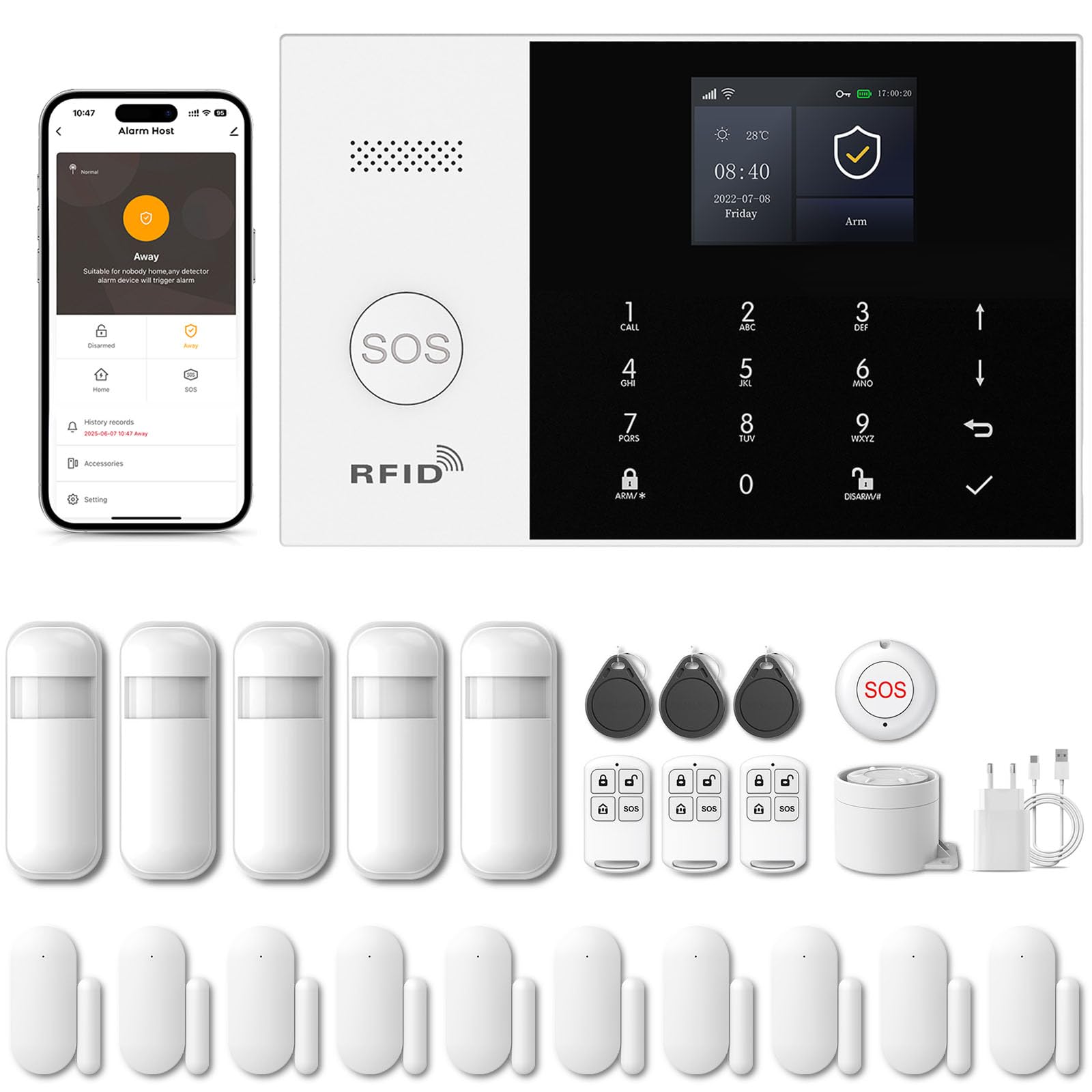
Image 1.1: PGST Home Alarm System main unit and included accessories.
2. Informazioni sulla sicurezza
- Non esporre il dispositivo a temperature estreme, umidità o luce solare diretta.
- Assicurati che l'adattatore di alimentazione sia compatibile con la tua tensione localetage e corrente.
- Tenere il dispositivo lontano dall'acqua e da altri liquidi.
- Non tentare di smontare o riparare da soli il dispositivo. Contatta l'assistenza clienti per assistenza.
- Utilizzare solo accessori e parti di ricambio autorizzati.
3. Contenuto della confezione
Verifica che tutti gli articoli siano presenti nel tuo pacco:
- PGST Alarm Host Panel (QEK-A105F-F)
- Adattatore di alimentazione
- Telecomandi
- Sensori per porte/finestre
- Rilevatore di movimento PIR
- RFID Tags
- Mounting Screws and Adhesives
- Manuale d'uso

Immagine 3.1: Es.ample of included components in the alarm kit.
4. Prodotto finitoview
4.1. Alarm Host Panel Layout

Immagine 4.1: Anteriore e posteriore view of the alarm host panel with labeled components.
- Oratore: Per suoni di allarme e messaggi vocali.
- Pulsante SOS: Press for emergency alarm.
- Area di rilevamento della carta RFID: For disarming with RFID tags.
- Schermo TFT: 2.4-inch screen for status and settings.
- Up/Down Function Buttons: Per la navigazione.
- Pulsante Indietro/Annulla: To go back or cancel an action.
- Pulsante Conferma: Per confermare le selezioni.
- Dialing Buttons (0-9): For entering numbers or codes.
- Away Arming Key: Activates full arming mode.
- Home Arming Key: Activates home arming mode.
- Disarming Button: Disattiva il sistema di allarme.
- Anti-prying switch: Triggers alarm if panel is tampcon cui.
- 3.5mm Siren Interface: For connecting an external wired siren.
- Wired Arming Area Interface: Per il collegamento di sensori cablati.
- Slot per scheda SIM: For 2G/3G/4G GSM SIM card.
- Interruttore ON/OFF: Interruttore di alimentazione principale.
- Micro USB 110/220V AC to 5V: Porta di ingresso alimentazione.
4.2. Dimensioni
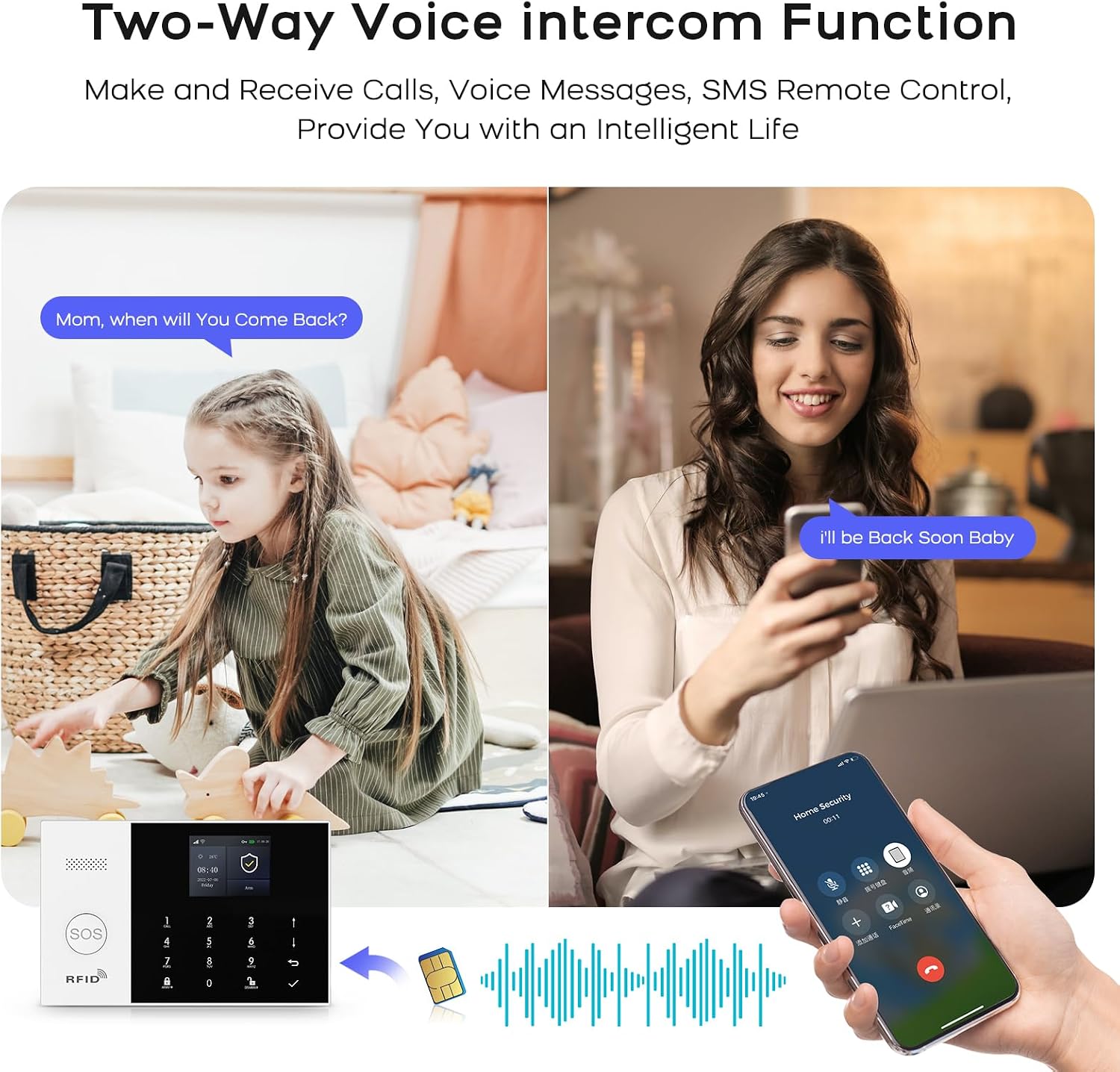
Image 4.2: Physical dimensions of the alarm host panel.
5. Configurazione e installazione
5.1. Powering the Host Panel
- Connect the power adapter to the Micro USB port on the host panel.
- Collegare l'adattatore a una presa a muro standard.
- Portare l'interruttore ON/OFF in posizione 'ON'. Il pannello si accenderà.
5.2. SIM Card Installation (Optional for 4G GSM Functionality)
- Ensure the host panel is powered off.
- Locate the SIM card slot on the rear of the panel.
- Insert a 2G/3G/4G GSM SIM card into the slot, ensuring correct orientation.
- Power on the host panel. The system will attempt to register with the cellular network.
5.3. Installazione dell'app e connessione Wi-Fi
The system uses the 'Smart Life' or 'Tuya Smart' app for remote control and configuration.
- Download the 'Smart Life' or 'Tuya Smart' app from your smartphone's app store (Google Play for Android, App Store for iOS).
- Registrati o accedi al tuo account.
- On the alarm host panel, navigate to Menu > Wi-Fi > Soft AP Configuration.
- In the app, tap '+' to add a device. Select 'Sensors' > 'Alarm' > 'Wi-Fi Flashing'.
- Follow the on-screen instructions in the app to connect the alarm host to your 2.4GHz Wi-Fi network. (5GHz Wi-Fi is not supported).

Image 5.1: Steps for Wi-Fi configuration via the Smart Life app.
5.4. Adding Wireless Accessories (Sensors, Remotes)
The system supports up to 100 wireless storage locations for accessories.
- On the host panel, enter the pairing mode (refer to the panel's menu for 'Add Sensor' or 'Add Remote').
- Activate the accessory (e.g., trigger a motion sensor, separate a door sensor, press a button on the remote).
- The host panel will confirm successful pairing.
- Ripetere l'operazione per tutti gli accessori desiderati.

Immagine 5.2: Es.ample of sensor placement within a home environment.
6. Funzionamento del sistema
6.1. Inserimento e disinserimento
- Braccio lontano: Premere il tasto Away Arming Key on the panel, use the remote control, or arm via the Smart Life app. All sensors will be active.
- Braccio Home: Premere il tasto Home Arming Key on the panel, use the remote control, or arm via the Smart Life app. Typically, perimeter sensors (doors/windows) are active, while internal motion sensors are inactive.
- Disarmare: Enter your PIN on the panel, use the disarm button on the remote, use an RFID tag, or disarm via the Smart Life app.
6.2. Funzione di emergenza SOS
In caso di emergenza, premere il tasto Pulsante SOS on the host panel or the remote control. The system will immediately trigger the alarm and send notifications to pre-set emergency contacts.

Image 6.1: Remote control with SOS button for emergency alerts.
6.3. Interfono vocale bidirezionale
The alarm host supports two-way voice communication through the integrated speaker and microphone, allowing you to communicate with someone at the alarm panel via the app or a phone call.

Image 6.2: Two-way voice intercom function in use.
6.4. Timer Function (Scheduled Arm/Disarm)
You can set schedules for automatic arming and disarming of the system through the Smart Life app.

Immagine 6.3: Es.ampdegli orari di attivazione e disattivazione programmati.
6.5. Entry/Exit Delay
Configure custom entry and exit delays to allow time to leave or enter your property without triggering the alarm immediately. This can be set in the app.

Image 6.4: Customizing entry and exit delays via the app.
6.6. Controllo vocale (Alexa e Google Assistant)
Integrate your alarm system with Amazon Alexa or Google Assistant for convenient voice control commands such as arming or disarming the system.

Image 6.5: Using Alexa for voice control of the alarm system.
6.7. Notifiche di allarme
Upon alarm trigger, the system will:
- Sound the internal siren (up to 120dB) and any connected external sirens.
- Send instant push notifications to your smartphone via the Smart Life app.
- Send SMS messages to up to 5 pre-set phone numbers (if a SIM card is installed).
- Make phone calls to up to 5 pre-set phone numbers (if a SIM card is installed).

Image 6.6: Five preset alarm call numbers for notifications.
7. Manutenzione
7.1. Gestione della batteria
The host panel has a built-in 1000 mAh backup battery, providing approximately 5.5 hours of operation during a power outage. Wireless sensors are battery-powered and will send low battery alerts to the host panel and your app when replacement is needed.
Image 7.1: Low battery alerts for wireless sensors.
7.2. Pulizia
Wipe the host panel and sensors with a soft, dry cloth. Do not use liquid cleaners or abrasive materials.
7.3. Anti-TampProtezione dell'energia
The alarm host is equipped with an anti-tampering switch. If the main unit is forcibly removed from its mounting, an alarm will be triggered immediately, regardless of its armed status.

Image 7.2: Anti-tampering protection feature.
8. Risoluzione Dei Problemi
| Problema | Possibile causa | Soluzione |
|---|---|---|
| Host panel not powering on. | Power adapter disconnected; ON/OFF switch off; faulty adapter. | Check power connection; ensure switch is ON; try a different adapter. |
| Impossibile connettersi al Wi-Fi. | Incorrect Wi-Fi password; 5GHz network used; host too far from router. | Verify password; ensure 2.4GHz network; move host closer to router. |
| I sensori non attivano l'allarme. | Sensor battery low; sensor not paired; system disarmed. | Replace sensor battery; re-pair sensor; ensure system is armed. |
| No SMS/Call notifications. | No SIM card; SIM card not active; poor cellular signal; incorrect emergency numbers. | Install/activate SIM card; check signal strength; verify emergency numbers in settings. |
9. Specifiche
- Marca: PGST
- Numero modello: QEK-A105F-F
- Tecnologia di connettività: Wireless (Wi-Fi 2.4GHz, GSM/3G/4G)
- Fonte di energia: Battery (1000 mAh Lithium Polymer) / AC Adapter
- Dimensioni del prodotto (L x P x A): 18 x 12 x 3 cm (7.09 x 4.72 x 1.18 pollici)
- Display: Schermo TFT da 2.4 pollici
- Metodo di controllo: Application (Tuya Smart Life), Keypad, Remote Control, Voice Control (Alexa, Google Assistant)
- Portata wireless massima: Metri 100 (area aperta)
- Tipo di allarme: Audio e movimento
- Tipo di installazione: Self-adhesive / Wall-mounted
10. Garanzia e supporto
Your PGST Home Alarm System comes with a standard manufacturer's warranty. Please refer to the warranty card included in your package for specific terms and conditions. For technical support, troubleshooting assistance, or warranty claims, please contact PGST customer service through the contact information provided on the official PGST websito o sulla tua piattaforma di acquisto.