
1. Introduzione
Thank you for choosing the iKF V11 Wired Gaming Headset. This manual provides essential information for setting up, operating, and maintaining your headset to ensure an optimal gaming experience. Please read these instructions carefully before use.
2. Prodotto finitoview
2.1 Componenti inclusi
- iKF V11 Wired Gaming Headset
- Microfono staccabile
- Manuale d'uso
2.2 Caratteristiche principali
- Immersive 7.1 Virtual Surround Sound: Equipped with high-performance sound card chips and 53mm drivers for 360-degree spatial audio.
- Crystal-Clear ENC Calls: Dual 360° AI noise-canceling omnidirectional microphones ensure clear voice communication.
- Compatibilità multipiattaforma: Supports PC, laptop, PS4, PS5, and Xbox (an adapter may be required for some Xbox models, not included) via USB connection.
- Design ergonomico e confortevole: Lightweight, adjustable headband with soft memory foam protein ear pads for extended gaming sessions.
- FPS Exclusive Game Tuning: Enhances tactical sound quality, including footsteps, gunshots, and vehicle sounds for competitive gaming.
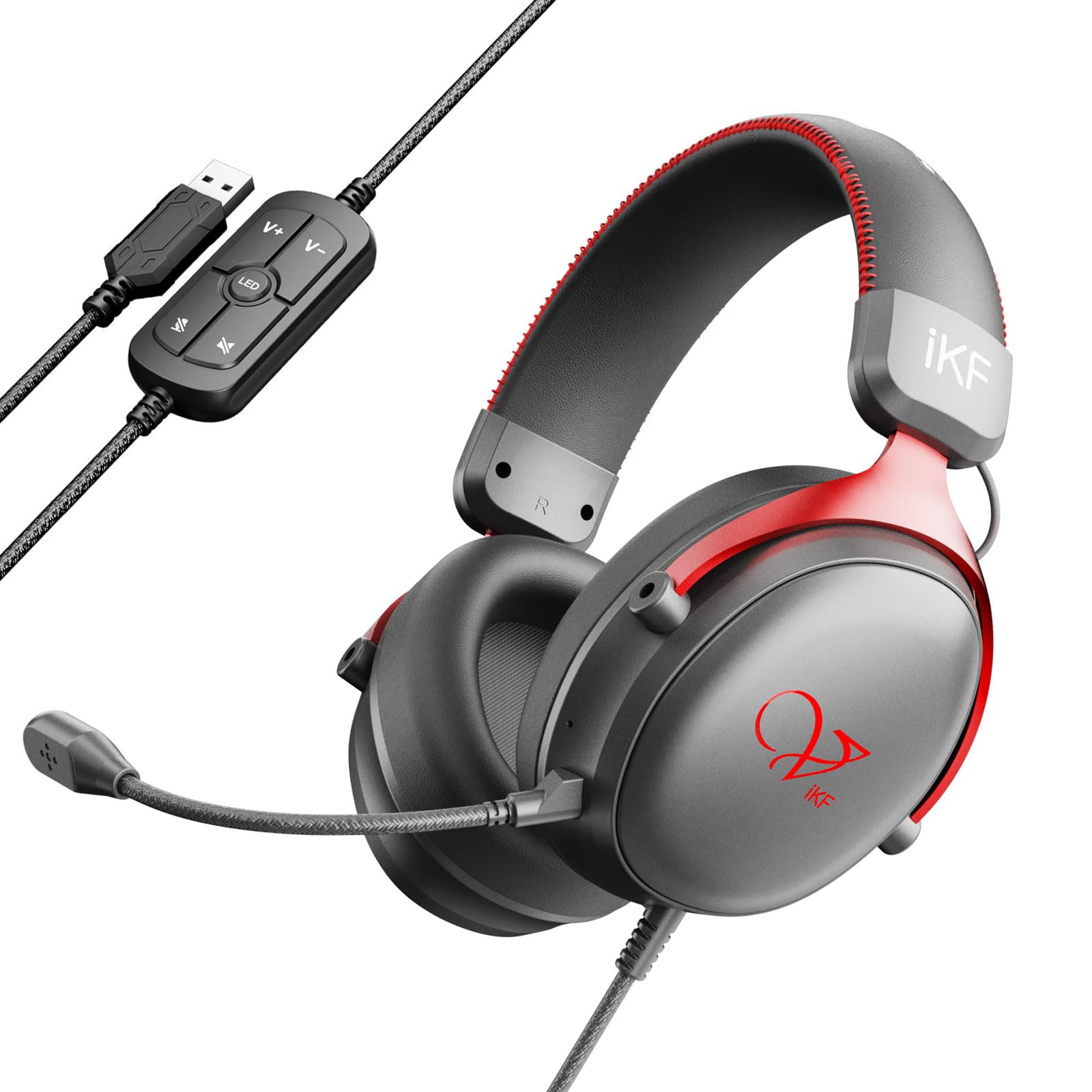
Image: The iKF V11 headset, showcasing its design and highlighting the 7.1 Virtual Surround Sound feature.
3. Istruzioni per l'installazione
3.1 Collegamento dell'auricolare
- Locate an available USB port on your PC, laptop, PS4, PS5, or Xbox console.
- Plug the USB connector of the iKF V11 headset into the USB port.
- Your operating system or console should automatically detect the headset. Follow any on-screen prompts for driver installation if necessary.

Image: The iKF V11 headset with its USB connector and inline control unit, demonstrating USB compatibility.
3.2 Collegamento del microfono
- Identificare la porta del microfono sul padiglione auricolare sinistro delle cuffie.
- Align the detachable microphone's connector with the port and gently push it in until it clicks securely into place.
- Adjust the flexible microphone boom to position it optimally near your mouth for clear communication.

Image: A user wearing the iKF V11 headset, highlighting the detachable microphone and its noise-canceling capabilities.
4. Istruzioni per l'uso
4.1 Controllo audio
- Regolazione del volume: Use the volume up (+) and volume down (-) buttons on the inline control unit to adjust the audio output level.
- Microfono disattivato: Press the microphone mute button on the inline control unit to toggle the microphone on or off. An indicator light may show the microphone status.
4.2 7.1 Suono surround virtuale
The iKF V11 headset features 7.1 virtual surround sound. This feature is typically enabled automatically upon connection or can be configured through your device's sound settings. For PC users, check your operating system's sound control panel or any dedicated iKF software (if available) to ensure 7.1 surround sound is active for an immersive audio experience.

Immagine: Un interno view of the headset's earcup, illustrating the advanced 53mm driver technology responsible for high-quality audio.
4.3 Regolazione ergonomica
- Regolazione della fascia: Gently slide the earcups up or down along the headband to find a comfortable fit that rests securely on your head.
- Rotazione del padiglione auricolare: The earcups may have a slight pivot to conform to the shape of your ears, enhancing comfort and seal.

Image: The iKF V11 headset demonstrating its adaptive headband and breathable memory foam earmuffs for comfort.
4.4 FPS Game Tuning
The headset is designed with FPS exclusive game tuning to enhance critical in-game sounds. This tuning optimizes the audio profile to make sounds like footsteps, gunshots, and vehicle movements more distinct, providing a tactical advantage in competitive gaming. This feature is integrated into the headset's sound processing.

Image: The iKF V11 headset, illustrating its specialized FPS game tuning for enhanced in-game audio cues.
5. Manutenzione
- Pulizia: Use a soft, dry cloth to wipe the headset and earcups. Do not use harsh chemicals or abrasive materials.
- Magazzinaggio: Conservare le cuffie in un luogo fresco e asciutto, lontano dalla luce solare diretta e da temperature estreme. Evitare di appoggiare oggetti pesanti sulle cuffie.
- Cura del cavo: Per evitare danni, evitare di piegare bruscamente o tirare eccessivamente il cavo USB.
6. Risoluzione Dei Problemi
- Nessun suono:
- Ensure the headset's USB connector is fully plugged into the device.
- Check the volume level on the inline control unit and your device.
- Verifica che l'auricolare sia selezionato come dispositivo di uscita audio predefinito nelle impostazioni audio del tuo dispositivo.
- Test the headset on a different USB port or device to rule out port issues.
- Microfono non funzionante:
- Assicurarsi che il microfono staccabile sia saldamente fissato all'auricolare.
- Check if the microphone mute button on the inline control unit is active (unmuted).
- Verifica che il microfono dell'auricolare sia selezionato come dispositivo di input predefinito nelle impostazioni audio del tuo dispositivo.
- Adjust microphone sensitivity in your device's sound settings.
- Distorsione del suono:
- Lower the volume on both the headset and your device.
- Assicurarsi che la connessione USB sia stabile.
- Update audio drivers on your PC if applicable.
7. Specifiche
| Caratteristica | Dettaglio |
|---|---|
| Nome del modello | V11 |
| Marca | iKF |
| Tecnologia di connettività | Cablato (USB) |
| Dimensioni del conducente | 53 millimetri |
| Tipo di suono | 7.1 Virtual Surround Sound |
| Tipo di microfono | Detachable, Dual 360° AI Noise-Canceling (ENC) |
| Posizionamento dell'orecchio | Sopra l'orecchio |
| Fattore di forma | Circumaurale |
| Impedenza | 32 Ohm |
| Tipo di controllo | Button Control (Inline) |
| Materiale | Plastic, Memory Foam Protein Ear Pads |
| Dispositivi compatibili | PC, Laptop, PS4, PS5, Xbox |
| Colore | Rosso |
8. Garanzia e supporto
For warranty information and customer support, please refer to the documentation included with your purchase or contact the iKF customer service directly. The standard return policy for this product is 30 days for refund or replacement.
Manufacturer: iKF
Seller: iKF Store