
Introduzione
Grazie per l'acquistoasing the UPERFECT 23.8-inch 120Hz Portable Touch Monitor. This device is designed to enhance your productivity and entertainment experience with its large display, high refresh rate, and versatile connectivity. Please read this manual carefully before use to ensure proper operation and to maximize the monitor's potential.
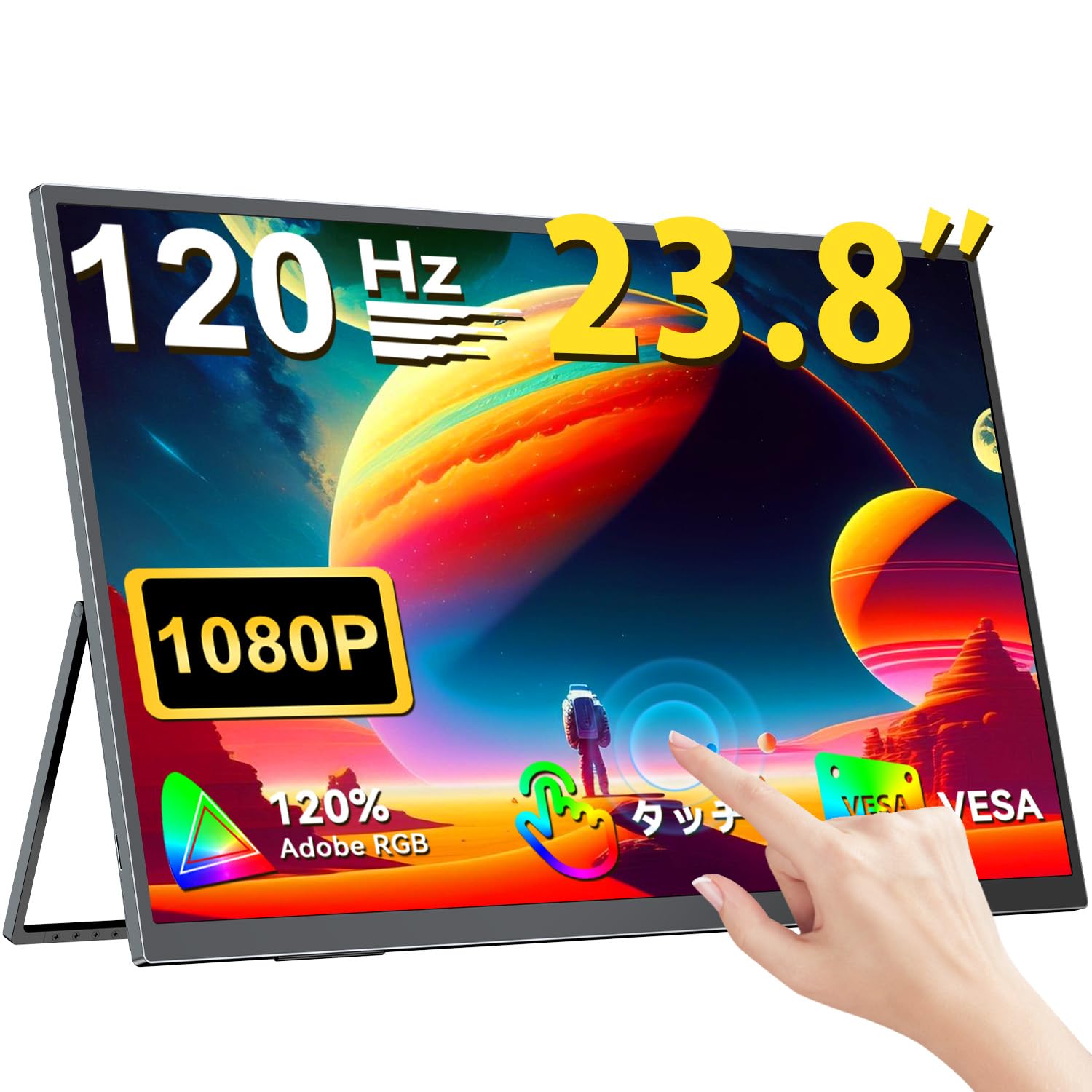
The UPERFECT 23.8-inch 120Hz Portable Touch Monitor.
Informazioni sulla sicurezza
Per evitare danni e garantire un funzionamento sicuro, osservare le seguenti precauzioni:
- Non esporre il monitor a pioggia, umidità o temperature estreme.
- Evitare di posizionare oggetti pesanti sul monitor.
- Utilizzare solo l'alimentatore e i cavi forniti.
- Do not attempt to disassemble or repair the monitor yourself. Contact customer support for assistance.
- Garantire un'adeguata ventilazione attorno al monitor per evitare il surriscaldamento.
- When adjusting the stand, ensure the monitor is stable to prevent tipping.

Recommended ergonomic viewing angles for comfortable use. Avoid upward viewing angles to prevent tipping and eye strain.
Contenuto della confezione
Verificare che tutti gli articoli siano presenti nel pacco:
- UPERFECT 23.8-inch Portable Touch Monitor
- Adattatore di alimentazione
- USB Type-C Cable (Full-featured)
- Cavo da mini HDMI a HDMI
- USB-A to USB-C Cable (for power/OTG)
- Manuale d'uso
Prodotto finitoview
Caratteristiche del monitor
- 23.8-inch IPS Panel: Large display with 178° wide viewangoli di inclinazione.
- Frequenza di aggiornamento 120Hz: Provides smooth visuals, ideal for gaming and fast-paced content.
- Multi-touch a 10 punti: Intuitive interaction with supported devices.
- Gamma di colori sRGB al 120%: Offre colori vivaci e precisi.
- Supporto integrato: Adjustable from 0° to 180° for flexible viewposizioni di avanzamento.
- Compatibile con montaggio VESA: Supports 75x75mm VESA standard for alternative mounting options.
- Non-Glare Screen: Reduces reflections for comfortable long-term use.
- Altoparlanti incorporati: Per l'uscita audio.
Porte e pulsanti

Sopraview delle porte e dei pulsanti di controllo del monitor.
- Spinotto degli auricolari: Uscita audio da 3.5 mm.
- Pulsante Menu: Accede al menu OSD (On-Screen Display).
- Pulsanti Più/Meno: Navigate OSD menu, adjust volume/brightness.
- Indicatore di alimentazione: Mostra lo stato dell'alimentazione.
- Pulsante di accensione/ritorno: Powers the monitor on/off, or returns to previous OSD menu.
- Porte di tipo C (x2): Full-featured USB-C for power, video, and touch signal.
- Mini porta HDMI: Ingresso video.
- Porta Micro USB-B OTG: For connecting peripherals like mouse or keyboard.
Impostare
Connessione ai dispositivi
The monitor supports various devices including laptops, desktops, smartphones, and gaming consoles (PS4, PS5, Xbox, Nintendo Switch).

The monitor can be connected to various devices using a single Type-C cable for power and display, provided the device supports DP Alt Mode.
- Connessione USB di tipo C: Connect a full-featured USB Type-C cable from your device (laptop, smartphone, Switch) to one of the monitor's Type-C ports. If your device supports DP Alt Mode, a single cable can transmit video, audio, touch, and power. If your device does not support DP Alt Mode, or for stable power delivery, connect the included power adapter to the other Type-C port.
- Connessione Mini HDMI: Connect a Mini HDMI to HDMI cable from your device (PC, game console) to the monitor's Mini HDMI port. For power, connect the included power adapter to one of the monitor's Type-C ports.
- Porta OTG: Utilizzare la porta Micro USB-B OTG per collegare un mouse o una tastiera per un controllo migliorato, soprattutto quando si utilizza il monitor con uno smartphone in modalità desktop.
Nota importante:
- For optimal performance, especially when increasing contrast, brightness, or color saturation, always connect the monitor to an external power source using the provided power adapter.
- If your device's USB-C port does not support DP Alt Mode, a Type-C cable alone cannot transmit video. Refer to your device's specifications for compatibility.
Stand Adjustment and VESA Mounting

The monitor features a smart integrated stand for flexible positioning and VESA compatibility for arm mounts.
- Supporto integrato: The monitor features a durable aluminum alloy integrated stand. Adjust the viewing angle freely within a 0° to 180° range. The base includes anti-slip rubber pads for stability.
- Montaggio VESA: The monitor is compatible with VESA 75x75mm mounts (M4*4mm screw holes). This allows for attachment to monitor arms or wall brackets for a customized setup.
Istruzioni per l'uso
Accensione/spegnimento
Press the Power/Return button to turn the monitor on or off.
Menu OSD (On-Screen Display)
Press the Menu button to access the OSD menu. Use the Plus/Minus buttons to navigate and adjust settings such as brightness, contrast, color temperature, and input source.
Funzionalità touch

The monitor supports 10-point multi-touch gestures for intuitive control. For MacBook connections, 2-point gestures (pinch zoom/rotate) are supported.
The monitor supports 10-point multi-touch for Windows and Android devices. For MacBook connections, 2-point gestures (pinch zoom/rotate) are fully supported. This allows for direct interaction with the screen for tasks like sketching, document navigation, and presentations.
Modalità di visualizzazione

Easily switch between horizontal (landscape) and vertical (portrait) display modes to suit your content and workflow. Portrait mode settings are configured on your PC.
Il monitor supporta diverse modalità di visualizzazione per soddisfare le tue esigenze:
- Modalità estesa: Extend your PC desktop across both screens for increased workspace.
- Modalità duplicata: Mirror your PC screen for presentations or shared viewing.
- Modalità ritratto: Rotate the monitor vertically for document review or coding. (Settings for portrait mode are typically configured on the connected PC).
Caratteristiche di gioco

The monitor supports FreeSync technology to eliminate screen tearing and stuttering during gaming.
- Frequenza di aggiornamento 120Hz: Experience smoother gameplay and action sequences compared to standard 60Hz displays.
- Supporto FreeSync: Compatible with FreeSync technology to reduce screen tearing and stuttering, providing a more fluid gaming experience.
- Tempo di risposta rapido: Enjoy a quick response time of 1ms, minimizing motion blur.
Manutenzione
Follow these guidelines to maintain your monitor:
- Pulizia dello schermo: Pulire delicatamente lo schermo con un panno morbido e privo di lanugine. Per macchie ostinate, strofinare leggermenteampImmergere il panno con acqua o una soluzione detergente per schermi. Non spruzzare il liquido direttamente sullo schermo.
- Pulizia del Casing: Utilizzare un panno morbido e asciutto per pulire il monitor casing. Evitare detergenti abrasivi o solventi.
- Magazzinaggio: Quando non viene utilizzato per lunghi periodi, conservare il monitor in un luogo fresco e asciutto, lontano dalla luce solare diretta e da temperature estreme.
- Resistenza alle impronte digitali: The screen features an anti-fingerprint coating to help maintain cleanliness in business environments.
Risoluzione dei problemi
In caso di problemi, fare riferimento ai seguenti problemi comuni e alle relative soluzioni:
| Problema | Possibile causa | Soluzione |
|---|---|---|
| Nessun display/Nessun segnale | Incorrect input source selected; Cable not connected properly; Device not outputting signal; Insufficient power. | Check cable connections; Select correct input source via OSD; Ensure device is powered on and configured to output to external display; Connect external power adapter to monitor. |
| La funzione touch non funziona | USB-C cable not full-featured; Device does not support touch output; Driver issue (Windows); Cable connection issue. | Ensure a full-featured USB-C cable is used; Verify device compatibility with touch output; Reconnect USB-C cable; For Windows, ensure touch drivers are installed (usually automatic). |
| Screen flickering/Unstable image | Cable issue; Graphics card issue; Refresh rate mismatch; Insufficient power. | Try a different cable; Update graphics drivers; Adjust refresh rate in device settings; Ensure external power is connected. |
| Nessun audio dagli altoparlanti del monitor | Volume troppo basso; Disattivato; Uscita audio selezionata non corretta sul dispositivo. | Adjust monitor volume via OSD; Check device's audio output settings. |
| Monitor keeps restarting | Potenza insufficiente. | Ensure the monitor is connected to the provided power adapter for stable power delivery. |
Specifiche
| Caratteristica | Specificazione |
|---|---|
| Marca | SUPERFETTO |
| Numero di modello | Modello M238T02 |
| Dimensioni dello schermo | 23.8 pollici |
| Risoluzione | Risoluzione Full HD 1080p (1920 x 1080) |
| Proporzioni | 16:9 |
| Tipo di pannello | Schermo LCD IPS |
| Superficie dello schermo | Antiriflesso |
| Rapporto di contrasto | 1000:1 |
| Frequenza di aggiornamento | Frequenza 120 Hz |
| Tempo di risposta | 1 millisecondi |
| Viewangolo di ing | 178 gradi |
| Valore gamma colore | 120% sRGB |
| Connettività | 2x USB Type-C (Full-featured), 1x Mini HDMI, 1x Micro USB-B (OTG), 1x 3.5mm Audio Jack |
| Compatibilità VESA | 75x75mm (viti M4*4mm) |
| Dimensioni (P x L x A) | Dimensioni: 1.7 x 54.5 x 32.7 cm |
| Sincronizzazione adattiva | Sincronizzazione gratuita |
Garanzia e supporto
UPERFECT provides comprehensive support for your product:
- Garanzia del produttore: Questo prodotto è coperto da una garanzia del produttore di 2 anni.
- Garanzia di soddisfazione di 90 giorni: If you are not completely satisfied within 90 days, a full refund is available.
- Supporto dedicato: Contact our dedicated support team for any questions or issues.
- Sostituzione gratuita degli accessori: Genuine cables and adapters are provided free of charge for life.
- Certificato PSE: The product is PSE certified, ensuring safety standards.
For any inquiries or if you encounter an initial defect within the warranty period, please contact us through your order history. We are committed to providing the best possible assistance.