
1. Introduzione
Grazie per l'acquistoasing the AODK B10022OKT301 Side Table. This manual provides essential information for the safe and efficient assembly, operation, and maintenance of your new furniture. Please read these instructions carefully before beginning assembly and retain them for future reference.
2. Informazioni sulla sicurezza
- Montare sempre il prodotto su una superficie morbida e pulita per evitare graffi.
- Assicurarsi che tutte le parti siano fissate saldamente prima dell'uso.
- Non sovraccaricare ripiani o cassetti. Consultare le specifiche per i limiti di peso.
- Keep liquids away from the integrated power outlet to prevent electrical hazards.
- Non tentare di modificare il prodotto o i suoi componenti elettrici.
- Durante il montaggio, tenere le parti di piccole dimensioni fuori dalla portata dei bambini.
3. Contenuto della confezione
Prima del montaggio, verificare che tutti i componenti siano presenti e integri. Se qualche componente risulta mancante o danneggiato, contattare l'assistenza clienti.
- Componenti del telaio in metallo
- Pannelli per ripiani in legno (superiore, centrale, inferiore)
- Cassetti in tessuto (x2)
- Integrated Power Outlet Unit with Cable
- Hardware di montaggio (viti, connettori)
- Manuale di istruzioni
4. Installazione e assemblaggio
The AODK B10022OKT301 Side Table is designed for easy and quick assembly, often requiring no additional tools. While one person can assemble it, having two people may expedite the process.
- Disimballare i componenti: Estrarre con cautela tutti i componenti dall'imballaggio e disporli su una superficie pulita e morbida.
- Assemblare il telaio: Connect the metal frame components according to the diagrams provided in the separate assembly sheet (if included). Ensure all connections are firm.
- Fissare i ripiani: Secure the wooden top, middle, and bottom shelves to the assembled metal frame using the provided hardware.
- Installare la presa di corrente: Integrate the power outlet unit into the designated slot on the top shelf. Ensure the cable is routed safely.
- Inserisci cassetti: Piegare e inserire i due cassetti in tessuto nei rispettivi scomparti.
- Controllo finale: Verificare che tutte le parti siano correttamente assemblate e serrate.
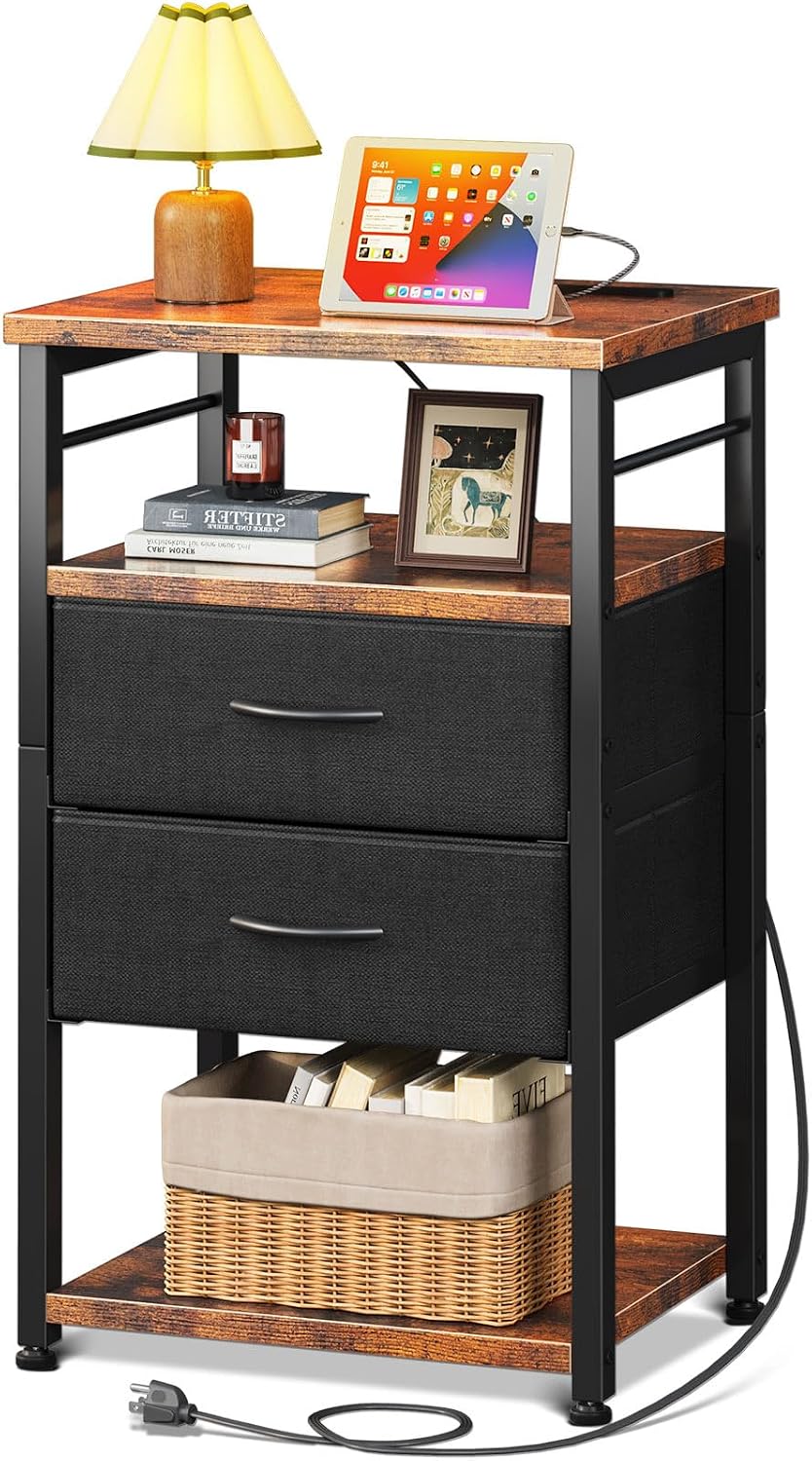
Figura 1: Assembled AODK B10022OKT301 Side Table. This image shows the complete side table with its top shelf, two fabric drawers, and a bottom open shelf, along with the integrated power outlet.

Figura 2: Product Dimensions. This diagram illustrates the compact dimensions of the side table, measuring approximately 40cm in width, 30cm in depth, and 70cm in height, suitable for various spaces.
5. Istruzioni per l'uso
5.1. Integrated Power Outlet
The side table features a built-in power outlet for convenient charging and power management.
- Collegamento elettrico: Collegare il cavo di alimentazione del tavolo a una presa a muro standard.
- Prese CA: Use the two AC outlets (100-240V/15A) to power devices such as lamps, computer portatili o altri dispositivi elettronici.
- Porta USB: Use the 5V/2A USB port to charge smartphones, tablets, or other USB-powered devices.
- Gestione dei cavi: The 70-inch power line allows for flexible placement. Ensure the cable is not pinched or damaged.

Figura 3: Power Outlet Functionality. This image highlights the integrated power strip on the table's surface, showing its AC outlets and USB port in use for charging devices.
5.2. Cassetti e ripiani portaoggetti
The table offers efficient 4-layer storage to help keep your space organized.
- Cassetti in tessuto: The two pull-out fabric drawers are ideal for storing small items, keeping them out of sight and preventing clutter.
- Scaffali aperti: The top and bottom open shelves provide easy access for frequently used items like books, remote controls, or decorative pieces.

Figura 4: Storage Capacity. This image demonstrates the storage capabilities of the side table, featuring the two fabric drawers and the accessible bottom shelf for various items.
6. Manutenzione
- Pulizia: Pulire le superfici in legno con un panno morbido eamp panno. Evitare prodotti chimici aggressivi o detergenti abrasivi.
- Cassetti in tessuto: Spot clean fabric drawers with a mild detergent if necessary. Do not machine wash.
- Componenti elettrici: Ensure the power outlet is unplugged before cleaning. Use a dry cloth to wipe the power strip.
- Controlli regolari: Controllare periodicamente tutte le viti e i collegamenti per assicurarsi che siano sempre ben serrati.
7. Risoluzione Dei Problemi
- Il tavolo è traballante: Ensure all screws are tightened. Check that the table is on a level surface. Adjust the leveling feet if present.
- Presa di corrente non funzionante: Verify that the table's power cord is securely plugged into a functional wall outlet. Check if the wall outlet itself is working by plugging in another device.
- I cassetti non scorrono fluidamente: Ensure the fabric drawers are correctly assembled and inserted. Check for any obstructions in the drawer compartments.
8. Specifiche
| Marca | AODK |
| Numero di modello | B10022OKT301 |
| Dimensioni del prodotto (L x P x A) | Dimensioni: 30 cm x 40 cm x 70 cm |
| Dimensioni del pacco | Dimensioni: 43.5 x 33.4 x 13.3 cm |
| Peso del pacco | 5.94 kg |
| Colore | Vinotage & Black |
| Progettazione del tavolo | Comodino |
| Stile | Industriale moderno |
| Power Outlet AC Output | 100-240V/15A |
| Power Outlet USB Output | 5V/2A |
| Lunghezza del cavo di alimentazione | 70 pollici |
| Utilizzo della batteria | NO |
9. Garanzia e supporto
Per informazioni sulla garanzia o sull'assistenza clienti, consultare la documentazione di acquisto o contattare il rivenditore. Conservare la prova d'acquisto per eventuali reclami in garanzia.
