Wengart WG01RF Wireless Thermostat and Receiver User Manual
Modello: WG01RF
1. Introduzione
The Wengart WG01RF Wireless Thermostat and Receiver system provides convenient and efficient temperature control for your home. Utilizing RF technology, it offers stable and reliable signal transmission without the need for extensive wiring. This system is compatible with radiant floor heating systems and gas boilers, offering a flexible solution for various heating setups. The thermostat features an LCD display and programmable functions for personalized comfort.
2. Caratteristiche del prodotto
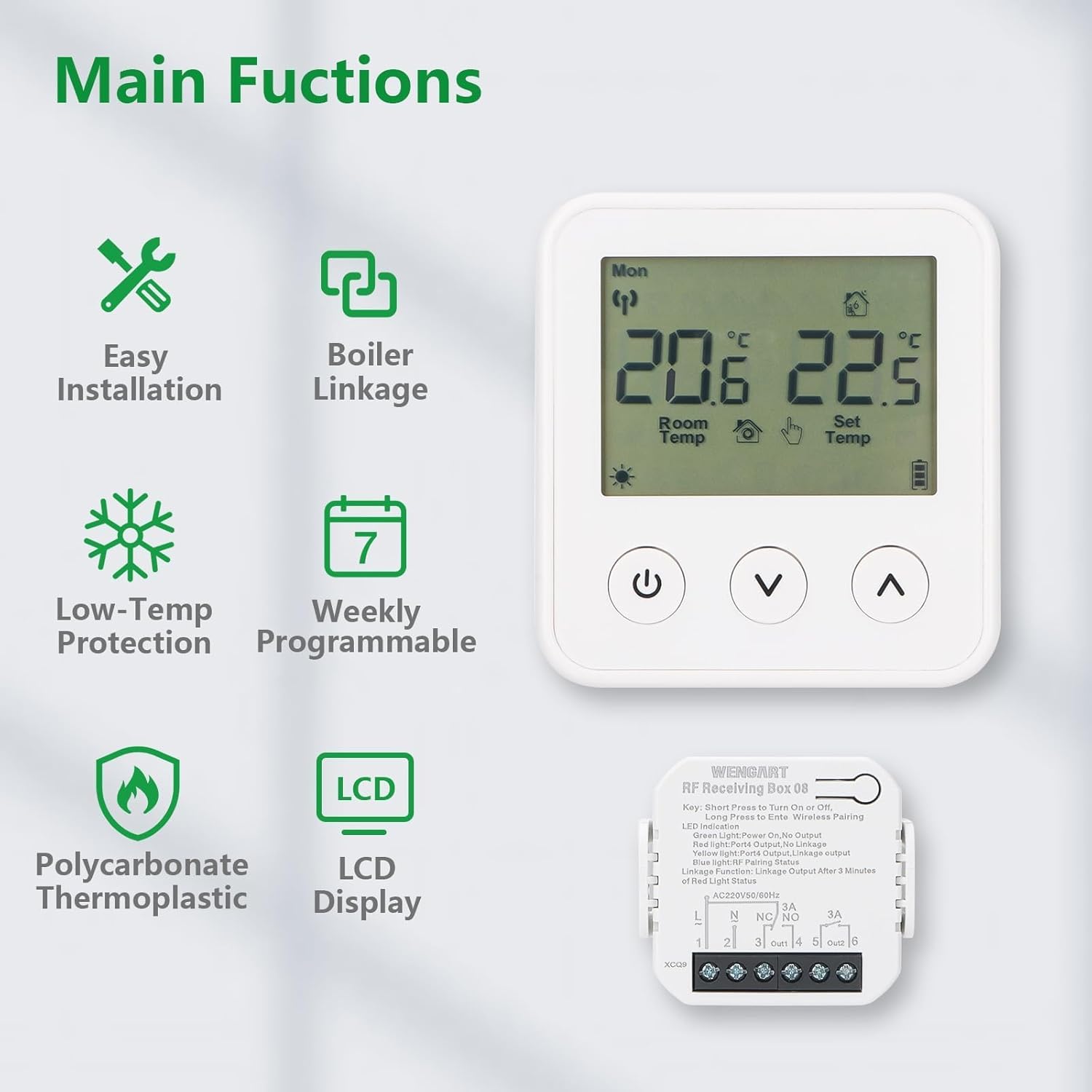
Installazione senza fili: Uses RF technology for easy setup without wall damage.
Collegamento della caldaia: Compatible with gas boilers and radiant floor heating systems.
Protezione a bassa temperatura: Helps prevent pipes from freezing.
Programmabile settimanalmente: Set custom temperature schedules for different times of the day and week.
Schermo LCD: Clear screen for viewing room temperature, set temperature, and operating modes.
Battery-Powered Thermostat: The thermostat unit is battery-operated for flexible placement.
Materiale durevole: Constructed from Polycarbonate Thermoplastic for longevity.
Image 1: Main Functions Overview. This image illustrates the key features of the Wengart WG01RF thermostat, including easy installation, boiler linkage, low-temp protection, weekly programmability, LCD display, and polycarbonate thermoplastic construction.
3. Configurazione e installazione
The Wengart WG01RF system consists of two main components: the wireless thermostat panel and the receiver box. Installation is designed to be straightforward.
3.1 Installazione del ricevitore
Montaggio: Choose a suitable location for the receiver box near your heating system (boiler or floor heating manifold). Ensure it is accessible for wiring.
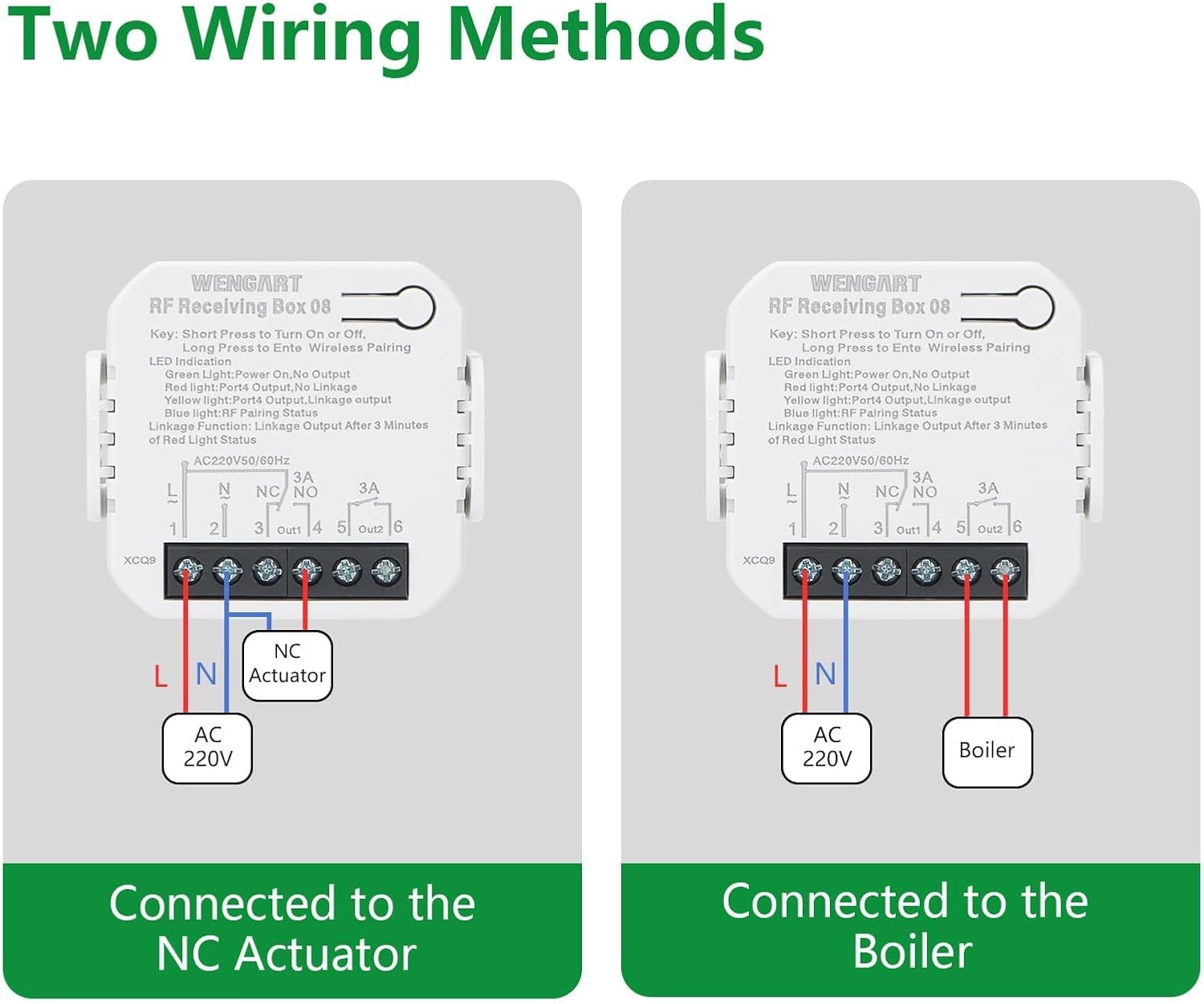
Cablaggio: Connect the receiver to your heating system. The receiver supports two main wiring methods:
Connected to NC Actuator: For normally closed actuators in floor heating systems. Connect the Live (L) and Neutral (N) power supply to terminals 1 and 2. Connect the NC Actuator to terminals 3 (NC) and 4 (NO).
Connected to Boiler: For gas boilers. Connect the Live (L) and Neutral (N) power supply to terminals 1 and 2. Connect the boiler control wires to terminals 3 (NC) and 4 (NO).
Importante: All wiring should be performed by a qualified electrician and with the main power supply turned off to prevent electric shock.
Accensione: Once wiring is complete and secure, restore power to the receiver.
Image 2: Two Wiring Methods. This image displays diagrams for connecting the Wengart RF Receiving Box 08 to either an NC Actuator (for floor heating) or a Gas Boiler. It shows the Live (L), Neutral (N), NC (Normally Closed), and NO (Normally Open) terminals.
3.2 Thermostat Panel Placement
Inserire le batterie: Open the battery compartment on the back of the thermostat panel and insert 2 AAA 1.5V alkaline batteries (not included).
Posizionamento: Place the thermostat panel in a central location in the room where you want to measure and control the temperature. Avoid direct sunlight, drafts, or areas near heat sources (e.g., radiators, lamps) che potrebbero influenzare le letture della temperatura.
Associazione (automatica): The thermostat and receiver are typically pre-paired from the factory. If pairing is required, refer to the "Troubleshooting" section for instructions.
Immagine 3: Applicazione Examplui. This image shows the Wengart WG01RF thermostat and receiver installed in a home environment, demonstrating its use with a radiant floor heating system.
4. Funzionamento
The thermostat features an intuitive LCD display and three control buttons.
4.1 Fine displayview
Image 4: Product Analysis Display. This diagram labels the various indicators on the thermostat's LCD screen, including Week, Wireless Signal, Indoor Temperature, Set Temperature, Programming Mode, Manual Mode, Key Lock, Battery Level Indicator, Boiler Linkage, and Valve Body Opened.
Indicatore della settimana: Displays the current day of the week (Mon-Sun).
Segnale senza fili: Indicates the connection status between the thermostat and receiver.
Temperatura interna: Mostra la temperatura ambiente attuale.
Imposta temperatura: Visualizza la temperatura desiderata.
Modalità di programmazione: Indicates if the thermostat is operating in a programmed schedule.
Modalità manuale: Indica il controllo manuale della temperatura.
Blocco tasti: Shows if the buttons are locked to prevent accidental changes.
Indicatore del livello della batteria: Visualizza la durata residua della batteria.
Collegamento della caldaia: Indicates if the heating system is active.
Valve Body Opened: Specific to floor heating systems, indicates valve status.
4.2 Funzioni dei pulsanti
Pulsante di accensione (⏻): Short press to turn the thermostat ON/OFF. Long press may enter settings or pairing mode (refer to specific instructions for advanced functions).
Pulsante Giù (⌄): Decreases the set temperature or navigates menu options.
Pulsante Su (⌃): Increases the set temperature or navigates menu options.
4.3 Regolazione della temperatura di base
When the thermostat is ON, use the ⌄ (Giù) e ⌃ (Up) buttons to adjust the desired set temperature. The new setting will override the current program until the next scheduled change or until manually reset.
5. Programmazione settimanale
The Wengart WG01RF thermostat allows you to set a weekly schedule to automatically adjust the temperature according to your lifestyle. This feature helps optimize energy consumption and comfort.
5.1 Setting a Custom Program
To enter programming mode, typically a long press on a specific button (often the power button or a dedicated 'M' or 'Menu' button, though not explicitly shown on the provided images for this model, consult the included paper manual for exact button sequence). Once in programming mode, you can define temperature settings for different time periods throughout the week.
Image 5: Custom Programming. Questa immagine mostra un example of a weekly programming schedule for the Wengart WG01RF thermostat, detailing different time periods (Morning, Go out, Go home, Night) with corresponding default temperatures for working days and weekends.
un example programming schedule might include:
Periodo di tempo
Ora di inizio
Temperatura predefinita
Working Day - Morning
06:00
24°C
Working Day - Go out
08:00
16°C
Working Day - Go home
17:00
24°C
Working Day - Night
22:00
16°C
Weekend - Morning
06:00
24°C
Weekend - Night
20:00
16°C
Follow the on-screen prompts and use the Up/Down buttons to adjust times and temperatures for each period. Confirm your settings to save the program.
6. Manutenzione
Pulizia: Pulire le superfici del termostato e del ricevitore con un panno morbido e asciutto. Non utilizzare detergenti abrasivi, solventi o spray chimici.
Sostituzione della batteria: When the battery level indicator shows low battery, replace the 2 AAA 1.5V alkaline batteries in the thermostat panel promptly to ensure continuous operation.
Evitare ostacoli: Ensure the thermostat is not covered by curtains, furniture, or other objects that could block airflow and affect temperature readings.
7. Risoluzione Dei Problemi
Problema
Possibile causa
Soluzione
Thermostat not turning ON/OFF heating.
No power to receiver, receiver not wired correctly, thermostat batteries low/dead, thermostat not paired with receiver, heating system issue.
Controllare l'alimentazione del ricevitore.
Verify receiver wiring according to Section 3.1.
Replace thermostat batteries.
Re-pair thermostat and receiver (see below).
Ensure your boiler/heating system is functioning correctly.
Il display del termostato è vuoto o poco luminoso.
Low or dead batteries in the thermostat.
Replace the 2 AAA 1.5V alkaline batteries.
Difficulty programming the schedule.
Incorrect button sequence, misunderstanding of programming steps.
Refer to Section 5.1 and the detailed instructions in the physical user manual for the exact programming steps. Ensure you are pressing buttons for the correct duration (short vs. long press).
Thermostat and receiver not communicating (no wireless signal icon).
Out of range, interference, pairing lost.
Avvicinare il termostato al ricevitore.
Avoid placing near large metal objects or other strong RF sources.
Procedura di riassociazione:
On the receiver, long press the pairing button (often labeled "Key" or "Pair") until the LED indicator flashes.
On the thermostat, with the unit OFF, long press the power button (or a designated pairing button if available) until a pairing symbol appears or the display indicates pairing mode.
The devices should pair within a few seconds. The wireless signal icon on the thermostat should become solid.
Letture della temperatura imprecise.
Termostato posizionato in una posizione non idonea.
Posizionare il termostato lontano dalla luce solare diretta, da correnti d'aria o da fonti di calore.
8. Specifiche
Caratteristica
Dettaglio
Alimentatore (termostato)
2 batterie alcaline AAA da 1.5 V (non incluse)
Alimentazione (ricevitore)
230V 50/60Hz
Consumo energetico
0.3W
Intervallo di impostazione
Temperatura ambiente: da 5 a 35 °C
Interruttore differenziale
0.5 ~ 5 °C regolabile (impostazione di fabbrica ±1 °C)
Temperatura ambiente
Temperatura -5 ~ 50 °C
Precisione di visualizzazione della temperatura
±0.5 °C
Precisione del controllo della temperatura
±0.5 °C
Campo di misura
Temperatura ambiente: da 1 a 40 °C
Sensore interno
NTC 10k @ 25 °C
Carico di resistenza massimo
3A
Alloggiamento di protezione
Grado di protezione IP20
Materiale dell'alloggiamento
PC (policarbonato) ignifugo
Cablaggio Clamp
1 clamp for 2 x 1.5mm² wires or 1 x 2.5mm² wire
Tecnologia di connettività
RF (radiofrequenza)
Tipo di visualizzazione
LCD
Tipo di montaggio
Montaggio a parete
Dimensioni del prodotto (termostato)
ca. 84.5 mm (L) x 90.7 mm (A) x 20 mm (P)
Dimensioni del prodotto (ricevitore)
ca. 46 mm (L) x 46 mm (A) x 18.9 mm (P)
Peso
114.8 grammi (peso totale della confezione)
Image 6: Product Size. This image provides detailed dimensions for both the Wengart WG01RF thermostat and the RF receiving box, showing measurements in millimeters and inches.
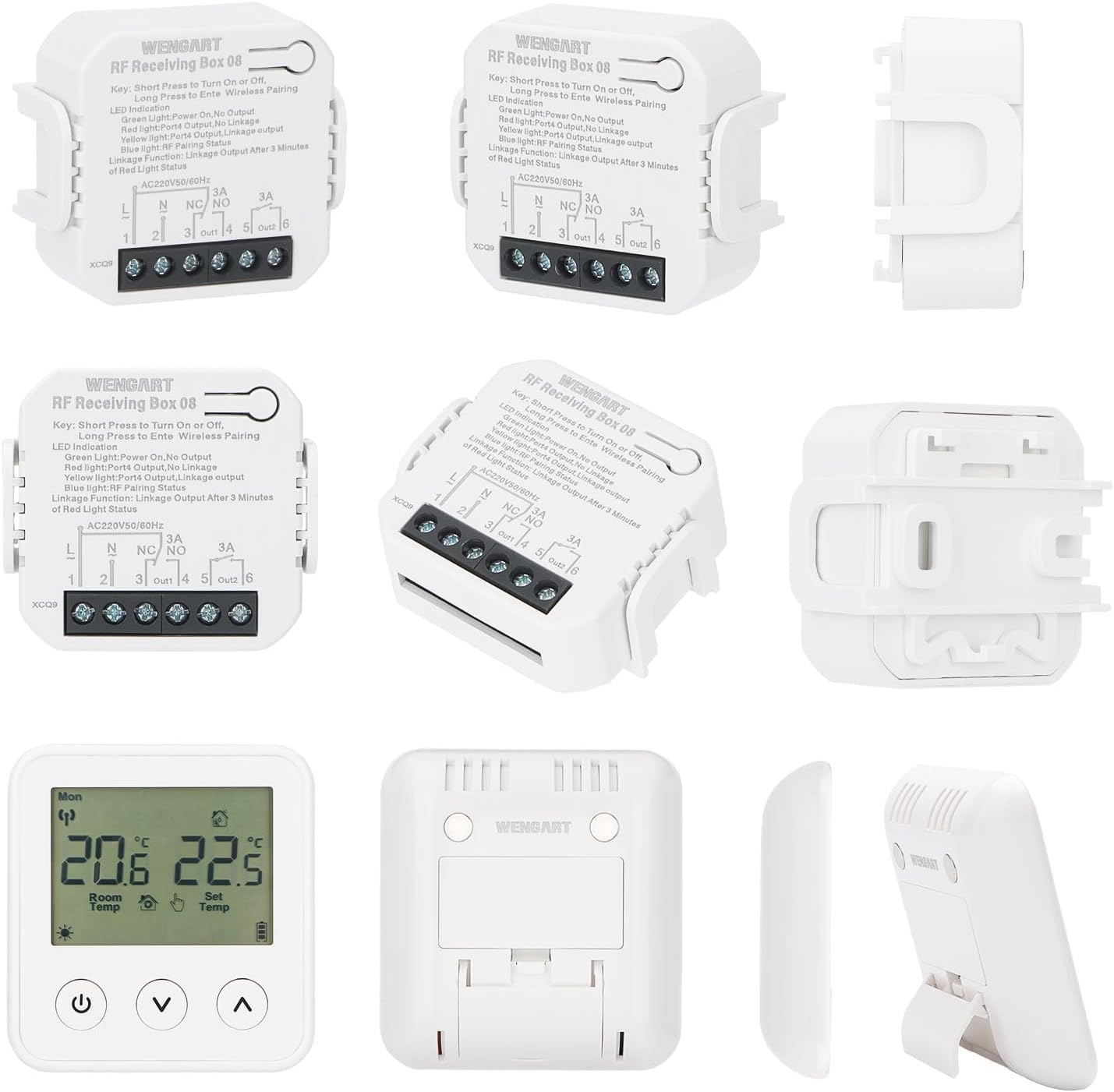
Image 7: Multiple Product Views. This image displays various angles and components of the Wengart WG01RF wireless thermostat and receiver, including front, back, side, and disassembled views of the receiver.
9. Informazioni sulla garanzia
Specific warranty details for the Wengart WG01RF Wireless Thermostat and Receiver are not provided in the available product data. Please refer to the warranty card included with your product or contact the manufacturer directly for warranty terms and conditions.
10. Assistenza clienti
For technical assistance, troubleshooting beyond this manual, or inquiries regarding your Wengart WG01RF Wireless Thermostat and Receiver, please contact Wengart customer support. Contact information is typically found in the product packaging or on the manufacturer's official websito.
Ask a question about this manual
Ask about setup, troubleshooting, compatibility, parts, safety, or missing instructions. Manuals+ will review the question and use this page’s manual context to help answer it.