
GMKtec M3 Ultra
GMKtec Mini PC M3 Ultra User Manual
Model: M3 Ultra with Intel Core i7-12700H
1. Introduzione
This manual provides essential information for setting up, operating, maintaining, and troubleshooting your GMKtec Mini PC M3 Ultra. Please read this manual thoroughly before using the device to ensure proper functionality and longevity.
The GMKtec Mini PC M3 Ultra is a compact desktop computer powered by an Intel Core i7-12700H processor, featuring 14 cores and 20 threads with a maximum turbo frequency of 4.7 GHz. It includes Intel Iris Xe Graphics, 16GB DDR4 RAM, and a 1TB NVMe SSD, designed for various computing tasks from daily use to demanding applications.

Immagine: frontale e laterale view of the GMKtec Mini PC M3 Ultra, showcasingrazie al suo design compatto e alla ventilazione.
2. Contenuto della confezione
Verifica che tutti gli articoli elencati di seguito siano inclusi nel tuo pacchetto:
- 1 x Nucbox M3 Ultra Mini PC
- 1 x Power Supply & Cable
- 1 x Manuale utente (questo documento)
- 1 cavo HDMI
- 1 x supporto VESA con viti
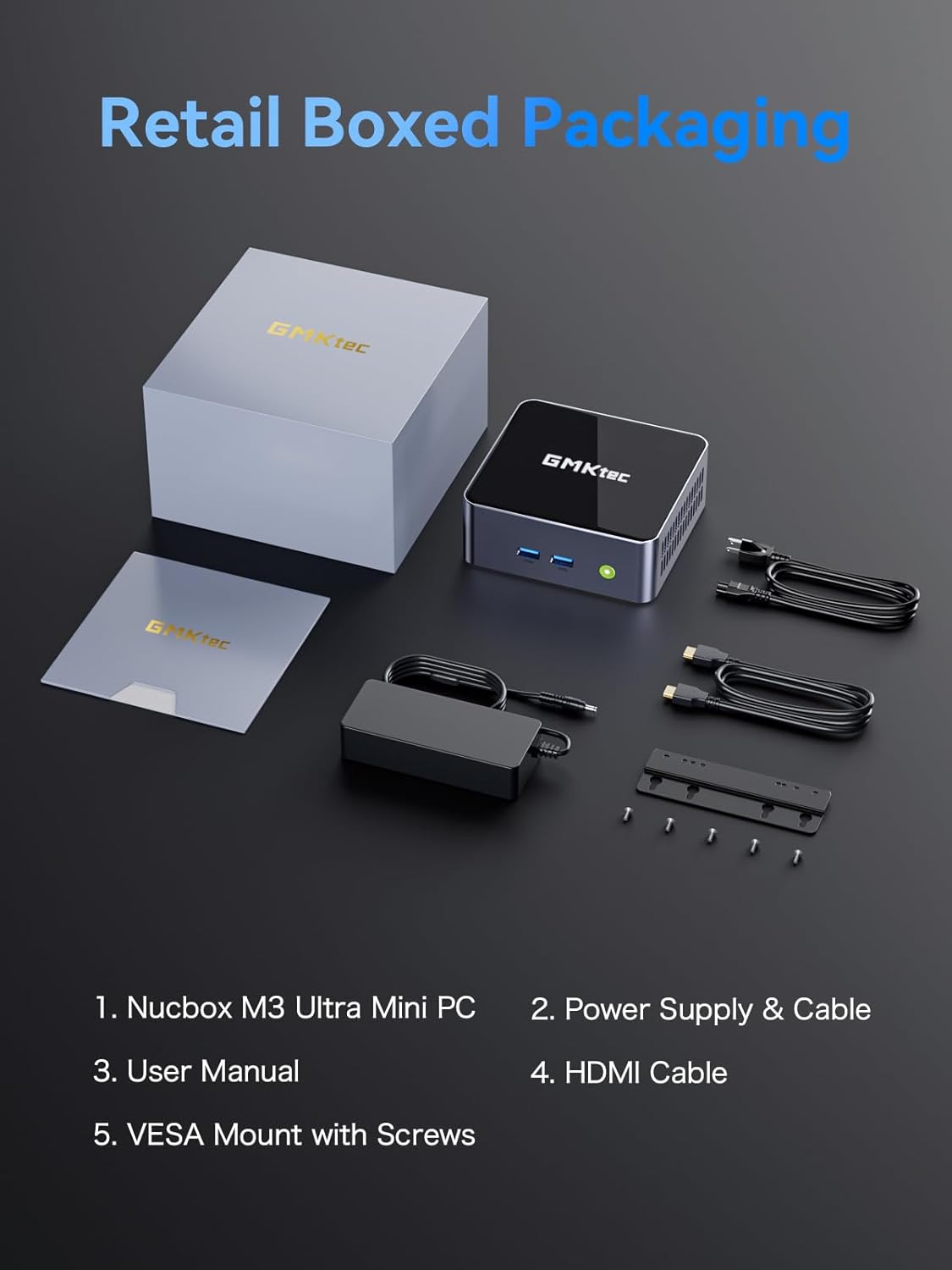
Image: Contents of the GMKtec Mini PC M3 Ultra retail package, including the mini PC, power adapter, cables, user manual, and VESA mount.
3. Prodotto finitoview
The GMKtec Mini PC M3 Ultra features a comprehensive set of ports for connectivity and expansion.
Pannello frontale
- Pulsante di accensione: Per accendere o spegnere il dispositivo.
- USB 3.2 (x2): Porte di trasferimento dati ad alta velocità.
Pannello posteriore
- DC IN (20V/5A 100W): Porta di ingresso alimentazione.
- HDMI (4K@60Hz) (x2): Video output ports for connecting displays.
- 2.5G LAN (Intel I226-V): High-speed Ethernet port for network connectivity.
- USB 3.2 (x1): Porta di trasferimento dati ad alta velocità.
- USB 2.0 (x1): Porta standard per il trasferimento dati.
- Type-C (DP1.4/DATA): Multi-function port supporting DisplayPort 1.4 video output and data transfer.
- 3.5 mm CTIA: Audio jack for headphones or speakers.

Immagine: dettagliata view of the front and rear ports on the GMKtec Mini PC M3 Ultra, indicating their functions.
4. Configurazione iniziale
Per configurare il tuo Mini PC, segui questi passaggi:
- Connetti Display: Connect your monitor(s) to the HDMI ports or the Type-C port using appropriate cables.
- Connetti le periferiche: Collega la tastiera, il mouse e gli altri dispositivi USB alle porte USB disponibili.
- Connetti rete (facoltativo): For a wired connection, connect an Ethernet cable from your router or modem to the 2.5G LAN port. For wireless, ensure your WiFi network is available.
- Connetti alimentazione: Plug the power adapter into the DC IN port on the Mini PC, then connect the power cable to an electrical outlet.
- Accensione: Premere il pulsante di accensione sulla parte anteriore del Mini PC. Il sistema si avvierà.
5. Istruzioni per l'uso
Sistema operativo
The Mini PC comes with an operating system pre-installed (OS POR). Follow the on-screen instructions for initial setup, including language, region, and user account creation. The device is compatible with various operating systems, including Windows 10, Linux, and Ubuntu.
Funzionamento di base
- Accensione/spegnimento: Press the power button once to turn on. To turn off, use the operating system's shutdown function or press and hold the power button for 5 seconds.
- Ricomincia: Utilizzare la funzione di riavvio del sistema operativo.
- Modalità risparmio: Utilizzare la funzione di sospensione del sistema operativo.
Auto Power On and Wake-on-LAN
The Mini PC supports 'Auto Power On' and 'Wake-on-LAN' features. These can typically be configured within the system's BIOS settings. Refer to your operating system or BIOS documentation for detailed instructions on enabling and configuring these features.
6. Hardware Expansion (RAM & SSD)
The GMKtec Mini PC M3 Ultra is designed for easy upgrades of its RAM and storage components.
Memory (RAM) Expansion
The device is equipped with dual 16GB DDR4 RAM and supports expansion up to 64GB (via two SO-DIMM slots).
Storage (SSD) Expansion
The Mini PC includes a 1TB M.2 PCIe 2280 SSD. It supports expansion up to 16TB. Additionally, there is support for a second M.2 SATA/PCIEX4 2242 drive, also expandable up to 16TB.
To upgrade or install additional components, carefully open the chassis as per the instructions provided in the full user manual (if available) or by a qualified technician. Ensure the device is powered off and unplugged before performing any hardware modifications.

Immagine: Interna view of the GMKtec Mini PC M3 Ultra, highlighting the M.2 2280 PCIe SSD slot, M.2 2242 SATA/PCIEX4 slot, and dual DDR4 SO-DIMM slots for memory expansion.
7. Sistema di raffreddamento
The M3 Ultra Mini PC incorporates an upgraded quiet cooling fan system designed for efficient heat dissipation. It features copper cooling pipes and multiple exhaust vents to maintain optimal operating temperatures and ensure stable performance.
- Dual Turbo Cooling: Enhances airflow and heat removal.
- Two-way Convection Air Inlet: Optimizes air circulation within the chassis.
- Quiet Cooling Design: Riduce al minimo il rumore durante il funzionamento.

Image: Diagram illustrating the dual turbo cooling, two-way convection air inlet, and quiet cooling design of the GMKtec Mini PC M3 Ultra.
8. Connettività
Wired Network (2.5GbE NIC LAN)
The built-in Intel Ethernet Controller I226-V provides a 2.5 Gbit/s connection speed, offering significantly faster network performance compared to traditional Gigabit Ethernet. This is beneficial for large data transfers, online gaming, and streaming.
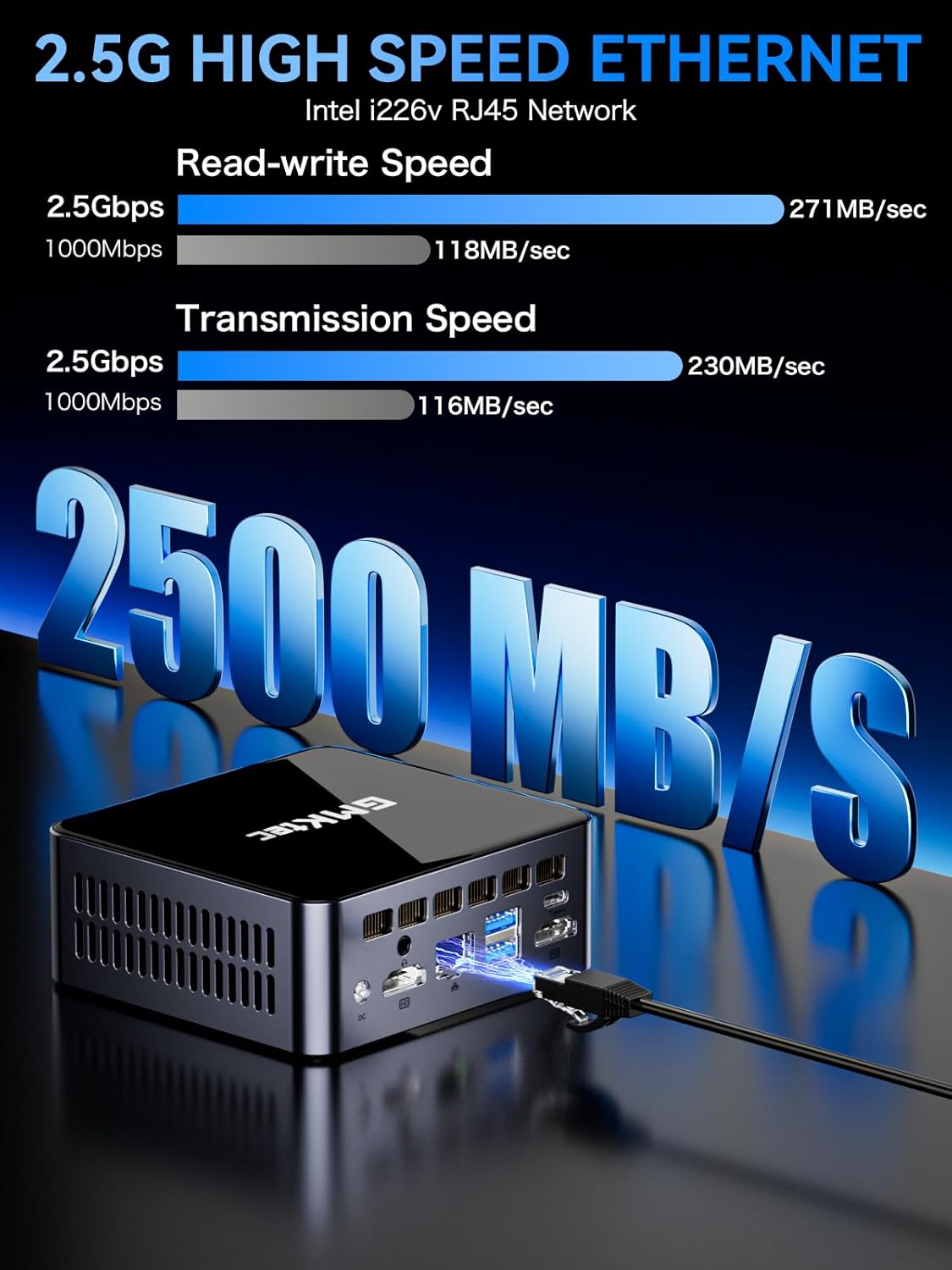
Image: Visual representation of 2.5G high-speed Ethernet performance on the GMKtec Mini PC M3 Ultra, showing read-write and transmission speeds compared to 1000Mbps.
Wireless Connectivity (WiFi 6 + Bluetooth 5.2)
The Mini PC supports WiFi 6 (802.11ax) and Bluetooth 5.2 technologies. WiFi 6 offers faster internet speeds, lower latency, and improved network efficiency for stable and quick connections. Bluetooth 5.2 enables seamless connection with wireless peripherals such as keyboards, mice, and audio devices.
9. Triple 4K Display Setup
The GMKtec M3 Ultra supports up to three 4K displays simultaneously, enhancing productivity and providing an extended workspace. This is achieved through its dual HDMI ports and one Type-C (DP1.4/DATA) port.
Collegamento di più display
- Connect your primary monitor to one of the HDMI ports.
- Connect a second monitor to the other HDMI port.
- Connect a third monitor to the Type-C port using a compatible USB-C to DisplayPort cable or adapter.
- Once connected, configure your display settings within your operating system to extend or duplicate your desktop across the monitors.

Image: A user enjoying a triple 4K display setup powered by the GMKtec Mini PC M3 Ultra, demonstrating its multi-monitor capabilities for gaming and productivity.
10. Manutenzione
To ensure the longevity and optimal performance of your Mini PC, follow these maintenance guidelines:
- Mantenere pulito: Pulire regolarmente l'esterno del Mini PC con un panno morbido e asciutto. Utilizzare aria compressa per rimuovere la polvere dalle aperture di ventilazione.
- Ventilazione adeguata: Assicurarsi che il Mini PC sia posizionato in un'area ben ventilata, lontano dalla luce solare diretta o da fonti di calore. Non ostruire le prese d'aria.
- Aggiornamenti software: Mantieni aggiornati il sistema operativo e i driver per garantire sicurezza e prestazioni.
- Spegnimento sicuro: Always shut down the system properly through the operating system before unplugging the power.
- Evitare i liquidi: Keep the Mini PC away from liquids to prevent damage.
11. Risoluzione Dei Problemi
If you encounter issues with your GMKtec Mini PC, refer to the following common troubleshooting steps:
Nessun potere
- Assicurarsi che l'adattatore di alimentazione sia collegato saldamente sia al Mini PC sia a una presa di corrente funzionante.
- Verificare che la presa di corrente funzioni collegandovi un altro dispositivo.
Nessuna visualizzazione
- Check that the display cable (HDMI, USB-C) is securely connected to both the Mini PC and the monitor.
- Assicurarsi che il monitor sia acceso e impostato sulla sorgente di input corretta.
- Prova a collegarti a un display diverso o a utilizzare un cavo diverso.
Nessuna connessione Internet
- Wired: Controlla la connessione del cavo Ethernet. Verifica che il router/modem funzioni.
- Senza fili: Ensure WiFi is enabled in the operating system. Check if you are connected to the correct network and entered the password correctly. Restart your router/modem.
Rallentamento o blocco del sistema
- Chiudere le applicazioni non necessarie in esecuzione in background.
- Controlla che ci sia spazio di archiviazione libero sufficiente sul tuo SSD.
- Assicurarsi che il Mini PC abbia una ventilazione adeguata e non si surriscaldi.
- Aggiornare i driver e il sistema operativo.
Se questi passaggi non risolvono il problema, contatta l'assistenza clienti.
12. Specifiche tecniche
| Componente | Specificazione |
|---|---|
| Processore | Intel Core i7-12700H (14 Cores/20 Threads, up to 4.7 GHz, 24 MB Cache) |
| Grafica | Intel Iris Xe Graphics (up to 1.45GHz) |
| Memoria (RAM) | 16GB DDR4 (Dual Channel SO-DIMM, expandable up to 64GB) |
| Magazzinaggio | 1TB M.2 PCIe 2280 SSD (expandable up to 16TB) |
| Secondary Storage Slot | M.2 SATA/PCIEX4 2242 (expandable up to 16TB) |
| Uscita video | 2 x HDMI (4K@60Hz), 1 x Type-C (DP1.4/DATA) - Triple 4K Display Support |
| Etereo | 2.5GbE NIC LAN (Intel I226-V) |
| Connettività wireless | Wi-Fi 6 (802.11ax), Bluetooth 5.2 |
| Porte USB | 3 x USB 3.2, 1 x USB 2.0, 1 x Type-C (DP1.4/DATA) |
| Audio | Jack audio CTIA da 3.5 mm |
| Alimentazione elettrica | 20V/5A (100W) |
| Sistema operativo | OS Pre-installed (Compatible with Windows 10, Linux, Ubuntu) |
| Dimensioni | Circa 6.46 x 6.22 x 4.69 pollici (dimensioni della confezione) |
| Peso | Circa 3.27 libbre |
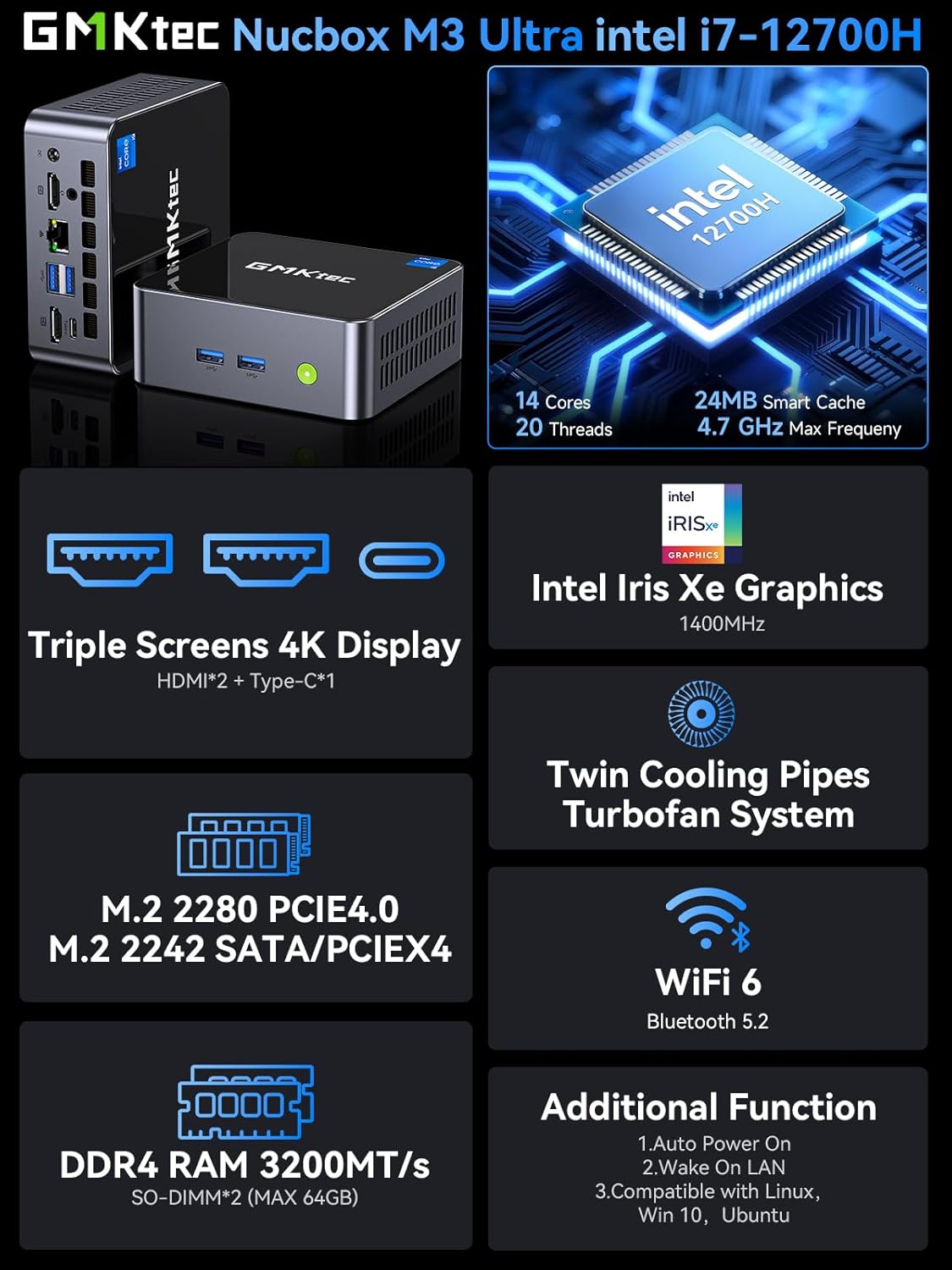
Image: Summary of key features for the GMKtec Nucbox M3 Ultra, including CPU, GPU, display, storage, cooling, and connectivity.
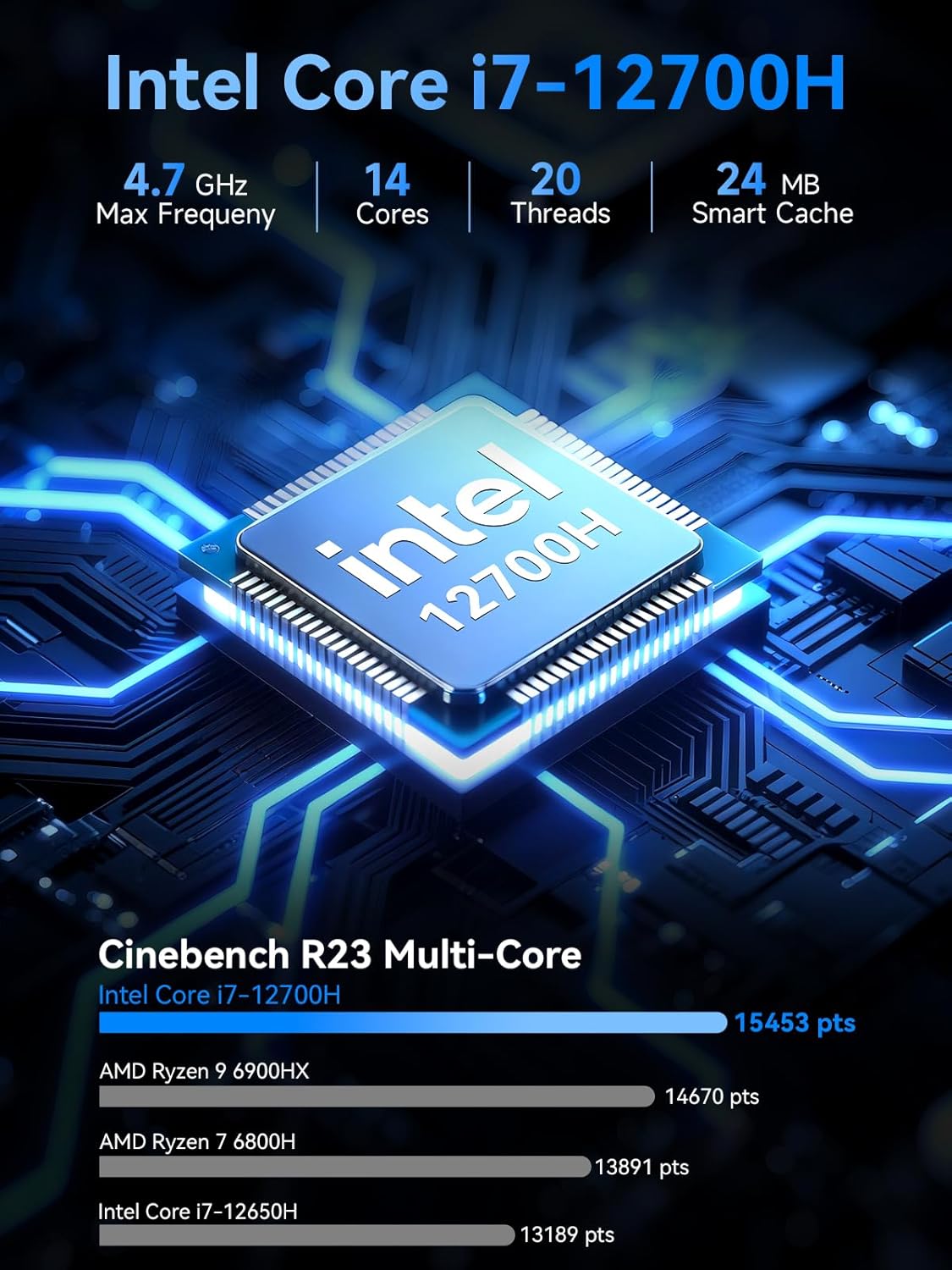
Image: Detailed specifications of the Intel Core i7-12700H processor, including core count, threads, max frequency, and Cinebench R23 multi-core performance comparison.
13. Informazioni sulla garanzia
GMKtec provides a Garanzia limitata di 1 anno for each Mini PC, effective from the date of purchase. This warranty covers all defects attributed to design and workmanship. For warranty claims or service, please retain your proof of purchase.
14. Assistenza clienti
Should you require assistance, have questions, or encounter issues not covered in this manual, please contact the GMKtec professional after-sales support team. Refer to the contact information provided with your product packaging or visit the official GMKtec websito per i dettagli del supporto.
Ask a question about this manual
Ask about setup, troubleshooting, compatibility, parts, safety, or missing instructions. Manuals+ will review the question and use this page’s manual context to help answer it.