
1. Introduzione
This manual provides essential information for setting up, operating, and maintaining your NIMO 17.3" IPS FHD Gaming Laptop. Designed for both productivity and entertainment, this laptop features an AMD Ryzen 7 8745HS processor, 64GB DDR5 RAM, and a 2TB PCIe 4.0 SSD, ensuring a responsive and powerful user experience.
Image 1.1: NIMO 17.3" FHD Gaming Laptop overview, evidenziandone le caratteristiche principali.
2. Cosa c'è nella scatola
Si prega di verificare che tutti gli articoli siano presenti al momento dell'apertura della confezione:
- 1 x NIMO N177 Laptop
- 1 x Type-C 100W PD Fast Charger
- 1 x Manuale utente
- Windows 11 Home (Pre-installed)
3. Configurazione iniziale
3.1 Accensione e ricarica
- Connect the provided 100W Type-C PD Fast Charger to the laptop's USB-C port and a power outlet.
- Aprire il coperchio del laptop. Il laptop potrebbe accendersi automaticamente oppure potrebbe essere necessario premere il pulsante di accensione.
- Allow the battery to charge fully before initial use. A 15-minute charge can provide approximately 2 hours of use.

Image 3.1: Illustration of the laptop charging process and battery life.
3.2 Windows 11 Configuration
Segui le istruzioni visualizzate sullo schermo per completare la procedura di configurazione di Windows 11. Questa procedura include la selezione della regione, la connessione a una rete Wi-Fi e la creazione di un account utente.
3.3 Configurazione del lettore di impronte digitali
Per una maggiore sicurezza e un accesso rapido, configura il lettore di impronte digitali integrato:
- Vai su Impostazioni di Windows > Account > Opzioni di accesso.
- Select 'Fingerprint recognition (Windows Hello)' and follow the instructions to register your fingerprint.

Image 3.2: The backlit keyboard and fingerprint sensor for secure login.
4. Utilizzo del laptop
4.1 Prestazioni e multitasking
Your NIMO laptop is equipped with an AMD Ryzen 7 8745HS processor (8-core/16-thread, up to 4.9GHz) and 64GB DDR5 RAM, providing robust performance for demanding applications, gaming, and seamless multitasking. The 2TB PCIe 4.0 SSD ensures fast boot times and rapid data access.

Image 4.1: Details of the AMD Ryzen 7 8745HS processor.

Image 4.2: Laptop demonstrating seamless multitasking with ample storage and RAM.
4.2 Visualizzazione
The 17.3" FHD (1920x1080) IPS anti-glare display offers immersive visuals with vibrant colors and wide viewing angles. The ultra-thin bezel design provides an 85% screen-to-body ratio for an expansive viewesperienza di acquisizione.

Image 4.3: The 17.3" FHD IPS display for visual clarity.
4.3 Tastiera e touchpad
The full-size keyboard includes a numeric keypad and features backlighting for comfortable typing in various lighting conditions. The precision gesture touchpad allows for intuitive navigation and supports multi-touch gestures.
4.4 Webcamma
Il 2MP integrato webcam is suitable for video calls and online meetings. For privacy, the laptop includes a physical privacy switch to disable the webcam quando non in uso.

Image 4.4: Privacy-focused camera convenience with a built-in switch.
5. Connettività
5.1 Porte e interfacce
The NIMO N177 laptop offers a variety of ports for connecting peripherals and external displays:
- 1 porte USB 2.0
- 3 porte USB 3.0
- 1 x USB 4.0 Type-C Port (supports 100W PD charging, data transfer, and display output)
- 1 x Porta HDMI
- 1 x Jack per cuffie
- 1 x lettore di schede SD
- 1 slot per blocco Kensington

Image 5.1: Detailed diagram of the laptop's high-speed interfaces.
5.2 Connettività wireless
The laptop supports 802.11a/b/g/n/ac Wi-Fi for reliable wireless internet access and Bluetooth for connecting wireless accessories.
6. Manutenzione
6.1 Pulizia
- Per pulire lo schermo e le superfici esterne, utilizzare un panno morbido e privo di lanugine.
- Evitare l'uso di prodotti chimici aggressivi o materiali abrasivi.
- For the screen, use a specialized screen cleaner and a microfiber cloth.
6.2 Aggiornamenti software
Regularly check for and install Windows updates and driver updates to ensure optimal performance and security. You can find driver updates on the NIMO official websito.
6.3 Conservazione e manipolazione
Store the laptop in a cool, dry place. Avoid exposing it to extreme temperatures, direct sunlight, or excessive moisture. Handle the laptop with care to prevent physical damage.
7. Risoluzione Dei Problemi
If you encounter issues with your NIMO laptop, try the following common troubleshooting steps:
- Nessun potere: Ensure the charger is securely connected to both the laptop and a working power outlet. Check if the power adapter's LED indicator is on.
- Problemi di visualizzazione: Se lo schermo è vuoto, prova a collegare un monitor esterno per verificare se il portatile funziona. Regola le impostazioni dello schermo in Windows.
- Prestazioni lente: Chiudere le applicazioni non necessarie, controllare i processi in background e assicurarsi di avere sufficiente spazio di archiviazione libero.
- Problemi di connettività: For Wi-Fi issues, restart your router and the laptop. For peripheral issues, ensure drivers are updated and connections are secure.
- Sistema non reattivo: Tenere premuto il pulsante di accensione per 10-15 secondi per forzare lo spegnimento, quindi riavviare il laptop.
For persistent issues, refer to the support section or contact NIMO customer service.
8. Specifiche
| Caratteristica | Specificazione |
|---|---|
| Marca | NIMO |
| Nome del modello | NIMO N177L |
| Dimensioni dello schermo | 17.3 pollici |
| Risoluzione dello schermo | 1920 x 1080 pixel (FHD IPS) |
| Processore | AMD Ryzen 7 8745HS (8 Cores, up to 4.9 GHz) |
| Memoria RAM | 64 GB DDR5 (4800 MHz) |
| Disco rigido | 2 TB SSD (PCIe 4.0) |
| Coprocessore grafico | AMD Radeon 780M (integrata) |
| Sistema operativo | Windows 11 Casa |
| Tipo senza fili | 802.11a/b/g/n/ac |
| Porte USB | 1 x USB 2.0, 3 x USB 3.0, 1 x USB 4.0 Tipo-C |
| Caratteristiche speciali | Tastiera retroilluminata, lettore di impronte digitali, audio HD, tastierino numerico |
| Durata media della batteria | 15.5 ore (75 Wh) |
| Peso dell'articolo | 3.84 libbre |
| Dimensioni del prodotto | 15.66 x 9.99 x 0.74 pollici |
| Colore | Nero |
9. Garanzia e supporto
9.1 Informazioni sulla garanzia
Your NIMO laptop is backed by a Garanzia di 2 anno. This warranty covers manufacturing defects and ensures your satisfaction. The product also includes partial U.S. assembly.
9.2 Politica di reso
NIMO offers hassle-free Resi entro 90 giorni from the date of purchase. Please refer to your purchase documentation for detailed return instructions.
9.3 Assistenza clienti
Our dedicated support team is available to assist you with any questions or issues. You can contact us via:
- E-mail: servizio@nimopc.com
- Il nostro funzionario website or product page (for contact details).
We aim to provide quick solutions and a worry-free experience.
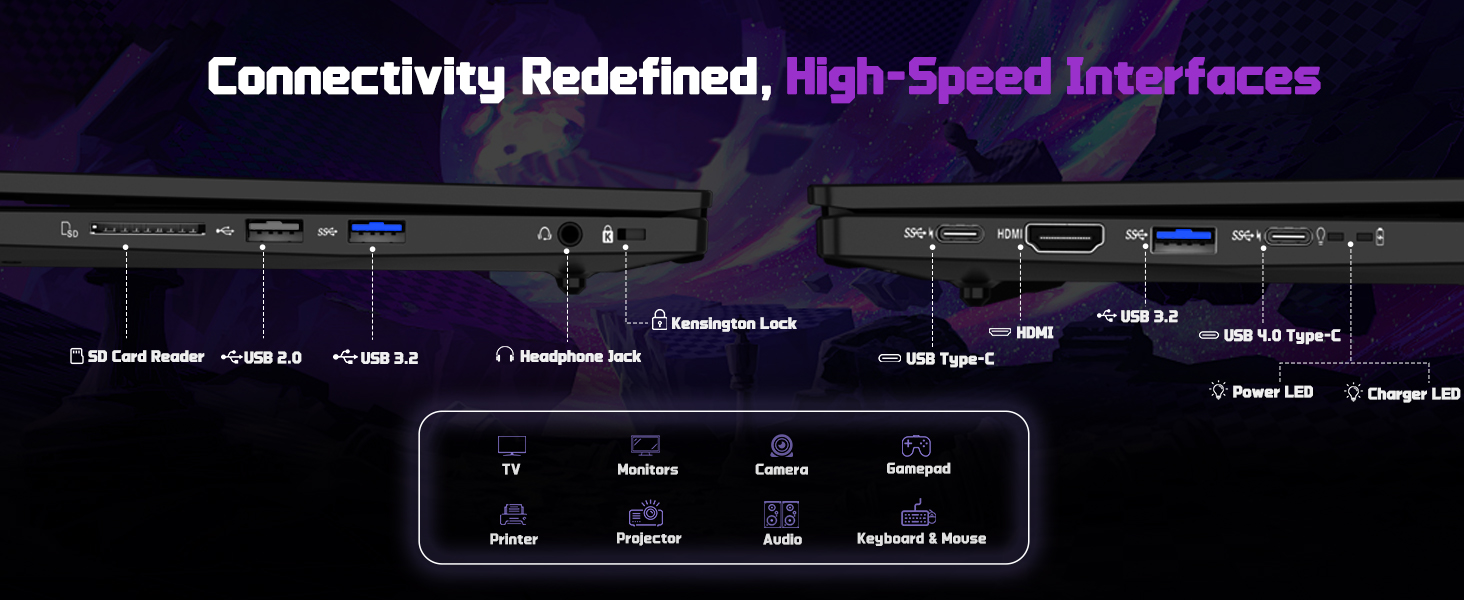
Immagine 9.1: Passoview of NIMO's customer commitment and support.