
1. Introduzione
Grazie per l'acquistoasing the Surge Wireless Pro Controller. This controller is designed for multi-platform compatibility, offering an enhanced gaming experience across various devices. Please read this manual carefully before use to ensure proper operation and to maximize your gaming enjoyment.
Caratteristiche principali:
- Multi-Platform Compatibility: Nintendo Switch/Switch 2 (Note: No C Button/Audio Port support for Switch 2), Windows PC, Steam Deck, Android, and iOS devices.
- Hall Effect Thumb Sticks & Triggers: Provides precise control and reduces the likelihood of stick drift.
- Turbo Functionality: Offers three adjustable turbo levels for rapid-fire control.
- Vibration Feedback: Four adjustable vibration levels for customizable haptic feedback.
- Motion Controls: Supports motion sensing in compatible games.
- Console Wake Up: Ability to wake the Nintendo Switch console from sleep mode (Nintendo Switch only).
- Rechargeable Battery: Built-in 600mAh Li-polymer battery provides up to 10 hours of play.
- USB-C Charging: Includes a 1-meter USB-C charging cable.
2. Contenuto della confezione
- 1 x Surge Wireless Pro Controller
- 1 cavo di ricarica USB-C (1 metro)
- 1 x Manuale di istruzioni
3. Disposizione del controller
Familiarize yourself with the buttons and features of your Surge Wireless Pro Controller.
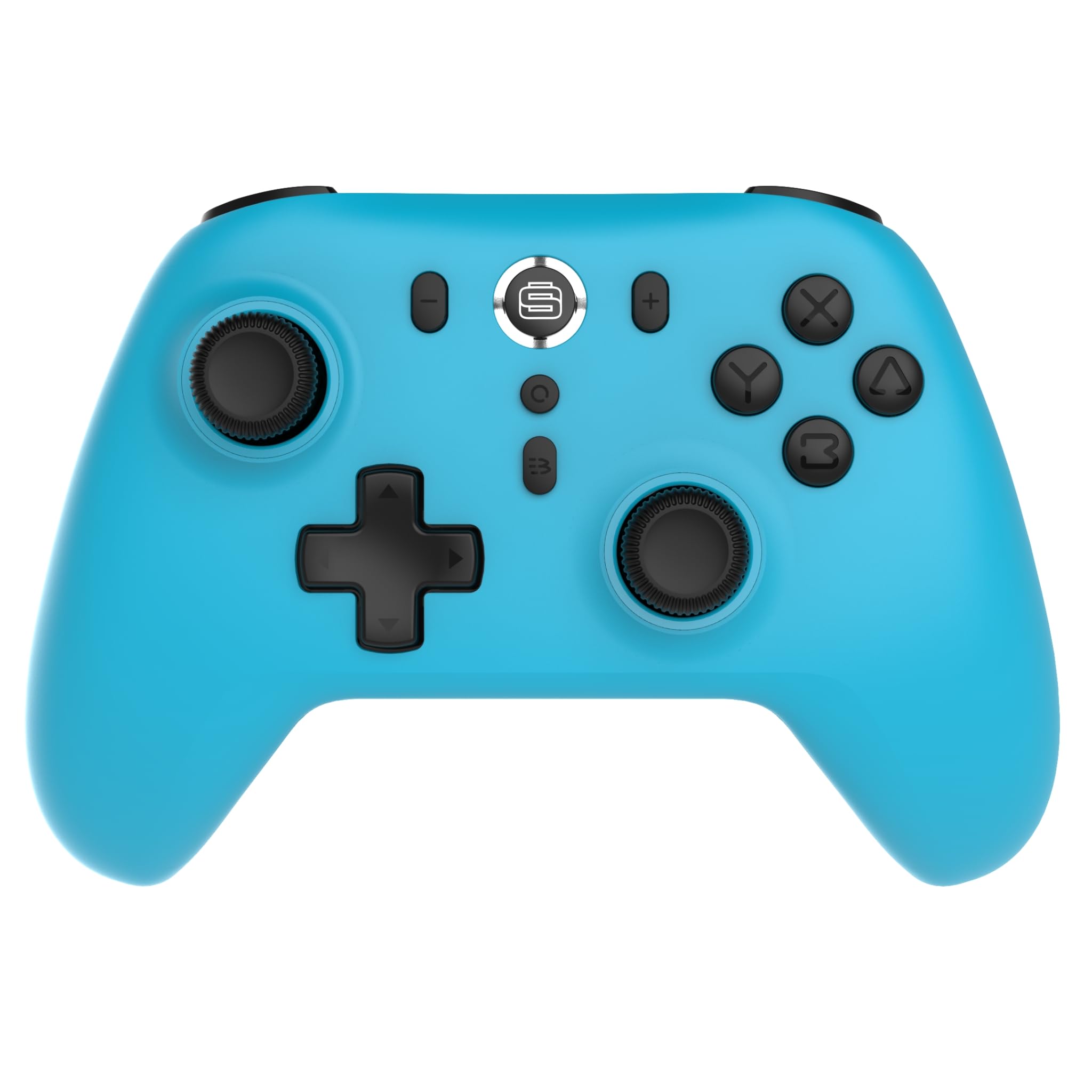
Davanti view of the Surge Wireless Pro Controller, showing the D-pad, left and right analog sticks, A/B/X/Y buttons, Home button, Capture button, Plus and Minus buttons, and the Surge logo button.

Indietro view of the Surge Wireless Pro Controller, showing the textured grips and the charging port.
4. Configurazione e associazione
The Surge Wireless Pro Controller supports multiple connection methods depending on your device.

This image displays the various platforms compatible with the Surge Wireless Pro Controller, including Nintendo Switch, Nintendo Switch 2, Windows PC, Android, and iOS.
4.1. Pairing with Nintendo Switch / Switch 2
- Dal menu HOME, seleziona Controllori > Cambia impugnatura/ordine.
- Sul controller, tieni premuto il tasto Pulsante Home for 3-5 seconds until the indicator lights begin to flash rapidly.
- Una volta effettuata l'associazione, la spia luminosa sul controller rimarrà accesa fissa.
- To wake the console from sleep mode, press the Pulsante Home sul controller.
4.2. Pairing with Windows PC
- Assicurati che il tuo PC abbia il Bluetooth abilitato.
- Vai a Bluetooth & other devices settings sul tuo PC.
- Selezionare Aggiungi Bluetooth o altro dispositivo > Bluetooth.
- Sul controller, tieni premuto il tasto Pulsante Home for 3-5 seconds until the indicator lights begin to flash rapidly.
- Select the controller from the list of available devices on your PC.
- Una volta effettuata l'associazione, la spia luminosa sul controller rimarrà accesa fissa.
4.3. Pairing with Android / iOS Devices
- Abilita il Bluetooth sul tuo dispositivo Android o iOS.
- Vai al menu delle impostazioni Bluetooth sul tuo dispositivo.
- Sul controller, tieni premuto il tasto Pulsante Home for 3-5 seconds until the indicator lights begin to flash rapidly.
- Select the controller from the list of available devices.
- Una volta effettuata l'associazione, la spia luminosa sul controller rimarrà accesa fissa.
5. Caratteristiche operative
5.1. Hall Effect Thumb Sticks & Triggers
The controller is equipped with Hall Effect technology for its thumb sticks and triggers. This technology uses magnets and electrical conductors to detect position, providing enhanced precision and significantly reducing the risk of stick drift over time compared to traditional potentiometers.

This image highlights the Hall Effect thumbsticks and triggers, emphasizing their role in providing precise inputs and preventing stick drift.
5.2. Funzione Turbo
The Turbo function allows for rapid, repeated input of a button press. This controller features 3 adjustable turbo levels.
- Per attivare Turbo: Premere e tenere premuto il tasto Pulsante turbo, then press the desired action button (A/B/X/Y, L1/R1, L2/R2, D-pad directions). The button will now rapidly repeat its input when held.
- Per regolare la velocità Turbo: With Turbo active on a button, press and hold the Pulsante turbo e spostare il Levetta analogica destra su o giù to cycle through the 3 speed levels.
- Per disattivare Turbo: Premere e tenere premuto il tasto Pulsante turbo, quindi premere nuovamente lo stesso pulsante di azione.
5.3. Feedback di vibrazione
The controller provides haptic feedback through vibration. You can choose from 4 vibration levels.
- To adjust Vibration level: Premere e tenere premuto il tasto Pulsante di vibrazione (if present, or a designated button combination, refer to specific button mapping if available) and move the Left Analog Stick Up or Down to cycle through the 4 levels (Off, Low, Medium, High).
5.4. Controlli di movimento
The controller supports motion controls for compatible games, particularly on Nintendo Switch/Switch 2. This allows for intuitive gameplay where physical movement of the controller translates into in-game actions.

This image visually represents the controller's advanced features, including Turbo Function, Motion Controls, and Rumble Vibration, enhancing the gaming experience.
6. Ricarica
The controller is equipped with a built-in 600mAh Li-polymer battery, providing up to 10 hours of gameplay on a single charge.

This image shows the controller being held, emphasizing its internal rechargeable battery for extended play sessions.
- Connect the included USB-C charging cable to the controller's USB-C port.
- Collegare l'altra estremità del cavo a una fonte di alimentazione USB (ad esempio, console, PC, adattatore USB da parete).
- The indicator lights on the controller will show charging status (e.g., blinking while charging, solid when fully charged).
- Una carica completa richiede in genere circa 2-3 ore.
7. Manutenzione
Per garantire la longevità e le prestazioni ottimali del tuo controller, segui queste linee guida per la manutenzione:
- Pulizia: Utilizzare un panno morbido e asciutto per pulire il controller. Per lo sporco ostinato, leggermente dampLavare il panno con acqua. Evitare l'uso di prodotti chimici aggressivi o detergenti abrasivi.
- Magazzinaggio: Conservare il controller in un luogo fresco e asciutto, lontano dalla luce solare diretta e da temperature estreme.
- Evitare gocce: Proteggere il controller da cadute e urti che potrebbero danneggiare i componenti interni.
- Esposizione al liquido: Non esporre il controller all'acqua o ad altri liquidi.
8. Risoluzione Dei Problemi
If you encounter issues with your Surge Wireless Pro Controller, please refer to the following common solutions:
| Problema | Soluzione |
|---|---|
| Il controller non si accende. | Assicurati che il controller sia carico. Collegalo a una fonte di alimentazione tramite il cavo USB-C. |
| Il controller non si associa. | Ensure the controller is in pairing mode (indicator lights flashing rapidly). Check that Bluetooth is enabled on your device. Try restarting both the controller and the device. |
| Ritardo di input o disconnessione. | Ensure the controller is within range of the device. Reduce interference from other wireless devices. Ensure the controller is fully charged. |
| I pulsanti o gli stick non rispondono. | Try resetting the controller (if a reset button is available, typically a small pinhole on the back). Ensure no debris is obstructing the buttons. |
| La vibrazione non funziona. | Check the vibration settings on the controller and in the game. Ensure the vibration level is not set to 'Off'. |
9. Specifiche
| Caratteristica | Dettaglio |
|---|---|
| Numero di modello | SG60095 |
| Tipo di batteria | 1 Nonstandard Battery (Li-polymer, 600mAh) |
| Durata della batteria | Fino a 10 ore (circa) |
| Porta di ricarica | USB-C |
| Dimensioni | Dimensioni: 20.5 x 14 x 6.6 cm |
| Peso | 320 grammi |
| Paese di origine | Cina |
10. Garanzia e supporto
For warranty information and customer support, please refer to the documentation included with your purchase or visit the official Surge websito. Conservare la prova d'acquisto per eventuali reclami in garanzia.