
1. Informazioni sulla sicurezza
Please read all instructions carefully before using the Trisomy SD-380GM Foldable Treadmill. Retain this manual for future reference.
- Linea elettrica: Ensure the power line is properly grounded. If you experience any issues, please seek professional assistance. Do not disassemble the unit yourself.
- Chiave di sicurezza: Always attach the safety key to your clothing before starting your workout. In case of an emergency, pulling the safety key will immediately stop the treadmill.
- Capacità di peso: Non superare il peso massimo raccomandato di 350 libbre.
- Posizionamento: Place the treadmill on a flat, stable surface. Ensure adequate clear space around the treadmill for safe operation.
- Bambini e animali domestici: Tenere i bambini e gli animali domestici lontani dal tapis roulant durante il funzionamento.
- Manutenzione: Eseguire la manutenzione regolare come descritto nel presente manuale per garantire prestazioni sicure e ottimali.
2. Cosa c'è nella scatola
Your Trisomy SD-380GM Foldable Treadmill package includes the following components:
- Trisomy SD-380GM Foldable Treadmill Unit
- Cavo di alimentazione
- Telecomando
- Chiave di sicurezza
- Manuale dell'utente (questo documento)
- Chiave a forma di L
- Lubrificante
- Portablocco
- Adesivo magnetico

Figure 2.1: All included components in the Trisomy SD-380GM package.
3. Impostazione
The Trisomy SD-380GM treadmill comes 95% pre-assembled for your convenience. Follow these steps to complete the setup:
- Disimballare il tapis roulant: Estrarre con cautela il tapis roulant e tutti gli accessori dalla confezione.
- Posizionare il tapis roulant: Posizionare il tapis roulant su una superficie piana e stabile.
- Raise the Handlebar: If using in treadmill mode, gently lift the handlebar until it locks into the upright position. Secure it by tightening the knobs on both sides.
- Collegare la chiave di sicurezza: Connect the safety key to the designated slot on the handlebar console.
- Collegare: Connect the power cord to the treadmill's power inlet (located at the front base) and then to a grounded electrical outlet.
- Accensione: Flip the main power switch (usually red, located near the power inlet) to the 'ON' position. The LED display will illuminate.

Figure 3.1: The handlebar can be folded down for under-desk use or raised for jogging/running.

Figure 3.2: Secure the handlebar by tightening the side knobs.
4. Istruzioni per l'uso
4.1 Accensione/spegnimento
- To turn on, ensure the treadmill is plugged in and the main power switch is on. The display will light up.
- To turn off, press the power button on the remote control or the main power switch.
4.2 Utilizzo del telecomando
The remote control allows you to start/stop the treadmill, adjust speed, and switch display modes.
- Avvio/Arresto: Press the play/pause button to start or stop the treadmill.
- Regolazione della velocità: Utilizzare i pulsanti '+' e '-' per aumentare o diminuire la velocità.
- Selezione della modalità: Press the 'M' button to cycle through different display metrics (Time, Speed, Distance, Calories).
Il mio profilo
The transparent LED display shows your workout metrics:
- Velocità: Velocità attuale in MPH.
- Tempo: Durata del tuo allenamento.
- Distanza: Distanza totale percorsa in miglia.
- Calorie: Calorie bruciate stimate.
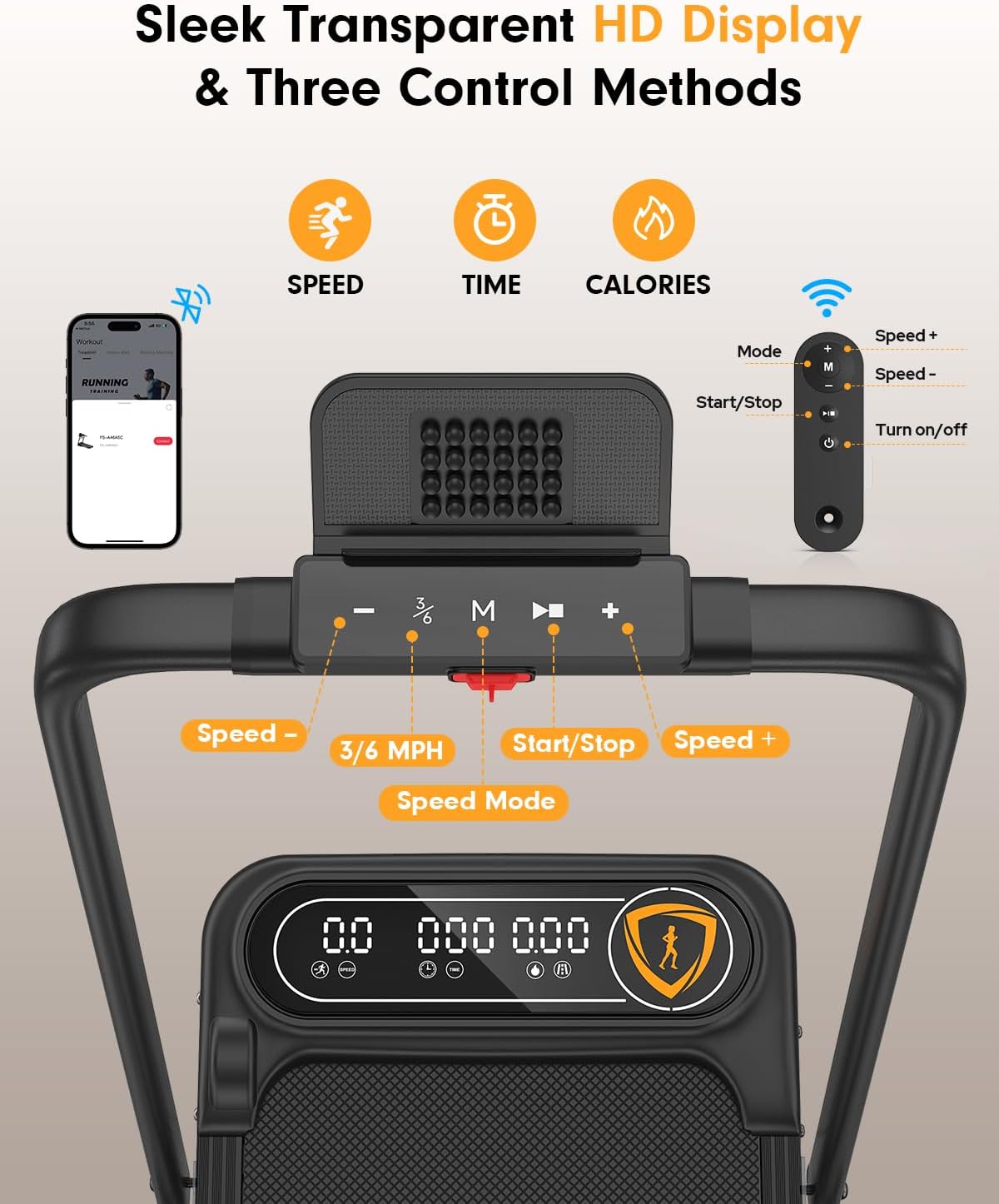
Figure 4.1: Ultra-clear transparent LED display and control buttons on the handlebar.
4.4 Operating Modes & Speed
- Modalità Walking Pad (manubrio piegato): For walking and light jogging, speeds range from 0.6 to 4 MPH. Ideal for use under a desk.
- Treadmill Mode (Handlebar Raised): For jogging, running, and incline training, speeds range from 0.6 to 6 MPH.
Figure 4.2: The treadmill supports both walking pad and traditional treadmill modes.
4.5 Regolazione manuale dell'inclinazione
The treadmill features a 10% manual incline for increased calorie burning. To adjust the incline:
- Assicurarsi che il tapis roulant sia spento e scollegato.
- Individuare i piedini regolabili nella parte posteriore del tapis roulant.
- Manually adjust the height of these feet to achieve the desired incline level.

Figure 4.3: The 10% manual incline helps burn more calories.
4.6 Controllo dell'app
Enhance your workout experience by connecting to the fitness app via Bluetooth:
- Download the official Trisomy fitness app from your device's app store.
- Abilita il Bluetooth sul tuo dispositivo e apri l'app.
- The app will automatically detect and connect to your treadmill.
- Track key metrics, customize workouts, and connect with other users.

Figure 4.4: Explore more with the dedicated fitness app for interactive workouts.
Video 4.1: Official Trisomy video demonstrating the walking pad with incline and app features.
5. Manutenzione
5.1 Lubrificazione
Regular lubrication is essential for smooth operation and extending the lifespan of your treadmill. Apply lubricant every 3-6 months depending on usage.
- Spegnere e scollegare il tapis roulant.
- Lift the running belt slightly on one side.
- Apply a small amount of the provided lubricant evenly under the center of the belt.
- Ripetere dall'altro lato.
- Collegare il tapis roulant alla presa di corrente e farlo funzionare a bassa velocità (ad esempio 1 MPH) per 5 minuti per distribuire il lubrificante.

Figure 5.1: Apply lubricant regularly for optimal performance.
5.2 Regolazione del nastro da corsa
If the running belt drifts to one side, it may need adjustment:
- Belt Drifts Right: Tighten the right screw slightly or loosen the left screw.
- Belt Drifts Left: Tighten the left screw slightly or loosen the right screw.
- Self-Centering Function: The treadmill has a self-centering function that corrects slight belt misalignment via no-load low-speed operation.

Figure 5.2: Adjusting the running belt to ensure proper alignment.
6. Conservazione
The Trisomy SD-380GM treadmill features a space-saving, foldable design and smooth-rolling wheels for easy storage.
- Fold the Handlebar: Loosen the knobs on the handlebar and gently fold it down.
- Move with Wheels: Tilt the treadmill and use the integrated wheels to roll it to your desired storage location.
- Opzioni di archiviazione: Store it under a sofa, desk, bed, or against a wall. Its ultra-compact design (folds to 4.43" tall) makes it suitable for small apartments and offices.

Figure 6.1: The treadmill's space-saving design allows for easy storage.
7. Risoluzione Dei Problemi
If you encounter any issues with your Trisomy SD-380GM treadmill, please refer to the following common solutions:
- Il tapis roulant non si avvia: Ensure the power cord is securely plugged into both the treadmill and a grounded outlet. Check that the main power switch is 'ON' and the safety key is correctly attached.
- Slittamento della cinghia: The running belt may need tension adjustment. Refer to Section 5.2 for instructions.
- Rumore insolito: Check for any loose parts or foreign objects under the belt. Ensure proper lubrication (Section 5.1).
- Display non funzionante: Verificare il collegamento all'alimentazione. Se il problema persiste, contattare l'assistenza clienti.
For further assistance, please contact Trisomy customer support.
8. Specifiche
| Caratteristica | Specificazione |
|---|---|
| Marca | Trisomy |
| Nome del modello | SD-380GM |
| Dimensioni del prodotto | 46"P x 23.4"L x 39"A |
| Materiale | Acciaio legato |
| Velocità massima | 6 miglia all'ora |
| Caratteristiche speciali | Compact Design, Foldable, Manual 10% Incline, Portable, Shock Absorbent, APP & Remote Control |
| Potenza massima | 3.5 cavalli |
| Peso massimo raccomandato | 350 libbre |
| Livello di rumore | Sotto i 40 dB |
| Superficie di corsa | 36"x15" with 6-layer anti-slip belt |
9. Garanzia e supporto
9.1 Informazioni sulla garanzia
The Trisomy SD-380GM Foldable Treadmill comes with a Garanzia di 1 anno dalla data di acquisto. La presente garanzia copre difetti di fabbricazione e malfunzionamenti in condizioni di normale utilizzo. Si prega di conservare la prova d'acquisto per eventuali reclami in garanzia.
9.2 Assistenza clienti
For any questions, technical support, or warranty claims, please contact Trisomy customer service. Our dedicated team is available to assist you promptly.
- Supporto online: Visitare il Trisomy Store on Amazon and use the 'Ask a Question' feature.
- E-mail/Telefono: Refer to the contact information provided in the physical user manual included with your product.