
1. Introduzione
This manual provides comprehensive instructions for the safe and effective use of your Cangaroo Babypone Callisto Baby Monitor. This modern baby monitor offers clear image and sound transmission, convenient two-way communication, soothing lullabies, night vision capabilities, and a room temperature sensor. The camera can be remotely controlled from the parent unit, allowing for upward, downward, left, and right adjustments. The system provides reliable monitoring, flexible camera control, and clear picture and sound quality, day and night.
2. Contenuto della confezione
Si prega di controllare attentamente il contenuto della confezione. Se qualche articolo risulta mancante o danneggiato, contattare il rivenditore.
- Parent Unit with 2.8-inch LCD display
- Unità bambino (fotocamera)
- Adattatore di alimentazione per unità genitore
- Adattatore di alimentazione per unità bambino
- USB Power Cables (2x)
- Kit di montaggio a parete (viti e tasselli)
- Manuale dell'utente (questo documento)

Immagine 2.1: Included accessories: two USB power cables, two power adapters, and a wall mounting kit.
3. Prodotto finitoview
Familiarize yourself with the components and controls of your Cangaroo Babypone Callisto Baby Monitor.
3.1 Unità Genitore

Immagine 3.1: Avvicinamento view of the Parent Unit's 2.8-inch LCD screen and control buttons.
- Display LCD da 2.8 pollici: Shows live video feed from the baby unit.
- Pulsante di accensione: Turns the parent unit on/off.
- Pulsante OK: Conferma le selezioni.
- Pulsanti di navigazione (su, giù, sinistra, destra): Navigate menus, control camera pan/tilt.
- Pulsante Menu: Accede alle impostazioni e alle funzionalità.
- Pulsante Ninna nanna: Activates/deactivates lullabies.
- Microfono: Per la comunicazione audio bidirezionale.
- Oratore: For audio output from the baby unit and lullabies.
- Porta di ricarica: Per collegare l'adattatore di alimentazione.
3.2 Unità bambino (fotocamera)

Immagine 3.2: Davanti view of the Baby Unit (camera) with its lens and sensors.
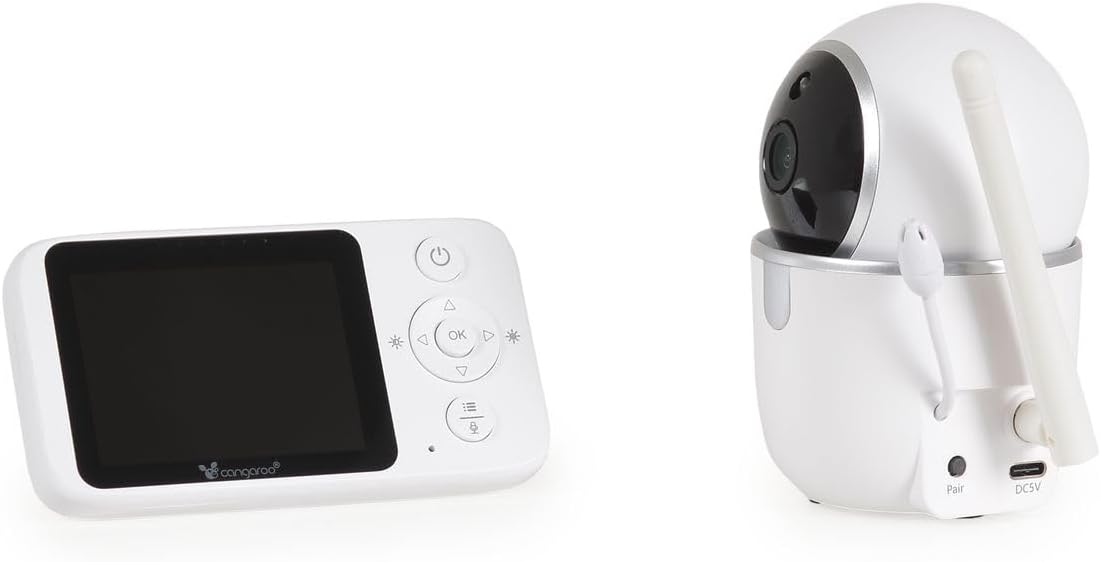
Immagine 3.3: Posteriore view of the Baby Unit, showing the 'Pair' button and DC5V power input.
- Obiettivo della fotocamera: Cattura il feed video.
- LED infrarossi: Per la funzionalità di visione notturna.
- Microfono: Rileva i suoni provenienti dalla stanza del bambino.
- Oratore: Per l'audio bidirezionale e la riproduzione di ninne nanne.
- Sensore di temperatura: Monitora la temperatura ambiente.
- Pulsante di coppia: Used to pair the baby unit with the parent unit.
- Ingresso alimentazione DC5V: Per collegare l'adattatore di alimentazione.
- Antenna: Per la trasmissione del segnale wireless.
4. Impostazione
4.1 Accensione delle unità
- Connect the power adapter to the Baby Unit's DC5V input and plug it into a power outlet. The baby unit will power on automatically.
- Connect the power adapter to the Parent Unit's charging port and plug it into a power outlet. Press and hold the Power Button on the Parent Unit to turn it on.
- Allow both units a few moments to establish a connection. The parent unit display will show the live video feed once connected.
4.2 Posizionamento dell'unità bambino (telecamera)
Posizionare l'unità bambino in un luogo che fornisca una vista libera view of your baby's crib or sleeping area. Ensure it is at least 1 meter (3 feet) away from the baby to prevent any potential cord hazards. The camera can be placed on a flat surface or mounted to a wall using the included wall mounting kit.
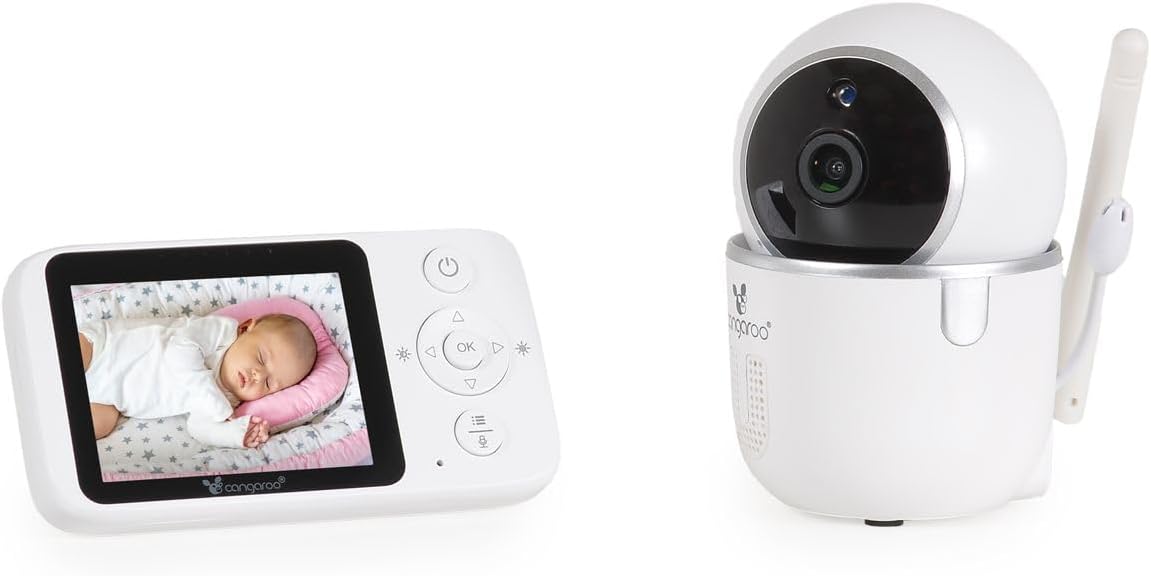
Immagine 4.1: The Parent Unit displaying a baby, alongside the Baby Unit (camera).
- Posizionamento ottimale: Position the camera to capture the entire crib area.
- Sicurezza del cavo: Keep all cords out of reach of children.
- Gamma del segnale: The monitor has a radio range of up to 250m outdoors and up to 50m indoors. Obstacles like walls and furniture can reduce this range.
4.3 Abbinamento (se necessario)
The units are typically pre-paired. If they do not connect automatically, follow these steps:
- Ensure both the Parent Unit and Baby Unit are powered on.
- On the Parent Unit, press the Menu button to access the menu.
- Navigate to the "Pairing" option using the navigation buttons and press OK.
- Within 10 seconds, press the "Pair" button located on the back of the Baby Unit.
- The Parent Unit will display a confirmation message once pairing is successful.
5. Istruzioni per l'uso
5.1 Monitoraggio di base
- Once powered on and paired, the Parent Unit will automatically display the live video feed and audio from the Baby Unit.
- The screen will show the current room temperature detected by the Baby Unit's sensor.
- Visione notturna: The Baby Unit automatically activates infrared night vision in low-light conditions, providing clear images up to 5 meters.
5.2 Comunicazione audio bidirezionale
To speak to your baby through the Baby Unit's speaker:
- Press and hold the Talk button (often represented by a microphone icon) on the Parent Unit.
- Parlare chiaramente nel microfono dell'unità genitore.
- Release the Talk button to hear your baby again.
5.3 Remote Camera Control (Pan/Tilt)
You can remotely adjust the camera's viewing angle from the Parent Unit:
- Use the Up/Down/Left/Right navigation buttons on the Parent Unit to pan (left/right) and tilt (up/down) the Baby Unit's camera. The camera supports 360° rotation.
5.4 ninne nanne
To play lullabies to your baby:
- Press the Lullaby button on the Parent Unit.
- Use the navigation buttons to select one of the 5 built-in lullabies.
- Press OK to start playback. Press the Lullaby button again to stop.
5.5 Alarm Function and Settings
The monitor includes an alarm function and adjustable settings:
- Regolazione del volume: Use the Parent Unit's menu to adjust the alarm volume.
- Regolazione della luminosità: Adjust the display brightness via the Parent Unit's menu.
- Modalità risparmio energetico: Activate this mode in the menu to conserve battery life. The screen may turn off after a period of inactivity, but audio monitoring continues. The screen will reactivate upon detecting sound or pressing a button.
6. Manutenzione
- Pulizia: Pulire le unità con un panno asciutto e morbido. Non utilizzare detergenti abrasivi o solventi.
- Cura della batteria (unità genitore): The Parent Unit has a built-in rechargeable ion battery. For optimal battery life, avoid fully discharging the battery frequently. Recharge when the low battery indicator appears.
- Magazzinaggio: If storing the unit for an extended period, ensure the battery is partially charged and store in a cool, dry place.
- Condizioni ambientali: Avoid exposing the units to extreme temperatures, direct sunlight, dust, or moisture.
7. Risoluzione Dei Problemi
| Problema | Possibile causa | Soluzione |
|---|---|---|
| Nessuna immagine/audio sull'unità genitore. | Le unità non sono accese o non sono associate. Fuori portata. | Ensure both units are plugged in and powered on. Re-pair the units if necessary (see Section 4.3). Move Parent Unit closer to Baby Unit. |
| Poor picture/sound quality. | Interference from other devices. Units are too far apart or obstacles are blocking the signal. | Move the units away from other electronic devices (e.g., Wi-Fi routers, microwaves). Reduce the distance between units. |
| La batteria dell'unità genitore si scarica rapidamente. | Energy Saving Mode is off. Frequent use of features. | Activate Energy Saving Mode in the menu. Reduce screen brightness. Ensure the battery is fully charged before use. |
| La fotocamera non risponde al telecomando. | Units are out of range or connection issue. | Move Parent Unit closer to Baby Unit. Check connection status. |
| La lettura della temperatura sembra imprecisa. | Baby Unit placed near a heat source or draft. | Relocate the Baby Unit to a more central location in the room, away from windows, vents, or direct sunlight. |
8. Specifiche
- Modello: Cangaroo Babypone Callisto (Model Number: 112301)
- Parent Unit Display: LCD da 2.8 pollici
- Tecnologia wireless: FHSS digitale a 2.4 GHz
- Portata interna: Fino a 50 metri (circa 164 piedi)
- Gamma all'aperto: Fino a 250 metri (circa 820 piedi)
- Visione notturna: Infrarossi, fino a 5 metri
- Caratteristiche della fotocamera: Pan/Tilt (360° rotation), Two-Way Audio, Temperature Sensor, Lullabies (5 built-in)
- Alimentazione elettrica: DC 5V (via included adapters)
- Batteria dell'unità genitore: Batteria agli ioni di litio ricaricabile integrata
- Materiale: Plastica
- Parent Unit Dimensions: L 11 x W 3 x H 6 cm
- Baby Unit Dimensions: L 6 x W 8 x H 10.5 cm
- Peso dell'articolo: 400 g (total product)
9. Garanzia e supporto
Per informazioni sulla garanzia e sull'assistenza clienti, consultare la documentazione fornita con l'acquisto o contattare il rivenditore. Conservare la prova d'acquisto per eventuali reclami in garanzia.