
Introduzione
The NEWFAST B912 Outdoor WiFi Bridge is designed to provide reliable, long-range wireless network connectivity for various outdoor environments. This device extends your network up to 3 kilometers (1.9 miles) using 5.8 GHz high-speed transmission, making it suitable for connecting buildings, barns, shops, farms, garages, warehouses, Starlink installations, or remote security cameras. This manual will guide you through the installation, configuration, and maintenance of your B912 WiFi Bridge system.

Image: Two NEWFAST B912 outdoor WiFi bridges are shown mounted on poles, illustrating their intended outdoor placement and the long-range wireless connection they establish over a landscape.
Contenuto della confezione
- 2 x NEWFAST B912 Outdoor WiFi Bridges
- 2 x 48V POE Power Adapters
- 4 x fascette
- 1 x Guida di installazione rapida
1. Configurazione e installazione
1.1 Installazione fisica
The NEWFAST B912 devices are designed for outdoor use and can be mounted on a pole or wall. Ensure a clear line of sight between the two units for optimal performance.

Image: This diagram demonstrates the physical installation process, showing how to secure the NEWFAST B912 unit to a pole using cable ties. It also depicts wall mounting options, emphasizing ease of installation.
Montaggio: Use the provided cable ties to securely attach the WiFi bridge to a pole. For wall mounting, additional brackets (not included) may be required.

Image: A network diagram illustrating a typical Point-to-Point (PtP) setup. One CPE (Master) connects to a router via a PoE adapter, and the other CPE (Slave) connects to a computer or switch, also powered by a PoE adapter, extending the internet connection wirelessly.
1.2 Powering On and Automatic Pairing
The devices are powered using the included 48V Power over Ethernet (PoE) adapters. Connect an Ethernet cable from the PoE adapter's LAN port to your router/switch, and another Ethernet cable from the PoE adapter's PoE port to the B912 unit's WAN/PoE port.
The B912 units feature automatic pairing. To assign roles:
- Identify the rotary switch on each device.
- Set one unit to "AP" (Access Point) mode. This unit will act as the transmitter, connecting to your main network.
- Set the other unit to "STA" (Station) mode. This unit will act as the receiver, extending the network to your remote location.
- Once powered on, the devices will automatically pair within minutes.

Immagine: Un dettaglio view of the NEWFAST B912's underside, highlighting the WAN and LAN Ethernet ports, the reset button, and the rotary switch used to select between STA (receiver) and AP (transmitter) modes for automatic pairing.
1.3 Signal Strength Indicator
The device features a 4-bar LED signal strength indicator to assist with alignment and ensure optimal signal reception. Adjust the direction and angle of the units based on these indicators for the best connection.
- 4 barrette: Very Strong Signal
- 3 barrette: Forte segnale
- 2 barrette: Segnale medio
- 1 barretta: Segnale debole

Image: This graphic illustrates the LED indicators on the side of the NEWFAST B912, detailing what each light signifies: signal strength (4 bars), WiFi status, WAN activity, and power status. This helps users optimize device placement.
2. Modalità operative
The NEWFAST B912 supports multiple operating modes to suit various network extension needs:
- Modalità Bridge Punto-Punto (PtP): Connects two locations wirelessly, ideal for extending a network from one building to another.
- Point-to-MultiPoint (PtMP) Bridge Mode: One AP unit can connect to multiple STA units, allowing network extension to several remote locations.
- Modalità AP (punto di accesso): Functions as a wireless access point, broadcasting a WiFi signal.
- Modalità ripetitore: Estende la portata di una rete WiFi esistente.
- Modalità router: Functions as a basic router, providing network address translation (NAT) and DHCP services.
2.1 High-Speed 5.8 GHz Connectivity
The B912 operates on the 5.8 GHz band, offering speeds up to 300 Mbps. This frequency band provides superior interference resistance compared to 2.4 GHz, ensuring stable and efficient data transmission, particularly beneficial for video surveillance and IoT deployments.

Image: This diagram illustrates a Master bridge unit providing connectivity to a main building, while a Slave bridge unit extends the network to a remote surveillance camera, demonstrating smooth video streaming capabilities.
2.2 Funzionalità di sicurezza della rete
To enhance network security, the B912 supports SSID masking. This feature prevents unauthorized wireless devices from detecting your network's SSID, thereby protecting your network data.

Image: This graphic highlights the robust security features of the NEWFAST B912, including anti-hijacking, anti-piracy, anti-Trojan, and encryption, all designed to protect the user's network and data.
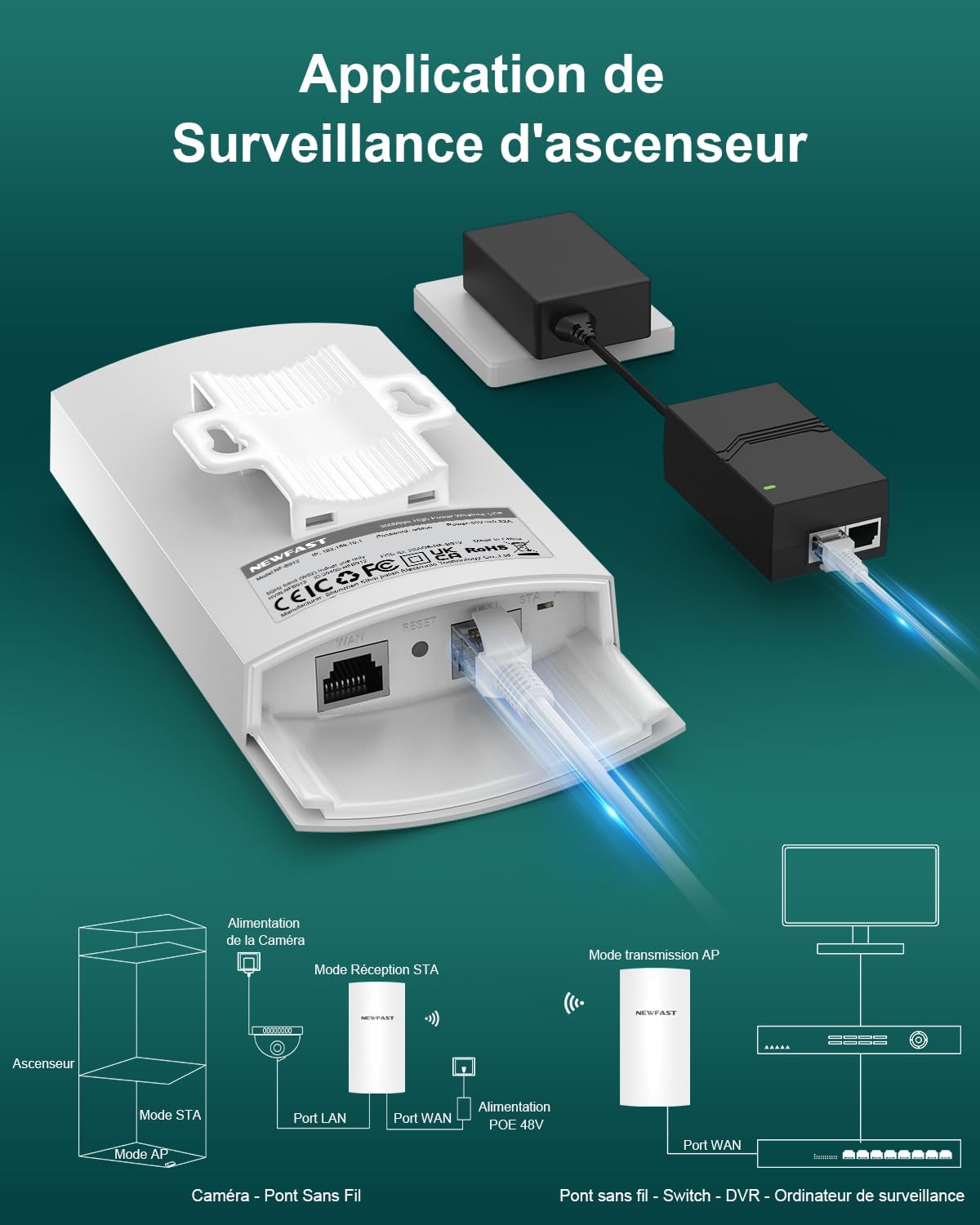
Image: A diagram illustrating the application of the NEWFAST B912 for surveillance systems, showing how one unit in STA mode connects to a camera and another in AP mode transmits the signal to a monitoring station.
3. Manutenzione
The NEWFAST B912 is built for durability in outdoor conditions. Its IP65-rated casing provides exceptional resistance to dust and water, and it includes lightning protection. Regular maintenance is minimal:
- Pulizia: Periodically wipe the exterior of the units with a soft, damp panno per rimuovere polvere e detriti. Non utilizzare prodotti chimici aggressivi.
- Ispezione: Annually inspect the mounting hardware and cable connections to ensure they remain secure and free from damage.
- Aggiornamenti del firmware: Controllare il produttore websito per eventuali aggiornamenti firmware disponibili per garantire prestazioni e sicurezza ottimali.

Image: A collage demonstrating the all-weather durability of the NEWFAST B912, showcasing its resistance to lightning, sun, rain (waterproof), dust, and freezing temperatures, making it suitable for diverse outdoor environments.
4. Risoluzione Dei Problemi
If you encounter issues with your NEWFAST B912 WiFi Bridge, refer to the following common troubleshooting steps:
- Nessuna connessione/Segnale debole:
- Assicurarsi che entrambe le unità siano accese e che gli adattatori PoE funzionino correttamente.
- Verify a clear line of sight between the AP and STA units. Obstructions like trees or buildings can degrade signal quality.
- Check the LED signal strength indicators (refer to Section 1.3) and adjust the alignment of the units for optimal signal.
- Confirm that the AP and STA modes are correctly set on each device.
- Bassa velocità:
- Check for potential interference from other 5 GHz devices in the area.
- Ensure the units are aligned properly, as indicated by the signal strength LEDs.
- Verify that your internet source (router) is providing adequate speed.
- Impossibile accedere Web Interfaccia:
- Ensure your computer is directly connected to the LAN port of the PoE adapter (for the unit you are trying to configure) or is on the same network segment.
- Verify the IP address of the B912 and your computer's IP settings. Refer to the Quick Installation Guide for default IP addresses.
- Il dispositivo non si accende:
- Check the power outlet and the PoE adapter connections.
- Ensure the Ethernet cable from the PoE adapter to the B912 is securely connected to the PoE port.
5. Specifiche tecniche
| Caratteristica | Dettaglio |
|---|---|
| Marca | NUOVO VELOCE |
| Nome del modello | Codice NF-B912 |
| Colore | Bianco |
| Tecnologia di connettività | Ethernet, Wi-Fi |
| Standard di comunicazione wireless | 802.11a |
| Classe di banda di frequenza | Banda singola (5.8 GHz) |
| Caratteristiche speciali | Access Point Mode, Internet Security, LED Indicator, IP65 Waterproof |
| Uso consigliato | All'aperto |
| Dispositivi compatibili | WiFi Devices, Surveillance Camera, Personal Computer, Smartphone, Smart TV |
| Alimentazione elettrica | 48V POE Adapter |
| Gamma di trasmissione | Fino a 3 KM (1.9 miglia) |
| Velocità massima | 300 Mbps (5.8 GHz) |
6. Informazioni sulla garanzia
The NEWFAST B912 Outdoor WiFi Bridge comes with a manufacturer's warranty of 1 year. Please retain your proof of purchase for warranty claims. For detailed terms and conditions, refer to the warranty card included in your package or visit the official NEWFAST websito.
7. Assistenza clienti
Per assistenza tecnica, risoluzione dei problemi o ulteriori richieste, fare riferimento alle seguenti risorse:
- Risorse online: Visit the official NEWFAST websito per FAQ, manuali aggiornati e forum di supporto.
- Contatta l'assistenza: If you require direct assistance, please contact NEWFAST customer service through the contact information provided on the official websito o sulla tua piattaforma di acquisto.