
1. Introduzione
The HTVRONT A300 Auto Hat Heat Press Machine is designed for efficient and precise heat transfers onto various hat types. This automatic press simplifies the heat transfer process, making it suitable for both beginners and experienced crafters. This manual provides detailed instructions for safe and effective operation, maintenance, and troubleshooting.
2. Informazioni sulla sicurezza
- Caution: Hot Surface. Avoid Contact. The heat plate reaches high temperatures during operation. Always use the provided heat-resistant gloves when handling the machine or materials during and immediately after use.
- Assicurarsi che la macchina sia posizionata su una superficie stabile e resistente al calore.
- Tenere lontano dalla portata dei bambini e degli animali domestici.
- Non utilizzare la macchina con le mani bagnate o in prossimità di acqua.
- Unplug the machine when not in use or before cleaning and maintenance.
- Non tentare di smontare o riparare la macchina da soli. Contattare l'assistenza clienti per ricevere assistenza.
3. Contenuto della confezione
Verificare che tutti gli articoli siano presenti nel pacco:
- HTVRONT A300 Auto Hat Heat Press Machine (x1)
- Large Hat Platen (Pre-Installed) (x1)
- Small Hat Platen (x1)
- Cavo di alimentazione (x1)
- Heat-Resistant Gloves (x1 pair)
- User Guide Envelope (x1)

4. Caratteristiche del prodotto
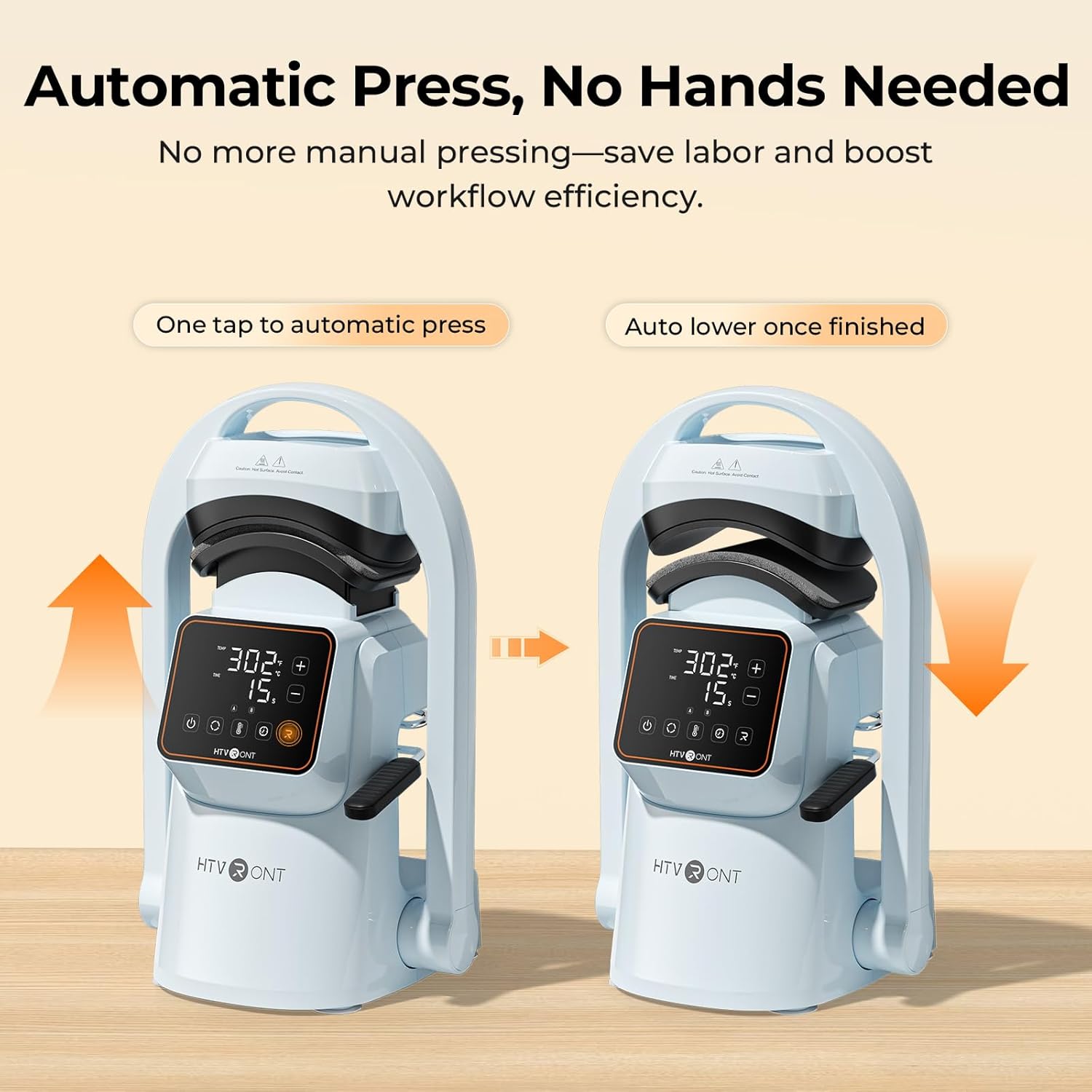
- One-Touch Automatic Press: The machine automatically lowers and lifts, applying consistent pressure and timing with a single touch, reducing manual effort.
- Forte pressione: Delivers over 176 lb (80 kg) of pressure, suitable for various transfer materials including Hotfix rhinestones, embroidered patches, DTF transfer film, puff heat transfer vinyl, and sublimation paper.
- Dual Hat Platens: Includes two quick-swap platens for adult and children's hat sizes, ensuring even pressure and alignment for different cap styles.
- Modalità preimpostate intelligenti: Features two customizable preset modes for saving preferred temperature and time settings, simplifying batch production.
- Precise Temperature & Time Control: Intuitive touchscreen allows precise adjustment of temperature (104–410°F / 40–210°C) and time (1–999 seconds).
- Distribuzione uniforme del calore: Cast-aluminum heat plate heats rapidly and distributes heat uniformly, preventing cold spots. The PTFE coating helps prevent sticking.
- Design compatto e leggero: Facile da riporre e trasportare.
- Ventose potenti: Ensures stability on your workspace during operation.
- Spegnimento automatico: Automatically powers off after 15 minutes of inactivity for safety.


5. Impostazione
- Disimballaggio: Rimuovere con cautela tutti i componenti dall'imballaggio. Conservare l'imballaggio per un eventuale stoccaggio o trasporto futuro.
- Posizionamento: Place the HTVRONT A300 on a flat, stable, and heat-resistant surface. The integrated suction cups on the base will help secure the machine.
- Collegamento elettrico: Connect the power cord to the machine and then to a standard electrical outlet.
- Installazione del rullo: The large hat platen is typically pre-installed. To swap platens, simply remove the current platen by unscrewing it and snap the desired platen into place. Ensure it is securely fastened.

6. Istruzioni per l'uso
- Accensione: Press the power button on the touchscreen display to turn on the machine.
- Imposta temperatura e ora: Use the intuitive touchscreen to adjust the temperature and time settings according to your transfer material's requirements. You can also select one of the two preset modes (A or B) for quick setup.
- Prepare the Hat: Pull back the handle to open the press. Place your hat onto the platen, ensuring it is centered and smooth. Use the hat stretcher (if applicable) to flatten the hat surface for optimal pressing.
- Position Transfer Material: Carefully place your DTF film, embroidery patch, sublimation paper, or other transfer material onto the desired area of the hat.
- Inizia la stampa: Push the handle forward to engage the lower platen. Press the 'Go' button (often indicated by 'R' or a play icon) on the touchscreen. The machine will automatically lower the heat plate, apply pressure, and begin the countdown.
- Completamento: Once the timer finishes, the machine will beep, and the heat plate will automatically lift.
- Togli il cappello: Pull back the handle to fully open the press. Carefully remove the hat using the heat-resistant gloves. Allow the transfer to cool before peeling (if required by your material).


Quick Reference Chart for Heat Transfer Settings
| Materiali | Tessile | Temporaneo | Tempo | Nota |
|---|---|---|---|---|
| Vinile termoadesivo puro | 100% Cotton, Polycotton, Polyester, etc. | 145°C/293°F | Anni 15 | Peeling a freddo |
| Giltter Heat Transfer Vinyl | 100% Cotton, Polycotton, Polyester, etc. | 150°C/302°F | Anni 15 | Peeling a freddo |
| Vinile olografico per trasferimento termico | 100% Cotton, Polycotton, Polyester, etc. | 150°C/302°F | Anni 15 | Peeling a freddo |
| Vinile termoadesivo camaleonte | 100% Cotton, Polycotton, Polyester, etc. | 145°C/293°F | Anni 15 | Peeling a freddo |
| Vinile metallizzato per trasferimento termico | 100% Cotton, Polycotton, Polyester, etc. | 140°C/284°F | Anni 10 | Peeling a freddo |
| Vinile termotrasferibile stampabile | 100% Cotton, Polycotton, Polyester, etc. | 145°C/293°F | Anni 15 | Peeling a freddo |
| Vinile riflettente per trasferimento termico | 100% Cotton, Polycotton, Polyester, etc. | 150°C/302°F | Anni 15 | Peeling a freddo |
| Flock Heat Transfer Vinyl | 100% Cotton, Polycotton, Polyester, etc. | 150°C/302°F | Anni 15 | Peeling a freddo |
| Vinile termoadesivo Puff | 100% Cotton, Polycotton, Polyester, etc. | 155°C/311°F | Anni 15 | Peeling caldo |
| Carta termoadesiva per tessuti scuri | 100% Cotton, Polycotton, Polyester, etc. | 160°C/320°F | Anni 20 | Peeling a freddo |
| Carta termoadesiva per tessuti leggeri | 160°C/320°F | Anni 20 | Peeling a freddo | |
| carta di sublimazione | Polycotton, 100% Polyester, etc. | 200°C/392°F | Anni 40 | Peeling caldo |
| Pellicola di trasferimento DTF | 100% Cotton, Polycotton, Polyester, etc. | 150°C/302°F | Anni 15 | Peeling a freddo |
| Embroidered Patches | 100% Cotton, Polycotton, Polyester, etc. | 170°C/338°F | Anni 20 | Peeling a freddo |
| Hotfix Rhinestones | 100% Cotton, Polycotton, Polyester, etc. | 175°C/347°F | Anni 20 |
7. Manutenzione
- Pulizia della piastra riscaldante: After the machine has cooled completely, wipe the PTFE-coated heat plate with a soft, damp panno per rimuovere eventuali residui. Non utilizzare detergenti abrasivi o oggetti appuntiti che potrebbero danneggiare il rivestimento.
- Pulizia generale: Pulire l'esterno della macchina con un panno asciutto o leggermente asciutto.amp stoffa.
- Magazzinaggio: Conservare la macchina in un ambiente asciutto e privo di polvere quando non viene utilizzata.
8. Risoluzione Dei Problemi
If you encounter issues with your HTVRONT A300, refer to the following common problems and solutions:
- La macchina non si accende: Ensure the power cord is securely plugged into both the machine and a working electrical outlet. Check if the outlet has power.
- Uneven Heat Transfer: Verify that the hat is placed smoothly on the platen and that the transfer material is flat. Ensure the correct temperature and time settings are used for your specific material.
- Transfer Material Not Sticking: Double-check the recommended temperature, time, and pressure settings for your material. Ensure the material is compatible with heat pressing.
- Machine Not Pressing Automatically: Ensure the handle is fully engaged and the 'Go' button has been pressed.
For further assistance, please contact HTVRONT customer support.
9. Specifiche
| Caratteristica | Dettaglio |
|---|---|
| Marca | HT-VRONTE |
| Modello | A300 |
| Materiale | Alluminio |
| Colore | Blu |
| Dimensioni del prodotto (L x P x A) | 17.72" x 12.4" x 11.22" |
| Dimensioni piastra riscaldante | 5.70" x 3.68" x 2.28" (14.52 x 9.36 x 5.80 cm) |
| Hat Platen Sizes | Small: 6.69" x 2.76" (7 x 17 cm) / Large: 5.9" x 3.15" (8 x 15 cm) |
| Energia | 350 L |
| Intervallo di temperatura | 40–210 °C / 104–410 °F |
| Intervallo di tempo | 1–999 secondi |
| Pressione massima | ≥ 176 lb (80 kg) |
10. Garanzia e supporto
The HTVRONT A300 Auto Hat Heat Press Machine comes with a Garanzia di 1 anno dalla data di acquisto. La presente garanzia copre difetti di fabbricazione e malfunzionamenti in condizioni di normale utilizzo.
For warranty claims, technical support, or any questions regarding the product, please contact HTVRONT customer service through their official webo il rivenditore presso cui è stato acquistato il prodotto. Si prega di tenere a portata di mano la prova d'acquisto e il numero di modello del prodotto quando si contatta l'assistenza.