
Introduzione
This manual provides comprehensive instructions for the installation, operation, and maintenance of your AINAVI 6.36-Inch Single Din Touchscreen Car Stereo, Model 6.36-SD-02. This unit is designed to enhance your driving experience with features such as Wired/Wireless CarPlay and Android Auto, 1080P HD display, GPS navigation, hands-free calling, steering wheel control (SWC), FM radio, and Bluetooth connectivity. Please read this manual thoroughly before use to ensure proper functionality and safety.
Cosa c'è nella scatola
Dopo aver aperto la confezione, verificare che siano presenti tutti i seguenti componenti:
- 6.36-Inch Single Din Touchscreen Car Stereo (960*360) x1
- Microfono esterno x1
- Antenna radio x1
- Cavo di alimentazione x1
- Snap Bracket x4
- Manuale utente x1
Descrizione del video: Questo video fornisce un overview of the AINAVI 6.36-inch car radio, including its unboxing and a detailed look at the included components and the unit itself.

Descrizione dell'immagine: An image displaying the various components included with the AINAVI 6.36-inch car stereo, such as the main unit, wiring harnesses, GPS antenna, and mounting brackets.
Prodotto finitoview
The AINAVI 6.36-Inch Single Din Touchscreen Car Stereo features a sleek design with essential ports and controls for easy access and operation.

Descrizione dell'immagine: Un fronte view of the AINAVI 6.36-inch Single Din Touchscreen Car Stereo, highlighting its compact size and touchscreen display.

Descrizione dell'immagine: Un primo piano view of the AINAVI car stereo's left side, showing the USB and Type-C ports for data transfer and charging, along with auxiliary input and microphone port.
Guida all'installazione
Proper installation is crucial for the optimal performance of your car stereo. It is recommended to seek professional assistance if you are unsure about any steps.
Installazione generale
The AINAVI 6.36-inch car stereo is designed for standard single DIN slots. Follow these general steps for installation:
- Separate the short sleeve from the radio body.
- Insert the short sleeve into the car's radio mounting window.
- Press the iron piece on the short sleeve with mounting tools to fasten the iron piece to the car.
- Push the radio body into the short sleeve and let the radio snap into the short sleeve.

Descrizione dell'immagine: A visual guide illustrating the four steps for installing the single DIN touchscreen car stereo into a vehicle's dashboard.
Schema elettrico
Refer to the detailed wiring diagram below for connecting the power, speaker, and other auxiliary cables.

Descrizione dell'immagine: A comprehensive wiring diagram showing connections for Plug A (speakers), Plug B (power, SWC, antenna), and Plug C (RCA outputs, video input, external microphone) for the single DIN radio.
Installazione della telecamera di backup
The unit supports CVBS backup camera input. Follow the instructions below based on your vehicle type.
Per i pick-up:
Descrizione del video: This video demonstrates the installation process for an aftermarket backup camera in a pickup truck, covering cable routing and connections to the reverse light and car stereo.

Descrizione dell'immagine: A diagram illustrating the wiring connections for a backup camera to the single DIN radio, showing how to connect to the reverse light and the main unit.
Per berline e SUV:
Descrizione del video: This video details the installation of an aftermarket backup camera for sedans and SUVs, including routing the cable through the vehicle's interior and making the necessary electrical connections.
Istruzioni per l'uso
Familiarize yourself with the various functions and controls of your AINAVI car stereo.
CarPlay e Android Auto
This unit is compatible with Wireless CarPlay and Android Auto. Connect your smartphone to access navigation, phone contacts, notifications, music, and more. Use Siri/Google Assistant for voice control to focus on the road.
Descrizione del video: A demonstration of the CarPlay functionality on the AINAVI single DIN touchscreen car stereo, showing music playback and navigation features.

Descrizione dell'immagine: A split image showing the Apple CarPlay interface on the left and the Android Auto interface on the right, both displayed on the AINAVI car stereo screen.

Descrizione dell'immagine: The AINAVI car stereo screen displaying a navigation map with voice control prompts for Siri and Google Assistant, indicating smart voice control capabilities.
Funzioni di base
The 6.36-inch HD capacitive touchscreen supports 1080P video playback and offers a responsive viewesperienza di acquisizione.
- Riproduzione musicale: Enjoy your favorite music through various sources.
- Riproduzione video: Supports 1080P video playback for entertainment.
- FM Radio: Tune into FM stations for news and music.
- Telefonata: Make and receive calls hands-free via Bluetooth.
- Controllo del volante (SWC): Easily control music and calls using your existing steering wheel controls.
- Bluetooth: Enhanced listening experience and hands-free calling.
- USB & Type-C: Connect devices for media playback and data transfer.
Descrizione dell'immagine: A collage of four images demonstrating the AINAVI car stereo's core functions: music playback, video playback, FM radio interface, and hands-free phone call screen.

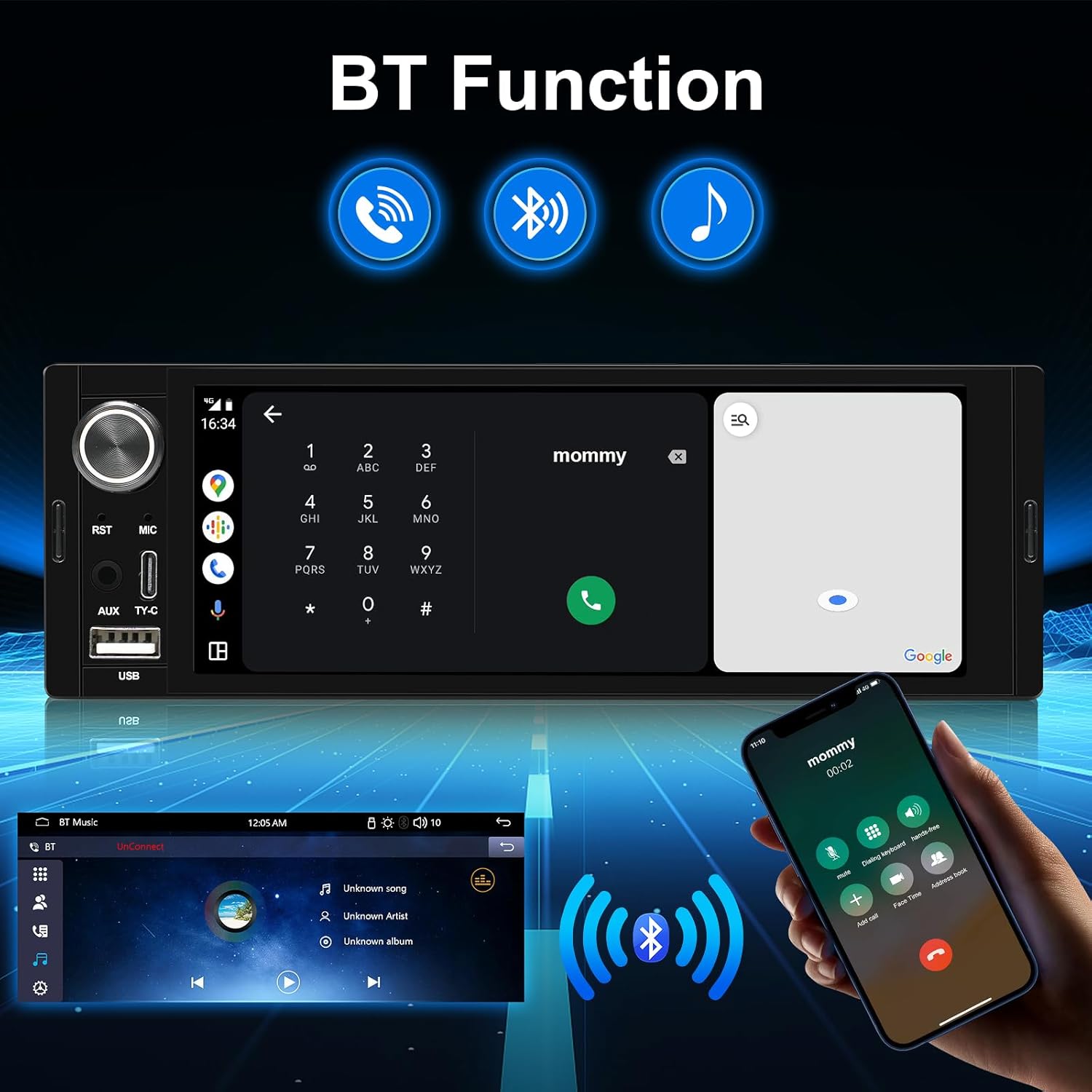
Descrizione dell'immagine: The AINAVI car stereo displaying its Bluetooth functionality, including a phone dialer and music playback interface, with a smartphone connecting via Bluetooth.

Descrizione dell'immagine: The AINAVI car stereo screen showing the steering wheel control learning interface, with various button functions like power, mute, volume, and navigation highlighted.
Impostazioni audio
Adjust the sound balance according to your seating position. Choose from six sound modes: User, Jazz, Classic, Rock, Pop, and Soft, to customize your audio experience.
Risoluzione dei problemi
If you encounter any issues with your AINAVI 6.36-Inch Single Din Touchscreen Car Stereo, please refer to the troubleshooting section in the full user manual for detailed solutions. Common issues may include connectivity problems, audio output, or display malfunctions. Ensure all connections are secure and refer to the wiring diagram if necessary. For persistent problems, contact customer support.
Specifiche
| Caratteristica | Dettaglio |
|---|---|
| Marca | AINAVI |
| Numero di modello | 6.36-SD-02 |
| Tecnologia di connettività | Bluetooth, USB, Wired, Wireless |
| Tipo di controllore | Sistema Linux |
| Caratteristiche speciali | Android Auto, Apple CarPlay, Bluetooth Music/Phone, FM, Video Playback, Touch Screen 960*360 Resolution, SWC, AV-IN |
| Dispositivi compatibili | Microphone, Smartphone |
| Tipo di connettore | USB tipo A, USB tipo C |
| Modalità di uscita audio | Stereo surround |
| Codifica video | MP4 |
| Peso dell'articolo | 200 grammi |
| Metodo di controllo | Tocco |
Garanzia e supporto
Your AINAVI 6.36-Inch Single Din Touchscreen Car Stereo comes with a Garanzia del produttore di 12 mesi. For any pre-sale or after-sale services, including installation technical support, please contact our professional technical support team.
Puoi contattarci tramite:
- Your order center on Amazon.
- Hotline: +1 (833) 858-5016 (Working hours: 01:00 PM to 00:00 AM PST).
- Email: info@ainavi.com

Descrizione dell'immagine: A customer support representative wearing a headset, with text overlay providing contact details for assistance: order center, hotline number, and email address.