
CINMOORE CM-C2LU
Manuale utente della telecamera fittizia CINMOORE
Model: CM-C2LU
Marca: CINMOORE
1. Introduzione
Thank you for choosing the CINMOORE Dummy Camera. This indoor security camera is designed to provide reliable surveillance and peace of mind for your home or office. Featuring advanced AI detection, two-way audio, and clear night vision, it offers comprehensive monitoring capabilities. This manual will guide you through the setup, operation, and maintenance of your device.

Immagine: Frontale view of the CINMOORE Dummy Camera, a white, spherical camera with a dark lens and a blue indicator light, featuring the CINMOORE logo at its base.
2. Cosa è incluso
Si prega di controllare il contenuto della confezione per assicurarsi che siano presenti tutti gli articoli:
- Telecamera di sicurezza CINMOORE × 1
- Base della staffa di montaggio × 1
- Adattatore di alimentazione × 1
- Cavo dati × 1
- Tasselli a vite × 1
- Manuale dell'utente × 1
3. Impostazione
The CINMOORE Dummy Camera offers flexible installation options for various indoor environments.
3.1 Opzioni di montaggio
The camera can be installed using the following methods:
- Montaggio a soffitto: Ideal for wide-angle coverage from above.
- Montaggio da tavolo: Simple placement on any flat surface.
- Wall Mount: Secure installation on a vertical surface.
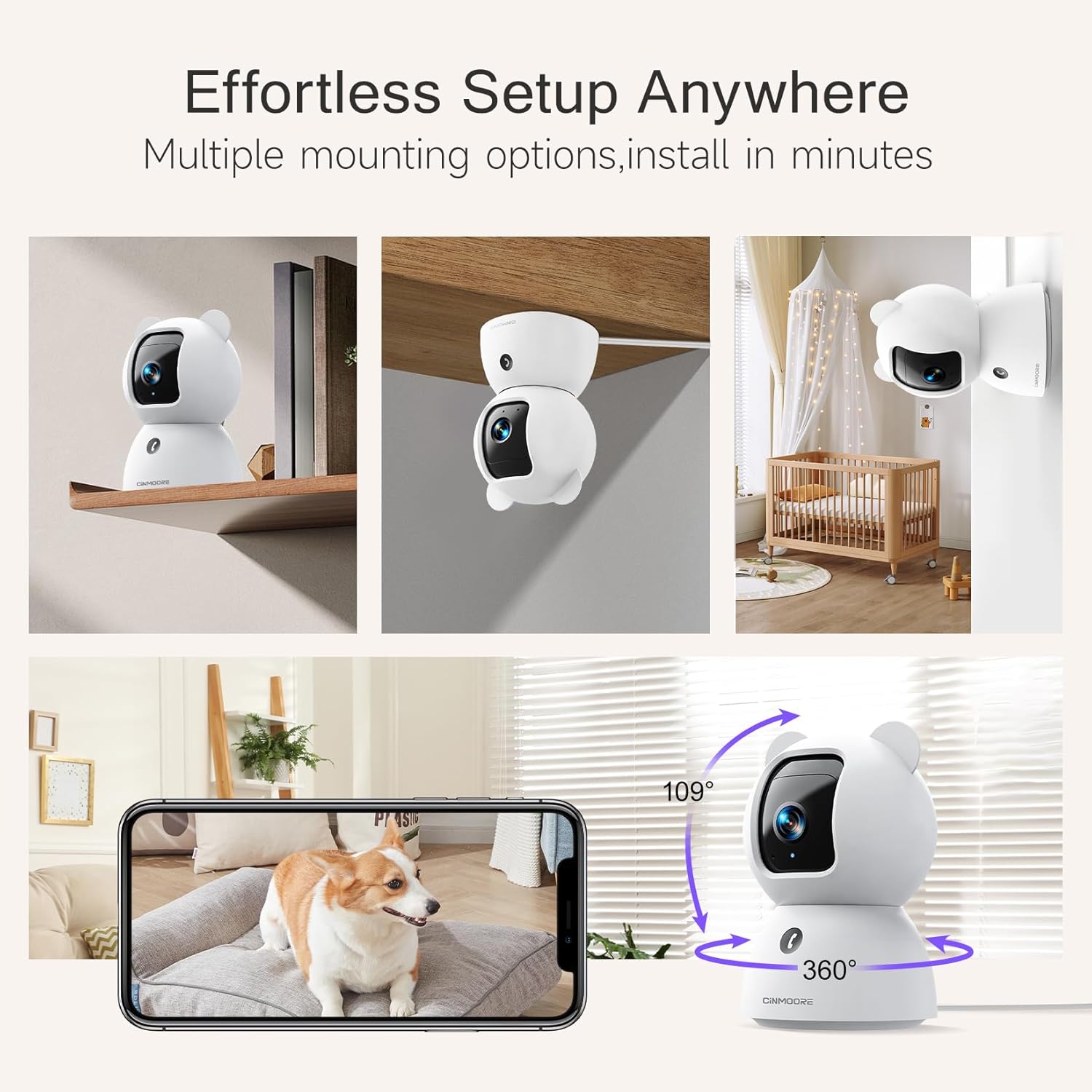
Image: A collage showing the CINMOORE Dummy Camera mounted in various positions: on a shelf, inverted on a ceiling, and on a wall, demonstrating its versatile installation options.
3.2 Passaggi di configurazione iniziale
- Accensione: Connect the camera to the power adapter using the provided data cable and plug it into a power outlet.
- Scarica l'app: Download the official CINMOORE app from your smartphone's app store (iOS/Android).
- Registrazione dell'account: Apri l'app e registrati per un nuovo account oppure accedi se ne hai già uno.
- Aggiungi dispositivo: Segui le istruzioni nell'app per aggiungere la tua nuova fotocamera. In genere, ciò comporta la scansione di un codice QR sulla fotocamera o la connessione al suo hotspot Wi-Fi temporaneo.
- Connessione Wi-Fi: Connect the camera to your home Wi-Fi network (2.4GHz recommended).
- Posizionamento: Posizionare la telecamera nella posizione desiderata, assicurandosi che abbia una visuale libera view dell'area che desideri monitorare.
4. Istruzioni per l'uso
4.1 Qualità video e Viewing
The camera captures video in 2.5K resolution, providing clear and detailed images. You can view il feed live e il cibo registratotage through the CINMOORE app.

Image: A side-by-side comparison demonstrating the superior clarity of 2.5K resolution (left, showing a baby) versus 2K resolution (right, showing a puppy).
4.2 Pan & Tilt (PTZ) Functionality
The camera features PTZ (Pan, Tilt, Zoom) technology, allowing for 360-degree coverage. You can remotely control the camera's viewing angle through the app to monitor different areas of a room.

Image: The CINMOORE Dummy Camera surrounded by icons representing its features: Ultra HD 2.5K, Sound/Crying Alerts, Smart Night Vision, Encrypted Local Storage (up to 256GB), Secure Cloud Storage, Full Duplex Audio, Human/Pet Tracking, One-Touch Call, and Pan & Tilt, emphasizing its 360-degree protection.
4.3 Audio bidirezionale
Utilize the full-duplex two-way audio feature to communicate with people or pets in the camera's vicinity. This allows for natural, real-time conversations.

Image: A scene depicting a person speaking through a smartphone to a dog via the CINMOORE Dummy Camera, illustrating the two-way audio feature with speech bubbles.
4.4 Visione notturna
The camera is equipped with clear IR night vision, providing 2.5K clarity even in low-light or complete darkness, with a range of up to 33 feet.

Immagine: una persona viewing a black-and-white night vision feed from the CINMOORE Dummy Camera on their smartphone, showing a baby and a dog in a crib, demonstrating clear IR night vision in a dark room.
4.5 AI Alerts and Detection
The camera supports various AI-powered detection features without monthly fees, including:
- Rilevamento del movimento: Alerts you to general movement.
- Rilevamento persona: Specifically identifies human figures.
- Rilevamento animali domestici: Recognizes pet activity.
- Rilevamento del pianto: Notifies you of baby crying sounds.

Image: Two children playing near the CINMOORE Dummy Camera, with icons below representing its AI detection capabilities: Person, Pet, Motion, and Crying, highlighting its no-monthly-fee AI alerts.
4.6 Opzioni di archiviazione
The camera offers flexible and secure storage solutions:
- Archiviazione su scheda SD: Supports local storage via an SD card (not included), expandable up to 512GB. Ensure "SD Card Encryption" is enabled in the app for secure viewing.
- Archiviazione cloud: Offers AWS Cloud Storage with a 30-day free trial, providing bank-level encrypted storage for your recordings.

Image: A diagram showing the CINMOORE Dummy Camera with callouts for its storage features: SD card slot (expandable up to 512GB), Reset Button, and AWS Cloud Storage (30-day free trial), emphasizing encrypted and secure flexible storage.
5. Manutenzione
To ensure optimal performance and longevity of your CINMOORE Dummy Camera, follow these maintenance guidelines:
- Pulizia: Pulisci delicatamente l'obiettivo e il corpo della fotocamera con un panno morbido e asciutto. Evita di utilizzare prodotti chimici aggressivi o materiali abrasivi.
- Posizionamento: Assicurarsi che la telecamera sia posizionata in un luogo stabile, lontano dalla luce solare diretta, da temperature estreme e da elevata umidità.
- Aggiornamenti del firmware: Regularly check for and install firmware updates through the CINMOORE app to ensure your camera has the latest features and security enhancements.
- Alimentazione elettrica: Utilizzare solo l'adattatore di alimentazione originale fornito con la fotocamera.
6. Risoluzione Dei Problemi
If you encounter issues with your CINMOORE Dummy Camera, refer to the following common troubleshooting steps:
- Fotocamera non in linea: Check your Wi-Fi connection and ensure the camera is within range of your router. Restart the camera by unplugging and re-plugging the power adapter.
- Scarsa qualità video: Ensure the lens is clean and free from dust. Check your internet speed; a stable connection is crucial for high-resolution streaming.
- Nessun audio: Verify that the microphone and speaker settings are enabled in the app. Ensure there are no obstructions blocking the microphone or speaker on the camera.
- Detection Not Working: Check the detection sensitivity settings in the app. Ensure the camera's view è chiaro e non ostruito.
- Impossibile connettersi all'app: Ensure you have the latest version of the CINMOORE app. Try resetting the camera (using the reset button, if available) and re-adding it to the app.
For further assistance, please contact CINMOORE customer support.
7. Specifiche
| Nome del modello | Telecamera di sicurezza interna |
| Numero modello articolo | CM-C2LU |
| Marca | CINMOORE |
| Tecnologia di connettività | Cablato, Wi-Fi |
| Risoluzione di acquisizione video | 2.5K |
| Uso interno/esterno | Al chiuso |
| Caratteristiche speciali | 2 Way Audio, Cry Detection, HD Resolution, PTZ Technology |
| Gamma di visione notturna | 33 piedi |
| Tipo di montaggio | Montaggio a soffitto / Montaggio da tavolo / Montaggio a parete |
| Materiale | Acrilonitrile Butadiene Stirene (ABS) |
| Dimensioni dell'articolo L x P x A | 7.6 x 7.6 x 11.4 centimetri |
| Peso dell'articolo | 340 grammi |
| Livello di resistenza all'acqua | Impermeabile |
| Usi consigliati | Monitoraggio dei neonati, monitoraggio degli animali domestici, sicurezza domestica interna, sorveglianza dell'ufficio |
8. Garanzia e supporto
Garanzia: The CINMOORE Dummy Camera comes with a 1-year warranty from the date of purchase. Please retain your proof of purchase for warranty claims.
Supporto: For technical support, troubleshooting assistance, or warranty inquiries, please visit the official CINMOORE website or contact their customer service team. Refer to the product packaging or the CINMOORE app for specific contact details.
Ask a question about this manual
Ask about setup, troubleshooting, compatibility, parts, safety, or missing instructions. Manuals+ will review the question and use this page’s manual context to help answer it.