
Introduzione
The OMOTON VC07 is a versatile 360° rotating magnetic mount designed to transform your smartphone into a high-quality webcam or provide a stable viewing stand. It is compatible with various devices and surfaces, offering flexible positioning for video calls, content creation, and general use. This manual provides detailed instructions for its setup, operation, and maintenance.
Cosa c'è nella scatola
- Continuity Camera Mount
- Manuale d'uso
- Metal Ring (for non-MagSafe compatible devices)
Caratteristiche del prodotto
- Versatile Camera Mount: Converts your smartphone into a webcam for monitors, laptops, TVs, or desktops.
- Dual-Sided Magnetic Attachment: Features 20 strong magnets for secure phone attachment and a magnetic base for adherence to metal surfaces.
- 360° Rotation and Dual-Axis Adjustment: Allows for precise angle adjustments and full rotation for optimal viewing.
- Design multifunzionale: Can be used as a monitor mount, desktop stand, or attached to tripods via a universal 1/4" screw base.
- Ampia compatibilità: Supports iPhone 17/16/15/14/13 Pro Max series and MagSafe cases. Includes a metal ring for compatibility with Android phones and non-magnetic cases.
Istruzioni di installazione
- Unfold the Mount: Gently unfold the OMOTON VC07 mount to its desired configuration. The hinges allow for various angles.
- Attach Phone (MagSafe): For MagSafe compatible iPhones or cases, simply align the back of your phone with the magnetic ring on the mount. The magnets will securely attach the phone.
- Attach Phone (Non-MagSafe/Android): If your phone or case is not MagSafe compatible, use the included metal ring. Adhere the metal ring to the center back of your phone or case. Then, attach your phone to the magnetic ring on the mount.
- Posizionamento del monitor/laptop: Place the base of the mount on top of your monitor or laptop screen. The anti-slip silicone padding on the base helps secure it and prevent scratches. Adjust the angle of the phone as needed.
- Attacco per treppiede: For tripod use, locate the 1/4" screw hole on the bottom of the mount. Screw the mount onto a compatible tripod.
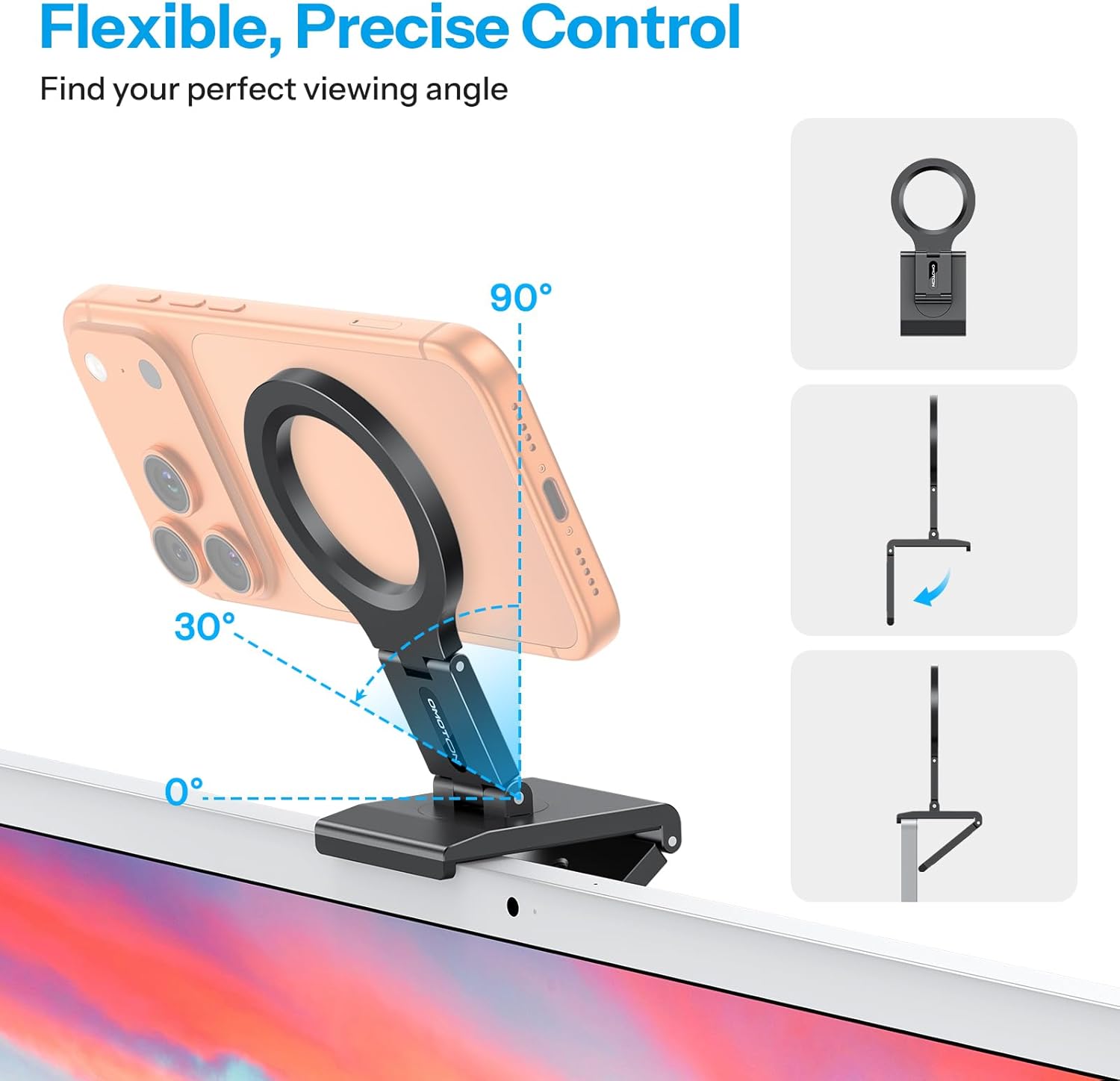
Image: The OMOTON VC07 mount demonstrating its flexible angle adjustments for optimal viewing.

Image: A visual representation of the strong magnetic connection between the mount and a smartphone.
Video: An official demonstration of the OMOTON VC07 Continuity Camera Mount, showcasing its features and how it attaches to devices and tripods.
Istruzioni per l'uso
Using as a Continuity Camera Mount
Place the mount on top of your iMac, desktop monitor, or laptop screen. Ensure the base is stable. Attach your iPhone to the magnetic ring. Open a video conferencing application or use Apple's Continuity Camera feature to utilize your iPhone as a high-quality webcam. Adjust the phone's angle and rotation for the best view.

Image: A smartphone mounted on a monitor using the OMOTON VC07, actively participating in a video conference.
Using as a Magnetic Stand on Metal Surfaces
The base of the OMOTON VC07 mount contains magnets, allowing it to adhere to various metal surfaces such as gym equipment, refrigerators, or whiteboards. Simply press the base firmly against the metal surface. Attach your phone to the magnetic ring for hands-free viewregistrazione o registrazione.

Immagine: Examples of the OMOTON VC07 mount magnetically attached to different metal surfaces for diverse applications.
Utilizzo con un treppiede
Attach the OMOTON VC07 mount to any tripod with a standard 1/4" screw. This allows for stable, elevated, or remote camera positioning for photography, videography, or streaming. Secure your phone to the magnetic ring and adjust the tripod and mount for desired framing.

Image: The OMOTON VC07 mount securely holding a smartphone on a tripod, ready for use.
Adjusting Angles and Rotation
The mount features a 360° rotating base and dual-axis hinges. To adjust the viewing angle, gently move the phone or the mount's arm to the desired position. The robust hinges will hold the angle firmly. For horizontal or vertical orientation, rotate the phone on the magnetic ring.

Image: The OMOTON VC07 mount elevating a smartphone for an improved workspace view during a video call.
Manutenzione
To ensure the longevity and optimal performance of your OMOTON VC07 mount, follow these maintenance guidelines:
- Pulizia: Wipe the mount with a soft, dry cloth. For stubborn dirt, a slightly damp È possibile utilizzare un panno e asciugare immediatamente. Evitare detergenti abrasivi o solventi.
- Magazzinaggio: When not in use, fold the mount flat for compact storage. Store it in a clean, dry place away from extreme temperatures.
- Anello magnetico: Ensure the magnetic ring on the mount and the metal ring (if used) on your phone are free from debris to maintain a strong connection.
- Cerniere: The hinges are designed for durability. Avoid forcing them beyond their intended range of motion.
Risoluzione dei problemi
| Problema | Possibile causa | Soluzione |
|---|---|---|
| Phone does not attach securely. | Not a MagSafe compatible phone/case; debris on magnetic surface; weak magnetic ring adhesion. | Ensure your phone/case is MagSafe compatible or use the provided metal ring. Clean magnetic surfaces. Re-apply metal ring if it's loose. |
| Mount is unstable on monitor/laptop. | Incorrect placement; monitor too thin/curved; excessive phone weight. | Adjust the mount's position for better balance. Ensure the anti-slip pads are making full contact. Consider using the mount as a desktop stand or with a tripod for heavier phones or unstable screens. |
| Hinges are too loose or too stiff. | Normal wear; environmental factors. | The hinges are designed to maintain tension. If they become excessively loose or stiff, contact customer support. Do not attempt to disassemble. |
Specifiche
| Caratteristica | Dettaglio |
|---|---|
| Marca | OMOTON |
| Nome del modello | VC07 |
| Numero di modello | VC07-US |
| Colore | Nero |
| Tipo di montaggio | Magnetico |
| Materiale di recinzione | Alluminio |
| Caratteristiche aggiuntive | 360 Degree Rotation, Adjustable, Hand Free, with 1/4" Screw |
| Dispositivi compatibili | iPhone 17/16/15/14/13/12 series, iOS 16, MacBook Pro/Air, iMac, macOS 13 Ventura, TV, Laptop, Apple TV 4K, Desktop Monitor, Tripod |
| Modelli di telefono compatibili | All Phones: iPhone 17 Pro Max, iPhone 17 Pro, iPhone 17 Air, iPhone 17, iPhone 16 Pro Max, iPhone 16 Pro, iPhone 16 Plus, iPhone 16, iPhone 15 Pro Max, iPhone 15 Pro, iPhone 15 Plus, iPhone 15, iPhone 14, iPhone 14 Plus, iPhone 14 Pro, iPhone 14 Pro Max, iPhone 13, iPhone 13 Pro, iPhone 13 Pro Max, iPhone 13 mini, iPhone 12, iPhone 12 Pro, iPhone 12 Pro Max, iPhone 12 mini, MagSafe Phone Case, Smartphone, Telephones, Kindle, Mobile Phone, Smart Phones, Small Palmtop, Samsung Galaxy, Sony, Google Pixel, Huawei, Honor, HTC, Nokia, Xiaomi, Microsoft, Lumia, BlackBerry |
Garanzia e supporto
OMOTON products are designed for reliability and performance. This product comes with a standard manufacturer's warranty. For specific warranty details, please refer to the warranty card included with your purchase or visit the official OMOTON websito.
If you encounter any issues or have questions regarding your OMOTON VC07 mount, please contact OMOTON customer support through their official website or the retailer where the product was purchased. Please have your model number (VC07) and proof of purchase ready when contacting support.