1. Introduzione
Welcome to the DOOGEE Note56 user manual. This guide provides essential information on setting up, operating, and maintaining your new smartphone. The DOOGEE Note56 is a SIM-free smartphone running on Android 16, featuring a 6.56-inch 90Hz HD+ display, a large 6150mAh battery, and an 8MP AI camera. Please read this manual carefully to ensure optimal performance and longevity of your device.
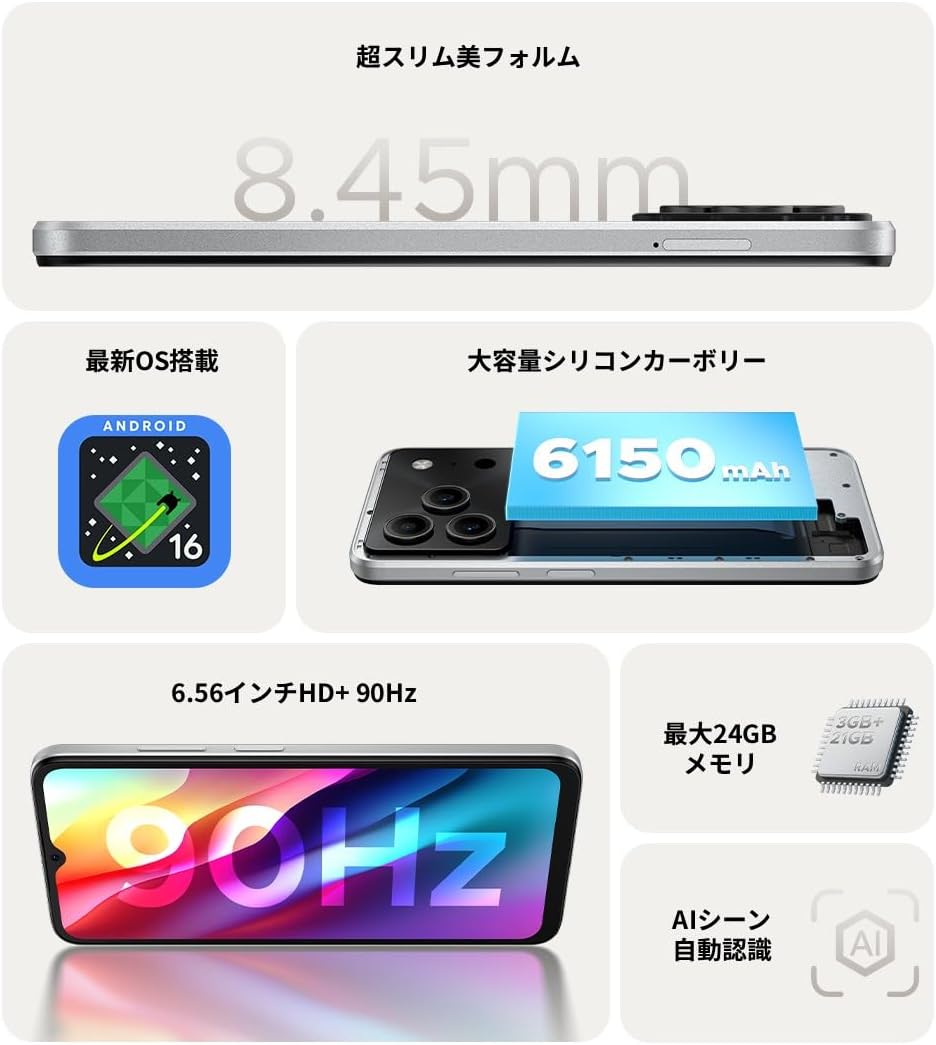
Figura 1.1: Oltreview of DOOGEE Note56 key features.
2. Dispositivo suview
The DOOGEE Note56 is designed with a sleek and lightweight profile, measuring 8.45mm thin and weighing 195g. It features a geometric lens module for its camera system and a durable build.

Figure 2.1: The ultra-slim and lightweight design of the DOOGEE Note56.
3. Per iniziare
3.1 Contenuto della confezione
Assicurati che tutti gli articoli siano presenti nella confezione del prodotto:
- 1 x DOOGEE Note56 Smartphone
- 1 x Cavo USB di tipo C
- 1 x adattatore di alimentazione
- 1 x pellicola protettiva pre-applicata
- 1 x Perno di espulsione del vassoio SIM
- Cassa del telefono 1 x
- 1 x scatola di imballaggio
- 1 x Manuale di istruzioni
- 1 x Scheda di garanzia

Figure 3.1: Included accessories with your DOOGEE Note56.
3.2 Installazione della scheda SIM
Your DOOGEE Note56 supports Dual SIM functionality. To install your SIM card(s):
- Individuare il vassoio della SIM sul lato del dispositivo.
- Inserire lo spillo di espulsione della SIM nel piccolo foro accanto al vassoio e premere delicatamente finché il vassoio non fuoriesce.
- Inserisci la/le scheda/e Nano-SIM e/o la scheda microSD negli appositi slot sul vassoio. Assicurati che i contatti dorati siano rivolti verso il basso.
- Spingere con cautela il vassoio nel dispositivo finché non è a filo con il lato.
3.3 Accensione iniziale e configurazione
Per accendere il dispositivo per la prima volta:
- Tenere premuto il pulsante di accensione finché non viene visualizzato il logo DOOGEE.
- Segui le istruzioni sullo schermo per selezionare la lingua, connetterti al Wi-Fi e configurare il tuo account Google.
- You can also set up security features like face recognition during this process.
3.4 Ricarica del dispositivo
Connect the Type-C USB cable to the charging port at the bottom of the phone and the other end to the power adapter. Plug the adapter into a wall outlet. The battery indicator on the screen will show charging status. For optimal battery life, fully charge the device before first use.
4. Utilizzo del dispositivo
Sistema operativo Android 16 4.1
The DOOGEE Note56 runs on the latest Android 16 operating system, offering a faster, more secure, and intuitive user experience. Key features include:
- Prestazioni migliorate: Improved app launch speeds and overall system responsiveness.
- Simplified UI: An easy-to-navigate interface suitable for all users.
- Stronger Security: Advanced privacy protection features to keep your data safe.
- Intelligenti Caratteristiche: Customize screen colors, Super Clipboard, Dual System Mode, Smart Body Sensing, Memory Expansion, and Screen Optimization.

Figura 4.1: Caratteristiche principali del sistema operativo Android 16.
4.2 Funzionalità di visualizzazione
Experience smooth visuals on the 6.56-inch HD+ IPS display with a 90Hz refresh rate. This ensures fluid scrolling and video playback, reducing eye strain. The display also includes dedicated Reading Mode and Night Mode for comfortable viewin varie condizioni di illuminazione.

Figure 4.2: The 6.56-inch HD+ 90Hz display for a smooth visual experience.
4.3 Funzioni della fotocamera
Capture vibrant and natural photos with the 8MP AI main camera and 5MP front camera. The AI correction automatically optimizes settings for various scenes, including people, landscapes, and food. Enjoy diverse shooting modes:
- Immagine HDR: Per un'esposizione bilanciata in condizioni di illuminazione difficili.
- Modalità Pro: Controllo manuale delle impostazioni della fotocamera.
- Acquisizione del sorriso: Scatta automaticamente una foto quando rileva un sorriso.
- Panorama: Cattura ampi panorami views.
- Modalità notturna: Improved low-light photography.
- Filtri: Applica vari effetti alle tue foto.
- Beauty Mode (Front Camera): Enhance selfies.
- Portrait Effects (Front Camera): Add depth to your selfies.

Figure 4.3: AI scene recognition automatically adjusts camera settings for optimal results.

Figure 4.4: Capturing clear moments with the 8MP main camera.

Figure 4.5: Easy selfies with the 5MP front camera.
4.4 Gestione della batteria
The DOOGEE Note56 is equipped with a large 6150mAh Silicon-Carbon battery, providing extended usage throughout the day. The convenient Type-C charging port ensures easy and smooth charging.
- Supports approximately 1000 charge/discharge cycles.
- 20% smaller in size for a lighter design.
- Estimated usage times: 7 hours web browsing, 49.5 hours music playing, 14 hours video watching, 28 hours calling.
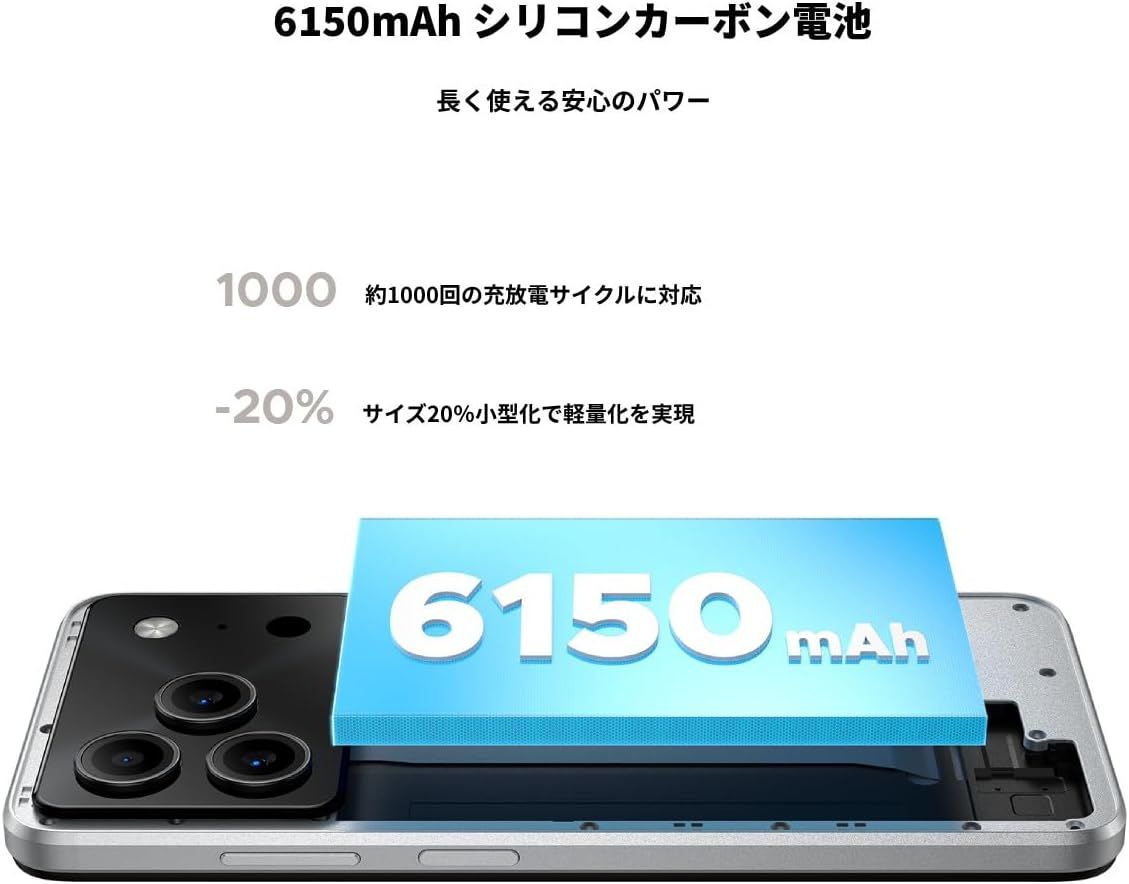
Figure 4.6: The 6150mAh Silicon-Carbon battery provides long-lasting power.

Figure 4.7: Slim design with powerful battery performance.
4.5 Prestazioni e archiviazione
The DOOGEE Note56 is powered by a Unisoc SC9863A Octa-core processor for smooth and efficient operation. It comes with 24GB of RAM (including virtual expansion) and 64GB of internal storage, expandable up to 2TB with a microSD card, ensuring ampspazio per le tue app, foto e files.

Figure 4.8: Internal memory configuration for smooth multitasking.
4.6 Connettività e altre funzionalità
The device supports 4G Dual SIM, allowing you to manage work and personal life separately. It includes standard connectivity options like Bluetooth and Wi-Fi. Additional features:
- Interfaccia USB OTG: Collega dispositivi USB esterni.
- Posizione GPS: Per una navigazione accurata.
- Jack per cuffie da 3.5 mm: Enjoy music and calls with wired headphones.
- FM Radio: Listen to your favorite radio stations anytime.

Figure 4.9: Face recognition, GPS navigation, and FM radio features.

Figure 4.10: Connect wired headphones via the 3.5mm jack.
4.7 Funzionalità di sicurezza
The DOOGEE Note56 offers convenient and secure unlocking methods:
- Riconoscimento facciale: Sblocca il tuo dispositivo in modo rapido e sicuro utilizzando il tuo volto.
- Riconoscimento delle impronte digitali: (If applicable, check device for sensor) Another secure method for unlocking and authenticating.
5. Manutenzione e cura
To ensure the longevity and optimal performance of your DOOGEE Note56, follow these maintenance guidelines:
- Pulizia: Utilizzare un panno morbido e privo di lanugine per pulire lo schermo e il corpo. Evitare prodotti chimici aggressivi o materiali abrasivi.
- Condizioni ambientali: Evitare di esporre il dispositivo a temperature estreme, alla luce solare diretta o a umidità eccessiva.
- Aggiornamenti software: Controlla e installa regolarmente gli aggiornamenti di sistema per beneficiare delle funzionalità più recenti, delle patch di sicurezza e dei miglioramenti delle prestazioni.
- Cura della batteria: Avoid fully discharging the battery frequently. For long-term storage, keep the battery charged to around 50%.
- Protezione: Utilizzare la custodia per telefono e la pellicola protettiva per lo schermo fornite per proteggere il telefono da graffi e piccoli urti.
6. Risoluzione Dei Problemi
If you encounter issues with your DOOGEE Note56, try the following basic troubleshooting steps:
- Il dispositivo non si accende: Assicurarsi che la batteria sia carica. Collegare il caricabatterie e attendere qualche minuto prima di riprovare ad accendere.
- Problemi di ricarica: Check the charging cable and adapter for damage. Try a different outlet or charging accessory.
- Problemi di connettività di rete: Ensure your SIM card is correctly inserted. Check if airplane mode is off. Restart the device.
- Blocco/arresto anomalo dell'app: Chiudi l'app problematica e riaprila. Se il problema persiste, riavvia il telefono.
- Prestazioni lente: Close unnecessary background apps. Clear cache for frequently used apps. Consider freeing up storage space.
For more detailed troubleshooting or persistent issues, please refer to the FAQ section on the product page or contact customer support.
7. Specifiche
Key technical specifications for the DOOGEE Note56:
| Caratteristica | Specificazione |
|---|---|
| Dimensioni dello schermo | 6.56 pollici |
| Capacità della batteria | 6150 mAh |
| Colore | Bianco |
| Nome del marchio | DOOGEE |
| Produttore | DOOGEE |
| Anno di rilascio | 2025 |
| Componenti inclusi | SIM Tray Ejector, USB Cable, Power Adapter, Phone Case |
| Sistema operativo compatibile | Androide 16 |
| Altre funzioni | USB OTG, Dual SIM, Expandable Memory |
| Connettività | Wifi bluetooth |
| Tipo di visualizzazione | LCD |
| Dimensioni del prodotto | 16.38 x 7.58 x 0.84 cm; 195 g |
| Sistema operativo | Androide 16 |
| Dimensione RAM installata | 24 GB |
| Velocità della CPU | 1.6 GHz |
| Capacità di archiviazione della memoria | 64 GB |
8. Garanzia e supporto
Your DOOGEE Note56 comes with a 12-month quality warranty (excluding human-caused damage) and a 30-day refund guarantee. The product is fully compatible with major Japanese carrier networks.
If you require support or have any questions, please contact our customer service. You can typically find contact information by clicking on the seller's name below the "Add to Cart" button on the product page and selecting "Ask a Question."


