
1. Introduzione
This manual provides essential information for the NIMO 15.6" Gaming Laptop (Model N159). It covers product features, setup procedures, operating instructions, maintenance guidelines, troubleshooting tips, and detailed specifications. Please read this manual thoroughly before using your new laptop to ensure optimal performance and longevity.

Image: The NIMO 15.6" Gaming Laptop, showcasing its display and key features like fingerprint unlock, Type-C PD charger, and backlit keyboard.
2. Cosa c'è nella scatola
Verificare che tutti gli articoli siano presenti nella confezione:
- 1 x NIMO N159 Laptop
- 1 x Type-C 100W PD Fast Charger
- 1 x Manuale utente (questo documento)
- Windows 11 Home Operating System (pre-installed)
- Warranty Information (2 Years Warranty, 90 Days Return)
3. Prodotto finitoview
3.1 Caratteristiche principali
- Processore: AMD Ryzen 7 7735HS (8 core, 16 thread, fino a 4.75 GHz)
- Grafica: Integrated AMD Radeon 680M GPU
- Display: 15.6" Full HD (1920x1080) IPS Anti-Glare Display
- Memoria: 16GB DDR5 RAM (upgradeable)
- Magazzinaggio: 1TB PCIe 4.0 SSD (upgradeable)
- Ricarica: 100W Type-C PD Fast Charger
- Sicurezza: Fingerprint Reader for secure unlock
- Tastiera: Tastiera retroilluminata con tastierino numerico
- Audio: Dual 2W stereo speakers, dual beamforming microphones
- WebCamera: 2MP with physical camera shutter
- Sistema operativo: Windows 11 Casa

Image: An illustration detailing the AMD Ryzen 7 7735HS processor, highlighting its 8 cores, 16 threads, and integrated Radeon 680M graphics for balanced performance.
3.2 Porte e connettori
Familiarize yourself with the available ports on your NIMO laptop:

Image: A detailed diagram illustrating the location and type of ports on the NIMO laptop, including USB 2.0, USB 3.2 Gen1, Type-C Gen2 (multifunction), HDMI 2.0, Audio Jack, Micro SD Reader, and Kensington Lock.
- Porta USB 2.0: Per collegare dispositivi USB più vecchi.
- Porte USB 3.2 Gen1 (x4): Per il trasferimento dati ad alta velocità con dispositivi USB compatibili.
- Type-C Gen2 Ports (x2, Multifunction): Supports data transfer, video output, and power delivery (100W PD fast charging).
- Porta HDMI 2.0: Per il collegamento a display esterni o TV.
- Jack audio: Per collegare cuffie o altoparlanti esterni.
- Micro SD Reader: For reading Micro SD memory cards.
- Slot per blocco Kensington: Per proteggere il tuo laptop con un lucchetto compatibile.
4. Impostazione
4.1 Accensione iniziale
- Disimballare il computer portatile e tutti gli accessori dalla scatola.
- Connect the 100W Type-C PD Fast Charger to one of the Type-C ports on the laptop and then to a power outlet.
- Aprire il coperchio del laptop. Il laptop potrebbe accendersi automaticamente oppure potrebbe essere necessario premere il pulsante di accensione.
- Seguire le istruzioni visualizzate sullo schermo per completare la configurazione di Windows 11 Home, inclusa la selezione della lingua, la connessione di rete e la creazione dell'account utente.
4.2 Caricamento della batteria
Before first use, it is recommended to fully charge the laptop battery. The 100W Type-C PD Fast Charger can provide approximately 5 hours of usage time with just 1 hour of charging.

Image: A visual representation of the 100W Type-C lightning-fast charger connected to the NIMO laptop, demonstrating its ability to charge quickly and efficiently.
5. Istruzioni per l'uso
5.1 Accensione/spegnimento e modalità di sospensione
- Accensione: Premere il pulsante di accensione situato sulla tastiera.
- Spegni: Fare clic sul pulsante Start in Windows, quindi selezionare Arresta il sistema > Arresta il sistema.
- Modalità risparmio: Fare clic sul pulsante Start, quindi selezionare Alimentazione > Sospensione oppure chiudere il coperchio del laptop.
5.2 Utilizzo dello sblocco tramite impronta digitale
The fingerprint reader is integrated into the touchpad for quick and secure access.
- During Windows setup or later in Windows Settings, configure your fingerprint for login.
- To unlock, simply place your registered finger on the fingerprint reader on the touchpad.
5.3 Adjusting the Backlit Keyboard
The keyboard backlight can be adjusted for comfortable typing in various lighting conditions.

Image: A visual guide demonstrating the fingerprint unlock feature on the touchpad and the functionality of the backlit keyboard, including how to cycle through brightness settings using the F9 key.
- Premere il tasto F9 key to cycle through backlight settings:
- 1 Tap: Light (Temporary)
- 2 Taps: Light (Temporary)
- 3 Taps: Light (Constant)
- 4 Taps: Off
5.4 Usando il Webcam Shutter
For privacy, the laptop includes a physical camera shutter.
- Slide the shutter to the left to open the camera.
- Slide the shutter to the right to close and cover the camera lens.

Image: A visual guide demonstrating the physical camera shutter, showing both the 'Camera Open' and 'Camera Close' statuses for enhanced privacy.
6. Manutenzione
6.1 Pulizia del portatile
- Prima di procedere alla pulizia, spegnere sempre il computer portatile e scollegare il caricabatterie.
- Utilizzare un panno morbido e privo di lanugine leggermente dampcon acqua o con un detergente per schermi specifico per il display.
- Per la tastiera e lo chassis, utilizzare un panno morbido e asciutto. Evitare prodotti chimici aggressivi o materiali abrasivi.
- Utilizzare periodicamente aria compressa per rimuovere la polvere dalle prese d'aria.
6.2 Cura della batteria
- Evitare di scaricare completamente la batteria frequentemente.
- Se non si utilizza il computer portatile per lunghi periodi, conservarlo in un luogo fresco e asciutto.
- Non esporre il portatile a temperature estreme.
6.3 Aggiornamenti software
Controllare e installare regolarmente gli aggiornamenti del sistema operativo e dei driver per garantire prestazioni e sicurezza ottimali.
7. Risoluzione Dei Problemi
| Problema | Possibile causa | Soluzione |
|---|---|---|
| Il portatile non si accende. | Problema con la batteria scarica o con l'adattatore di alimentazione. | Connect the charger and wait a few minutes before attempting to power on. Ensure the charger is properly connected to both the laptop and the power outlet. |
| Lo schermo è vuoto o nero. | Laptop in sleep mode, display settings issue, or hardware problem. | Press any key or the power button to wake from sleep. Try connecting an external monitor to check if the display output works. Restart the laptop. |
| La retroilluminazione della tastiera non funziona. | Backlight turned off or at lowest setting. | Premere il tasto F9 key repeatedly to cycle through brightness levels and turn on the backlight. |
| Fingerprint unlock not working. | Finger not properly placed, or sensor issue. | Ensure your finger is clean and dry and covers the sensor completely. Re-register your fingerprint in Windows Settings if the issue persists. |
| Prestazioni lente. | Troppe applicazioni in esecuzione, spazio di archiviazione insufficiente o driver obsoleti. | Close unnecessary applications. Check available storage space. Update Windows and device drivers. |
If you encounter issues not listed here or require further assistance, please contact NIMO customer support.
8. Specifiche
| Marca | NIMO |
| Nome del modello | Modello N159B |
| Dimensioni dello schermo | 15.6 pollici |
| Risoluzione dello schermo | 1920 x 1080 pixel (FHD IPS) |
| Processore | AMD Ryzen 7 7735HS (8 Cores, 4.75 GHz Max Turbo) |
| Memoria RAM | 16 GB DDR5 (4800 MHz) |
| Disco rigido | 1024 GB SSD (PCIe 4.0) |
| Coprocessore grafico | AMD Radeon 680M (integrata) |
| Sistema operativo | Windows 11 Casa |
| Tipo senza fili | 802.11a/b/g/n/ac |
| Porte USB 2.0 | 1 |
| Porte USB 3.0 | 4 |
| Durata media della batteria | 5 ore (54 Wh, 11.4 V/4700 mAh) |
| Peso dell'articolo | 3.8 libbre |
| Dimensioni del prodotto | 14.07 x 8.98 x 0.76 pollici |
| Colore | Blu |
| Posteriore WebRisoluzione della camma | 2 MP |
| Caratteristiche speciali | Tastiera retroilluminata, lettore di impronte digitali, audio HD, tastierino numerico |
9. Garanzia e supporto
9.1 Garanzia del produttore
Your NIMO N159 laptop is covered by a comprehensive Garanzia del produttore di 2 anno from Nimo Direct Inc. This warranty covers defects in materials and workmanship under normal use. For warranty claims, please contact customer support.

Image: A technician working on a laptop's internal components, representing the 2-year support provided for Nimo products.
9.2 Politica di restituzione
Nimo Direct Inc. offers a 90-Day Hassle-Free Return Policy. You may return any Nimo product for any reason within 90 days of purchase. Please refer to your purchase documentation for specific return procedures.
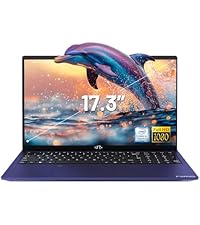
Image: A delivery person handing a package to a customer, illustrating the 90-day return policy for Nimo products.
9.3 Assistenza clienti
For any product-related questions, technical assistance, or warranty claims, please contact our professional after-sales service team. Our dedicated support team is available to resolve issues or facilitate replacements.
- E-mail: servizio@nimopc.com
- In linea: Visit the official NIMO website or product page for contact options.

Image: Customer service representatives wearing headsets, indicating professional customer assistance available via phone and live chat.