
Kinglucky A20
Kinglucky ClipFree A20 Open-Ear Earbuds Instruction Manual
Modello: A20
Introduzione
Welcome to the Kinglucky ClipFree A20 Open-Ear Earbuds. These earbuds are designed for comfort and style, featuring an open-ear design and detachable crystal earrings. This manual provides essential information for setting up, operating, maintaining, and troubleshooting your new earbuds.
Cosa c'è nella scatola
Upon opening your Kinglucky ClipFree A20 package, you should find the following items:
- Kinglucky ClipFree A20 Open-Ear Earbuds
- Custodia di ricarica
- Detachable Crystal Butterfly Earrings (if included with your model)
- Cavo di ricarica USB-C
- Manuale dell'utente (questo documento)

Image: The Kinglucky A20 earbuds, charging case, detachable butterfly earrings, and USB-C charging cable as packaged.
Impostare
1. Ricarica degli auricolari e della custodia
Before first use, fully charge your Kinglucky A20 earbuds and charging case. Connect the provided USB-C cable to the charging port on the case and a power source. The digital display on the case will show the battery level. A full charge provides up to 8 hours of playtime for the earbuds, with the case extending total playtime to approximately 50 hours.
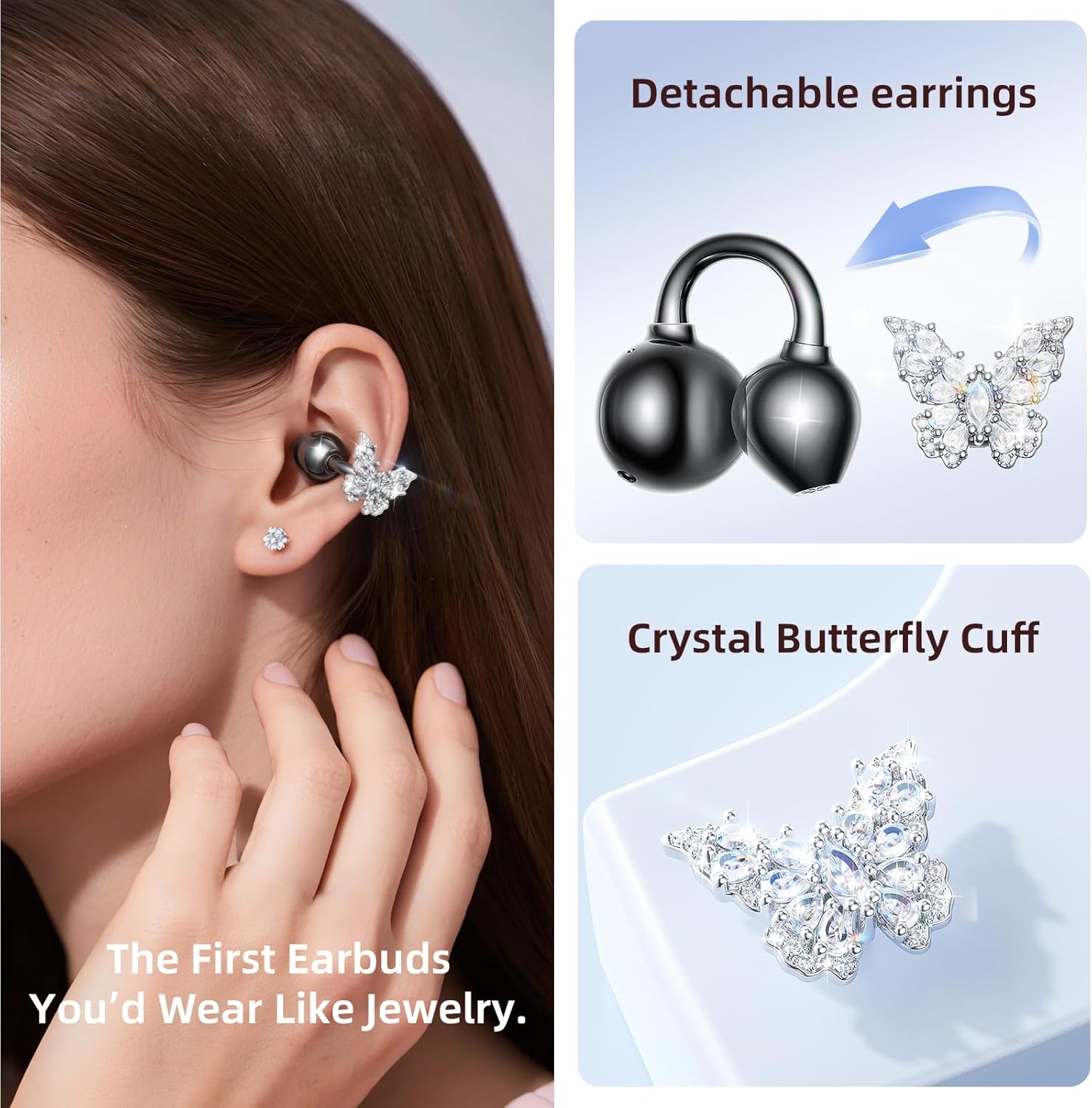
Image: The Kinglucky A20 earbuds resting in their charging case, displaying the battery percentage on the front.
2. Accoppiamento Bluetooth
- Aprire la custodia di ricarica. Gli auricolari entreranno automaticamente in modalità di associazione.
- Sul tuo dispositivo (smartphone, tablet, ecc.), vai alle impostazioni Bluetooth.
- Select "Kinglucky A20" from the list of available devices.
- Una volta effettuata la connessione, sentirai un messaggio audio e la spia luminosa sugli auricolari cambierà.
The Kinglucky A20 supports Bluetooth 5.4 for a stable connection and multipoint pairing, allowing connection to two devices simultaneously.
3. Indossare gli auricolari
The A20 earbuds feature an open-ear clip design for comfort and stability. They do not enter the ear canal, resting gently on the ear.
- Gently open the ear cuff of the earbud.
- Position the earbud over your ear, ensuring the speaker is aligned with your ear canal for optimal sound.
- Regolare per una vestibilità sicura e confortevole.
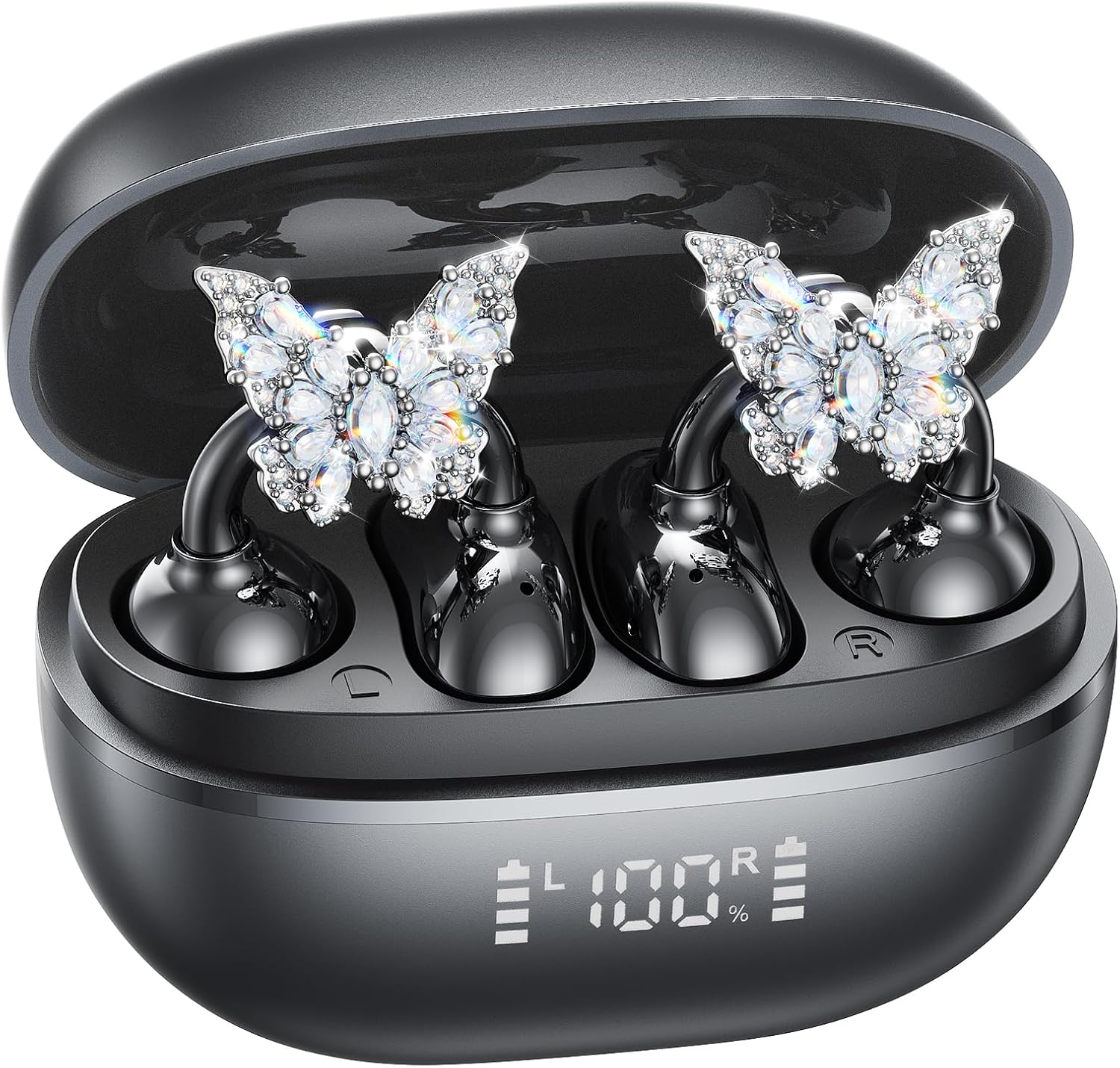
Image: A woman wearing the Kinglucky A20 earbuds with the detachable butterfly earrings, demonstrating the clip-on fit.
4. Attaching/Detaching Crystal Earrings
The crystal butterfly earrings are detachable. To attach, gently clip them onto the earphone stem. To detach, carefully unclip them. Remove the decorative earrings before storing the earbuds in the charging case to prevent damage.

Image: A visual guide illustrating the process of attaching the crystal butterfly accessory to the earbud stem.
Istruzioni per l'uso
Controlli touch
The Kinglucky A20 earbuds feature intuitive touch controls on the outer surface of each earbud.
- Riproduci/Pausa musica: Tocca due volte uno degli auricolari.
- Rispondi/Termina chiamata: Tocca due volte uno degli auricolari durante una chiamata in arrivo o una chiamata attiva.
- Rifiuta chiamata: Durante una chiamata in arrivo, tenere premuto uno dei due auricolari per 2 secondi.
- Attiva l'assistente vocale: Tieni premuto uno degli auricolari per 3 secondi.

Image: A visual representation of the touch control functions for music playback and call management on the earbuds.
Qualità del suono e chiarezza delle chiamate
The A20 earbuds are engineered to deliver clear and balanced sound for various audio content, from podcasts to music. They feature AI-powered call clarity with 2 beamforming microphones and advanced noise-canceling technology for crisp conversations.

Image: An exploded diagram showing the internal components of the Kinglucky A20 earbud, highlighting its sound engineering.
Manutenzione
- Pulizia: Use a soft, dry cloth to wipe the earbuds and charging case. Avoid using harsh chemicals or abrasive materials.
- Magazzinaggio: Quando non li usi, riponi gli auricolari nella custodia di ricarica per proteggerli e assicurarti che rimangano carichi.
- Resistenza all'acqua: The earbuds are IP56 water-resistant, meaning they can withstand sweat and light rain. Do not submerge them in water.
Risoluzione dei problemi
| Problema | Soluzione |
|---|---|
| Gli auricolari non si accoppiano | Ensure earbuds are charged. Turn off and on Bluetooth on your device. Forget "Kinglucky A20" in your device's Bluetooth settings and re-pair. |
| Nessun suono da un auricolare | Riposiziona entrambi gli auricolari nella custodia di ricarica, chiudi il coperchio, attendi qualche secondo, quindi aprilo e riprova. Controlla le impostazioni di bilanciamento audio del dispositivo. |
| La custodia di ricarica non si ricarica | Verifica che il cavo USB-C sia collegato saldamente sia alla custodia che alla fonte di alimentazione. Prova un cavo o un alimentatore diverso. |
| Scarsa qualità delle chiamate | Ensure earbuds are properly seated on your ears. Move closer to your connected device to avoid interference. |
Specifiche
- Nome modello: A20
- Connettività: Senza fili, Bluetooth 5.4
- Posizionamento dell'orecchio: Orecchio aperto
- Durata della batteria: Up to 8 hours (earbuds), up to 50 hours total with charging case
- Resistenza all'acqua: Grado di protezione IP56
- Peso: Circa 4.0 g per auricolare
- Componenti inclusi: Earbuds, Charging Case, USB-C Cable, User Manual, Detachable Crystal Earrings
Garanzia e supporto
Kinglucky products are manufactured to high standards and undergo rigorous quality checks. For warranty information, technical support, or customer service inquiries, please refer to the contact details provided on the Kinglucky official websito o la documentazione di acquisto. Conservare la prova d'acquisto per eventuali reclami in garanzia.
Per ulteriore assistenza, puoi visitare il Kinglucky Store on Amazon.
Ask a question about this manual
Ask about setup, troubleshooting, compatibility, parts, safety, or missing instructions. Manuals+ will review the question and use this page’s manual context to help answer it.