
Introduzione
This manual provides comprehensive instructions for the ALLIMITY RC933A FMB1 Voice Remote Control. Designed for ease of use, this remote offers full functionality for compatible TCL Mini LED Smart TV models without requiring complex programming or setup. Its ergonomic design ensures comfortable handling and reliable performance.
Modelli TV compatibili:
- TCL Q8CX7
- TCL 85Q8CX7
- TCL 98Q8CX7
- TCL 75Q8CX7
- TCL 65C8K
- TCL 75C89K
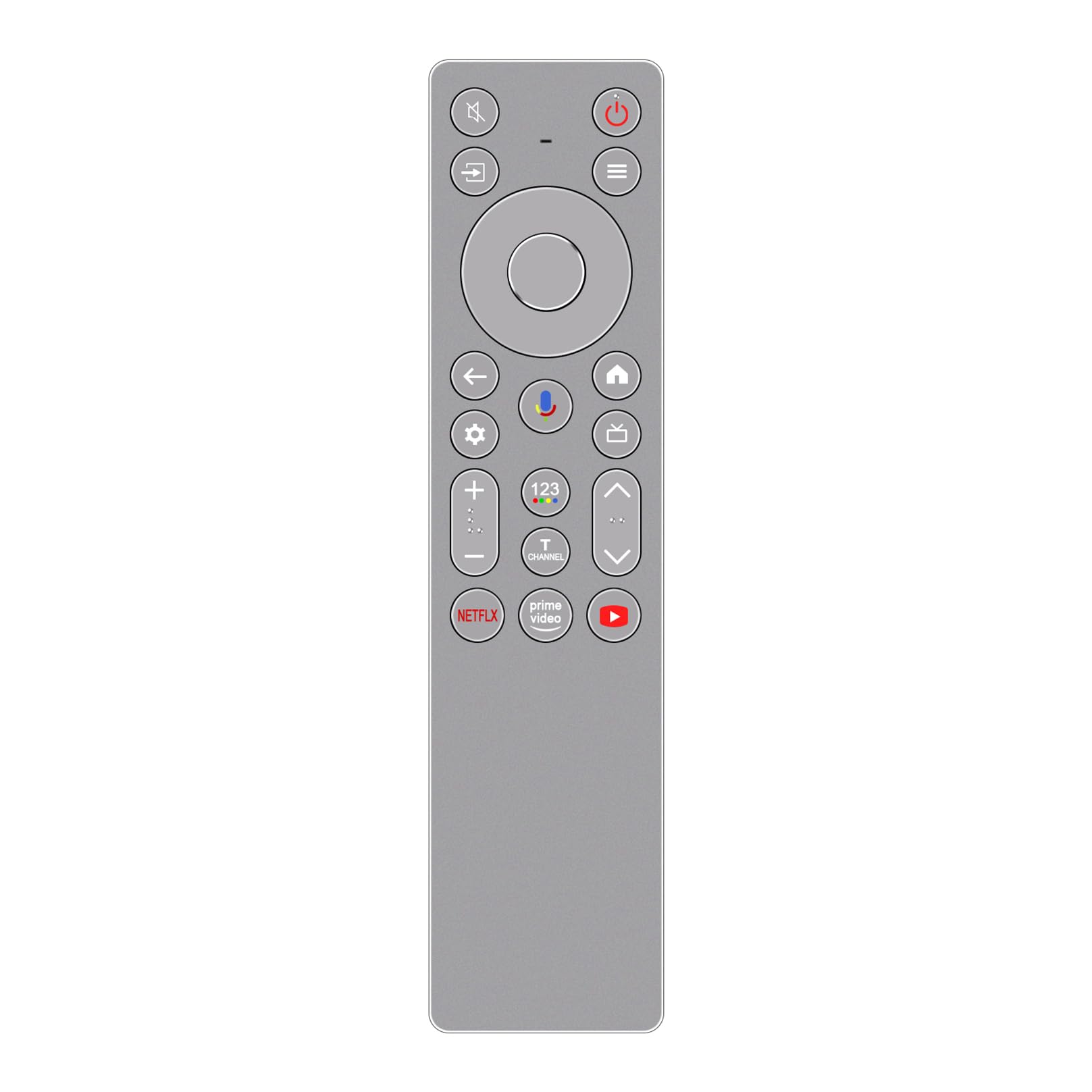
Immagine: Frontale view of the ALLIMITY RC933A FMB1 Voice Remote Control, showcasing its button layout and sleek silver-grey finish.
Impostare
The ALLIMITY RC933A FMB1 remote control is designed for immediate use with compatible TCL Smart TVs. No programming or complex setup is required. Simply install the batteries to begin operation.
Installazione della batteria
- Individuare il vano batterie sul retro del telecomando.
- Far scorrere per aprire il coperchio del vano batterie.
- Inserire due batterie AA, assicurandosi che i terminali positivo (+) e negativo (-) siano allineati correttamente con gli indicatori all'interno del vano.
- Chiudere saldamente il coperchio del vano batterie.
The remote is now ready for use. Point it towards your TCL Smart TV and press any button to confirm functionality.
Istruzioni per l'uso
The ALLIMITY RC933A FMB1 remote control provides intuitive access to your TV's functions, including voice commands and dedicated app buttons.
Funzioni dei pulsanti terminateview
- Pulsante di accensione: Accende o spegne la TV.
- Tastierino direzionale (D-Pad) e pulsante OK: Navigare nei menu e confermare le selezioni.
- Pulsante Indietro: Ritorna alla schermata o al menu precedente.
- Pulsante Home: Accede alla schermata iniziale del televisore.
- Pulsante Impostazioni: Apre il menu delle impostazioni del televisore.
- Volume su/giù: Regola il volume del televisore.
- Canale su/giù: Cambia canale TV.
- Tasto muto: Disattiva o riattiva l'audio della TV.
- Pulsante Input/Sorgente: Seleziona le sorgenti di ingresso (HDMI, AV, ecc.).
- Pulsanti app dedicati: Accesso rapido a Netflix, Prime Video e YouTube.
Funzionalità di controllo vocale
The remote features a voice command button for convenient control of your TV. This allows you to search for content, change settings, or launch apps using your voice.
- Premere il tasto Pulsante di controllo vocale (typically indicated by a microphone icon).
- Tenere il telecomando a circa 10-30 cm (4-12 pollici) dalla bocca.
- Pronuncia chiaramente il comando nel microfono del telecomando.
- Rilascia il pulsante una volta terminato di parlare.

Immagine: Un dettaglio view of the ALLIMITY RC933A FMB1 remote control, with a magnified inset showing the multi-colored microphone icon for voice control.
Manutenzione
Una cura e una manutenzione adeguate garantiranno la longevità e le prestazioni ottimali del tuo telecomando.
Pulizia
- Pulire il telecomando con un panno morbido e asciutto.
- Per sporco ostinato, leggermente dampPulire il panno con acqua o con un detergente delicato e non abrasivo. Evitare l'eccessiva umidità.
- Non utilizzare prodotti chimici aggressivi, solventi o spugne abrasive, poiché potrebbero danneggiare la superficie del telecomando o i componenti interni.
Sostituzione della batteria
- Sostituire le batterie quando la risposta del telecomando diventa lenta o smette di funzionare.
- Sostituire sempre entrambe le batterie contemporaneamente con batterie AA nuove.
- Non mischiare batterie vecchie e nuove o diversi tipi di batterie.
- Rimuovere le batterie se il telecomando non viene utilizzato per un periodo prolungato per evitare perdite.
Magazzinaggio
Conservare il telecomando in un luogo fresco e asciutto, lontano dalla luce solare diretta, da temperature estreme e da elevata umidità.
Risoluzione dei problemi
If you encounter issues with your ALLIMITY RC933A FMB1 remote control, refer to the following common solutions:
- Il telecomando non risponde:
- Controllare che le batterie siano inserite correttamente, rispettando la polarità corretta.
- Sostituisci le batterie con batterie AA nuove.
- Assicurarsi che non vi siano ostacoli tra il telecomando e il ricevitore a infrarossi del televisore.
- Assicuratevi di trovarvi entro il raggio d'azione effettivo (fino a 10 metri).
- Il controllo vocale non funziona:
- Assicurarsi che le batterie del telecomando siano nuove.
- Press and hold the voice control button while speaking.
- Parlare in modo chiaro e diretto nel microfono.
- Check your TV's settings to ensure voice control is enabled and properly configured.
- Breve raggio di trasmissione:
- Replace batteries with new ones. Low battery power can reduce range.
- Assicurarsi che nessuna fonte di luce intensa (come la luce solare diretta o luci fluorescenti intense) interferisca con il segnale a infrarossi.
- Remove any physical obstructions between the remote and the TV.
Specifiche
| Marca | ALLIMITÀ |
| Nome del modello | MM-RC933A-FMB1 |
| Colore | Silver/Grey (as pictured) |
| Tecnologia di connettività | Infrarossi (IR) |
| Tipo di controllo | Comando vocale |
| Portata massima | 10 metri (33 piedi) |
| Numero di pulsanti | 25 |
| Descrizione della batteria | AA (2 richiesti) |
| Peso del prodotto | 59 grammi |
| Dimensioni (lunghezza x larghezza) | 18.5 cm (7.28 pollici) x 4.8 cm (1.89 pollice) |
| Numero massimo di dispositivi supportati | 1 (for direct control, though it can be compatible with multiple models) |

Immagine: affiancata view of the ALLIMITY RC933A FMB1 remote control, illustrating its length (18.5 cm / 7.28 in) and width (4.8 cm / 1.89 in).
Garanzia e supporto
For specific warranty information or technical support regarding your ALLIMITY RC933A FMB1 Voice Remote Control, please refer to the documentation provided with your purchase or contact the retailer/manufacturer directly. Keep your purchase receipt as proof of purchase for any warranty claims.