
Introduzione
Thank you for choosing the PUTORSEN Adjustable PC Tower Stand. This product is designed to provide a mobile, stable, and space-saving solution for your computer tower. Made from high-quality alloy steel, it features adjustable height, protective guardrails, and smooth-rolling casters to enhance your workspace ergonomics and protect your valuable equipment.
This manual provides essential information for the proper setup, operation, and maintenance of your PC tower stand. Please read it thoroughly before use and retain it for future reference.
Informazioni sulla sicurezza
- Ensure the PC stand is placed on a stable, level surface before placing your computer tower on it.
- Non superare la capacità di carico massima di 30 kg (66 libbre).
- Always lock the casters when the stand is in its desired position to prevent accidental movement.
- When adjusting the height, ensure the PC tower is securely positioned and balanced.
- Durante la regolazione dell'altezza, tenere mani e dita lontane dalle parti mobili.
Contenuto della confezione
Verificare che tutti i componenti siano presenti e integri:
- 1 x PUTORSEN Adjustable PC Tower Stand (Model CPM-001)
- 4 x Swivel Casters (2 with locking mechanism)
- Assembly Hardware (if applicable, though product is largely pre-assembled)
Se qualche parte risulta mancante o danneggiata, contattare l'assistenza clienti.
Istruzioni di installazione
The PUTORSEN PC Tower Stand (Model CPM-001) requires minimal assembly. It is designed for quick and easy deployment.
- Disimballaggio: Rimuovere con attenzione tutti i componenti dalla confezione.
- Installazione delle rotelle: If the casters are not pre-installed, insert each caster into the designated holes at the bottom of the stand until they click securely into place. Ensure the two locking casters are positioned at the front for easy access.
- Posizionamento iniziale: Position the stand in your desired location. Ensure the area is clear and provides adequate space for your PC tower.
- Regolazione dell'altezza: To adjust the height, locate the adjustment pins on the side rails. Press the pins inward and slide the platform to one of the 5 available height levels (from 13.3 cm to 30.3 cm). Release the pins to lock the platform in place. Ensure both sides are adjusted to the same level for stability.
- Placing PC Tower: Carefully lift your PC tower and place it onto the stand. Ensure it is centered and fits within the protective guardrails. The stand accommodates PC cases up to 25.5 cm (10 inches) wide.
- Ruote bloccabili: Once the PC tower is in place and the stand is in its final position, press down on the locking levers of the two front casters to secure the stand and prevent unwanted movement.


Istruzioni per l'uso
The PUTORSEN PC Tower Stand is designed for simple and effective use.
- Mobilità: To move your PC tower, unlock the two front casters by lifting their levers. Gently push or pull the stand to its new location. Once in position, lock the casters again to ensure stability. The 360° swivel casters allow for easy maneuverability, making cleaning around your workspace effortless.
- Regolazione dell'altezza: The stand offers 5 levels of height adjustment, from 13.3 cm (5.2 inches) to 30.3 cm (11.9 inches). This feature is particularly useful for height-adjustable desks, allowing you to keep your PC tower off the floor and at an optimal height for airflow and accessibility.
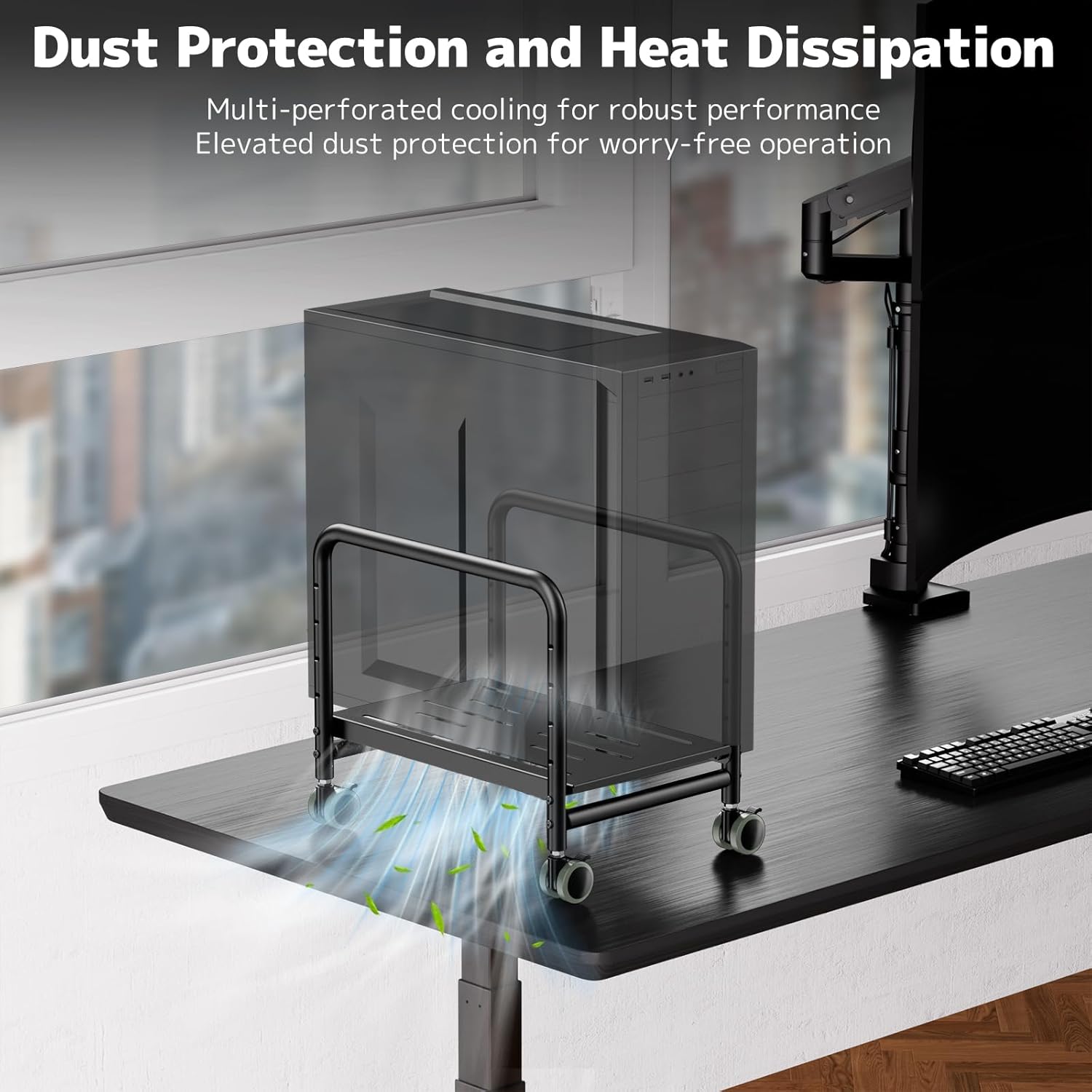
- Dust Protection and Airflow: By elevating your PC tower off the floor, the stand significantly reduces dust intake, which can prolong the life of your computer components. The perforated platform design further promotes robust airflow, aiding in heat dissipation.
- Stability and Protection: The high-quality steel construction and protective side rails ensure your PC tower remains secure and stable, preventing accidental tipping or falling, even on carpeted surfaces.


Manutenzione
- Pulizia: Pulisci il supporto con un panno morbido eamp panno per rimuovere polvere e sporco. Evitare l'uso di detergenti abrasivi o solventi che potrebbero danneggiare la finitura.
- Cura delle rotelle: Periodically check the casters for any accumulated debris (hair, lint) and clean them to ensure smooth rolling.
- Ispezione: Regularly inspect all connections and adjustment mechanisms to ensure they are secure and functioning correctly.
Risoluzione dei problemi
| Problema | Possibile causa | Soluzione |
|---|---|---|
| Il supporto è instabile o traballa. | Uneven surface; height adjustment pins not fully engaged; PC tower not centered. | Move to a level surface; ensure height pins are securely locked on both sides; reposition PC tower to be centered. |
| Le rotelle non scorrono fluidamente. | Debris caught in casters; casters not properly installed. | Clean any debris from the caster wheels; ensure casters are fully inserted into their sockets. |
| La regolazione dell'altezza è difficile. | Pins are stuck; excessive weight on the platform. | Ensure no weight is on the platform during adjustment; check pins for obstruction and apply gentle force. |
Specifiche
| Marca | PUTORI |
| Numero di modello | CPM-001 |
| Materiale | Acciaio legato |
| Colore | Nero |
| Tipo di finitura | Opaco |
| Dimensioni articolo (L x P x A) | 44 x 33 x 9.5 cm (17.3 x 13 x 3.7 pollici) |
| Peso dell'articolo | 4.07 chilogrammi (8.97 libbre) |
| Capacità di carico massima | 30 chilogrammi (66 libbre) |
| Livelli di regolazione dell'altezza | 5 levels (13.3 cm to 30.3 cm / 5.2 to 11.9 inches) |
| Compatible PC Case Width | Fino a 25.5 cm (10 pollici) |
| Assemblaggio richiesto | NO |
| Componenti inclusi | Supporto CPU |


Garanzia e supporto
PUTORSEN products are manufactured to high-quality standards. For specific warranty information, please refer to the documentation included with your purchase or visit the official PUTORSEN websito.
If you encounter any issues or have questions regarding your PC tower stand, please contact PUTORSEN customer support through the retailer where you purchased the product or via the contact information provided on the PUTORSEN brand store page on Amazon.
Supporto online: Per ulteriori risorse e FAQ, visitare il sito PUTORSEN Brand Store.