
1. Prodotto finitoview
The GDFStudio Modern Computer Desk is designed for compact spaces, offering a functional workspace with integrated storage. It features a rectangular tabletop, an open cubby, a storage drawer, and sturdy hairpin metal legs.

Image 1.1: The GDFStudio Modern Computer Desk, showcasing its design and functionality in a typical home office environment.
Caratteristiche principali:
- Design compatto: Optimized for smaller spaces, suitable for apartments, dorms, or home offices.
- Archiviazione integrata: Includes an open cubby and a spacious drawer for organization.
- Costruzione durevole: Made from laminated particleboard and MDF with metal hairpin legs.
- Stile versatile: Wood-grain finish with black metal legs complements various interior designs.
2. Installazione e assemblaggio
Assembly is required for this product. Please follow these instructions carefully. It is recommended to have two people for assembly to ensure stability and prevent damage.
Prima di iniziare:
- Inspect all components for damage. Do not proceed with assembly if parts are damaged.
- Ensure all hardware and parts listed in the packing list are present.
- Clear a spacious, clean area for assembly. Place a soft cloth or cardboard on the floor to protect the desk components from scratches.
- Tenere i bambini e gli animali domestici lontani dall'area di raccolta.
Fasi di assemblaggio:
- Identificare e separare tutti i componenti e l'hardware.
- Attach the hairpin legs to the designated points on the desk frame. Ensure all screws are tightened securely but do not overtighten.
- Assemble the drawer unit according to the provided diagram, ensuring the drawer slides are correctly oriented.
- Insert the assembled drawer into the desk unit.
- Carefully stand the desk upright.
- Verify all connections are secure and the desk is stable.

Image 2.1: Assembly diagram and dimensional overview, including weight capacities for the desk components.
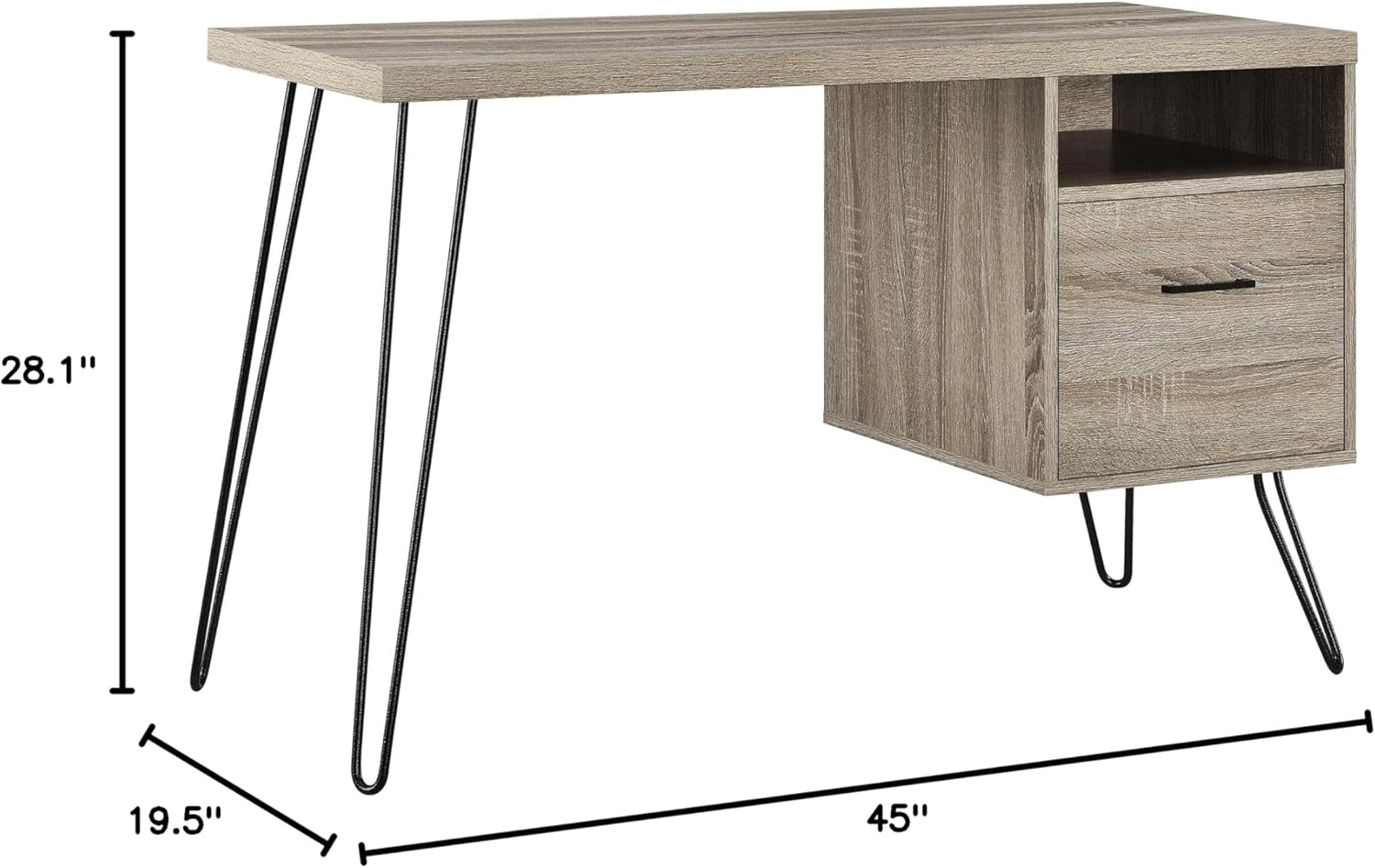
Image 2.2: Product dimensions: 45 inches (W) x 19.5 inches (D) x 28.1 inches (H).
3. Istruzioni per l'uso
The GDFStudio Modern Computer Desk is designed for versatile use in various home or office settings.
Utilizzo dello spazio di lavoro:
- Place your laptop, monitor, or writing materials on the main tabletop. The tabletop supports up to 60 lbs.
- Utilize the open cubby for quick access items such as notebooks, tablets, or small accessories. The cubby supports up to 10 lbs.
- The spacious drawer is suitable for storing letter-sized files or other office supplies, helping to keep your workspace organized. The drawer supports up to 20 lbs.

Image 3.1: The desk's storage drawer, designed to accommodate letter-sized files per un'organizzazione efficiente.
Considerazioni sul posizionamento:
- Position the desk on a level surface to ensure stability.
- Evitare di posizionare la scrivania alla luce diretta del sole o vicino a fonti di calore per evitare il degrado del materiale.
- Ensure adequate space around the desk for comfortable use and access to the drawer.
4. Manutenzione
Proper care and maintenance will extend the life and appearance of your GDFStudio Modern Computer Desk.
Pulizia:
- Per la pulizia generale, pulire le superfici con un panno morbido eamp stoffa.
- Evitare l'uso di prodotti chimici aggressivi, detergenti abrasivi o lucidanti che potrebbero danneggiare la finitura.
- Promptly wipe up spills to prevent staining or water damage to the laminated particleboard.
Cura generale:
- Controllare e serrare periodicamente tutte le viti e gli elementi di fissaggio per garantire la stabilità della scrivania.
- Avoid dragging the desk when moving it; always lift it to prevent damage to the legs and frame.
- Do not place excessively hot or cold items directly on the desk surface without protective coasters.
5. Risoluzione Dei Problemi
Se riscontri problemi con la tua scrivania, consulta i seguenti suggerimenti comuni per la risoluzione dei problemi:
La scrivania ondeggia:
- Assicurarsi che la scrivania sia posizionata su una superficie piana.
- Check all leg attachments and frame connections. Tighten any loose screws.
- Verify that all hairpin legs are making even contact with the floor.
Il cassetto si blocca o non si chiude correttamente:
- Remove the drawer and inspect the drawer slides for any obstructions or debris.
- Ensure the drawer slides are properly aligned and securely attached to both the drawer and the desk frame.
- Apply a small amount of silicone lubricant to the drawer slides if necessary.
6. Specifiche
| Caratteristica | Dettaglio |
|---|---|
| Marca | GDFStudio |
| Numero di modello | 9658096PCOM |
| Dimensioni del prodotto (P x L x A) | 19.5" x 45" x 28.1" (49.5 cm x 114.3 cm x 71.4 cm) |
| Peso dell'articolo | 57 libbre (25.9 kg) |
| Materiale | Laminated Particleboard, MDF, Metal (Hairpin Legs) |
| Colore | Brown (Wood-grain finish) |
| Progettazione della scrivania | Scrivania per computer |
| Numero di cassetti | 1 |
| Caratteristica speciale | Storage (Drawer, Open Cubby) |
| Assemblaggio richiesto | SÌ |
| Capacità di peso (da tavolo) | 60 libbre (27.2 kg) |
| Weight Capacity (Cubby) | 10 libbre (4.5 kg) |
| Capacità di peso (cassetto) | 20 libbre (9.1 kg) |
7. Garanzia e supporto
For information regarding product warranty, please refer to the documentation provided at the time of purchase or contact your retailer directly. For further assistance or support, please reach out to GDFStudio customer service through their official websito o le informazioni di contatto fornite con l'acquisto.