
1. Introduzione
The Xiaomi Redmi Pad 2 is an 11-inch tablet designed for versatile use, offering powerful performance in a lightweight and durable unibody metal design. It features a sharp 2.5K (2560 x 1600 px) display with 10-bit color depth and 600 nits peak brightness, enhanced by a 90 Hz AdaptiveSync refresh rate and TÜV Rheinland blue light certification for comfortable viewing.
Equipped with a MediaTek G100-Ultra processor, the tablet ensures fluid multitasking. Its audio experience is enriched by four stereo speakers supporting Hi-Res Audio and Dolby Atmos. The device boasts a 9000 mAh battery with 18W fast charging via USB-C, providing extended autonomy. Running on Xiaomi HyperOS, it offers smart productivity and connectivity with Wi-Fi 5 and Bluetooth 5.3, alongside expandable storage up to 2 TB.

Figura 1.1: Fronte view of the Xiaomi Redmi Pad 2 tablet.
2. Cosa c'è nella scatola
Upon unboxing your Xiaomi Redmi Pad 2, please verify that all the following items are included:
- Tablet Xiaomi Redmi Pad 2
- Manuale di istruzioni (questo documento)
- USB-C Charging Cable or Connector
3. Impostazione
3.1. Carica del dispositivo
Before initial use, fully charge your Redmi Pad 2. Connect the provided USB-C cable to the tablet's USB-C port and the other end to a compatible power adapter (not always included) or a computer's USB port. The tablet supports 18W fast charging.
3.2. Accensione/Spegnimento
- Per accendere: Tenere premuto il pulsante di accensione situato sul lato del tablet finché non appare il logo Xiaomi sullo schermo.
- Per spegnere: Press and hold the Power button until the power options appear. Select "Power off" from the menu.
- Ricominciare: Press and hold the Power button until the power options appear. Select "Restart" from the menu.
3.3. Configurazione iniziale
Alla prima accensione, il tablet ti guiderà attraverso la procedura di configurazione iniziale. Questa include:
- Selezione della lingua: Scegli la tua lingua preferita.
- Connessione Wi-Fi: Connect to a Wi-Fi network to access the internet and complete the setup.
- Account Google: Accedi con il tuo account Google o creane uno nuovo. Questo è essenziale per scaricare app dal Google Play Store e sincronizzare i dati.
- Xiaomi Account: You may be prompted to sign in or create a Xiaomi account for additional services and cloud backup.
- Impostazioni di sicurezza: Set up a screen lock (PIN, pattern, password, or facial recognition).
3.4. Archiviazione espandibile
The Redmi Pad 2 supports expandable storage up to 2 TB via a microSD card. Locate the microSD card slot on the side of the tablet, insert your card carefully until it clicks into place. You can then use this storage for photos, videos, and other files.
4. Istruzioni per l'uso
4.1. Display e navigazione
The 11-inch 2.5K display offers a vibrant visual experience. Navigate the tablet using touch gestures:
- Rubinetto: Seleziona un elemento o apri un'app.
- Scorri: Scorri le pagine, le schermate iniziali o i menu.
- Pizzica per ingrandire: Ingrandisci o rimpicciolisci foto, mappe e web pagine.
- Premere a lungo: Accedi ai menu contestuali o sposta le icone delle app.
The 90 Hz AdaptiveSync refresh rate provides smooth scrolling and responsiveness. The TÜV Rheinland blue light certification helps reduce eye strain during prolonged use.
4.2. Caratteristiche audio
The Redmi Pad 2 is equipped with four stereo speakers, providing an immersive audio experience. It supports Hi-Res Audio and Dolby Atmos for enhanced sound quality when watching movies, listening to music, or playing games.
4.3. Prestazioni e multitasking
Powered by the MediaTek G100-Ultra processor, the tablet delivers efficient performance for daily tasks and multitasking. Xiaomi HyperOS optimizes system resources for a smooth user experience.
4.4. Connettività
- Wi-Fi 5: Connettiti alle reti wireless per accedere a Internet. Vai su Impostazioni > Wi-Fi per gestire le connessioni.
- Bluetooth 5.3: Pair with Bluetooth devices such as headphones, speakers, or keyboards. Go to Settings > Bluetooth to manage pairings.
- USB-C: Use the USB-C port for charging, data transfer, and connecting to other peripherals.
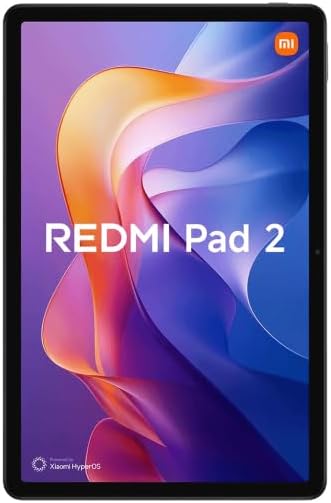
Figura 4.1: Indietro view of the Xiaomi Redmi Pad 2 tablet.
5. Manutenzione
5.1. Pulizia del tablet
Per pulire il tablet, spegnerlo e scollegare tutti i cavi. Utilizzare un panno morbido e privo di lanugine leggermente dampened with water or a screen cleaner specifically designed for electronics. Avoid using harsh chemicals, abrasive materials, or excessive moisture.
5.2. Cura della batteria
The Redmi Pad 2 features a 9000 mAh battery with an average life of 12 hours. To prolong battery lifespan:
- Evitare temperature estreme.
- Non lasciare che la batteria si scarichi completamente troppo spesso.
- Use the original charging cable or a certified compatible one.
- Scollegare il caricabatterie quando la batteria è carica.
5.3. Aggiornamenti software
Regularly check for and install software updates to ensure optimal performance, security, and access to new features. Go to Settings > About tablet > System update to check for available updates.
6. Risoluzione Dei Problemi
If you encounter issues with your Redmi Pad 2, try the following steps:
- Il dispositivo non risponde: Per forzare il riavvio, tenere premuto il pulsante di accensione per circa 10-15 secondi.
- Problemi di connettività (Wi-Fi/Bluetooth): Turn Wi-Fi or Bluetooth off and then on again. If the issue persists, restart the tablet and your router/Bluetooth device.
- App che si bloccano/si bloccano: Close the app and reopen it. If the problem continues, clear the app's cache (Settings > Apps > [App Name] > Storage > Clear cache) or uninstall and reinstall the app.
- La batteria si scarica rapidamente: Controlla l'utilizzo delle app in background (Impostazioni > Batteria). Riduci la luminosità dello schermo e disattiva le funzioni non necessarie come GPS o Bluetooth quando non sono in uso.
- Prestazioni lente: Chiudi le app inutilizzate, svuota la cache e assicurati di avere spazio di archiviazione sufficiente. Considera un ripristino delle impostazioni di fabbrica come ultima risorsa (esegui prima un backup dei dati).
Per problemi più complessi, fare riferimento al supporto ufficiale Xiaomi websito o contattare il servizio clienti.
7. Specifiche
| Caratteristica | Dettaglio |
|---|---|
| Numero di modello | VHU5973EU |
| Dimensioni dello schermo | 11 pollici |
| Risoluzione dello schermo | 2560 x 1600 pixel (2.5K) |
| Frequenza di aggiornamento | 90 Hz AdaptiveSync |
| Processore | MediaTek G100-Ultra (3.4 GHz max clock speed) |
| Memoria RAM | 8 GB |
| Memoria interna | 256 GB |
| Archiviazione espandibile | Fino a 2 TB (microSD) |
| Sistema operativo | Xiaomi HyperOS (based on Android) |
| Capacità della batteria | 9000 mAh (tipico) |
| Durata della batteria (media) | 12 ore |
| Ricarica | Ricarica rapida da 18 W (USB-C) |
| Connettività | Wi-Fi 5 (802.11ac), Bluetooth 5.3 |
| Dimensioni (L x P x A) | 15 x 15 x 20 cm (circa) |
| Peso | 890 grammi (circa) |
| Audio | Quad Stereo Speakers, Hi-Res Audio, Dolby Atmos |
| Camera Resolution (Digital Zoom) | 7 Mpx |
| Presa per cuffie | 3.5 millimetri |
8. Garanzia e supporto
8.1. Informazioni sulla garanzia
The Xiaomi Redmi Pad 2 comes with a garanzia di tre anni contro i difetti di fabbricazioneLa presente garanzia copre i difetti di materiali e fabbricazione in condizioni di normale utilizzo. Si prega di conservare la prova d'acquisto per eventuali reclami in garanzia.
8.2. Assistenza clienti
Per ulteriore assistenza, supporto tecnico o reclami in garanzia, visita il supporto ufficiale Xiaomi website or contact their customer service. You can usually find contact information and FAQs on the official Xiaomi websito per la tua regione.
Risorse online: Supporto ufficiale Xiaomi