
1. Introduzione
This manual provides detailed instructions for the installation, operation, and maintenance of your PGST A107F-US-F Home Security Alarm System. This system offers comprehensive security protection with WiFi and GSM/4G connectivity, a 4.3-inch color touchscreen, and compatibility with smart home platforms like Alexa and Google Assistant. It is designed for various applications including homes, apartments, and small businesses, providing real-time alerts without monthly fees.
2. Package Contents (24-Piece Kit)
Verifica che tutti i componenti siano presenti nel tuo pacchetto:
- 1 x PGST Alarm Hub (Main Control Panel)
- 6 rilevatori di movimento PIR
- 12 x Door/Window Alarm Sensors
- 3 x telecomandi
- 2 RFID Tags
- 1 x Wired Siren (typically included with the hub)
- Adattatore di alimentazione per hub
- Hardware di montaggio
- Manuale d'uso
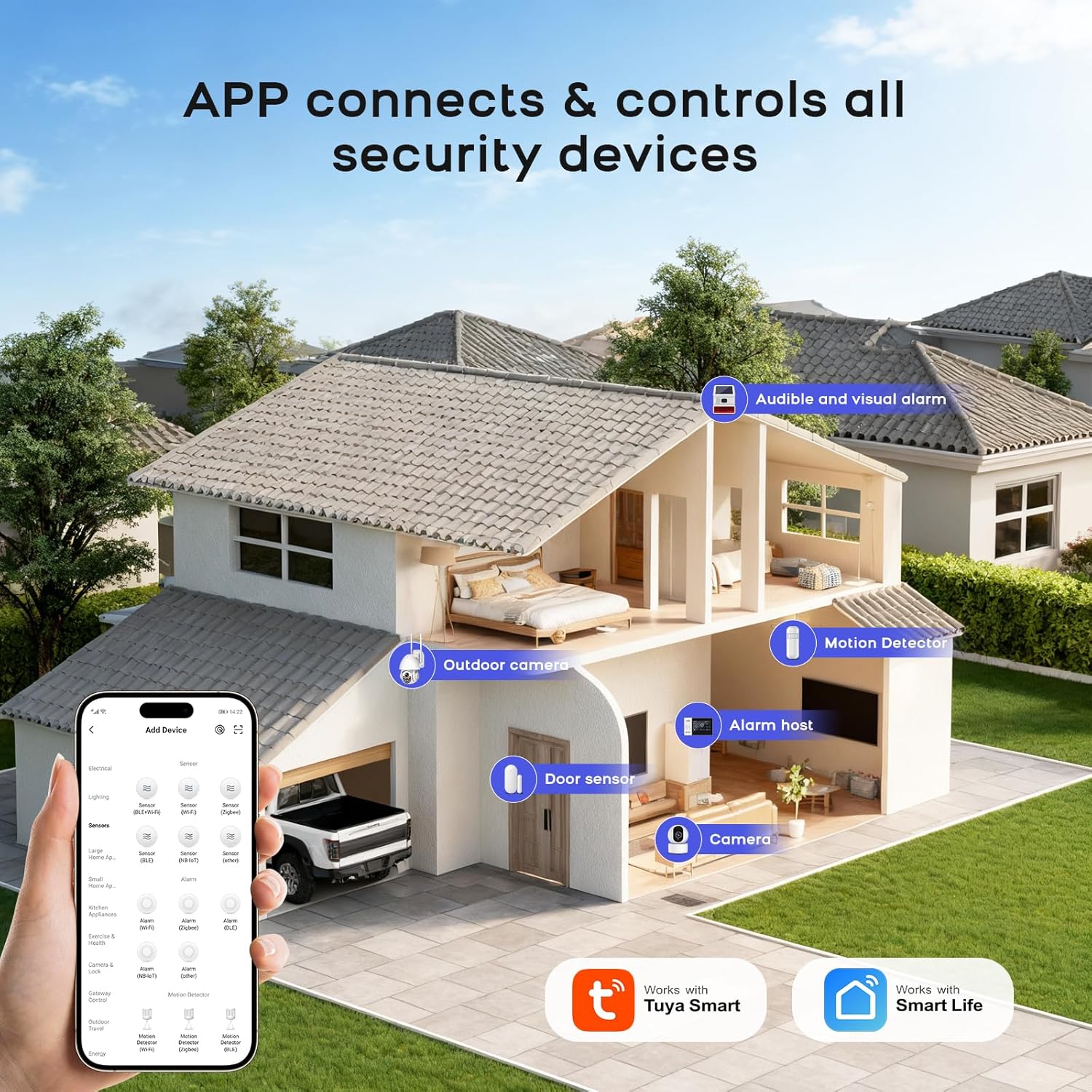
Immagine: Oltreview of the 24-piece PGST A107F-US-F Home Security Alarm System kit, showing the main hub, motion detectors, door/window sensors, remote controls, and RFID tags.
3. Impostazione
3.1 Initial Setup of the Alarm Hub
- Accensione: Connect the alarm hub to a power outlet using the provided adapter. The hub will power on automatically.
- Scarica l'app: Download the 'Smart Life' or 'Tuya Smart' app from your smartphone's app store. Register or log in to your account.
- Configurazione di rete:
- WiFi Connection (2.4GHz): On the hub's touchscreen, navigate to the network settings. Select WiFi and follow the on-screen prompts to connect to your 2.4GHz home WiFi network. Ensure your phone is also connected to the same 2.4GHz network during setup.
- GSM/4G Connection: If using a SIM card, insert a valid 2G/3G/4G SIM card into the designated slot on the hub. The system will automatically detect the network.
- Aggiungi dispositivo nell'app: Open the Smart Life/Tuya Smart app, tap 'Add Device', and select the alarm system category. Follow the in-app instructions to pair the hub with your account.

Image: Visual guide for configuring the network connection of the alarm hub using the touchscreen and mobile app.
3.2 Accoppiamento di sensori e accessori
The system supports up to 200 PGST sensor accessories and 5 remote controls. Follow these general steps to pair:
- Entra in modalità di associazione: On the alarm hub, navigate to the 'Accessories' or 'Add Device' section. Select the type of sensor you wish to add (e.g., Door Sensor, PIR Detector).
- Attiva sensore: Trigger the sensor (e.g., separate the two parts of a door sensor, or wave your hand in front of a motion detector). The hub will detect the sensor and prompt you to confirm pairing.
- Conferma associazione: Follow the on-screen instructions on the hub or in the app to complete the pairing process.

Image: Illustrates the process of customizing the name of a door/window sensor within the mobile application for easy identification.
3.3 Posizionamento del sensore
- Sensori per porte/finestre: Install on the frame and moving part of doors and windows. Ensure the two parts are aligned and within 1 cm of each other when the door/window is closed.
- Rilevatori di movimento: Mount in corners or on walls at a height of 2-2.2 meters, ensuring a clear line of sight to the area you wish to monitor. Avoid placing near heat sources or direct sunlight.

Image: Depicts the optimal placement of a motion detector in a room, highlighting its 110-degree detection angle and 12-meter range.
4. Funzionamento del sistema
Metodi di controllo 4.1
The PGST A107F-US-F system can be controlled via multiple methods:
- Schermo tattile: Directly operate the system using the 4.3-inch color touchscreen on the alarm hub.
- Applicazione mobile: Use the Smart Life/Tuya Smart app for remote control and monitoring from anywhere.
- Telecomando: Use the provided remote controls for quick arming, disarming, and SOS functions.
- Carta RFID: Tap an RFID card on the hub for convenient arming or disarming.
- Controllo vocale: Integrazione con Amazon Alexa o Google Assistant per i comandi vocali.

Image: Illustrates how the mobile app connects and controls all security devices, showing a smart home layout with various sensors.
4.2 Inserimento e disinserimento
- Modalità di inserimento: Activates all sensors. Any triggered sensor will initiate an alarm. Use when leaving the premises.
- Stay Arm Mode: Activates perimeter sensors (e.g., door/window sensors) while allowing movement within the property (e.g., motion detectors are disarmed). Use when staying at home.
- Modalità di disattivazione: Deactivates all sensors, allowing free movement without triggering alarms.
- Modalità allarme silenzioso: The hub supports a silent alarm mode, which sends notifications without an audible siren, allowing you to take protective measures discreetly.

Image: A user interacting with an Alexa device to arm the home security system, demonstrating voice control functionality.
4.3 Funzioni di emergenza
The system includes an SOS function for emergencies:
- Pulsante SOS: Press the SOS button on the alarm hub or the remote control to trigger an immediate emergency alert. This will activate the siren and send notifications to pre-set contacts.

Image: An elderly person holding an SOS remote control, illustrating the one-button emergency call feature for unexpected situations.
4.4 App Alerts and Notifications
The mobile app provides real-time monitoring and alerts:
- Avvisi immediati: Receive push notifications on your smartphone for any triggered alarms, system status changes, or sensor events.
- Avvisi di batteria scarica: The system will notify you via SMS and app alerts when a device's battery is low, ensuring continuous protection.

Image: A child opening a door equipped with a door sensor, demonstrating the 24/7 monitoring and real-time alert feature on a smartphone.

Image: Illustrates the low battery alert system, showing how the hub and mobile app notify users when sensor batteries are below a critical threshold.
4.5 Inserimento e disinserimento programmati
Set flexible schedules for arming and disarming your system via the mobile app to integrate with your daily routine.

Image: A screenshot of the mobile app interface showing options for custom arming and disarming schedules, battery level, and sensor sensitivity.
4.6 Caratteristiche del prodottoview Video
Video: Un breve riassuntoview demonstrating key features of the PGST Home Security Alarm System, including ease of installation, smart functionalities, and various applications.
5. Manutenzione
5.1 Sostituzione della batteria
- Sensori: When a low battery alert is received for a specific sensor, replace its batteries promptly. Refer to the individual sensor's instructions for battery type and replacement procedure. Most sensors use standard alkaline batteries.
- Alarm Hub: The alarm hub typically has a built-in rechargeable battery for backup power during outages. Ensure the hub remains connected to power for optimal performance.
5.2 Pulizia
Clean the alarm hub and sensors periodically with a soft, dry cloth. Avoid using abrasive cleaners or solvents that could damage the devices.
6. Risoluzione Dei Problemi
| Problema | Possibile causa | Soluzione |
|---|---|---|
| Il sistema non si connette al Wi-Fi. | Password Wi-Fi errata; rete selezionata a 5 GHz; segnale debole. | Verify password; ensure 2.4GHz network is selected; move hub closer to router. |
| Il sensore non attiva l'allarme. | Sensor not paired; low battery; incorrect placement; system disarmed. | Check pairing status; replace battery; adjust placement; arm the system. |
| Nessuna notifica dell'app. | App permissions disabled; phone not connected to internet; hub offline. | Enable app notifications; check phone's internet connection; verify hub's network status. |
| Telecomando non funzionante. | Low battery in remote; remote not paired. | Replace remote battery; re-pair remote with the hub. |
7. Specifiche tecniche
| Caratteristica | Specificazione |
|---|---|
| Marca | PGST |
| Numero di modello | A107F-US-F |
| Colore | White And Blue |
| Fonte di alimentazione | Battery Powered (for sensors), AC Adapter (for hub) |
| Dispositivi compatibili | Wifi, Alexa, Google Assistant |
| Dimensioni del mozzo (L x P x A) | 8 x 4 x 3.5 pollici |
| Tecnologia di connettività | Wi-Fi (2.4 GHz), GSM/4G |
| Tipo di installazione | Senza fili |
| Tipo di avviso | Audible And Visual, App Alerts, Phone Notifications |
| Hub Item Weight | 9.6 once |
| Voltage | 5 Volt |
| Metodo di controllo | App, Touchscreen, Remote Control, RFID Card |
| Composizione delle celle della batteria | Alcalina (per sensori) |
| Portata wireless massima | 100 Meters (sensor to hub) |
| Usi consigliati | Sicurezza domestica |
| Livello di rumore (sirena) | 110 decibel |
| Kit Unit Count | 24-Pz |
| Tecnologia | PIR Motion Detection, Magnetic Contact (Door/Window) |
8. Garanzia e supporto
8.1 Informazioni sulla garanzia
The PGST A107F-US-F Home Security Alarm System typically comes with a 2-year limited warranty. Please refer to your purchase documentation or contact the seller for specific warranty terms and conditions.
8.2 Assistenza clienti
For technical assistance, troubleshooting, or any questions regarding your alarm system, please contact PGST customer support through the vendor's official channels or the contact information provided with your product packaging.


