
1. Introduzione
Thank you for choosing the TOPUTURE Foldable Walking Pad with Incline. This versatile fitness equipment is designed for both walking and running, offering a convenient way to stay active at home or in the office. Featuring a 4-in-1 design, adjustable incline, and a compact form factor, this treadmill provides an effective workout solution. Please read this manual carefully before use to ensure safe and optimal operation.
2. Informazioni sulla sicurezza
AVVERTENZA: per ridurre il rischio di lesioni gravi, leggere tutte le precauzioni e le istruzioni importanti contenute nel presente manuale prima di utilizzare il tapis roulant.
- Posizionare sempre il tapis roulant su una superficie piana e stabile.
- Tenere i bambini e gli animali domestici lontani dal tapis roulant durante il funzionamento.
- Indossare calzature sportive adeguate. Non utilizzare il tapis roulant a piedi nudi o con i calzini.
- Ensure the safety key is properly attached to your clothing before starting. In case of emergency, the safety key will stop the treadmill.
- Do not exceed the maximum user weight of 300 lbs (approximately 136 kg).
- Consultare un medico prima di iniziare qualsiasi programma di esercizi.
- Scollegare il tapis roulant dalla presa di corrente quando non è in uso o prima di pulirlo/manutenerlo.
- Non utilizzare il tapis roulant se il cavo o la spina sono danneggiati o se non funziona correttamente.
3. Contenuto della confezione
Si prega di controllare la confezione per verificare la presenza dei seguenti elementi:
- TOPUTURE Foldable Walking Pad with Incline Treadmill
- Cavo di alimentazione
- Kit di strumenti
- Manuale dell'utente (questo documento)
- Telecomando
4. Caratteristiche del prodotto
The TOPUTURE Foldable Walking Pad with Incline offers a range of features designed for a comprehensive and convenient workout:
- Design 4 in 1: Seamlessly switch between Walking, Running, Climbing, and Working modes to suit your fitness needs.
- Adjustable Manual Incline: Features a 0-9% manual incline adjustment to simulate uphill walking/running, enhancing calorie burn.
- Potente motore da 2.5 CV: Provides smooth and consistent performance for various exercise intensities.
- Compatto e pieghevole: Designed for easy storage, folding to a compact size of approximately 50x23x4.5 inches. Transport wheels allow for effortless movement.
- Display LED e telecomando: Monitor your speed, time, distance, and calories burned on the integrated LED display. Control settings conveniently with the included remote.
- Connettività dell'app: Connect to a dedicated app for additional workout tracking and program options.
- Funzionamento a basso rumore: Operates at less than 45dB, making it suitable for home and office environments without causing disturbance.
- Generous Running Area: Provides a comfortable 40 x 16 inch running surface.
- Costruzione robusta: Supporta un peso massimo dell'utente di 300 libbre.
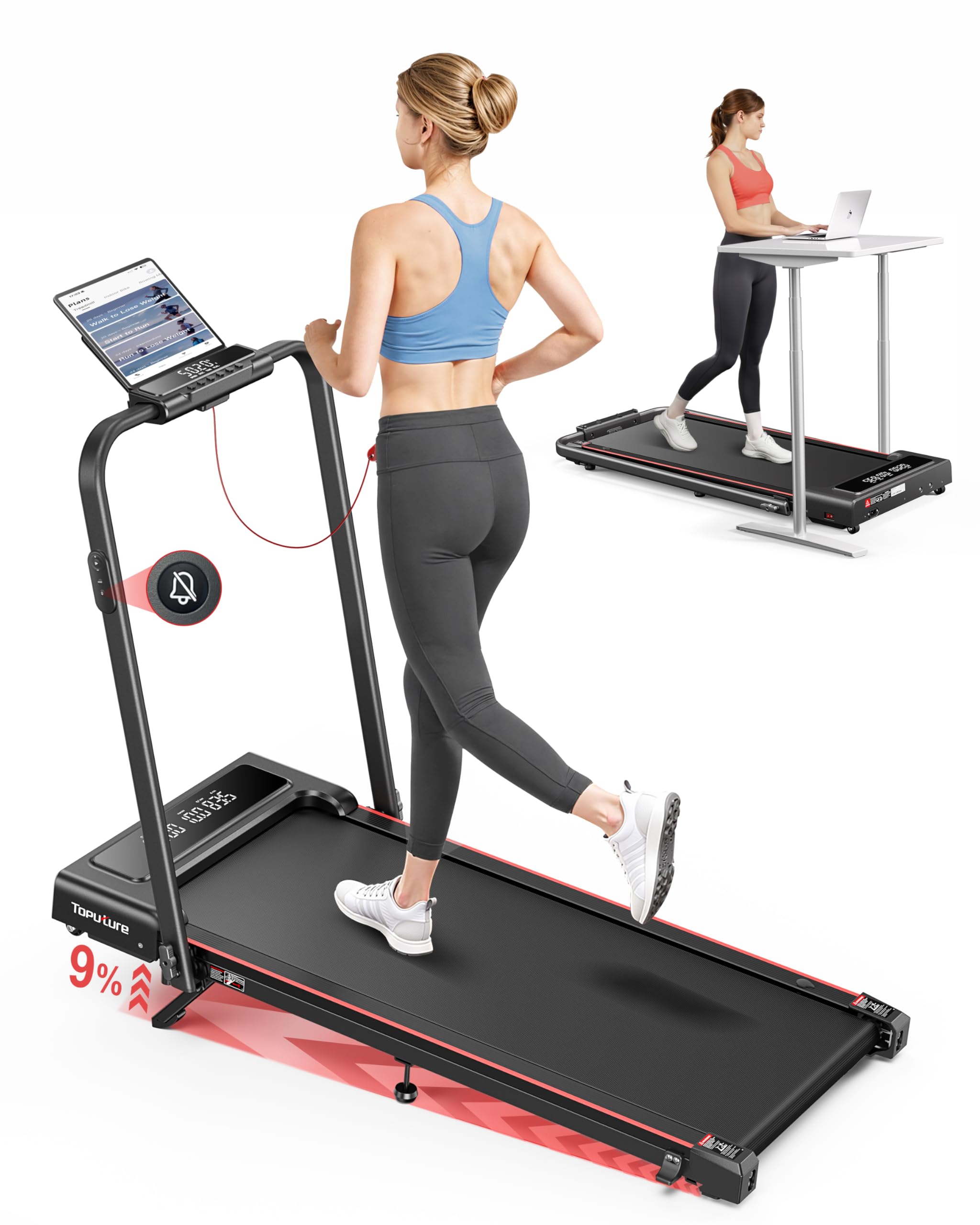
Image: The TOPUTURE walking pad features an adjustable 0-9% incline, designed to boost calorie burning during workouts.

Image: The 4-in-1 design allows for various uses, including walking under a desk or traditional running with the handle.

Image: Visual representation of the four distinct modes: Running, Climbing, Walking, and Working, with their respective speed ranges.
5. Guida all'installazione
The TOPUTURE Walking Pad is designed for minimal setup. Follow these steps to prepare your treadmill for use:
5.1 Apertura del tapis roulant
- Estrarre con cautela il tapis roulant dalla confezione.
- Posizionare il tapis roulant su una superficie piana e livellata.
- If the handle is folded, gently lift it until it locks into the upright position. Ensure all locking mechanisms are secure.
5.2 Regolazione dell'inclinazione
The treadmill features a manual incline adjustment. To change the incline:
- Aprire il poggiapiedi: Locate the adjustable footpads at the rear of the treadmill and unfold them.
- Inserire il perno: Use the provided pin to secure the footpad at your desired incline level (0% or 9%).
- Regolare il poggiapiedi centrale: Ensure the middle support footpad is also adjusted to provide stable support for the chosen incline.

Image: Step-by-step guide on how to manually adjust the treadmill's incline.
5.3 Collegamento dell'alimentazione
Plug the power cord into the treadmill's power input port and then into a grounded electrical outlet. Ensure the power switch is in the OFF position before plugging in.
6. Istruzioni per l'uso
6.1 Accensione/spegnimento
- Turn the main power switch located at the front of the treadmill to the ON position.
- Attach the safety key to the designated area on the console and clip the other end to your clothing. The display will illuminate.
- To turn off, remove the safety key, then switch the main power switch to OFF.
6.2 Utilizzo del telecomando
Il telecomando consente di avviare, arrestare e regolare la velocità del tapis roulant.
- Avvio/Arresto: Press the START/STOP button to begin or end your workout.
- Regolazione della velocità: Utilizzare i pulsanti '+' e '-' per aumentare o diminuire la velocità.
- Selezione della modalità: Some remotes may have buttons to switch between preset modes or programs.
6.3 Regolazione della velocità e modalità
The treadmill supports various speed ranges depending on the mode:
- Modalità di lavoro: 0.6 - 1.5 MPH (ideal for under-desk use).
- Modalità di camminata: 1.5 - 3 MPH.
- Modalità di arrampicata: 0.6 - 3 MPH (when incline is engaged).
- Modalità di esecuzione: 3 - 7.6 MPH (with handle in upright position).

Image: The treadmill's low noise feature and remote control make it ideal for under-desk use, allowing for quiet operation.
6.4 Utilizzo dell'app
Download the dedicated TOPUTURE app from your smartphone's app store. Follow the in-app instructions to pair your device with the treadmill via Bluetooth. The app allows you to track progress, set goals (time, calories, distance), and access additional workout programs.
6.5 chiave di sicurezza
The safety key is a critical safety feature. Always ensure it is properly placed on the treadmill console and clipped to your clothing. If the safety key is dislodged, the treadmill will immediately stop, preventing potential injury.
7. Manutenzione
Una manutenzione regolare garantisce la longevità e le prestazioni ottimali del tuo tapis roulant.
7.1 Lubrificazione
The running belt requires periodic lubrication to reduce friction and wear. Refer to the included tool kit for lubricating oil and instructions. Typically, lubrication is needed every 3-6 months depending on usage.
7.2 Regolazione della cinghia
If the running belt feels loose, slips, or is off-center, it may need adjustment. Use the provided tool to adjust the belt tension and alignment screws at the rear of the treadmill. Adjust in small increments and test the belt after each adjustment.
7.3 Pulizia
Pulisci le superfici del tapis roulant con un pannoamp cloth after each use to remove sweat and dust. Do not use abrasive cleaners or solvents. Keep the area around the treadmill clean and free of obstructions.

Image: Instructions for adding lubricating oil and adjusting the running belt for optimal performance.
8. Risoluzione Dei Problemi
If you encounter any issues with your TOPUTURE Walking Pad, refer to the following common problems and solutions:
| Problema | Possibile causa | Soluzione |
|---|---|---|
| Il tapis roulant non si accende. | Power cord not connected, power switch off, safety key not in place. | Check power cord connection, ensure power switch is ON, place safety key correctly. |
| Il nastro trasportatore slitta o si blocca. | Cinghia troppo lenta, sovraccarico del motore, lubrificazione insufficiente. | Adjust belt tension, reduce user weight/speed, lubricate the belt. |
| Rumore insolito durante il funzionamento. | Componenti allentati, attrito della cinghia, problema al motore. | Check for loose screws, lubricate belt, contact customer support if noise persists. |
| Il telecomando non risponde. | Dead battery, interference, remote not paired. | Replace remote battery, ensure no obstructions, re-pair remote if necessary (refer to app instructions). |
9. Specifiche
| Caratteristica | Dettaglio |
|---|---|
| Dimensioni del prodotto (aperto) | 126 x 62 x 12 cm (circa 50 x 24.4 x 4.7 pollici) |
| Dimensioni imballate | 50 x 23 x 4.5 pollici |
| Peso dell'articolo | 24.95 kg (circa 55 libbre) |
| Materiale | Acciaio legato |
| Potenza motore | 2.5 CV |
| Velocità massima | 7.6 miglia all'ora |
| Percentuale di inclinazione massimatage | 9% (Regolazione manuale) |
| Area di corsa | 40 x 16 pollici |
| Peso massimo dell'utente | 300 libbre |
| Visualizza metriche | Calorie bruciate, distanza, velocità, tempo |
| Numero di programmi | 12 (via App) |
| Caratteristiche speciali | Compact Design, Foldable, Lightweight, App Control, Remote Control |
| Assemblaggio richiesto | No (Installation-Free) |

Image: The treadmill is built to support a maximum user weight of 300 lbs.

Image: The treadmill's space-saving design allows it to be easily folded and moved using transport wheels for convenient storage.
10. Garanzia e supporto
For warranty information, please refer to the documentation included with your product or contact TOPUTURE customer support directly. If you require assistance with setup, operation, maintenance, or troubleshooting that is not covered in this manual, please reach out to our customer service team.
Informazioni sui contatti: Refer to your product packaging or the official TOPUTURE websito per i dettagli più aggiornati sull'assistenza clienti.