
1. Prodotto finitoview
The PGST WiFi Home Alarm System Qek-a107s-b is a comprehensive wireless security solution designed for homes and offices. It supports dual network connectivity (WiFi and GSM) and offers various alarm states for enhanced protection. The system is expandable, allowing for the addition of up to 100 wireless sensors and 3 wired sensors.

Figure 1.1: PGST WiFi Home Alarm System Qek-a107s-b main unit and included accessories.
Caratteristiche principali:
- Supporto di rete doppia: Operates via WiFi (2.4G only) and GSM for reliable communication.
- Sistema espandibile: Supporta fino a 100 sensori wireless e 3 sensori cablati.
- Modalità di attivazione multiple: Remote arming, home arming, delayed arming, and timely arming.
- Batteria di backup: Garantisce un funzionamento continuo durante l'interruzione di correntetages.
- Controllo flessibile: Arm/disarm via remote control, mobile app, RFID card, or phone call.
- Long-Range Signal: Integrated antenna for wide coverage, up to 2,500 square feet.
- Nessuna quota di abbonamento: Free app control without hidden costs or contracts.
2. Contenuto della confezione
Upon unpacking, verify that all the following items are included in your PGST WiFi Home Alarm System Qek-a107s-b package:
- 1 x Host di allarme (pannello di controllo principale)
- 3 x rilevatori di movimento
- 2 x telecomandi
- 6 sensori per porte/finestre
- 2 carte RFID
- 1 x sirena cablata
- All necessary batteries for included components.
3. Componenti del prodotto
3.1 Alarm Host (Main Control Panel)
The alarm host features a 4.3-inch TFT display and capacitive touch interface for easy navigation and control. It includes an SOS button and an RFID card sensing area for quick arming/disarming.

Figura 3.1: Fronte view of the alarm host, highlighting the 4.3 TFT display screen.
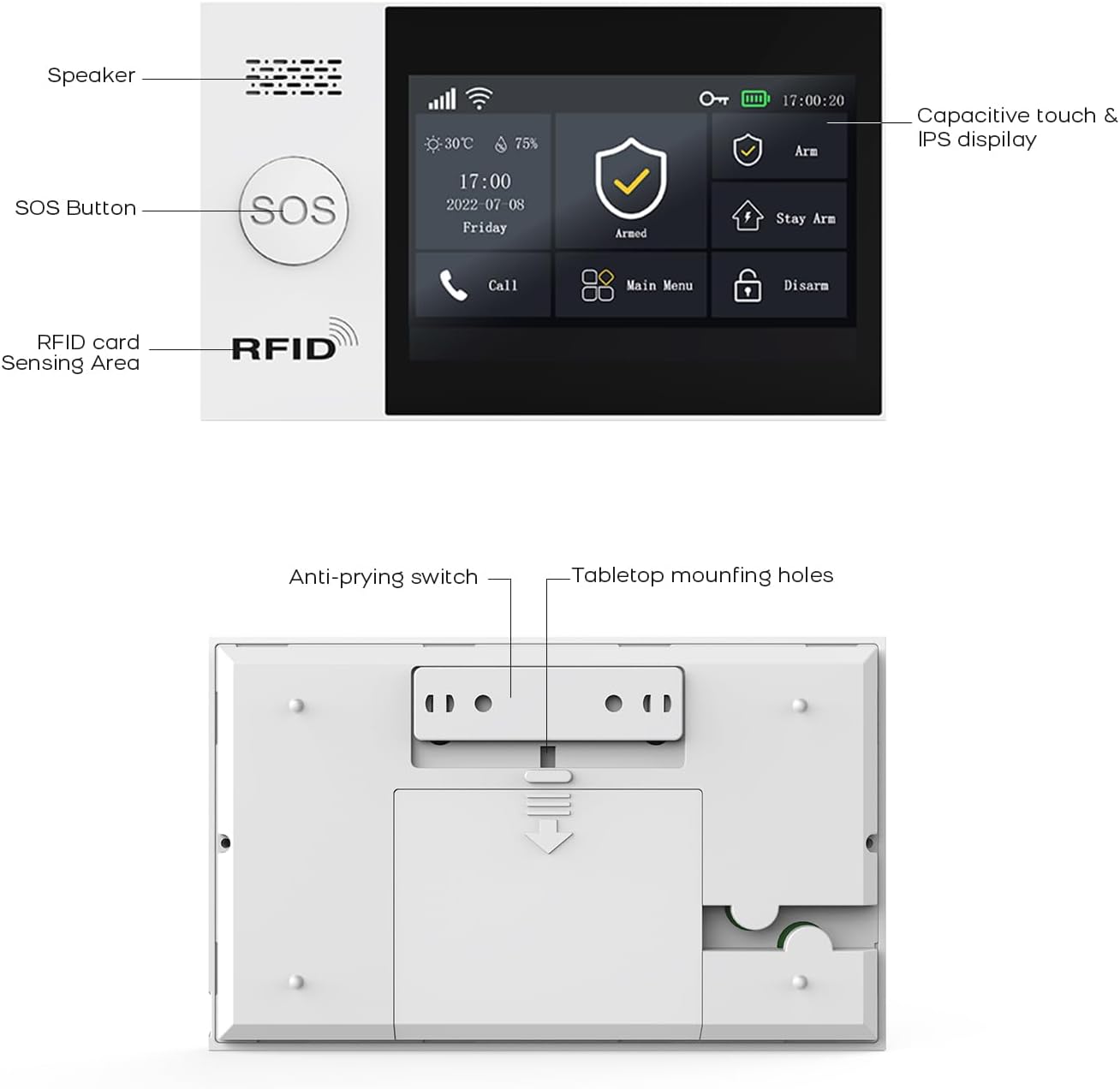
Figura 3.2: dettagliata view of the alarm host's front panel (speaker, SOS button, RFID area) and rear panel (anti-prying switch, tabletop mounting holes).
3.2 Sensori e accessori
The system includes various sensors and accessories to detect intrusions and provide comprehensive security. These include motion detectors, door/window sensors, remote controls, RFID cards, and a wired siren.
4. Configurazione e installazione
The PGST alarm system is designed for easy DIY installation. Follow these steps to set up your system.
4.1 Accensione iniziale
- Connect the alarm host to a power outlet using the provided adapter.
- Ensure the backup battery is properly installed. The system will automatically switch to battery power during an outage.
4.2 Connessione di rete (WiFi e GSM)
- Connessione wifi:
- Access the network settings on the alarm host's display.
- Select your 2.4GHz WiFi network (5GHz networks are not supported).
- Inserisci la password del tuo Wi-Fi per connetterti.
- Connessione GSM:
- Insert a valid SIM card into the designated slot on the alarm host.
- The system will automatically detect and connect to the GSM network.
4.3 Installazione del sensore
Strategically place motion detectors and door/window sensors in key areas of your home or office. Ensure sensors are within range of the alarm host.
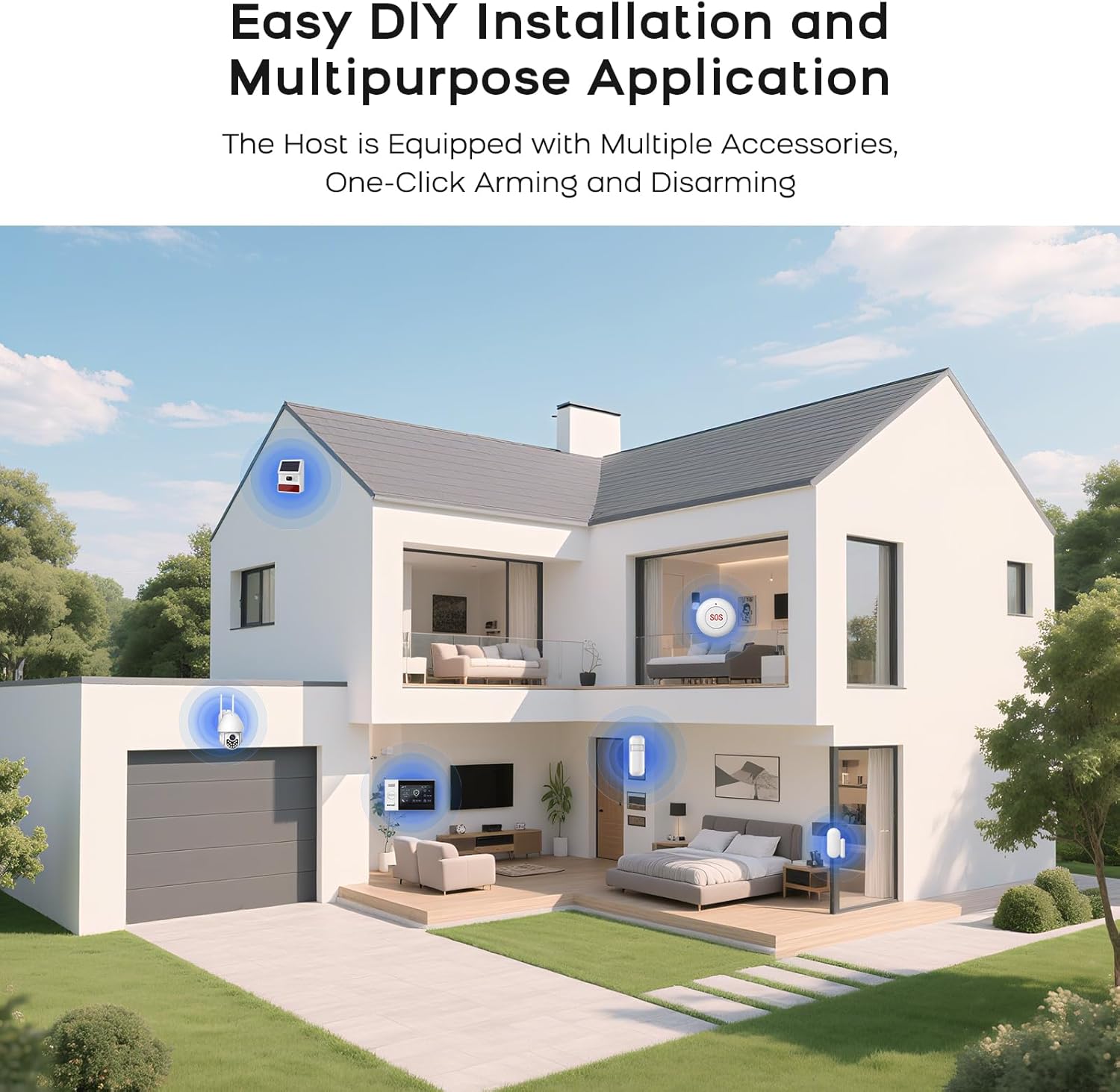
Figura 4.1: Esample of a typical alarm system installation layout in a home, showing placement of various sensors and the main unit.
- Sensori per porte/finestre: Montare le due parti del sensore sul telaio della porta/finestra e sulla porta/finestra stessa, assicurandosi che siano allineate e vicine tra loro quando sono chiuse.
- Rilevatori di movimento: Install in corners or areas with high traffic, ensuring a clear line of sight. Avoid placing near heat sources or direct sunlight.
- Sensori di accoppiamento: Refer to the alarm host's menu for instructions on pairing new sensors with the system.
5. Istruzioni per l'uso
5.1 Attivazione e disattivazione del sistema
Il sistema può essere attivato o disattivato utilizzando diversi metodi:
- Telecomando: Premere il pulsante di attivazione o disattivazione sul telecomando.
- Applicazione mobile: Use the dedicated mobile application (SMART LIFE, TUYA) to arm or disarm remotely.
- Carta RFID: Tap an authorized RFID card on the sensing area of the alarm host.
- Pannello host di allarme: Use the touch screen interface to select arming or disarming modes.
- Telefonata: Arm or disarm the system by calling the alarm host's GSM number and following voice prompts.
5.2 Smart App Remote Control
The mobile application allows for remote control and scheduling of arming/disarming times.

Figure 5.1: The mobile application interface for programming timed arming and disarming schedules.
5.3 Integrazione del controllo vocale
The system supports voice control via compatible smart assistants like Amazon Alexa and Google Assistant.

Figure 5.2: Demonstrating voice control integration with Amazon Alexa to arm the system.
5.4 Two-Way Voice Intercom Function
The alarm host features a two-way voice intercom function, allowing you to make and receive calls, and send voice messages through the system.

Figure 5.3: The two-way voice intercom function enables communication through the alarm system.
6. Manutenzione
6.1 Gestione della batteria
The alarm host and wireless sensors are battery-powered. Regular monitoring of battery levels is crucial for uninterrupted operation.
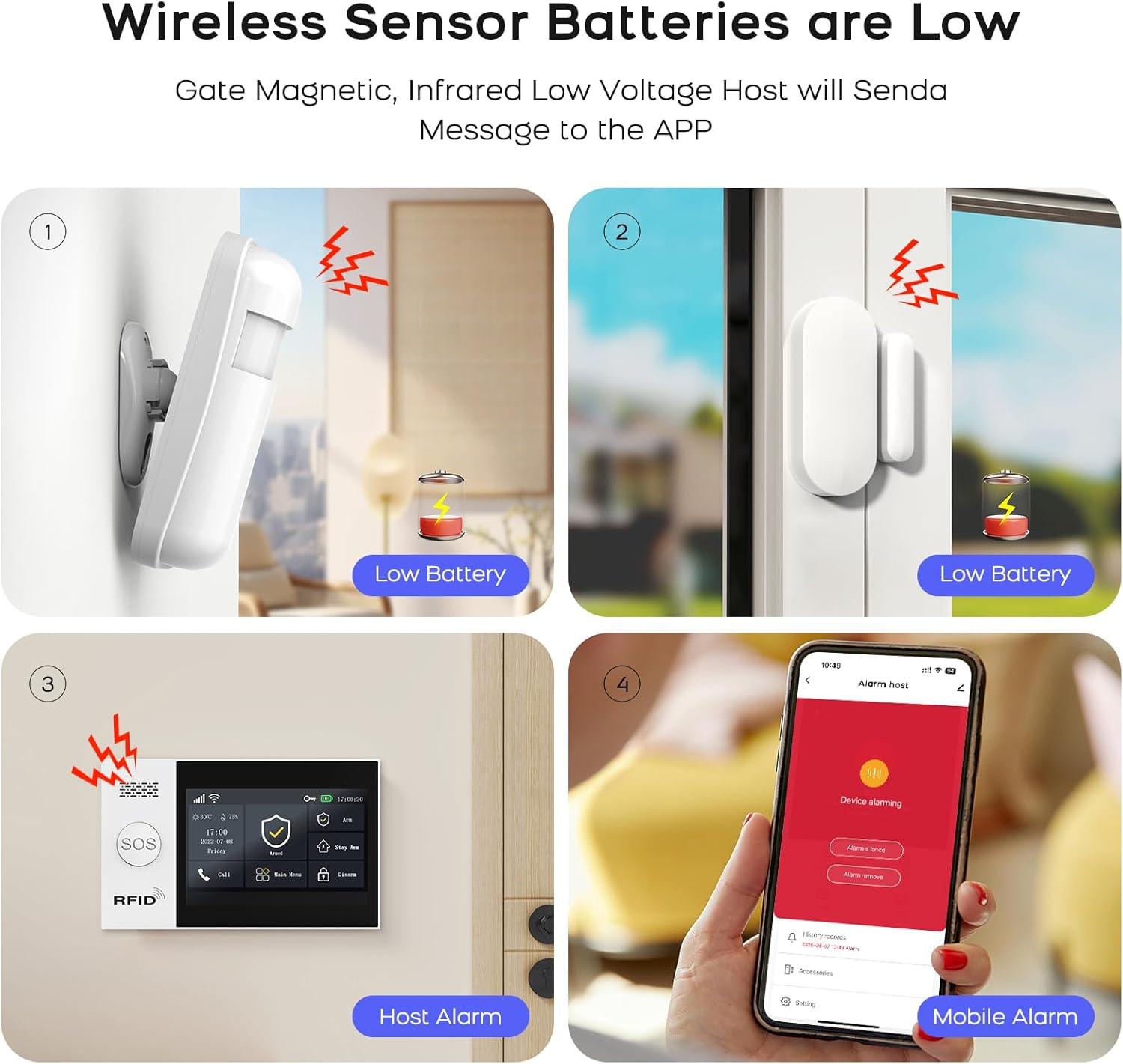
Figure 6.1: Visual representation of low battery alerts from wireless sensors and the alarm host, displayed on the host and mobile app.
- Batterie del sensore senza fili: When a wireless sensor's battery is low, the host will send a message to the mobile app. Replace batteries promptly to ensure continuous protection.
- Batteria di backup dell'host di allarme: The alarm host has a built-in backup battery providing approximately 5.5 hours of operation during a power failure. The system will send an SMS notification if power is interrupted and restored.

Figure 6.2: The alarm host display indicating battery status and power consumption.
6.2 Pulizia
Pulire l'host dell'allarme e i sensori con un panno morbido e asciutto. Evitare l'uso di detergenti abrasivi o solventi che potrebbero danneggiare i dispositivi.
7. Risoluzione Dei Problemi
| Problema | Possibile causa | Soluzione |
|---|---|---|
| Il sistema non si connette al Wi-Fi | Password Wi-Fi errata; rete selezionata a 5 GHz; segnale debole. | Verify password. Ensure you are connecting to a 2.4GHz network. Move the alarm host closer to the router or improve signal strength. |
| I sensori non rispondono | Low battery; out of range; not properly paired. | Replace sensor batteries. Relocate sensor closer to the alarm host. Re-pair the sensor with the alarm host. |
| No GSM network connection | SIM card not inserted correctly; invalid SIM card; no network coverage. | Ensure SIM card is correctly inserted. Verify SIM card is active and has credit. Check for GSM network coverage in your area. |
| Alarm host not powering on | Power adapter issue; backup battery depleted. | Check power adapter connection and power outlet. Allow backup battery to charge or replace if faulty. |
| Falsi allarmi | Posizionamento improprio del sensore; fattori ambientali (animali domestici, correnti d'aria). | Adjust sensor sensitivity. Reposition motion detectors to avoid pets or drafts. Ensure door/window sensors are securely mounted. |
8. Specifiche
| Caratteristica | Dettaglio |
|---|---|
| Marca | PGST |
| Modello | Qek-a107s-b |
| Fonte di alimentazione | Alimentato a batteria |
| Dispositivi compatibili | SMART LIFE, TUYA, Amazon Alexa, Google Assistant |
| Dimensioni articolo (LxPxA) | 18 x 12 x 3 cm (7.09 x 4.72 x 1.18 pollici) |
| Display | 4.3 inch TFT Capacitive Touch IPS Display |
| Frequenza senza fili | Wi-Fi a 2.4 GHz (5 GHz non supportato) |
| Numero massimo di sensori supportati | 100 wireless, 3 cablato |
| Uscita della sirena | 120dB (Wired Siren) |
| Durata della batteria di backup | Circa 5.5 ore |
9. Garanzia e supporto
Per informazioni sulla garanzia e supporto tecnico, fare riferimento alla documentazione inclusa con il prodotto o visitare il sito ufficiale PGST websito. Conservare la ricevuta d'acquisto come prova d'acquisto per eventuali reclami in garanzia.
If you encounter any issues not covered in this manual, please contact PGST customer service for assistance.