
1. Finitaview
The Element 32-inch 720p HD Xumo Smart TV offers reliable performance and smart functionality in a compact design. Ideal for smaller spaces such as kitchens, dorm rooms, guest rooms, or offices, this television combines a clear HD display with a versatile smart platform and modern connectivity options.
Key features include a 720p resolution display, a 120Hz effective refresh rate for smooth motion, and the integrated Xumo OS for access to numerous streaming applications and free live channels. Connectivity is robust with multiple HDMI ports, USB, LAN, Bluetooth, and Apple AirPlay support. The TV also comes with a voice remote for convenient navigation.
2. Cosa c'è nella scatola
Upon unboxing your Element 32-inch Xumo Smart TV, please ensure all the following components are present:
- 32-inch Element Xumo TV
- Voice Remote + 2 AAA batteries
- TV Stand & Screws
- Guida rapida

Image: The contents of the TV box, showing the 32-inch television, its remote control, two stand feet, and a bag of screws for assembly. Dimensions of the TV are also displayed.
3. Impostazione
3.1 Fissaggio del supporto TV
- Posizionare con cautela lo schermo del televisore su una superficie morbida e pulita per evitare graffi.
- Allineare ciascun piedino del supporto con i fori delle viti corrispondenti nella parte inferiore del televisore.
- Secure each stand foot using the provided screws. Ensure they are tightened firmly but do not overtighten.
- Sollevare con cautela il televisore e posizionarlo su una superficie stabile e piana.
Alternatively, the TV supports VESA mounting for wall installation (wall mount hardware sold separately).
3.2 Collegamento di alimentazione
Connect the power cord to the TV's power input and then plug it into a standard electrical outlet. A pilot light on the TV will indicate that it is receiving power.
3.3 Initial Setup (Xumo OS)
Alla prima accensione, il televisore ti guiderà attraverso la procedura di configurazione iniziale. Questa include:
- Selezione della lingua: Scegli la tua lingua preferita.
- Connessione di rete: Connect the TV to your home Wi-Fi network or via an Ethernet cable.
- Xumo OS Account Setup: Follow on-screen prompts to set up or log in to your Xumo OS account. This is necessary to access smart features and apps.
- Scansione canali: If connecting an antenna, the TV will scan for available channels.

Image: The Element 32-inch Xumo Smart TV is shown on a wooden TV stand, displaying its smart interface with various streaming app icons.
4. Connessioni
The Element Xumo Smart TV provides a variety of ports for connecting external devices:
- Porte HDMI (3): Connect high-definition devices such as Blu-ray players, gaming consoles, or cable/satellite boxes. One HDMI port supports eARC (enhanced Audio Return Channel) for simplified audio connections to compatible soundbars or AV receivers.
- Porta USB (1): Collegare i dispositivi di archiviazione USB a view foto, riprodurre musica o guardare video.
- Porta LAN (Ethernet): Per una connessione Internet cablata.
- Audio Out (Optical) / Headphone Jack: Per collegare sistemi audio esterni o cuffie.
- Composite Input / Analog Tuner: For connecting older devices or an antenna.
5. Utilizzo della TV
5.1 telecomando
The included voice remote allows for intuitive control of your TV. It features dedicated buttons for popular streaming services and a microphone for voice commands.
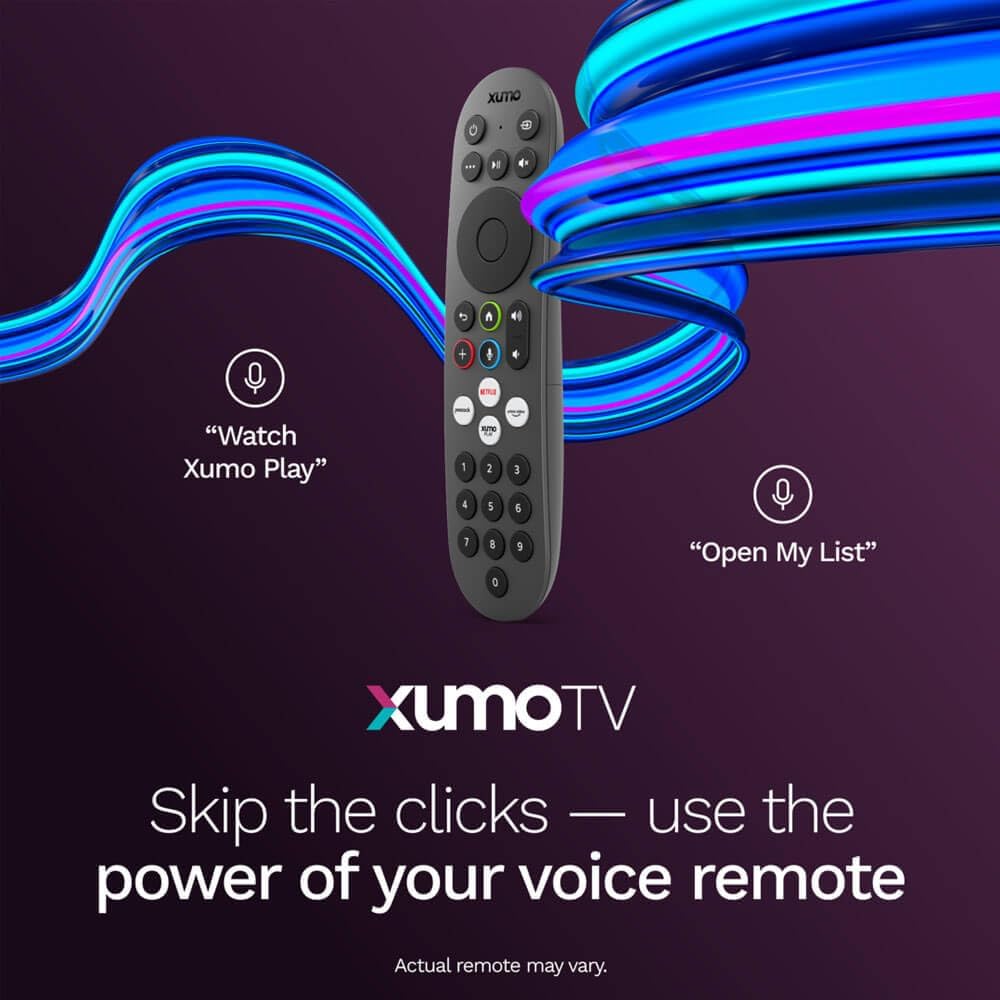
Image: A close-up of the Element Xumo Smart TV voice remote, highlighting its various buttons including a microphone for voice commands and quick access buttons for streaming services.
5.2 Smart Features & Streaming (Xumo OS)
The Xumo OS provides access to over 250 preloaded apps and more than 750 free live channels. You can:
- Cerca contenuto: Use the unified search function to find content across all your installed apps.
- La mia lista: Curate your personal watchlist for easy access to your favorite shows and movies.
- Free On-Demand Libraries: Explore a wide selection of free on-demand content.
- Controllo vocale: Use the voice remote to navigate, search, and control your TV hands-free.

Image: The Xumo TV interface showing a selection of popular streaming applications and content recommendations.
5.3 Impostazioni immagine e audio
Your TV delivers a crisp 720p HD display with a 120Hz effective refresh rate, minimizing motion blur for clear visuals. Dolby Audio processing enhances the sound experience. You can adjust picture and sound settings via the TV's menu to suit your preferences.
- Modalità immagine: Select from various preset picture modes (e.g., Standard, Vivid, Movie, Sports) or customize settings like brightness, contrast, and color.
- Modalità audio: Choose from different sound modes (e.g., Standard, Music, Movie, Speech) or adjust bass and treble levels.
5.4 Apple AirPlay & Home Support
Seamlessly stream content or mirror your screen from your iPhone, iPad, or Mac directly to your Element TV using Apple AirPlay. With Apple Home support, you can integrate your TV into your Apple smart home ecosystem for convenient control.
6. Manutenzione
To ensure the longevity and optimal performance of your Element Xumo Smart TV, follow these maintenance guidelines:
- Pulizia dello schermo: Pulire delicatamente lo schermo con un panno morbido, asciutto e privo di lanugine. Per i segni ostinati, strofinare leggermenteampPulire il panno con acqua o con una soluzione detergente specifica per schermi (non spruzzare mai direttamente sullo schermo).
- Pulizia dell'armadio: Per pulire il mobile TV, utilizzare un panno morbido e asciutto. Evitare l'uso di detergenti abrasivi o solventi.
- Ventilazione: Assicurarsi che le aperture di ventilazione sul retro del televisore non siano ostruite per evitare il surriscaldamento.
- Spegnimento quando non in uso: Spegnere la TV quando non la si utilizza per risparmiare energia e prolungarne la durata.
7. Risoluzione Dei Problemi
If you encounter any issues with your Element Xumo Smart TV, refer to the following common troubleshooting tips:
- Nessun potere: Controllare che il cavo di alimentazione sia collegato saldamente sia al televisore che alla presa elettrica. Assicurarsi che la presa sia funzionante.
- Nessuna immagine/suono: Verify that the correct input source is selected. Check all cable connections (HDMI, antenna, etc.) for secure fit.
- Il telecomando non funziona: Sostituisci le batterie AAA nel telecomando. Assicurati che non ci siano ostacoli tra il telecomando e il sensore IR del televisore.
- Problemi di connessione di rete: Restart your Wi-Fi router. Check the TV's network settings to ensure it's connected to the correct network and the password is entered correctly.
- Smart App Problems: Try restarting the app. If the issue persists, clear the app's cache or reinstall it. Ensure your TV's software is up to date.
For persistent issues, please contact Element customer support.
8. Specifiche
| Caratteristica | Specificazione |
|---|---|
| Numero di modello | Modello E300AE32C |
| Dimensioni dello schermo | 32 pollici |
| Risoluzione dello schermo | 720p (1366x768) |
| Frequenza di aggiornamento | 60 Hz (120Hz Effective) |
| Proporzioni | 1.78:1 |
| Sistema operativo | Xumo OS |
| Connettività | 3x HDMI (1x eARC), 1x USB, LAN (Ethernet), Optical Audio Out, Headphone Jack, Composite Input, Wi-Fi, Bluetooth |
| Caratteristiche speciali | Bezel-Less Design, Built-In Speaker, Voice Remote, Apple AirPlay & Home Support |
| TV with Stand Dimensions (W x H x D) | 28.8" x 19.2" x 7.0" |
| TV without Stand Dimensions (W x H x D) | 28.8" x 17.0" x 2.7" |
| Peso dell'articolo | 8.8 libbre |
9. Garanzia e supporto
The Element 32-inch 720p HD Xumo Smart TV comes standard with a Garanzia del produttore di 2 annoLa presente garanzia copre i difetti di materiali e fabbricazione in condizioni di normale utilizzo. Si prega di conservare la prova d'acquisto per eventuali reclami in garanzia.
For technical support, warranty inquiries, or further assistance, please refer to the contact information provided in your Quick Start Guide or visit the official Element Electronics websito.