
TOPUTURE TP5
Manuale utente del tapis roulant pieghevole TOPUTURE TP5
Modello: TP5 | Marca: TOPUTURE
Introduzione
This manual provides essential instructions for the safe and efficient use of your TOPUTURE TP5 Folding Treadmill. Please read this manual thoroughly before operating the device and retain it for future reference.
Importanti istruzioni di sicurezza
Per ridurre il rischio di lesioni gravi, leggere attentamente tutte le precauzioni e le istruzioni contenute nel presente manuale prima di utilizzare il tapis roulant. Il produttore non si assume alcuna responsabilità per lesioni personali o danni materiali derivanti dall'uso di questo prodotto.
- Always ensure the safety key is properly attached to your clothing before starting the treadmill.
- Tenere i bambini e gli animali domestici lontani dal tapis roulant durante il funzionamento.
- Posizionare il tapis roulant su una superficie piana, con spazio sufficiente attorno.
- Non utilizzare il tapis roulant se il cavo o la spina sono danneggiati o se non funziona correttamente.
- Consultare un medico prima di iniziare qualsiasi programma di esercizi.
Installazione e assemblaggio
The TOPUTURE TP5 treadmill comes largely pre-assembled. Follow these steps for quick setup:
- Disimballaggio: Carefully remove the treadmill from its packaging. Ensure all components are present.
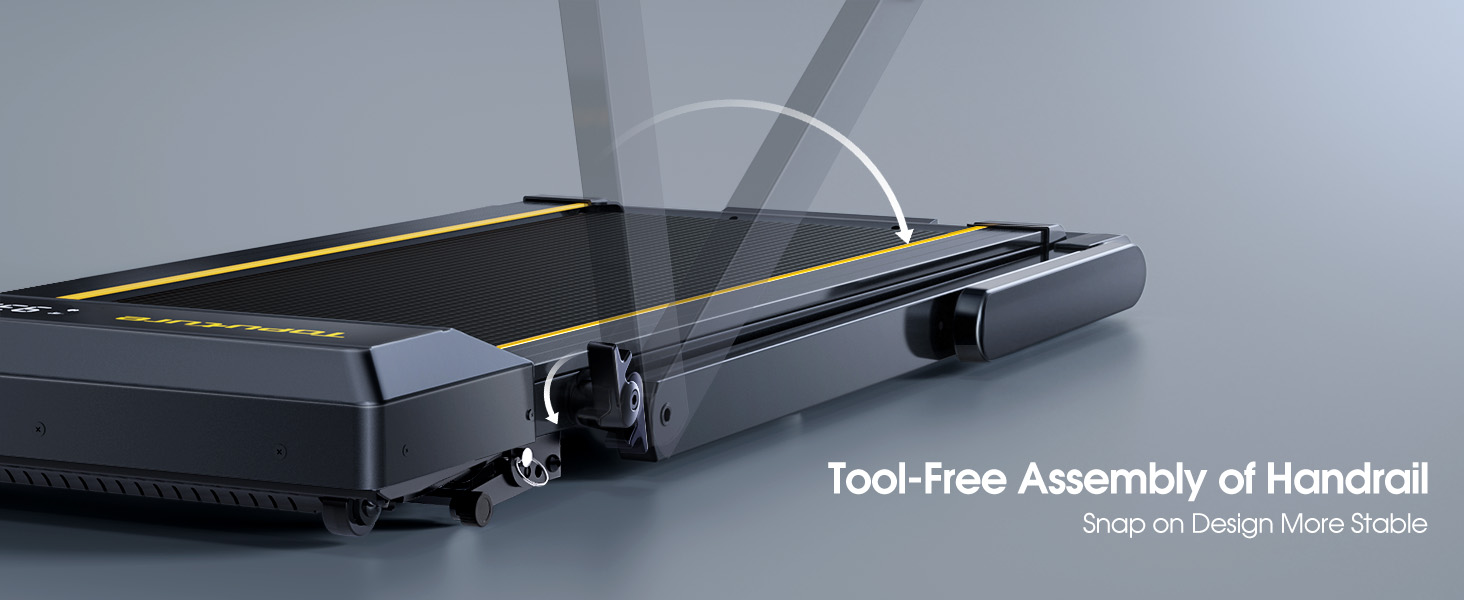
- Apertura del manubrio: Gently lift the handlebar into its upright position until it locks securely. The quick-release snaps allow for easy transition between walking pad and running treadmill configurations.
- Collegamento dell'alimentazione: Collegare il cavo di alimentazione a una presa elettrica dotata di messa a terra.
- Controllo iniziale: Before first use, ensure the running belt is centered and properly tensioned. Refer to the maintenance section for belt adjustment if needed.

Istruzioni per l'uso
Pannello di controllo e display
The treadmill features a multifunctional LED display and touch controls. Information displayed includes time, speed, calories burned, distance, and heart rate.

Starting and Adjusting Speed
- Avvio/Arresto: Press the Start/Pause button on the control panel or remote to begin/end your workout.
- Regolazione della velocità: Use the Speed +/- buttons on the control panel or remote to adjust the speed from 0.6 to 10 MPH.
- Controllo app: Connect your smartphone or tablet via Bluetooth to control the treadmill and access guided workouts.

Funzione Inclinazione
The treadmill offers three manual incline levels: 1%, 6%, and 12%. Adjust the incline by manually setting the support legs at the rear of the treadmill to the desired position.

Altoparlante Bluetooth
Connect your device to the treadmill's built-in Bluetooth speaker to enjoy music or audio during your workout.
Monitor della frequenza cardiaca
Grip the hand sensors on both sides of the display to monitor your heart rate during exercise.
Manutenzione
- Lubrificazione: Regularly apply treadmill lubricant under the running belt to ensure smooth operation and prolong belt life. Refer to the lubricant instructions for frequency.
- Pulizia: Pulisci il tapis roulant con un pannoamp panno dopo ogni utilizzo per rimuovere sudore e polvere.
- Regolazione della cintura: If the running belt feels loose or is off-center, use the provided tools to adjust the tension and alignment as per the detailed instructions in the full manual.

Risoluzione dei problemi
Se riscontri problemi con il tuo tapis roulant, fai riferimento alle seguenti soluzioni comuni:
- Il tapis roulant non si avvia: Ensure the power cord is securely plugged in and the safety key is correctly placed on the console. Check the power switch on the treadmill.
- Slittamento della cinghia: The running belt may need tensioning. Refer to the maintenance section or the full manual for instructions on adjusting belt tension.
- Rumori insoliti: Check for any loose parts or foreign objects under the belt. Lubricate the running belt if it has not been done recently.
- Schermo non funzionante: Assicurati che tutte le connessioni siano sicure. Se il problema persiste, contatta l'assistenza clienti.
Specifiche
| Caratteristica | Dettaglio |
|---|---|
| Marca | TOPUTURA |
| Nome del modello | TP5 |
| Colore | Nero |
| Dimensioni del prodotto | 52.3"P x 28.2"L x 5.1"A |
| Peso dell'articolo | 78 libbre |
| Materiale | Acciaio legato |
| Velocità massima | 10 miglia all'ora |
| Percentuale di inclinazione massimatage | 12% |
| Potenza massima | 2.5 CV |
| Peso massimo raccomandato | 300 libbre |
| Display | GUIDATO |
| Tecnologia di connettività | Bluetooth |
| Caratteristiche speciali | Altoparlante integrato, pieghevole, cardiofrequenzimetro, portatile, antiurto |
| Assemblaggio richiesto | No (pre-assemblato) |
| Componenti inclusi | Cavo di alimentazione |
Garanzia e supporto
Your TOPUTURE TP5 Treadmill comes with a garanzia di un anno. For any assistance, questions, or warranty claims, please contact TOPUTURE customer support.
Come contattare l'assistenza:
- Accedi al tuo account Amazon.
- Vai a "I tuoi ordini".
- Find the order ID for your treadmill.
- Clicca su "Contatta il venditore".
Please have your model name (TP5) and purchase details ready when contacting support.
Ask a question about this manual
Ask about setup, troubleshooting, compatibility, parts, safety, or missing instructions. Manuals+ will review the question and use this page’s manual context to help answer it.