
1. Introduzione
This manual provides detailed instructions for the installation, operation, and maintenance of your LAMTTO 10.25 Inch Wireless CarPlay & Android Auto Display. Please read this manual thoroughly before using the device to ensure proper functionality and safety. Keep this manual for future reference.
2. Prodotto finitoview
The LAMTTO 10.25-inch display is designed to integrate wireless Apple CarPlay and Android Auto into your vehicle, enhancing your driving experience with navigation, communication, and entertainment features. It includes built-in streaming applications and supports various audio output methods.

Image: The LAMTTO 10.25-inch display mounted on a car dashboard, showing a split screen with navigation on one side and a video streaming app on the other. Various feature icons are displayed below the main screen.
Caratteristiche principali:
- CarPlay e Android Auto wireless: Integrazione perfetta con il tuo smartphone per navigazione, chiamate, messaggi e musica.
- App di streaming integrate: Access Net-flix, YouTube, and other popular video applications directly from the device (requires phone hotspot connection).
- Posteriore View Telecamera: Includes a waterproof HD rear camera with night vision for enhanced safety during reversing.
- Dual-Band WiFi & Split-Screen: Stable wireless connection and the ability to display two applications simultaneously.
- High-Resolution In-Cell Display: 10.25-inch ultra-thin screen with 1920x720P clarity and responsive touch control.
- Personalizzazione: Personalize boot logos and wallpapers via SD card.
- Aggiornamenti OTA: Ricevi aggiornamenti software via etere per un miglioramento continuo.
- Molteplici opzioni di uscita audio: Built-in speakers, Bluetooth, FM transmission, and AUX connection.
3. Impostazione
3.1 Unboxing e componenti
Disimballare con cura tutti gli articoli dalla scatola. Assicurarsi che tutti i componenti siano presenti prima di procedere con l'installazione.
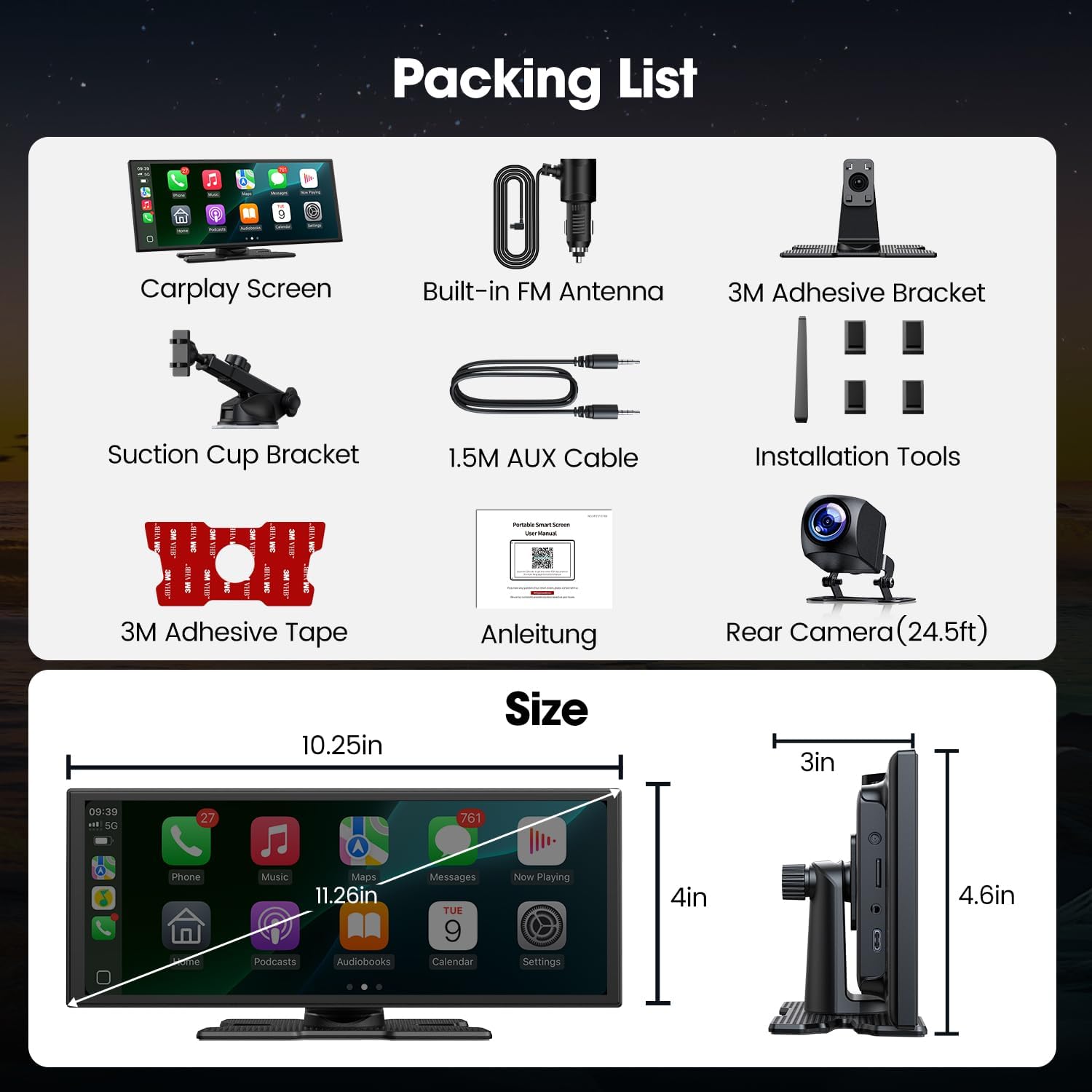
Image: A flat lay of all components included in the package: the Carplay screen, built-in FM antenna, 3M adhesive bracket, suction cup bracket, 1.5M AUX cable, installation tools, 3M adhesive tape, user manual, and rear camera (24.5ft cable).
3.2 Montaggio del display
The display offers two primary installation methods: using the 3M adhesive bracket or the suction cup bracket. Choose the method that best suits your vehicle's dashboard and ensures a stable, clear view senza ostacolare la guida.

Image: A visual guide illustrating the two installation methods for the display, showing how the screen attaches to both an adhesive base and a suction cup mount.
3.3 Collegamento dell'alimentazione e della telecamera posteriore
Connect the power cable to your vehicle's 12V power outlet. If installing the rear camera, route the camera cable to the rear of the vehicle and connect it to the display. Ensure all connections are secure.
Video: This video demonstrates the unboxing process, assembly of the adjustable bracket, and initial setup of the LAMTTO Carplay screen, including connecting the power and rear camera.
4. Istruzioni per l'uso
4.1 Accensione/Spegnimento
The device will power on automatically when your vehicle starts. To power off, disconnect the power cable or use the designated power button if available.
4.2 Connecting to Wireless CarPlay / Android Auto
Per connettere il tuo smartphone:
- Assicurati che il Bluetooth e il Wi-Fi siano abilitati sul tuo telefono.
- On the LAMTTO display, navigate to the CarPlay or Android Auto section.
- Cercare the device's Bluetooth name (e.g., "T88-XXXX") on your phone and pair.
- Confirm the connection prompt on both your phone and the display.
- For Android Auto, ensure you have the latest Android Auto application installed on your phone.

Image: The LAMTTO display showing the Apple CarPlay interface, featuring common applications for communication, navigation, and entertainment.
4.3 Using Navigation and Voice Control
Once connected to CarPlay or Android Auto, you can use your preferred navigation apps. Activate voice control (Siri or Google Assistant) by pressing the voice command button on the screen or your steering wheel (if supported) to get directions, make calls, or play music hands-free.
4.4 Streaming di intrattenimento
The device supports built-in applications like Net-flix and YouTube. Connect the display to your phone's hotspot to access these streaming services. The split-screen feature allows passengers to watch videos while the driver uses navigation.

Image: A car dashboard display showcasing a variety of application icons, including popular streaming services like Netflix and YouTube, indicating entertainment capabilities.
4.5 Opzioni di uscita audio
The LAMTTO display offers four audio output methods:
- Altoparlanti incorporati: Per l'uscita audio diretta dal dispositivo.
- Bluetooth: Connect wirelessly to your car's audio system for high-quality sound.
- Trasmissione FM: Trasmetti l'audio alla radio FM della tua auto sintonizzandoti su una frequenza specifica.
- Connessione AUX: Use the provided AUX cable for a direct, lossless audio connection to your car's AUX input.

Image: The LAMTTO display highlighting its dual-band WiFi and Bluetooth 5.3 capabilities, emphasizing stable connection and high-speed data transfer for various functions.
4.6 Customizing Wallpapers and Boot Logos
You can personalize the display by uploading custom wallpapers and boot logos via an SD card (not included). Refer to the device settings for options to change these visual elements.
5. Manutenzione
To ensure the longevity and optimal performance of your LAMTTO display:
- Pulisci regolarmente lo schermo con un panno morbido e privo di lanugine. Evita detergenti abrasivi.
- Tenere il dispositivo lontano da temperature estreme e dalla luce solare diretta per periodi prolungati.
- Assicurarsi che tutti i cavi siano collegati saldamente e non siano schiacciati o danneggiati.
- Regularly check for and install OTA software updates to benefit from new features and bug fixes.
6. Risoluzione Dei Problemi
6.1 Nessun potere
- Check if the power cable is securely plugged into the vehicle's 12V outlet.
- Assicurarsi che l'accensione del veicolo sia accesa.
- Verify the vehicle's 12V outlet is functioning correctly.
6.2 CarPlay/Android Auto non si connette
- Assicurati che il Bluetooth e il Wi-Fi siano attivi sul tuo smartphone.
- Elimina il dispositivo dalle impostazioni Bluetooth del telefono e riprova ad associarlo.
- Restart both your phone and the LAMTTO display.
- For Android Auto, confirm the app is updated to the latest version.
6.3 Nessuna uscita audio
- Check the audio output settings on the display and ensure the correct method (Built-in Speaker, Bluetooth, FM, AUX) is selected.
- If using Bluetooth, ensure your phone is connected to the display and your car's audio system.
- If using FM transmission, verify the display and your car radio are tuned to the same clear FM frequency.
- If using AUX, ensure the cable is properly connected to both the display and your car's AUX input.
6.4 La fotocamera posteriore non viene visualizzata
- Check the camera cable connection to the display.
- Ensure the vehicle is in reverse gear to activate the camera display.
- Verify the camera lens is clean and free from obstructions.

Image: The LAMTTO display showing the view from the rear camera, complete with adjustable parking assist lines, providing a clear perspective for safe reversing.
7. Specifiche
| Caratteristica | Specificazione |
|---|---|
| Marca | LAMETTO |
| Numero di modello | B0FP4N74R5 |
| Dimensioni dello schermo | 10.25 pollici |
| Risoluzione | 1920x720 |
| Tipo di visualizzazione | LCD a LED |
| Connettività | USB, AUX, Dual-Band Bluetooth, Dual-Band WiFi |
| Caratteristiche speciali | Wireless CarPlay, Android Auto, Rear Camera, Built-in Netflix, YouTube, TikTok, OTA Updates, Ultra-thin Touch Screen |
| Rapporto di aspetto dell'immagine | 16:9 |
| Rapporto di contrasto dell'immagine | 1000:1 a 3000:1 |
| Compatibilità di potenza | 12V-24V Vehicles |

Image: Icons representing different vehicle types (Automobile, SUV, CRV, Truck, Pickup, Total Truck) indicating the universal 12V-24V compatibility of the device.
8. Garanzia e supporto
LAMTTO provides professional after-sales support for its products. If you encounter any issues with compatibility, operation, or connection, please contact our customer service team. We offer 24/7 customer support and a 30-day hassle-free return policy. Our technical experts aim to respond within 24 hours.
- Assistenza clienti: Available 24/7 for professional assistance.
- Politica di ritorno: 30-day hassle-free returns.
- Supporto tecnico: Expert responses within 24 hours.