
1. Introduzione
Grazie per l'acquistoasing the VIFLYKOO Bluetooth 5.4 Turntable. This device combines classic vinyl playback with modern connectivity, featuring integrated stereo speakers, Bluetooth 5.4 for both receiving and transmitting audio, USB recording, and multiple audio outputs. This manual provides essential information for safe operation, setup, and maintenance of your turntable.

Image: The VIFLYKOO Bluetooth 5.4 Turntable, showcasing its mahogany finish and classic design.
2. Istruzioni di sicurezza
Please read these safety instructions carefully before using the product and retain them for future reference. Incorrect use may result in electric shock, fire, or other hazards.
- Non esporre l'unità a pioggia, umidità o temperature estreme.
- Assicurarsi che l'adattatore di alimentazione sia compatibile con la rete elettrica locale.
- Non aprire il casing; affidare ogni intervento di manutenzione a personale qualificato.
- Tenere l'unità lontana da fonti di calore, dalla luce solare diretta e da forti campi magnetici.
- Pulire solo con un panno asciutto. Non utilizzare detergenti liquidi o spray.
- Place the turntable on a stable, level surface to prevent vibrations and ensure proper playback.
3. Contenuto della confezione
Verificare che tutti gli articoli siano presenti nel pacco:
- VIFLYKOO Bluetooth 5.4 Turntable
- Adattatore di alimentazione
- Manuale di istruzioni
- 45 RPM Adapter (for 7-inch records)
4. Prodotto finitoview
Familiarize yourself with the main components and features of your turntable.
4.1 Caratteristiche principali
- Connettività Bluetooth 5.4: Supports both receiving audio from external devices and transmitting audio to Bluetooth speakers or headphones.
- Altoparlanti stereo integrati: Two 5W speakers provide clear and authentic sound directly from the unit.
- Giradischi a 3 velocità: Plays 33 1/3, 45, and 78 RPM records.
- Funzionalità USB: Allows recording vinyl to MP3/WAV files and playing digital audio from a USB drive.
- Multiple Audio Connections: RCA output for external amplifiers, 3.5mm AUX input for external audio sources, and a headphone output for private listening.
- Funzione di arresto automatico: Automatically lifts the tonearm at the end of a record to protect the stylus and vinyl.
- Copertura antipolvere rimovibile: Protects the platter and stylus from dust accumulation.
- Anti-Resonance Belt Drive: Riduce al minimo le vibrazioni per una migliore qualità del suono.
4.2 Componenti
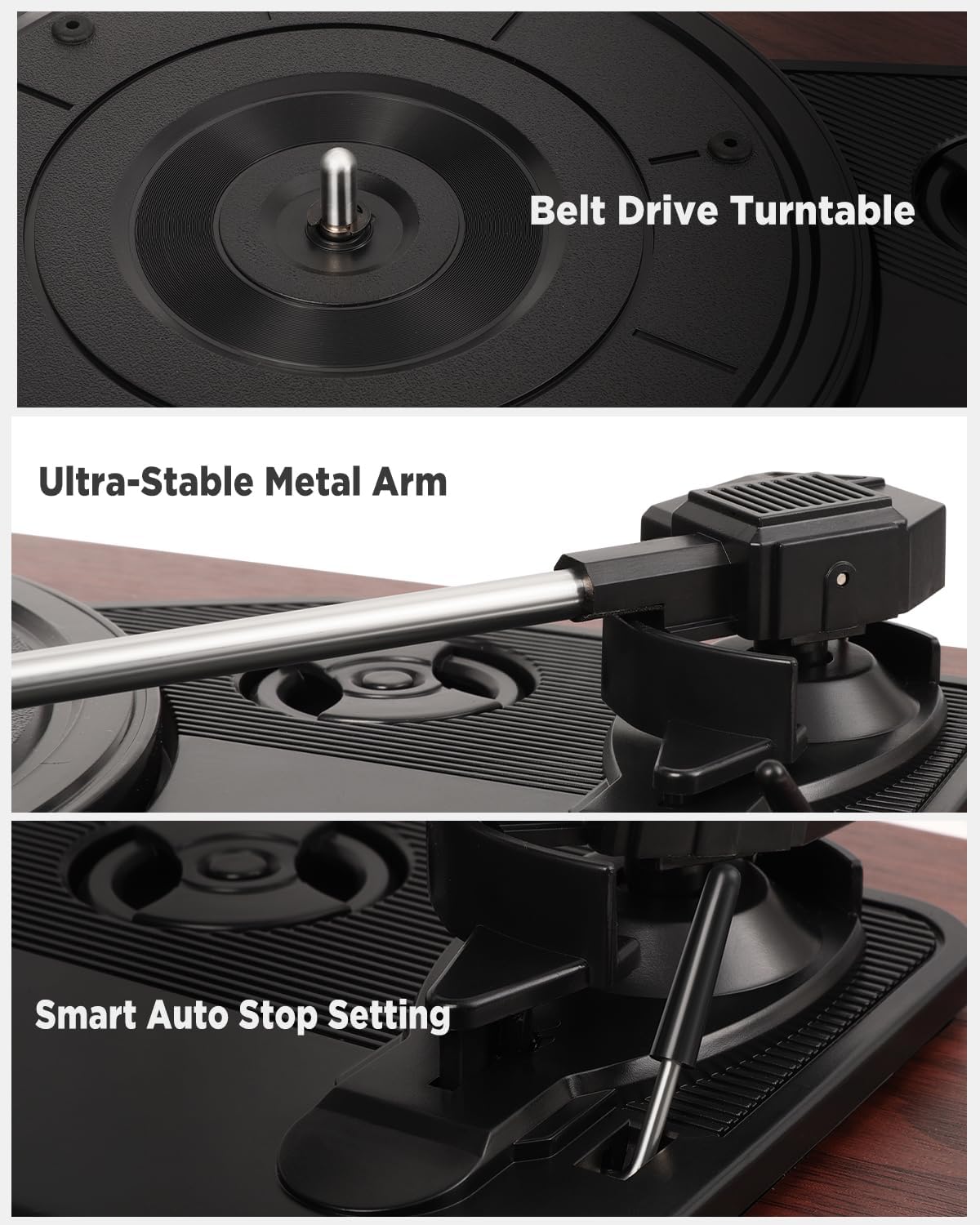
Immagine: dettagliata views of the belt drive system, the ultra-stable metal tonearm, and the smart auto-stop setting.

Image: An exploded diagram illustrating the internal structure of the integrated stereo speakers, highlighting the HiFi sound components.

Image: The rear panel of the turntable, showing the RCA output, AUX-in port, USB port, and headphone port, along with their respective functions.
5. Impostazione
Follow these steps to set up your turntable for the first time.
- Disimballare il giradischi: Rimuovere con attenzione tutti i componenti dalla confezione.
- Position the Turntable: Place the unit on a flat, stable, and vibration-free surface. Ensure there is adequate ventilation around the unit.
- Installare la copertura antipolvere: If not already installed, carefully attach the removable dust cover to the hinges at the back of the unit.
- Rimuovere la protezione dello stilo: Gently remove the protective cap from the stylus (needle). Be careful not to touch the stylus itself.
- Connetti alimentazione: Insert the DC plug of the power adapter into the DC IN port on the back of the turntable, then plug the adapter into a wall outlet.
- Accensione iniziale: Turn the volume knob to power on the unit.
6. Istruzioni per l'uso
6.1 Riproduzione di dischi in vinile
- Aprire il coperchio antipolvere.
- Place a vinyl record on the platter. If playing a 7-inch record, use the included 45 RPM adapter.
- Selezionare la velocità appropriata (33, 45 o 78 giri/min) utilizzando l'interruttore di selezione della velocità.
- Sollevare delicatamente il braccio utilizzando la leva di regolazione.
- Spostare il braccio sul solco iniziale desiderato del disco.
- Slowly lower the tonearm using the cueing lever. The record will begin to play.
- Regolare il volume utilizzando la manopola del volume.
- At the end of the record, the auto-stop function will automatically lift the tonearm and stop the platter rotation. Manually return the tonearm to its rest.
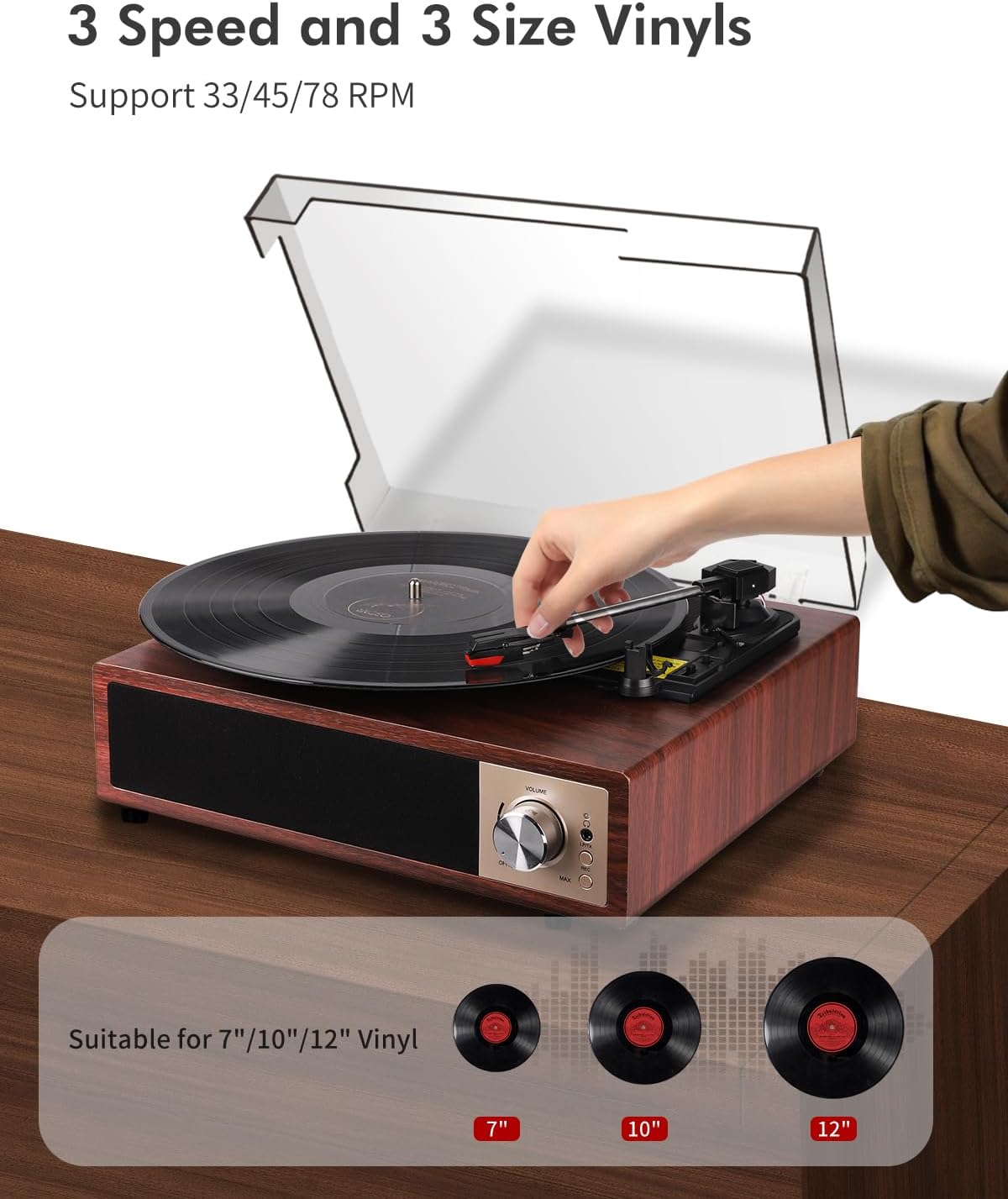
Image: A hand placing a record on the turntable, with visual representations of 7-inch, 10-inch, and 12-inch vinyl records, indicating support for all three sizes and 33/45/78 RPM speeds.
6.2 Funzionamento Bluetooth
The turntable supports Bluetooth 5.4 for both receiving and transmitting audio.
6.2.1 Bluetooth Receiving (Playing music from your phone)
- Accendi il giradischi.
- Switch the function mode to Bluetooth (BT). The Bluetooth indicator light will flash.
- Enable Bluetooth on your smartphone, tablet, or other Bluetooth device.
- Cercare "VIFLYKOO" in the list of available devices and select it to pair.
- Once paired, the indicator light will stop flashing. You can now play music from your device through the turntable's speakers.
6.2.2 Bluetooth Transmitting (Playing vinyl through external Bluetooth speakers/headphones)
- Assicurati che l'altoparlante Bluetooth esterno o le cuffie siano in modalità di associazione.
- Turn on the turntable and select the desired input source (e.g., Phono for vinyl).
- Press and hold the Bluetooth button on the turntable to activate transmitting mode. The Bluetooth indicator will flash rapidly.
- The turntable will automatically search for and connect to nearby Bluetooth audio devices.
- Once connected, the indicator light will stop flashing, and audio from the turntable will play through your external Bluetooth device.

Image: Two scenarios demonstrating Bluetooth 5.4 functionality: a user receiving music from a smartphone to the turntable, and the turntable transmitting vinyl audio to external Bluetooth speakers and headphones.
6.3 USB Function (Recording & Playback)
The USB port allows you to convert your vinyl records to digital files or play audio files da un'unità USB.
6.3.1 Registrazione di vinili su USB
- Insert a USB drive into the USB port on the back of the turntable.
- Select the Phono input mode.
- Inizia ad ascoltare il tuo disco in vinile.
- Press the 'REC' button (usually near the USB port or control panel) to start recording. The indicator light will confirm recording is active.
- Press the 'REC' button again to stop recording. The recorded audio will be saved as an MP3 or WAV file sull'unità USB.
6.3.2 Playing Audio from USB
- Inserisci un'unità USB contenente audio MP3 o WAV files nella porta USB.
- Switch the function mode to USB.
- The turntable will automatically detect and begin playing the audio files. Use the control buttons (if available) to skip tracks or pause playback.

Image: The turntable with a USB drive inserted, illustrating the process of recording vinyl to digital files (MP3 or WAV) and playing music files dall'unità USB.
6.4 Ingresso AUX
Connect external audio devices like MP3 players or smartphones via the 3.5mm AUX IN port.
- Connect one end of a 3.5mm audio cable (not included) to the AUX IN port on the turntable.
- Collegare l'altra estremità al jack delle cuffie o all'uscita audio del dispositivo esterno.
- Cambiare la modalità di funzionamento in AUX.
- Riproduci l'audio dal tuo dispositivo esterno e questo verrà riprodotto attraverso gli altoparlanti del giradischi.
6.5 uscita RCA
Connect your turntable to an external ampdiffusori acustici o amplificati per un suono migliore.
- Connect an RCA cable (not included) to the RCA OUT ports (Red for Right, White for Left) on the back of the turntable.
- Collegare l'altra estremità del cavo RCA all'ingresso audio corrispondente sul tuo amplificatore o altoparlanti amplificati.
- Assicurare il amplificatore/altoparlanti siano accesi e impostati sull'ingresso corretto.
- Play your vinyl record, and the audio will be routed through the external system.
6.6 Uscita cuffie
For private listening, connect headphones to the dedicated headphone jack.
- Plug your headphones into the 3.5mm headphone jack on the front or side of the turntable.
- The integrated speakers will typically mute when headphones are connected.
- Regolare il volume a un livello di ascolto confortevole.
7. Manutenzione
Una corretta manutenzione garantisce la longevità e le prestazioni ottimali del tuo giradischi.
- Pulizia dell'unità: Wipe the turntable's surface with a soft, dry, lint-free cloth. Avoid using abrasive cleaners, waxes, or solvents.
- Pulizia dello stilo: Utilizzare una spazzola morbida specifica per la pulizia dello stilo, spazzolando delicatamente dal retro verso la parte anteriore. Evitare di toccare lo stilo con le dita.
- Dust Cover Care: The removable acrylic dust cover can be cleaned with a soft, damp cloth. Avoid harsh chemicals that may scratch or cloud the acrylic.
- Cura dei documenti: Keep your vinyl records clean and free of dust to prevent damage to both the records and the stylus. Store them vertically in their sleeves.
- Sostituzione dello stilo: The stylus has a limited lifespan. If you notice a decrease in sound quality or increased skipping, consider replacing the stylus. Consult VIFLYKOO support for compatible replacement styli.
8. Risoluzione Dei Problemi
In caso di problemi, consultare la seguente guida alla risoluzione dei problemi.
| Problema | Possibile causa | Soluzione |
|---|---|---|
| Nessun potere | Adattatore di alimentazione non collegato o presa difettosa. | Assicurarsi che l'adattatore di alimentazione sia collegato saldamente e che la presa sia funzionante. |
| Nessun suono dagli altoparlanti | Volume too low; headphones connected; incorrect input mode. | Increase volume; disconnect headphones; select correct input mode (Phono, BT, AUX, USB). |
| Salti di registrazione o distorsione del suono | Dirty record; dirty or worn stylus; turntable not level. | Pulisci il disco; pulisci o sostituisci la puntina; assicurati che il giradischi sia posizionato su una superficie piana. |
| L'associazione Bluetooth non riesce | Dispositivo troppo lontano; modalità errata; dispositivo non in modalità di associazione. | Ensure devices are close; select correct Bluetooth mode (receiving/transmitting); put external device in pairing mode. |
| La registrazione USB non funziona | USB drive full or incompatible format; incorrect recording procedure. | Use a formatted USB drive (FAT32); ensure enough space; follow recording steps carefully. |
9. Specifiche
Technical details of the VIFLYKOO Bluetooth 5.4 Turntable.
- Marca: VIFLYKOO
- Numero modello: 3388651
- ASIN: B0FP57JZHX
- Codice GTIN/UPC: 774882248156
- Velocità di rotazione: 33 1/3, 45, 78 giri al minuto
- Tipo di motore: A cinghia
- Tecnologia di connettività: Bluetooth 5.4 (Receive & Transmit), Auxiliary (3.5mm), USB, RCA
- Altoparlanti integrati: Yes, 2 x 5W Stereo
- Uscite audio: RCA, 3.5mm Headphone Jack
- Ingressi audio: 3.5mm AUX-in, Bluetooth
- Funzione USB: MP3/WAV Recording, MP3/WAV Playback
- Caratteristiche speciali: Anti-resonance design, Automatic belt drive, Auto-stop function, Removable dust cover
- Materiale: Legno ingegnerizzato, metallo
- Peso dell'articolo: 2.15 chilogrammi
- Dimensioni articolo (L x P x A): Dimensioni: 35 cm x 29 cm x 12 cm
- Fonte di energia: Electric Cable (DC Adapter)
- Formato del segnale: Analogico, Digitale
10. Garanzia e supporto
Your VIFLYKOO Turntable is covered by a manufacturer's warranty and dedicated customer support.
- Garanzia: This product comes with a 2-year manufacturer's warranty from the date of purchase. Please retain your proof of purchase for warranty claims.
- Assistenza clienti: For technical assistance, troubleshooting not covered in this manual, or warranty inquiries, please contact VIFLYKOO customer service through the retailer's platform or the official VIFLYKOO websito.