
DANFI AUDIO DF TE-2017
DANFI AUDIO DF TE-2017 Vintage Wireless Bluetooth Record Player Instruction Manual
Model: TE-2017 | Brand: DANFI AUDIO DF
1. Prodotto finitoview e Caratteristiche
The DANFI AUDIO DF TE-2017 is a versatile record player designed for an enhanced audio experience. It combines vintage aesthetics with modern functionality, offering multiple playback and recording options.
- Giradischi a cinghia a 3 velocità: Supports 33 1/3, 45, and 78 RPM vinyl records.
- Connettività Bluetooth senza fili: Riproduci musica in streaming wireless da dispositivi compatibili.
- USB Recording & Playback: Convert vinyl to digital formats (MP3/WAV) and play music from USB drives (up to 64GB).
- Altoparlanti stereo incorporati: Dual speakers with EQ technology for clear sound.
- Ingresso AUX: Collegare sorgenti audio esterne tramite un cavo da 3.5 mm.
- Uscita di linea RCA: Connetti a esterno amplifiers or powered speakers for expanded audio.
- Funzione di arresto automatico: Automatically stops the turntable at the end of a record.
- Copertura antipolvere rimovibile: Protegge il giradischi e i dischi dalla polvere.

Immagine 1.1: Passoview of the DANFI AUDIO DF TE-2017 Record Player with key features highlighted.
2. Cosa c'è nella scatola
Disimballare con cura tutti i componenti e assicurarsi che siano inclusi i seguenti articoli:
- DANFI AUDIO DF TE-2017 Record Player
- Power Cord & Adapter (100-240V~)
- Adattatore 45 giri
- Ago di ricambio
- Tappetino antiscivolo per giradischi
- Manuale dell'utente (questo documento)
3. Istruzioni per l'installazione
- Disimballare il giradischi: Remove all packaging materials and place the turntable on a stable, flat surface.
- Install the Slipmat: Place the felt slipmat onto the turntable platter.
- Rimuovere la protezione dello stilo: Carefully remove the white plastic stylus protector from the needle.
- Connetti alimentazione: Plug the power adapter into the DC 5V/1A port on the back of the turntable and then into a wall outlet.
- Position Dust Cover: Ensure the clear dust cover is properly seated on its hinges. It can be left open or closed during playback.

Image 3.1: The DANFI AUDIO DF TE-2017 Record Player ready for use.
4. Istruzioni per l'uso
4.1 Riproduzione di dischi in vinile
- Accensione: Rotate the 'VOLUME' knob clockwise to turn on the turntable.
- Seleziona la modalità Phono: Press the 'MODE' button until 'PHO' is displayed on the LED screen.
- Registra il luogo: Place a vinyl record on the turntable platter. For 45 RPM records, use the included adapter.
- Imposta velocità: Adjust the speed switch (33, 45, or 78 RPM) to match your record's speed.
- Enable/Disable Auto-Stop: The auto-stop switch is located near the tonearm. Set it to 'ON' for the turntable to stop automatically at the end of the record, or 'OFF' for continuous play.
- Posizione del braccio: Gently lift the tonearm using the cueing lever. Move the tonearm over the desired track on the record.
- Braccio inferiore: Slowly lower the tonearm onto the record using the cueing lever. The music will begin to play.
- Regola volume: Utilizzare la manopola 'VOLUME' per regolare il livello del suono.
- Interrompi riproduzione: At the end of the record (if auto-stop is off), or to stop manually, gently lift the tonearm using the cueing lever and return it to its rest.

Image 4.1: Proper placement of the tonearm on a vinyl record.
4.2 Modalità Bluetooth
- Accensione: Rotate the 'VOLUME' knob clockwise to turn on the turntable.
- Seleziona la modalità Bluetooth: Press the 'MODE' button until 'BT' is displayed on the LED screen. The turntable will emit an audible tone indicating it's in pairing mode.
- Accoppia dispositivo: On your Bluetooth-enabled device (smartphone, tablet, etc.), search for 'TE-2017' in the Bluetooth settings and select it to pair.
- Riproduci musica: Once paired, you can stream music from your device through the turntable's speakers. Use the play/pause and track skip buttons on the turntable or your device.
Video 4.2.1: Demonstration of the DANFI AUDIO DF record player in pink, showcasing its Bluetooth functionality and ease of use.
4.3 Registrazione e riproduzione USB
- Inserisci unità USB: Insert a USB flash drive (up to 64GB) into the USB port on the front panel.
- Record Vinyl: While playing a vinyl record in Phono mode, press the 'M' (Mode) button until 'REC' appears on the display. The recording will begin. Press 'M' again to stop recording and save the file.
- Play USB Audio: Press the 'MODE' button until 'USB' is displayed. The turntable will automatically play audio files from the USB drive. Use the control buttons (play/pause, skip) to navigate tracks.

Image 4.3.1: Visual guide for USB recording from vinyl.
4.4 Ingresso AUX
Connect external audio devices (e.g., MP3 players, smartphones without Bluetooth) to the 'AUX' input jack on the front panel using a 3.5mm audio cable. Press the 'MODE' button until 'AUX' is displayed to play audio from the connected device.
4.5 RCA Line-Out
For enhanced sound, connect the 'RCA OUT' ports on the back of the turntable to an external amplifier or powered speakers using RCA cables. Ensure proper left and right channel connections.
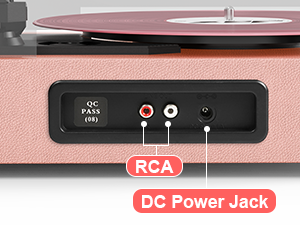
Image 4.5.1: Rear panel connections for RCA output and power.
5. Manutenzione
- Pulizia dello stilo: Pulire delicatamente e regolarmente lo stilo con una spazzola morbida, procedendo dal retro verso la parte anteriore.
- Pulizia dei registri: Per mantenere i tuoi dischi in vinile liberi da polvere e detriti, usa una spazzola in fibra di carbonio o una soluzione detergente per dischi.
- Dust Cover Care: Wipe the dust cover with a soft, dry cloth. Avoid abrasive cleaners.
- Superficie del giradischi: Clean the turntable's surface with a soft, slightly damp stoffa.
- Sostituzione dell'ago: The stylus (needle) should be replaced after approximately 300-500 hours of playback to maintain sound quality and prevent damage to your records.
6. Risoluzione Dei Problemi
- Nessun potere: Ensure the power adapter is securely connected to both the turntable and a working wall outlet. Check the 'VOLUME' knob is turned on.
- Nessun suono: Verify the volume is turned up. If using external speakers, ensure they are powered on and correctly connected via RCA. If in Bluetooth mode, confirm successful pairing.
- Saltare i record: Ensure the record is clean and free of dust. Check that the turntable is on a stable, level surface. The stylus might need cleaning or replacement.
- Problemi di accoppiamento Bluetooth: Make sure the turntable is in 'BT' mode. Ensure your device's Bluetooth is enabled and within range. Try unpairing and re-pairing the device.
- USB Recording Failure: Check that the USB drive is formatted correctly (FAT32) and has sufficient space. Ensure the capacity is less than 64GB.
7. Specifiche
| Caratteristica | Specificazione |
|---|---|
| Dimensioni del prodotto | 14.1 x 11.2 x 4.9 pollici |
| Peso dell'articolo | 4.85 libbre |
| Numero di modello | TE 2017 |
| Marca | DANFI AUDIODF |
| Massima velocità di rotazione | 78 RPM (supports 33 1/3, 45, 78 RPM) |
| Caratteristiche speciali | AUX Input, Built-In Bluetooth Receiver, Digital Recorder, Dust Cover, RCA Output |
| Materiale | Legno ingegnerizzato |
| Colore | Rosa chiaro |
| Dispositivi compatibili | Cuffie, Lettore MP3, Personal Computer, Smartphone, Tablet |
8. Garanzia e supporto
For warranty information and customer support, please refer to the documentation included with your product or contact DANFI AUDIO DF directly through their official websito o tramite i canali di assistenza clienti. Conservare la ricevuta d'acquisto per eventuali reclami in garanzia.
Supporto online: Visitare il DANFI AUDIO DF Store on Amazon per ulteriori informazioni sul prodotto e risorse di supporto.