
1. Introduzione
Thank you for choosing the New Bee Bluetooth Headset M54. This single-ear headset is designed for clear communication and comfortable wear, featuring advanced ENC environmental noise cancellation and CVC8.0 technology for superior call quality. With its long battery life and multi-device connectivity, it is an ideal companion for commuting, driving, office work, and business chats. Please read this manual carefully before use to ensure proper operation and to maximize your experience.
2. Contenuto della confezione
Si prega di controllare il contenuto della confezione per assicurarsi che siano presenti tutti gli articoli:
- Auricolare Bluetooth x1
- Cavo di ricarica di tipo C x1
- Eartips (S/M/L sizes) x3 pairs
- Custodia di ricarica x1
- Manuale di istruzioni x1
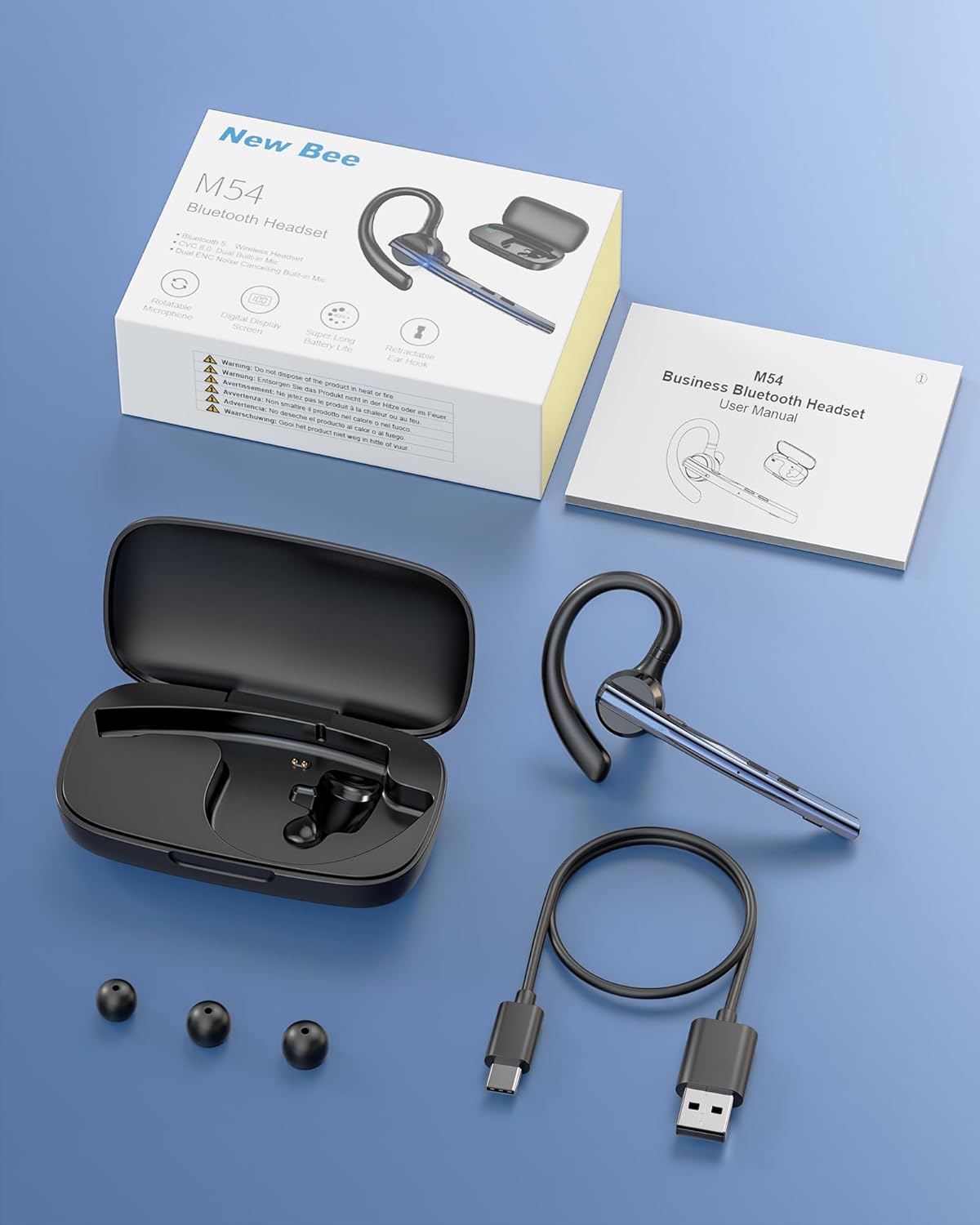
Immagine: Contenuto della confezione del nuovo auricolare Bluetooth Bee M54.
3. Caratteristiche del prodotto
ENC Dual Microphone for Clear Calls
The headset features a dual microphone array with ENC (Environmental Noise Cancellation) and CVC8.0 technology. The main microphone accurately captures your voice, while the sub-microphone collects ambient noise. The main control chip processes this information to enhance call effects by effectively canceling environmental noise and echoes. Enjoy HIFI sound quality and 360° surround sound for an immersive audio experience.

Image: Man using the headset in a car, highlighting ENC noise cancellation for clear calls.
Flexible Rotation & Comfortable Fit
An innovative balanced ear hook design prevents the headset from falling off and evenly distributes its weight for comfortable wear. The pivot points use elastic soft rubber material, combined with an in-ear design, ensuring comfort even during prolonged use. The microphone arm can rotate 270°, the ear hook rotates 180°, and the earcup front can move 30° left/right. Three sizes of eartips (S/M/L) are included for a customized fit.

Image: Woman wearing the headset, showcasing its lightweight and adjustable features.
Durata della batteria ultra lunga
Equipped with a large-capacity charging case and a low-power consumption chip, the headset offers extended usage times. Enjoy up to 15 hours of music playback, 12 hours of talk time, and an impressive 6 months of standby time. The charging case provides 2-3 full charges for the headset, extending the total operating time to approximately 60 hours.

Image: Headset charging in its case, illustrating battery life and charging options.
Bluetooth 5.1 & Strong Compatibility
Featuring the latest QCC3020/Bluetooth 5.1 chip, the headset ensures low power consumption, fast transmission speed, and a stable, smooth signal. It offers a reliable connection distance of up to 15 meters, making it compatible with a wide range of devices including smartphones, tablets, laptops, and PCs.

Image: Man using the headset outdoors, showing the 15m Bluetooth range.
Multi-functional & Easy Operation
The headset includes a multi-function button and an independent mute button for convenient control. One-touch mic off protects your privacy. Double-click the mute button to activate your voice assistant. It supports simultaneous connection to two devices, allowing seamless switching between music and call functions. The unique ear hook design is freely extendable to fit various ear shapes, accommodating more users. It is suitable for diverse environments such as office work, driving, phone conferences, and delivery services.

Image: Headset connected to multiple devices, demonstrating dual device connectivity.
4. Impostazione
4.1 Charging the Headset and Charging Case
Prima del primo utilizzo, caricare completamente l'auricolare e la custodia di ricarica.
- Ricarica dell'auricolare: Place the headset into the charging case. Ensure the charging contacts align. The indicator light on the headset will show charging status.
- Ricarica della custodia: Connect the provided Type-C USB cable to the charging port on the case and plug the other end into a USB power adapter (not included). The digital display on the case will show the battery percentage.
- A full charge for the headset takes approximately 1.5 hours. The charging case can fully charge the headset 2-3 times.
4.2 Accensione/Spegnimento
- Accensione: Press and hold the Multi-function Button for 3 seconds until the indicator light flashes blue.
- Spegni: Press and hold the Multi-function Button for 5 seconds until the indicator light flashes red and then turns off.
4.3 Associazione Bluetooth
- Assicurati che le cuffie siano spente.
- Press and hold the Multi-function Button for approximately 5-7 seconds until the indicator light flashes red and blue alternately, indicating pairing mode.
- Sul tuo dispositivo (smartphone, tablet, PC), attiva il Bluetooth e cerca i dispositivi disponibili.
- Select "M54" from the list of found devices.
- Once connected, the headset indicator light will flash blue slowly.
4.4 Indossare l'auricolare
The M54 headset is designed for comfortable and secure wear on either ear.
- Choose the Right Eartip: Select the S, M, or L eartip that best fits your ear canal for optimal sound and comfort.
- Adjust the Ear Hook: Place the ear hook over your ear. The ear hook can rotate 180° to fit both left and right ears.
- Posiziona il microfono: Rotate the microphone arm up to 270° to position it towards your mouth for clear voice pickup. The earcup front can also be adjusted 30° left or right for fine-tuning.
- Ensure a snug fit without discomfort. An improper fit may affect call quality.

Image: Instructions for selecting eartips and wearing the headset.
5. Istruzioni per l'uso
5.1 Funzioni dei pulsantiview

Image: Detailed diagram of headset buttons and their functions.
5.2 Gestione delle chiamate
- Rispondi/Termina chiamata: Single click the Multi-function Button.
- Rifiuta chiamata: Tieni premuto il pulsante multifunzione per 2 secondi.
- Ricomponi l'ultimo numero: Double click the Multi-function Button.
- Disattiva/Riattiva microfono: Single click the Mute Button.
5.3 Riproduzione di musica
- Riproduci/Pausa: Single click the Multi-function Button.
- Traccia successiva: Tenere premuto il pulsante Volume su per 3 secondi.
- Traccia precedente: Tenere premuto il pulsante Volume giù per 3 secondi.
5.4 Controllo del volume
- Aumenta volume: Single click the Volume Up button.
- Volume basso: Single click the Volume Down button.
5.5 Assistente vocale (SIRI)
- Attiva l'assistente vocale: Double click the Mute Button.
5.6 Connessione multi-punto
The M54 headset can connect to two Bluetooth devices simultaneously.
- Associare l'auricolare al primo dispositivo come descritto nella Sezione 4.3.
- Disattiva il Bluetooth sul primo dispositivo. L'auricolare tornerà in modalità di associazione.
- Associare l'auricolare al secondo dispositivo.
- Enable Bluetooth on the first device. The headset should automatically connect to both devices.
- You can now seamlessly switch between audio and calls from either connected device.
6. Manutenzione
Una corretta manutenzione garantisce la longevità e le prestazioni ottimali delle cuffie.
- Pulizia: Use a soft, dry cloth to clean the headset and charging case. Do not use harsh chemicals or abrasive materials. Regularly clean the eartips and charging contacts to prevent debris buildup.
- Magazzinaggio: Store the headset in its charging case when not in use to protect it from dust and damage. Avoid storing in extreme temperatures or high humidity.
- Cura della batteria: To preserve battery life, avoid fully discharging the battery frequently. Charge the headset regularly, even if not used for extended periods.
- Esposizione all'acqua: Il visore non è impermeabile. Evitare l'esposizione ad acqua, pioggia o umidità eccessiva.
7. Risoluzione Dei Problemi
In caso di problemi, fare riferimento ai seguenti problemi comuni e alle relative soluzioni:
| Problema | Possibile causa | Soluzione |
|---|---|---|
| Impossibile accendere | Batteria scarica | Caricare completamente l'auricolare e la custodia di ricarica. |
| Impossibile associare il dispositivo | Auricolare non in modalità di associazione; Bluetooth disattivato sul dispositivo; Dispositivo troppo lontano. | Ensure headset is in pairing mode (flashing red/blue). Turn on Bluetooth on your device. Move device closer to headset (within 15m). Try restarting both devices. |
| Nessun suono o volume basso | Volume too low; Headset not connected; Incorrect audio output selected. | Aumenta il volume sia sull'auricolare che sul dispositivo connesso. Ricollega l'auricolare. Controlla le impostazioni di uscita audio sul tuo dispositivo. |
| Scarsa qualità delle chiamate | Weak signal; Microphone obstructed; Improper fit. | Move closer to the connected device. Ensure microphone is clear and positioned correctly. Adjust headset fit and eartip size. |
| L'auricolare si disconnette frequentemente | Fuori portata; Interferenza; Batteria scarica. | Stay within 15m of the connected device. Avoid strong electromagnetic interference. Charge the headset. |
Se il problema persiste dopo aver provato queste soluzioni, contattare l'assistenza clienti.
8. Specifiche
| Marca | Nuova ape |
| Modello | Numero di modello: M54 |
| Colore | Blu |
| Versione Bluetooth | 5.1 (chip QCC3020) |
| Controllo del rumore | ENC Environmental Noise Cancellation, CVC8.0 Echo Cancellation |
| Distanza di trasmissione | Fino a 15 metri |
| Tempo di riproduzione della musica | Circa 15 ore |
| Tempo di conversazione | Circa 12 ore |
| Tempo di standby | Circa 6 mesi |
| Tempo di funzionamento totale (con custodia) | Circa 60 ore |
| Tempo di ricarica | Approx. 1.5 hours (headset) |
| Peso | Circa 14.2 g |
| Origine | Cina |
9. Garanzia e supporto
9.1 Informazioni sulla garanzia
The New Bee Bluetooth Headset M54 comes with a Garanzia del produttore di 1 anni dalla data di acquisto. La presente garanzia copre difetti di fabbricazione e malfunzionamenti dovuti a normale utilizzo. Non copre danni causati da uso improprio, incidenti, modifiche non autorizzate o normale usura.
9.2 Assistenza clienti
If you have any questions, require technical assistance, or need to claim warranty service, please contact New Bee customer support through the retailer where you purchased the product or visit the official New Bee website for contact information. Please have your purchase receipt and product model number (M54) ready when contacting support.