
1. Introduzione
Thank you for choosing the ANRAN Q04 5MP Solar 4G LTE Cellular Security Camera. This manual provides detailed instructions for the proper installation, operation, and maintenance of your security camera. Please read this manual thoroughly before use to ensure optimal performance and longevity of the product. This camera operates exclusively on 4G LTE cellular networks and does not support Wi-Fi connectivity.
2. Contenuto della confezione
Si prega di verificare che tutti gli articoli elencati di seguito siano inclusi nel pacco. Se alcuni articoli risultano mancanti o danneggiati, contattare l'assistenza clienti.
- ANRAN Q04 5MP Solar 4G LTE Cellular Security Camera
- Pannello solare integrato
- Staffa di montaggio e viti
- Scheda MicroSD da 32 GB (preinstallata o separata)
- 4G SIM Card (pre-installed or separate)
- Cavo di ricarica USB
- Manuale d'uso

Immagine: Oltreview of the ANRAN Q04 camera system, including the camera, solar panel, SIM card, and microSD card.
3. Impostazione
3.1 Installazione della scheda SIM e della scheda MicroSD
- Locate the SIM card slot and MicroSD card slot on the camera. These are typically protected by a rubber cover.
- Aprire con cautela il coperchio.
- Insert the provided 4G SIM card into the SIM card slot with the gold contacts facing down and the notched corner oriented correctly. Push until it clicks into place.
- Insert the provided MicroSD card into the MicroSD card slot with the gold contacts facing down. Push until it clicks into place.
- Ensure the rubber cover is securely closed to maintain the camera's weather resistance.
3.2 Montaggio della telecamera
Scegli una posizione che riceve ample sunlight for the solar panel and has good 4G LTE signal strength. Ensure the camera has a clear view dell'area che desideri monitorare.
- Position the mounting bracket against the desired surface (wall, pole, etc.) and mark the drill holes.
- Praticare dei fori pilota nei punti contrassegnati.
- Fissare la staffa di montaggio utilizzando le viti in dotazione.
- Attach the camera to the mounting bracket and adjust its angle for optimal coverage and solar panel exposure.

Image: A person installing the ANRAN Q04 camera, demonstrating simple installation on a wall.
3.3 Initial Power On & App Connection
- Ensure the camera's battery is sufficiently charged. You may pre-charge it using the USB cable if needed.
- Scarica l'app ufficiale ANRAN dall'app store del tuo smartphone (iOS o Android).
- Apri l'app e crea un account o accedi.
- Follow the in-app instructions to add your new camera. This typically involves scanning a QR code on the camera or manually entering its device ID.
- Once connected, the camera will establish a connection via the 4G LTE network.
4. Utilizzo della fotocamera
4.1 Camera Controls & Features
- Pan & Tilt: The ANRAN Q04 offers a 355° horizontal pan and 90° vertical tilt, allowing you to remotely adjust the camera's viewing angle via the app.

Image: Illustration of the camera's 355-degree pan and 90-degree tilt capabilities, controlled remotely via a smartphone app.
- Rilevamento del movimento e notifiche: The camera is equipped with human motion detection. When motion is detected, the camera will record footage and send real-time notifications to your smartphone. Note: This camera does not support auto-tracking.

Image: Depiction of the camera's motion detection feature at night, showing a person triggering an alert and the camera's lights illuminating the area.
- Modalità di visione notturna: La telecamera offre tre distinte modalità di visione notturna per diverse condizioni di scarsa illuminazione:
- Modalità Smart: Passa automaticamente dalla visione notturna a infrarossi a quella a colori in base all'attività rilevata.
- Modalità colore: Utilizza faretti integrati per fornire video a colori anche in completa oscurità.
- Modalità a infrarossi: Uses infrared LEDs for clear black-and-white video in low light, conserving power.
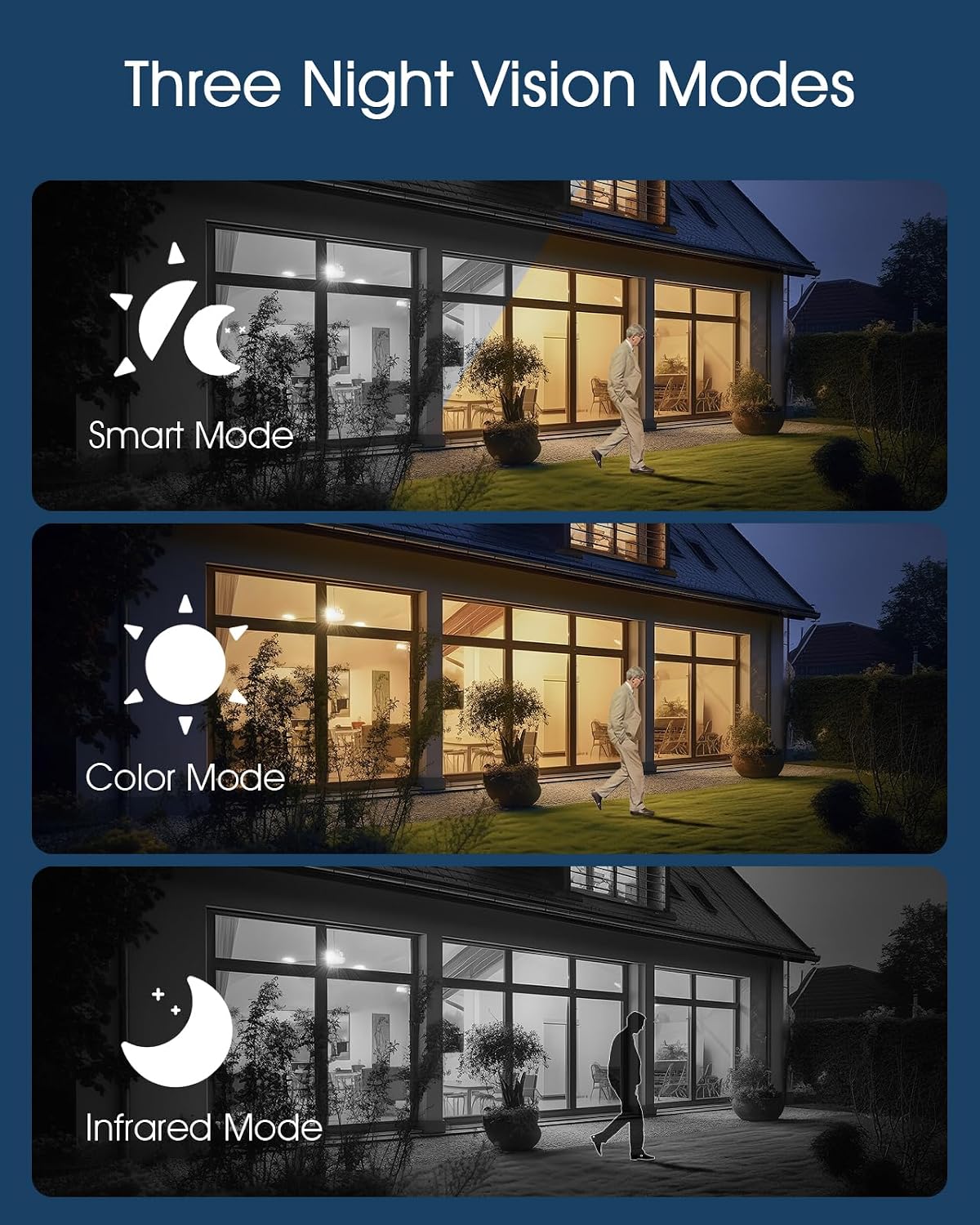
Image: A visual comparison of the three night vision modes: Smart Mode (auto-switching), Color Mode (full-color with spotlights), and Infrared Mode (black and white).
Connettività 4.2 4G LTE
The ANRAN Q04 camera is designed for areas without Wi-Fi access. It relies solely on a 4G LTE cellular connection for data transmission. Ensure your SIM card has an active data plan for continuous operation.

Image: A graphic emphasizing the camera's 4G LTE connectivity, explicit lack of Wi-Fi support, integrated solar panel for charging, and included SIM card.
4.3 Gestione dell'energia solare
The camera features an integrated solar panel and a 9600mAh rechargeable battery, providing continuous power. Position the solar panel to receive maximum direct sunlight daily to ensure optimal charging and uninterrupted operation.

Image: The camera mounted with its solar panel, illustrating its self-sustaining power system with a 9600mAh battery and IP66 weather resistance for year-round outdoor use.
5. Manutenzione
- Pulizia: Pulire periodicamente l'obiettivo della fotocamera e il pannello solare con un panno morbido eamp panno per rimuovere polvere e detriti. Non utilizzare prodotti chimici aggressivi.
- Cura della batteria: While the solar panel charges the battery, avoid prolonged periods of complete discharge. If storing the camera, ensure the battery is partially charged.
- Aggiornamenti del firmware: Check the ANRAN app regularly for firmware updates. Keeping your camera's firmware up-to-date ensures optimal performance and security.
- Gestione della scheda MicroSD: The camera will overwrite older footage when the MicroSD card is full. For critical recordings, download them to your device or cloud storage.
6. Risoluzione Dei Problemi
- La fotocamera non si accende: Ensure the battery is charged. Connect the camera to a USB power source for initial charging.
- No 4G LTE Signal: Check the SIM card installation and ensure it has an active data plan. Relocate the camera to an area with better cellular reception.
- Problemi di connessione dell'app: Ensure your smartphone has a stable internet connection. Restart the app and the camera. Re-add the camera if necessary.
- Visione notturna scarsa: Clean the camera lens. Ensure there are no obstructions blocking the infrared LEDs or spotlights.
- Pannello solare non in carica: Ensure the solar panel is clean and positioned to receive direct sunlight for several hours daily. Check for any physical damage to the panel or cable.
- Il rilevamento del movimento non funziona: Verify motion detection settings in the app. Ensure the camera's view è chiaro e non ostruito.
7. Specifiche
| Caratteristica | Specificazione |
|---|---|
| Modello | ANRAN Q04 |
| Risoluzione | 5 Megapixel |
| Connettività | Cellulare 4G LTE (nessun supporto Wi-Fi) |
| Fonte di alimentazione | Pannello solare integrato, batteria ricaricabile da 9600 mAh |
| Gamma di panoramica/inclinazione | Panoramica orizzontale di 355°, inclinazione verticale di 90° |
| Visione notturna | Modalità intelligente, modalità colore, modalità infrarossi |
| Magazzinaggio | MicroSD Card (up to 128GB, 32GB included) |
| Resistenza alle intemperie | Grado di protezione IP66 |
8. Garanzia e supporto
ANRAN products come with a limited warranty. For detailed warranty information, please refer to the warranty card included in your package or visit the official ANRAN website. If you encounter any issues or have questions regarding your ANRAN Q04 camera, please contact ANRAN customer support through the app or the official websito per assistenza.