
1. Prodotto finitoview
The HEIBAS G7 Bluetooth Headset is designed for clear communication and audio playback, featuring advanced Bluetooth 6.0 connectivity, active and environmental noise cancellation, and a long-lasting battery. Its ergonomic design ensures a comfortable and secure fit for extended use.

Immagine: Oltreview of the HEIBAS G7 Bluetooth Headset highlighting Bluetooth 6.0 features.
2. Contenuto della confezione
Si prega di controllare la confezione per verificare la presenza dei seguenti elementi:
- HEIBAS G7 Bluetooth Headset x 1
- Ear tips (S/M/L) x 3 pairs (6 pieces total)
- Cavo di ricarica di tipo C x 1
- Manuale di istruzioni x 1

Image: Diagram showing the headset, charging case, ear tips, and charging cable included in the package.
3. Configurazione e associazione
3.1 Addebito iniziale
Before first use, fully charge the headset and its charging case using the provided Type-C cable. The LED display on the charging case indicates the battery level.

Image: The charging case with an LED display showing battery percentage, che indica lo stato di carica.
3.2 Associazione con un dispositivo
- Assicurarsi che l'auricolare sia carico.
- Aprire la custodia di ricarica. L'auricolare entrerà automaticamente in modalità di associazione.
- Attiva il Bluetooth sul tuo smartphone, tablet o PC e cerca i dispositivi disponibili.
- Select "G7" from the list of devices to connect.
- Once connected, the headset is ready for use.
The headset supports automatic connection to previously paired devices when taken out of the case.

Image: The headset and charging case next to a smartphone, illustrating automatic connection upon removal from the case.
4. Indossare l'auricolare
The G7 headset features an adjustable design for a secure and comfortable fit on either ear.
4.1 Regolazione della vestibilità
- The ear hook can be rotated 180° and 360° to fit various ear shapes.
- The head part can rotate 45° left or right, allowing use on either the left or right ear.
- Choose the appropriate ear tip size (S, M, L) for optimal comfort and sound quality.

Image: Diagrams illustrating the 180°, 360°, and 45° adjustment capabilities of the headset for a customized fit.
4.2 Metodo d'uso
- Rotate the ear hook 90 degrees to the left (for right ear use, rotate 90 degrees to the right).
- Rotate the ear hook 90 degrees upwards.
- Rotate the earphone head and adjust its position to fit your ear shape.
Image: Step-by-step guide on how to wear the headset, including selecting the correct ear tip size (S, M, L).
5. Controlli e funzioni
The G7 headset features physical buttons for intuitive control of various functions.

Image: Diagram showing the physical buttons on the headset and their corresponding functions, including power, volume, play/pause, call control, mute, and Siri activation.
5.1 Operazioni di base
- Accensione/spegnimento: Tieni premuto il pulsante principale per 3 secondi.
- Riproduci/Pausa: Single press the main button.
- Volume su/giù: Press the volume buttons (indicated by +/-).
- Traccia successiva / precedente: Press and hold the volume buttons for 2 seconds.
5.2 Gestione delle chiamate
- Rispondi/Termina chiamata: Single press the main button.
- Rifiuta chiamata: Tieni premuto il pulsante principale per 2 secondi.
- Disattiva/Attiva audio: During a call, press the dedicated mute button (located on the side of the headset).
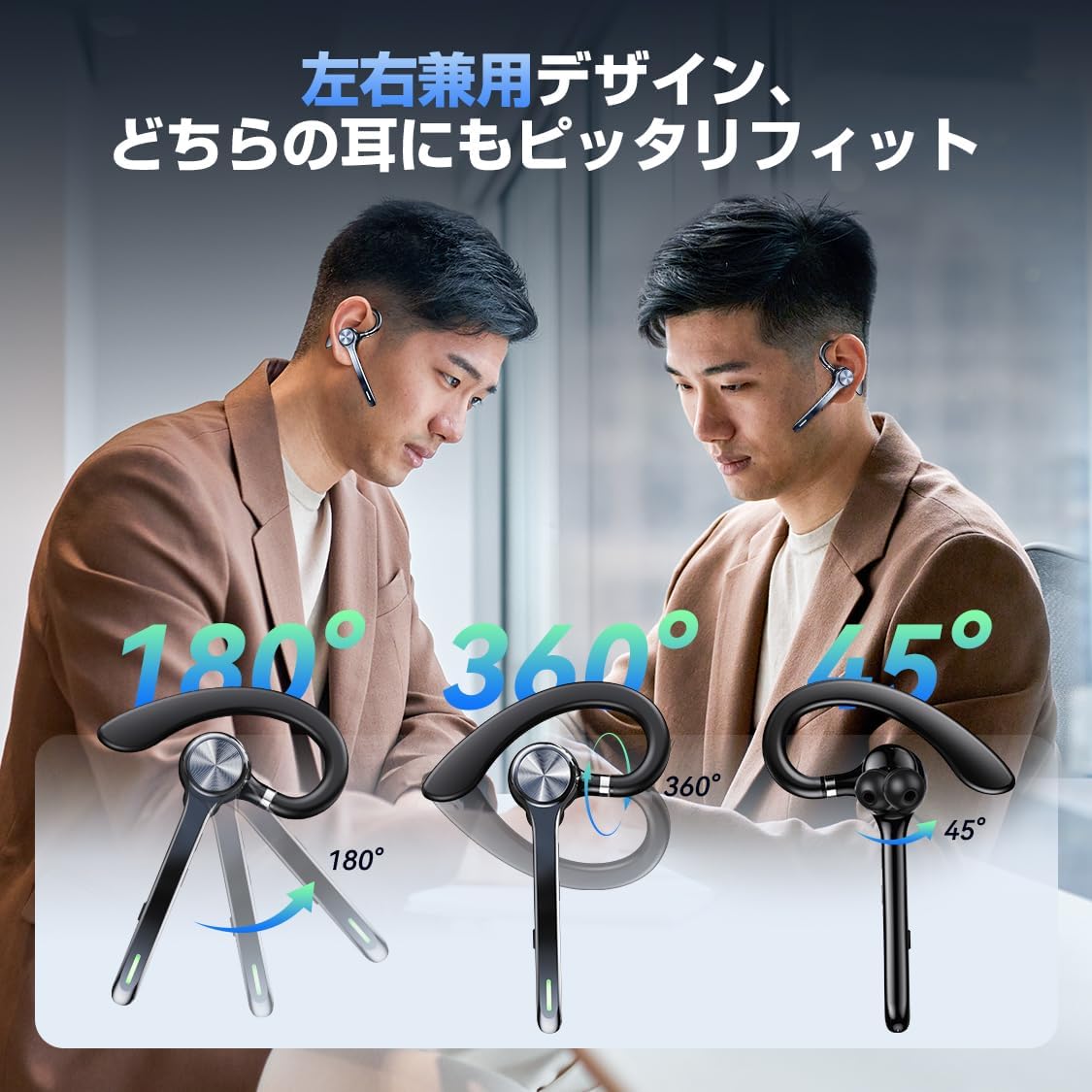
Image: A person using the headset during a call, demonstrating the mute function.
5.3 Assistente vocale (Siri)
- Attiva Siri: Premere due volte il pulsante principale.
6. Funzionalità avanzate
6.1 Connessione multipunto
The G7 headset supports simultaneous connection to two devices (e.g., a smartphone and a PC). This allows for seamless switching between music playback on one device and calls on another.

Image: The headset connected to both a smartphone and a laptop, demonstrating the multipoint connection feature.
6.2 Noise Cancellation (ANC & ENC)
- Cancellazione attiva del rumore (ANC): Reduces low-frequency ambient noise during music playback (e.g., train sounds, air conditioner hum).
- Cancellazione del rumore ambientale (ENC): Suppresses background noise during calls, ensuring your voice is transmitted clearly to the other party.

Image: Diagram illustrating the effect of ANC and ENC on sound, showing noise reduction before and after cancellation.
7. Batteria e ricarica
The G7 headset offers extended battery life for prolonged use.
- Headset Playback Time: Approximately 21-23 hours on a single charge.
- Tempo di riproduzione totale (con custodia di ricarica): Fino a 108 ore.
- Capacità della custodia di ricarica: 500 mAh.
- Interfaccia di ricarica: Tipo C.
- Tempo di ricarica: Circa 2-2.5 ore per una carica completa.

Image: Visual representation of the headset's battery life, including single playback time, total time with the charging case, and standby time.
8. Specifiche
| Nome del modello | G7 |
| Marca | HEIBAS (Origin qilin) |
| Tecnologia di connettività | Senza fili (Bluetooth 6.0) |
| Fattore di forma delle cuffie | Bluetooth Headset (Single Ear) |
| Cancellazione del rumore | ANC + ENC Dual Noise Cancellation |
| Durata della batteria (auricolare) | 21-23 ore |
| Durata totale della batteria (con custodia) | Fino a 108 ore |
| Capacità della custodia di ricarica | 500mAh |
| Interfaccia di ricarica | Tipo C |
| Peso | Approx. 12g (headset) |
| Resistenza all'acqua | Waterproof (level not specified, generally splash-proof) |
| Dispositivi compatibili | Smartphone, tablet, laptop |
| Componenti inclusi | Bluetooth Headset, Ear tips, Cable, Instruction Manual |
9. Risoluzione Dei Problemi
9.1 Impossibile accendere
- Assicurarsi che l'auricolare sia completamente carico.
- Tieni premuto il pulsante di accensione per almeno 3 secondi.
9.2 Impossibile associare
- Assicurarsi che l'auricolare sia in modalità di associazione (solitamente indicata da un LED lampeggiante).
- Disattiva e riattiva il Bluetooth sul tuo dispositivo.
- Assicurati che l'auricolare si trovi entro 10 metri dal dispositivo.
- Elimina "G7" dall'elenco Bluetooth del tuo dispositivo e riprova ad associarlo.
9.3 Scarsa qualità del suono o disconnessioni
- Assicurarsi che l'auricolare sia completamente carico.
- Reduce the distance between the headset and your device.
- Avoid obstacles (walls, large electronic devices) between the headset and your device.
- Verificare la presenza di interferenze da altri dispositivi wireless.
9.4 Problemi con il microfono
- Ensure the microphone is not muted during a call.
- Controlla le impostazioni audio del tuo dispositivo per assicurarti che l'auricolare sia selezionato come dispositivo di input/output.
10. Manutenzione
- Pulire regolarmente le cuffie con un panno morbido e asciutto.
- Avoid exposing the headset to extreme temperatures, humidity, or corrosive liquids.
- Quando non vengono utilizzate, conservare le cuffie nella custodia di ricarica per proteggerle e mantenerle cariche.
- Non tentare di smontare o riparare il visore da soli. In caso di problemi, contattare l'assistenza clienti.
11. Garanzia e supporto
For warranty information or technical support, please refer to the contact details provided on the product packaging or the official HEIBAS webluogo. Conserva la ricevuta di acquisto per eventuali richieste di garanzia.
12. Video del prodotto
Video: Un breve preview demonstrating key features of the HEIBAS G7 Bluetooth Headset, including its design, charging, and controls.