
1. Introduzione
This manual provides detailed instructions for the ANRAN Q04 5MP Solar Security Camera and the ANRAN F2M3 Solar Light Security Camera. It covers essential information regarding product setup, operation, maintenance, and troubleshooting to ensure optimal performance and longevity of your devices. Please read this manual thoroughly before installation and use.
2. Prodotto finitoview
2.1 ANRAN Q04 5MP Solar Security Camera
The ANRAN Q04 is a 5-megapixel wireless outdoor security camera featuring an integrated solar panel for continuous power. It offers pan and tilt capabilities for wide area surveillance.

Image: Two ANRAN Q04 solar security cameras, showcasing their design with integrated solar panels and dual antennas.

Image: An ANRAN Q04 camera illustrating its 355-degree pan and 90-degree tilt capabilities, with a smartphone displaying the live view.
2.2 ANRAN F2M3 Solar Light Security Camera
The ANRAN F2M3 combines a security camera with a motion-activated light, powered by a separate solar panel and a 5000 mAh battery. It includes features like two-way audio, a siren, and multiple night vision modes.

Image: Two ANRAN F2M3 solar light security cameras shown alongside their separate solar panels.

Image: An ANRAN F2M3 camera mounted on a wall, emphasizing its dual function as a wall light and camera, powered by a 3W solar panel and a 5000 mAh battery.

Image: An ANRAN F2M3 camera demonstrating its PIR detection and motion-activated light, along with icons for notification, 2-way audio, 70db siren, and 200-lumen brightness.
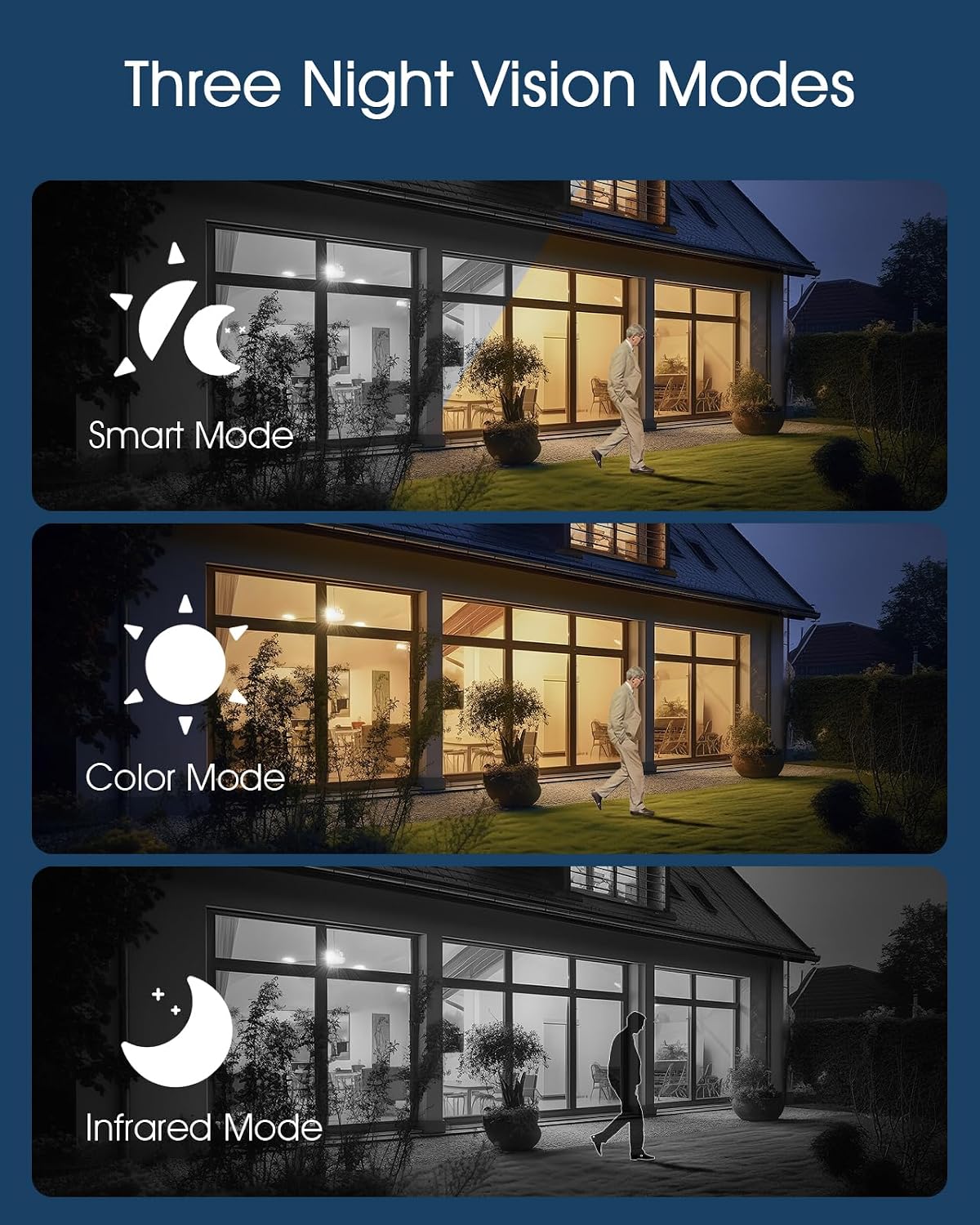
Image: Illustrations of the three night vision modes available for the F2M3 camera: Smart Mode, Color Mode, and Infrared Mode.
3. Impostazione
3.1 Unboxing e carica iniziale
Carefully unpack all components. Before installation, ensure the camera's battery is fully charged. Connect the camera to a power source using the provided USB cable for several hours.
3.2 Installazione
Select an optimal location for your camera, ensuring good Wi-Fi signal strength and direct sunlight exposure for the solar panel. Mount the camera securely using the provided screws and mounting bracket.
ANRAN Q04 Installation
The Q04 camera features an integrated solar panel. Mount it in a location that receives ample direct sunlight throughout the day to maximize charging efficiency.

Image: A woman installing an ANRAN Q04 camera on a wall, demonstrating the simple installation process without the need for a separate solar panel.
ANRAN F2M3 Installation
The F2M3 camera uses a separate solar panel. Mount the camera at the desired surveillance point and position the solar panel in a location with maximum sun exposure, connecting it to the camera with the provided cable.

Image: A man installing an ANRAN F2M3 camera on an exterior wall, highlighting its easy installation and instant connection to 2.4GHz WiFi.
3.3 Connessione all'app
- Download the official ANRAN app from your smartphone's app store.
- Crea un account e accedi.
- Follow the in-app instructions to add your camera. Ensure your Wi-Fi network is 2.4GHz, as the cameras do not support 5GHz Wi-Fi.
- Scan the QR code on the camera or manually enter the device ID to pair.
4. Istruzioni per l'uso
4.1 Vivere View e Registrazione
Once connected, open the ANRAN app to access the live video feed from your camera. You can initiate manual recordings or capture screenshots directly from the live view interfaccia.
4.2 Rilevamento del movimento e avvisi
Configure motion detection sensitivity and alert settings within the app. The cameras will send notifications to your smartphone when motion is detected. For the F2M3, motion detection also activates the integrated light and can trigger the siren.
4.3 Two-Way Audio (F2M3)
The F2M3 camera supports two-way audio communication. Use the microphone and speaker icons in the app to speak through the camera and hear audio from its vicinity.
4.4 Night Vision Modes (F2M3)
The F2M3 offers three night vision modes:
- Modalità Smart: Passa automaticamente dalla visione notturna a infrarossi a quella a colori in base al movimento rilevato.
- Modalità colore: Utilizes the integrated light to provide full-color video at night.
- Modalità a infrarossi: Provides black and white video using infrared LEDs for discreet surveillance.
4.5 Pan & Tilt Control (Q04)
For the Q04 camera, use the directional controls within the app to remotely adjust the camera's viewing angle (355° horizontal pan and 90° vertical tilt).
5. Manutenzione
5.1 Pulizia
Regularly clean the camera lens and solar panel surfaces with a soft, damp panno per garantire una qualità dell'immagine nitida e un'efficiente ricarica solare. Evitare detergenti abrasivi.
5.2 Cura della batteria
To prolong battery life, ensure the solar panel receives adequate sunlight. In prolonged periods of low light, consider temporarily charging the camera via USB if accessible.
5.3 Aggiornamenti firmware
Check the ANRAN app periodically for available firmware updates. Keeping your camera's firmware up-to-date ensures optimal performance, security, and access to new features.
6. Risoluzione Dei Problemi
6.1 La fotocamera non si accende
- Ensure the battery is fully charged. Connect to a USB power source for several hours.
- Verify the solar panel connection (F2M3) or ensure the integrated panel (Q04) is receiving sunlight.
6.2 Impossibile connettersi al Wi-Fi
- Confirm your Wi-Fi network is 2.4GHz. These cameras do not support 5GHz Wi-Fi.
- Assicurati che la telecamera si trovi nel raggio di azione del router Wi-Fi.
- Riavvia il router e la telecamera.
- Reset the camera to factory settings (refer to app for specific instructions) and attempt pairing again.
6.3 Scarsa qualità dell'immagine
- Pulisci l'obiettivo della fotocamera.
- Assicurarsi che non vi siano ostacoli nel campo di ripresa della telecamera view.
- Controlla la potenza del segnale Wi-Fi: un segnale debole può influire sulla qualità dello streaming.
6.4 Rilevamento del movimento non funzionante
- Verificare che le impostazioni di rilevamento del movimento siano abilitate nell'app.
- Regola i livelli di sensibilità.
- Ensure the camera's PIR sensor (F2M3) or motion detection area (Q04) is clear of obstructions.
7. Specifiche
| Caratteristica | ANRAN Q04 | ANRAN F2M3 |
|---|---|---|
| Risoluzione | 5 Megapixel | Not specified (typically 1080p/2K for light cameras) |
| Fonte di alimentazione | Pannello solare integrato, batteria ricaricabile | Separate 3W Solar Panel, 5000 mAh Battery |
| Connettività | Wi-Fi a 2.4 GHz (IEEE 802.11b/g/n) | |
| Panoramica/Inclinazione | Panoramica 355°, inclinazione 90° | NO |
| Visione notturna | Visione notturna a infrarossi | Modalità intelligente, modalità colore, modalità infrarossi |
| Audio | One-Way Audio (Listening) | Audio bidirezionale |
| Potenza luminosa | NO | 200-Lumen Motion-Activated Light |
| Sirena | NO | 70db Siren |
| Rilevamento | Rilevamento del movimento | PIR Detection, Motion Detection |
| Valutazione all'aperto | Weatherproof (specific IP rating not provided, but designed for outdoor use) | |
8. Garanzia e supporto
I prodotti ANRAN sono generalmente coperti da una garanzia limitata. Si prega di fare riferimento alla scheda di garanzia inclusa con il prodotto o di visitare il sito ufficiale ANRAN. websito per termini e condizioni di garanzia dettagliati.
For technical support, troubleshooting assistance, or any product-related inquiries, please contact ANRAN customer service through the contact information provided on their official websito o all'interno dell'app ANRAN.