
1. Introduzione
This manual provides detailed instructions for the installation, operation, and maintenance of your ANRAN 4G LTE Cellular Security Camera, Q04 Solar Security Camera, and F2M3 Solar Light Security Camera systems. Please read this manual thoroughly before using the product to ensure correct usage and optimal performance. Keep this manual for future reference.
Important Notice: The 4G LTE Cellular Solar Security Camera does not support WiFi connection. It operates exclusively on a 4G LTE cellular network.
2. Contenuto della confezione
Si prega di controllare il contenuto del pacco al momento della ricezione. Se qualche articolo risulta mancante o danneggiato, contattare l'assistenza clienti.
- ANRAN 4G LTE Cellular Security Camera (with integrated solar panel)
- ANRAN Q04 Solar Security Camera (optional, 2-pack)
- ANRAN F2M3 Solar Light Security Camera (optional, 2-pack)
- Staffa di montaggio e viti
- Cavo di ricarica USB
- Manuale d'uso
- SIM Card (pre-installed or included separately for 4G models)
- MicroSD Card (optional, e.g., 32GB)
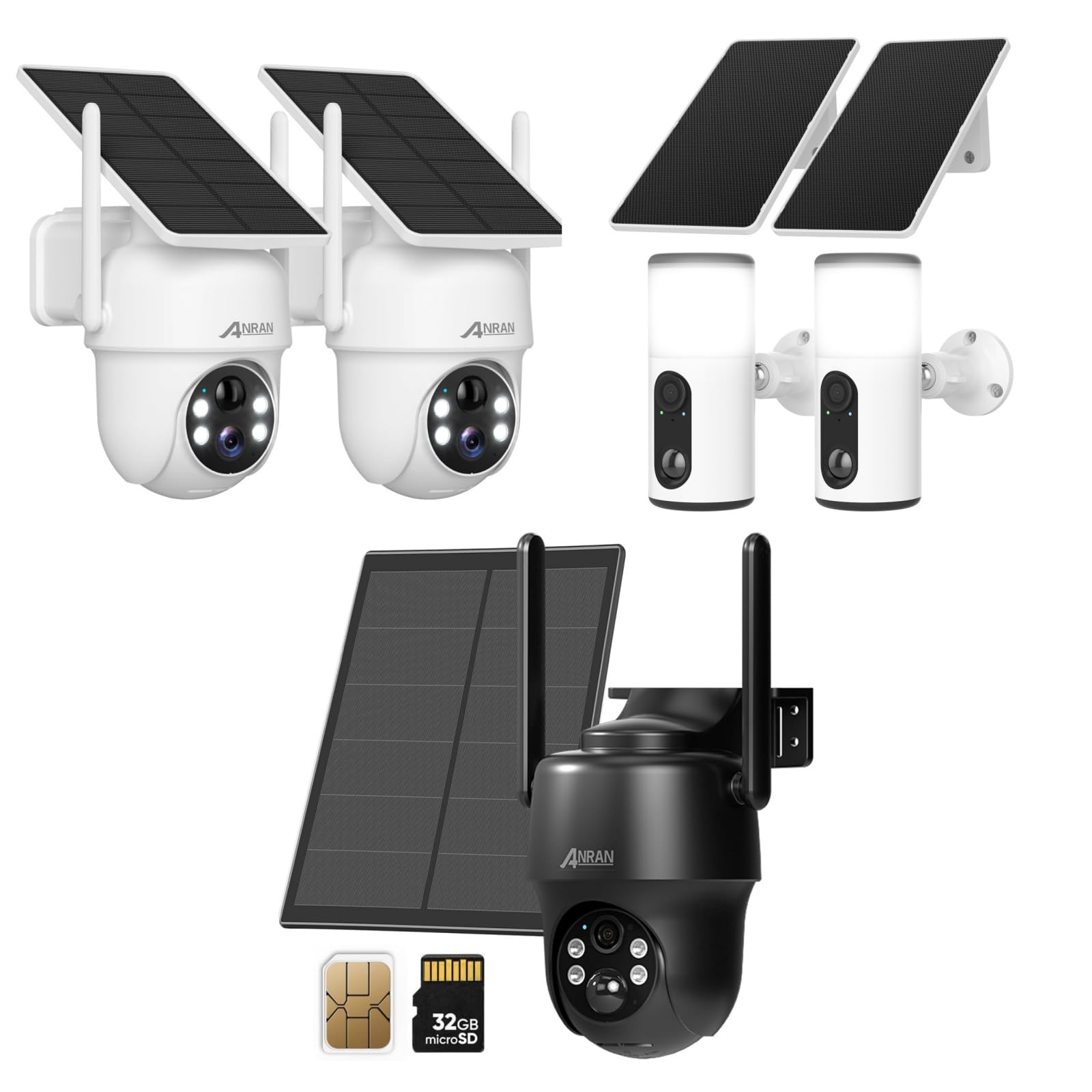
Image 2.1: ANRAN 4G LTE Cellular Security Camera with its solar panel, a SIM card, and a 32GB microSD card, illustrating typical package components.

Image 2.2: Two ANRAN Q04 Solar Security Cameras, typically sold as a pair, featuring integrated solar panels and a white finish.

Image 2.3: Two ANRAN F2M3 Solar Light Security Cameras, designed to function as both a security camera and a light source, shown with their solar panels.
3. Prodotto finitoview
The ANRAN security camera systems offer wire-free surveillance solutions, powered by solar energy and utilizing either 4G LTE cellular networks or local WiFi (for Q04/F2M3 models, if applicable). Each model is designed for outdoor use with robust construction.
3.1. ANRAN 4G LTE Cellular Security Camera
- Connettività: 4G LTE cellular network only (no WiFi support).
- Energia: Integrated solar panel for continuous charging.
- Caratteristiche: Pan-Tilt-Zoom (PTZ) capabilities, night vision, motion detection.
- Magazzinaggio: Supports microSD card for local storage.

Image 3.1: An ANRAN 4G LTE Cellular Security Camera mounted on a tree, highlighting its wire-free operation and solar power capabilities. It explicitly states '4G' and 'not support WiFi'.
3.2. ANRAN Q04 Solar Security Camera
- Connettività: Typically WiFi-enabled (refer to specific product details for confirmation).
- Energia: Integrated solar panel.
- Progetto: Compact dome-style camera.
3.3. ANRAN F2M3 Solar Light Security Camera
- Connettività: Typically WiFi-enabled (refer to specific product details for confirmation).
- Energia: Integrated solar panel (3W) and 5000 mAh battery.
- Funzionalità: Combines security camera features with an integrated wall light.

Immagine 3.2: Un primo piano view of the ANRAN F2M3 Solar Light Security Camera, illustrating its dual function as a wall light and a camera, powered by a 3W solar panel and a 5000 mAh battery.
4. Impostazione
4.1. Ricarica iniziale
Before first use, fully charge the camera's internal battery using the provided USB cable. Connect the cable to the camera's charging port and a 5V/2A power adapter (not included). The charging indicator light will show the charging status.
4.2. SIM Card and MicroSD Card Installation (for 4G LTE Cellular Camera)
- Locate the SIM card slot and microSD card slot on the camera (usually under a rubber seal).
- Insert the 4G LTE SIM card into the SIM slot with the gold contacts facing down and the notched corner oriented correctly. Ensure it clicks into place.
- Insert the microSD card (Class 10 or higher, up to 128GB recommended) into the microSD slot with the gold contacts facing down.
- Securely close the rubber seal to maintain waterproofing.
4.3. Download dell'app e registrazione dell'account
- Scarica l'app ANRAN dall'App Store (iOS) o dal Google Play Store (Android).
- Apri l'app e registra un nuovo account utilizzando il tuo indirizzo email o il tuo numero di telefono.
- Segui le istruzioni visualizzate sullo schermo per completare il processo di registrazione.
4.4. Camera Pairing with App
- Power on the camera. Wait for the status indicator light to flash, indicating it's ready for pairing.
- Nell'app ANRAN, tocca l'icona '+' per aggiungere un nuovo dispositivo.
- Select the appropriate camera model (e.g., 4G Camera, Solar Camera).
- Follow the in-app instructions to scan the QR code on the camera or manually enter the device ID.
- For 4G cameras, ensure the SIM card has an active data plan. For WiFi cameras, connect to your 2.4GHz WiFi network when prompted.
- Una volta connesso, puoi dare un nome alla tua telecamera e iniziare a trasmettere in diretta viewing.
4.5. Montaggio della fotocamera
Scegliere una posizione di montaggio che fornisca un'esposizione solare ottimale per il pannello solare e una vista libera view of the area you wish to monitor. Ensure the camera is within cellular network range (for 4G models) or WiFi range (for WiFi models).
- Segnare i punti di foratura utilizzando la staffa di montaggio come modello.
- Se si monta su muratura o stucco, praticare dei fori e inserire i tasselli a muro.
- Secure the mounting bracket to the wall or surface using the provided screws.
- Attach the camera to the mounting bracket and adjust the angle for desired coverage.

Image 4.1: A woman installing an ANRAN solar security camera on a wall, demonstrating the simple installation process.
5. Istruzioni per l'uso
5.1. Vivere View
Open the ANRAN app and select the desired camera from your device list to access the live video feed. You can view pippo in tempo realetage, acquisire schermate e registrare video manualmente.
5.2 Rilevamento del movimento e avvisi
Configure motion detection sensitivity and alert settings within the app. When motion is detected, the camera will record a video clip and send a notification to your smartphone.
- Sensibilità: Adjust to minimize false alarms.
- Zona di rilevamento: Imposta aree specifiche per il rilevamento del movimento.
- Programma di notifica: Define times when you wish to receive alerts.
5.3. Riproduzione e registrazione
Access recorded video clips through the app's playback feature. Recordings are stored on the microSD card or in cloud storage (if subscribed). You can filter recordings by date and time.
5.4. Audio bidirezionale
Utilizza la funzione audio bidirezionale per comunicare con i visitatori o scoraggiare gli intrusi. Tocca l'icona del microfono nella schermata live view per parlare e ascoltare attraverso l'altoparlante della telecamera.
5.5. Pan-Tilt-Zoom (PTZ) Control (for applicable models)
For cameras with PTZ functionality, use the directional controls in the app to remotely adjust the camera's viewing angle (pan and tilt) and zoom in or out.
5.6. Light Control (for F2M3 Solar Light Camera)
The F2M3 model allows control of the integrated light through the app. You can set schedules for the light to turn on/off, or activate it manually.
6. Manutenzione
6.1. Pulizia
Pulire regolarmente l'obiettivo della fotocamera e il pannello solare con un panno morbido eamp cloth to ensure clear image quality and efficient solar charging. Avoid abrasive cleaners or harsh chemicals.
6.2. Cura della batteria
The integrated solar panel helps maintain battery charge. In periods of low sunlight or heavy usage, the battery may require manual charging via the USB port. Ensure the charging port's rubber seal is always closed when not charging to prevent water ingress.
6.3. Aggiornamenti del firmware
Check the ANRAN app periodically for firmware updates. Keeping your camera's firmware up-to-date ensures optimal performance, security, and access to new features.
7. Risoluzione Dei Problemi
| Problema | Possibile causa | Soluzione |
|---|---|---|
| La fotocamera non si accende | Low battery; power button not pressed | Charge the camera fully; press and hold the power button for 3-5 seconds. |
| 4G camera not connecting to network | No active SIM card; poor cellular signal; incorrect APN settings | Ensure SIM card is active and has data; move camera to an area with better signal; check APN settings in app or contact carrier. |
| WiFi camera not connecting | Incorrect WiFi password; 5GHz network used; camera too far from router | Verify WiFi password; ensure you are connecting to a 2.4GHz network; move camera closer to router. |
| Avvisi di movimento non ricevuti | App notifications disabled; motion detection sensitivity too low; detection schedule active | Enable app notifications; increase motion detection sensitivity; check and adjust detection schedule. |
| Scarsa qualità dell'immagine | Lente sporca; condizioni di scarsa illuminazione; problemi di larghezza di banda della rete | Clean the camera lens; ensure adequate lighting; check network connection stability. |
8. Specifiche
- Risoluzione video: Typically 1080p or 2K (model dependent)
- Campo di View: Varies by model (e.g., 100-130 degrees fixed, 355 degrees pan, 90 degrees tilt for PTZ models)
- Visione notturna: Infrared LEDs, Color Night Vision (model dependent)
- Audio: Audio bidirezionale con microfono e altoparlante integrati
- Magazzinaggio: MicroSD card (up to 128GB, Class 10 recommended), Cloud Storage (subscription required)
- Connettività: 4G LTE (for cellular models), 2.4GHz WiFi (for Q04/F2M3 models)
- Energia: Rechargeable battery, Solar Panel charging (3W for F2M3, integrated for others)
- Capacità della batteria: 5000 mAh (F2M3), others vary by model
- Temperatura di esercizio: Da -4°C a 122°C (da -20°F a 50°F)
- Resistenza alle intemperie: IP65 or IP66 certified (dustproof and waterproof)
9. Garanzia e supporto
I prodotti ANRAN sono generalmente coperti da una garanzia limitata. Si prega di fare riferimento alla scheda di garanzia inclusa con il prodotto o di visitare il sito ufficiale ANRAN. website for detailed warranty terms and conditions. For technical support, product inquiries, or warranty claims, please contact ANRAN customer service through the contact information provided on their official websito o all'interno dell'app ANRAN.
Websito: www.anran-cctv.com