
1. Prodotto finitoview
The hygger HG247 Clip On Aquarium LED Light with Multi-Channel Controller is designed to provide comprehensive lighting solutions for freshwater aquariums. It features a 24/7 natural mode simulating sunrise, daylight, and moonlight, as well as a customizable DIY mode for time, brightness, and color adjustments. This system supports synchronized control for multiple lights, reducing cable clutter and enhancing aesthetic appeal.
2. Cosa c'è nella scatola
- hygger Clip On Aquarium LED Light(s) (Model HG247)
- Multi-Channel Controller
- Independent Power Adapter
- 2-way or 3-way cable (depending on package)
- Manuale d'uso
3. Configurazione e installazione
3.1 Attaching the Lights to Your Aquarium
The hygger HG247 LED lights feature a clip-style bracket designed for easy installation on aquarium walls less than 0.9 inches thick. The body of the fish tank light can be installed horizontally or vertically.
- Attach the clip bracket to the desired position on your aquarium rim.
- Tighten the screws on the clip bracket to secure it firmly to the tank wall.
- Slide the LED light panel into the bracket. Ensure it is securely seated.


3.2 Connecting the Controller and Power
- Connect the 2-way or 3-way cable to the LED light panels.
- Connect the multi-channel controller to the 2-way or 3-way cable.
- Plug the independent power adapter into the controller.
- Collegare l'adattatore di alimentazione a una presa di corrente adatta.
Nota: The multi-channel feature allows multiple lights to be connected through one controller harness, reducing cable clutter and improving aesthetics, especially for larger or multiple tanks.

4. Istruzioni per l'uso
4.1 Funzioni del controller
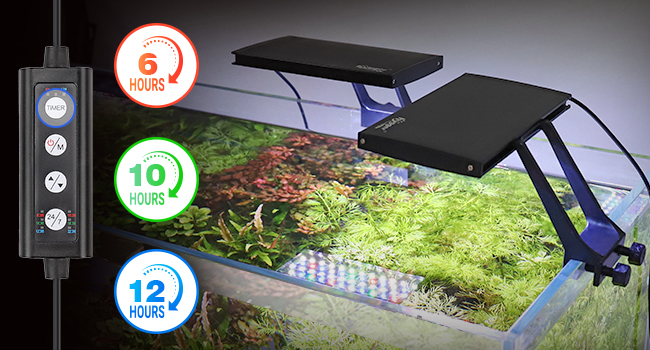
The controller features several buttons for easy operation:
- TIMER: Sets the lighting duration (6h, 10h, or 12h).
- ON-OFF/M: Powers the lights on/off and cycles through color options in DIY mode.
- Frecce su/giù: Adjusts brightness levels (5 levels: 10%, 25%, 50%, 70%, 100%).
- 24/7: Activates the 24/7 Natural Mode.

4.2 DEFAULT MODE (24/7 Natural Mode)
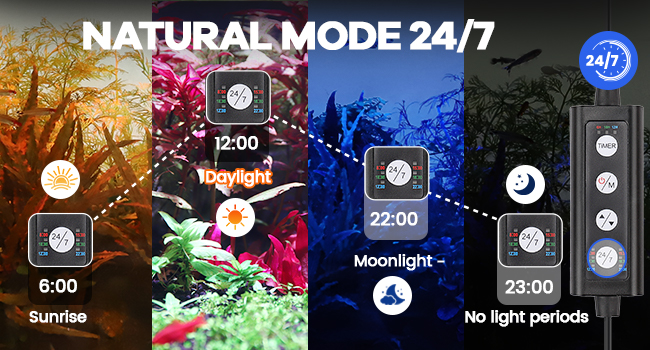
This mode simulates a natural 24-hour light cycle, providing a gradual transition of light intensity and color throughout the day:
- Sunrise (6:00 AM - 8:00 AM): Gradient orange light.
- Daylight (8:00 AM - 10:00 PM): Gradient white light.
- Moonlight (10:00 PM - 10:50 PM): Gradient blue light.
- Off (Other times): Le luci sono spente.
The overall default time period can be delayed or advanced as needed.
4.3 DIY MODE
Customize your lighting experience with the DIY mode:
- Time (TIMER key): Choose from 6 hours, 10 hours, or 12 hours.
- Brightness (Up/Down arrows): Select from 5 levels of brightness (10%, 25%, 50%, 70%, 100%).
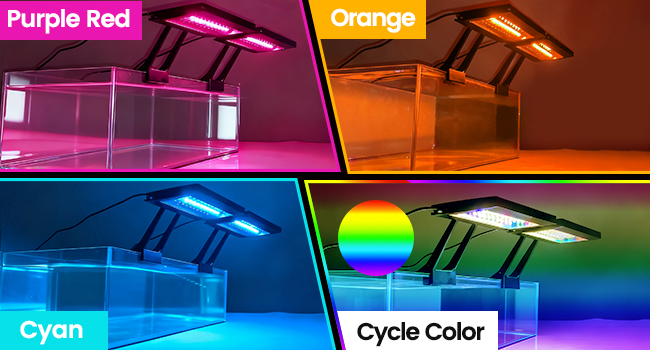
- Colore (tasto ON-OFF/M): Cycle through White, Red, Blue, Green, Purple, Orange, Cyan, or a continuous Cycle Color.



4.4 Dimostrazioni video
1 video: Questo video fornisce una panoramica dettagliataview of the hygger Clip On Aquarium LED Light with Multi-Channel Controller, demonstrating its features and functionality in an aquarium setting. It covers various lighting modes and installation aspects.
2 video: A concise demonstration of the hygger Clip On Aquarium LED Light with Multi-Channel Controller, showcasing its ease of use and various lighting options for aquariums. This video highlights the product's versatility.
5. Specifiche del prodotto
| Caratteristica | Dettaglio |
|---|---|
| Numero di modello | HG247 |
| Energia | 36W |
| Quantità LED | 3*60PCS (White: 3*29PCS, Blue: 3*11PCS, Red: 3*4PCS, Green: 3*4PCS, RGB: 3*12PCS) |
| CRI | 3*85 |
| Application (for Fish Tank long) | 30gal~60gal |
| Lunghezza del cavo di alimentazione | 67.72in + 1.97in + 50.39in |
| Ingresso volumetage | AC100-240V |
| Volume di uscitatage | DC20V |
| Kelvin | White 3*6500K, Blue 3*455nm, Red 3*620nm, Green 3*560nm |
| Lumen | 3*770lm |
| Materiale | Alluminio |
| Clip Bracket Compatibility | Tank walls less than 0.9in thick |

6. Manutenzione
- Pulizia: Regularly wipe the light panels with a soft, damp panno per rimuovere polvere e macchie d'acqua. Assicurarsi che la lampada sia scollegata prima di pulirla.
- Adattatore: The separable adapter design allows for easy replacement if damaged, avoiding the need to replace the entire light unit and reducing waste.
- Dissipazione del calore: The thickened aluminum body is designed to increase heat dissipation efficiency, contributing to the long service life of the LED beads (at least 50,000 hours).
- Contatto con l'acqua: The light is designed to be splashproof. Avoid submerging the light unit or controller in water.

7. Risoluzione Dei Problemi
If you encounter any issues with your hygger LED light, please refer to the following general steps:
- Nessun potere: Ensure all connections are secure and the power adapter is properly plugged into a working outlet. Check if the power adapter itself is functioning.
- Le luci non rispondono: Disconnect and reconnect the controller and power adapter. Ensure the controller buttons are pressed firmly.
- Incorrect Mode/Color: Cycle through the modes and colors using the controller buttons to reset or select the desired setting.
Per problemi persistenti, contattare l'assistenza clienti di Hygger.
8. Garanzia e supporto
The hygger HG247 Clip On Aquarium LED Light comes with a Garanzia del produttore di 2 anni.
For warranty claims, technical support, or any product-related inquiries, please contact hygger customer service through their official channels or the retailer where the product was purchased.