
Introduzione
This manual provides detailed instructions for the setup, operation, maintenance, and troubleshooting of your beyerdynamic MMX 150 Wireless Over-Ear Gaming Headset. Designed for versatile connectivity and comfort, this headset offers a premium audio experience for gaming and music.
The MMX 150 Wireless features Bluetooth 5.3, a low-latency wireless dongle, USB-C, and 3.5 mm wired connectivity. Enjoy up to 50 hours of battery life, personalized sound via the beyerdynamic app, and crystal-clear communication with the detachable META VOICE microphone.
Cosa c'è nella scatola
Upon unboxing your beyerdynamic MMX 150 Wireless headset, please verify that all components are present:
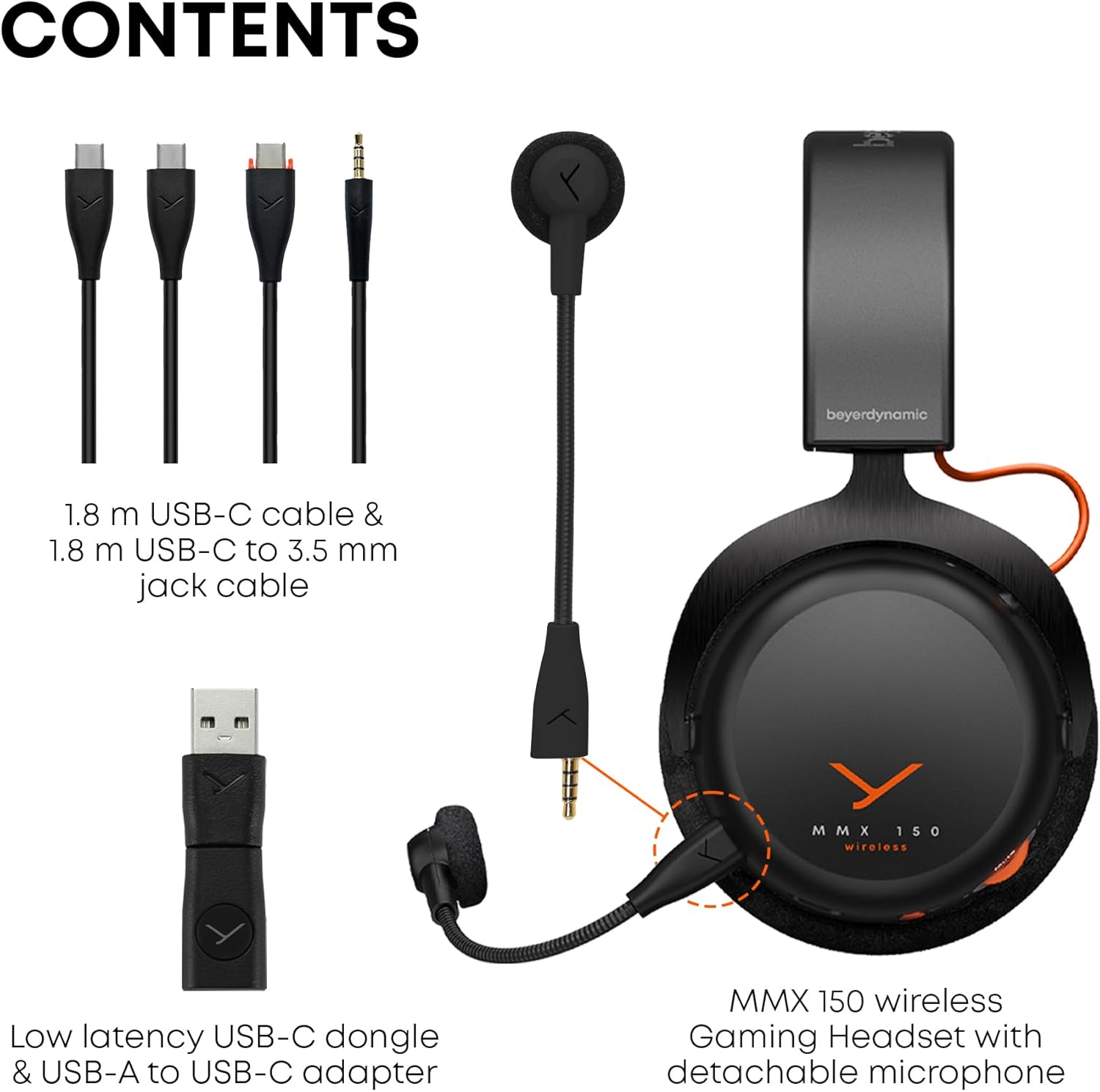
Image: The contents of the MMX 150 Wireless headset package, including the headset, a 1.8m USB-C cable, a 1.8m USB-C to 3.5mm jack cable, a low-latency USB-C dongle, a USB-A to USB-C adapter, and the detachable META VOICE microphone.
- Cuffie da gioco wireless Beyerdynamic MMX 150
- Detachable META VOICE Microphone
- Cavo da USB-C a USB-C da 1.8 m
- 1.8 m USB-C to 3.5 mm Jack Cable
- Low-latency USB-C Dongle
- Adattatore da USB-A a USB-C
Impostare
1. Caricare l'auricolare
Before initial use, fully charge your MMX 150 Wireless headset. Connect the supplied USB-C to USB-C cable to the headset's USB-C port and a compatible USB power source. A full charge provides up to 50 hours of playtime.
2. Collegamento del microfono
The META VOICE microphone is detachable. Align the microphone's connector with the port on the left earcup and gently push until it clicks into place. Ensure it is securely connected for optimal voice clarity.

Image: The MMX 150 Wireless headset in Arctic White, with the detachable META VOICE microphone connected to the left earcup.
3. Connessione ai dispositivi
- Wireless Dongle (Low-Latency): For PC and gaming consoles, insert the USB-C dongle directly into a USB-C port. If your device only has USB-A, use the provided USB-A to USB-C adapter. The headset will automatically connect to the dongle when powered on.
- Bluetooth 5.3: To pair via Bluetooth, power on the headset and press and hold the multi-function button until the LED indicator flashes blue and red, indicating pairing mode. Select "MMX 150 Wireless" from your device's Bluetooth settings.
- Connessione cablata da 3.5 mm: For devices with a 3.5 mm audio jack, connect the supplied USB-C to 3.5 mm jack cable to the headset and your audio source. This mode operates passively and does not require headset power.
4. beyerdynamic App Installation
Download the beyerdynamic app from your device's app store. This app allows for personalized sound adjustments, EQ settings, sidetone control, and firmware updates. Ensure your headset is connected via Bluetooth or the wireless dongle for app functionality.

Image: A smartphone displaying the beyerdynamic app interface, which allows users to customize sound profiles, adjust EQ, and control sidetone for the MMX 150 Wireless headset.
Istruzioni per l'uso
1. Accensione/spegnimento
Press and hold the power button on the headset for approximately 3 seconds to power on or off. An audible prompt and LED indicator will confirm the status.
2. Controllo del volume
Adjust the audio volume using the rotary wheel located on the earcup. Rotate clockwise to increase volume and counter-clockwise to decrease.
3. Microphone Usage and Sidetone
The detachable META VOICE microphone provides clear voice capture. To mute the microphone, press the dedicated microphone mute button. The built-in sidetone control allows you to hear your own voice naturally, preventing shouting during communication. Sidetone levels can be adjusted via the beyerdynamic app.

Image: A user wearing the MMX 150 Wireless headset with the META VOICE microphone positioned for clear communication, while holding a game controller.
4. Sound Personalization
Utilize the beyerdynamic app to tailor your audio experience. Adjust equalizer settings, activate or deactivate specific sound profiles, and fine-tune the sidetone for your microphone. These settings are saved to the headset for consistent performance across devices.

Image: A user wearing the MMX 150 Wireless headset, demonstrating its use with a mobile device, highlighting its versatility for both gaming and media consumption.
Manutenzione
1. Pulizia
- Cuscinetti auricolari: The velour ear pads can be gently wiped with a damp cloth. For deeper cleaning, they may be removable (refer to product specifics or support for removal instructions). Allow to air dry completely before reattaching.
- Headset Body: Use a soft, dry, lint-free cloth to wipe the surfaces of the headset. Avoid using harsh chemicals or abrasive materials.
- Microfono: Gently clean the microphone windscreen with a dry cloth.
2. Conservazione
When not in use, store the headset in a cool, dry place away from direct sunlight and extreme temperatures. Avoid placing heavy objects on the headset to prevent damage to the headband or earcups.
3. Cura della batteria
To prolong battery life, avoid fully discharging the headset frequently. If storing for an extended period, charge the battery to approximately 50% before storage and recharge every few months.
Risoluzione dei problemi
- Nessun suono:
- Assicurarsi che l'auricolare sia acceso e carico.
- Controllare il livello del volume sia sull'auricolare che sul dispositivo connesso.
- Verifica che sul tuo computer o sulla tua console sia selezionato il dispositivo di output audio corretto.
- If using the wireless dongle, ensure it is securely plugged in and recognized by the device.
- If using Bluetooth, ensure the headset is paired and connected. Try re-pairing.
- Se si utilizza il cavo da 3.5 mm, assicurarsi che sia completamente inserito sia nell'auricolare sia nella sorgente audio.
- Il microfono non funziona:
- Assicurarsi che il microfono sia fissato saldamente all'auricolare.
- Check if the microphone is muted (dedicated mute button or software settings).
- Verify the correct microphone input device is selected in your device's audio settings.
- Ensure the microphone is not damaged.
- Connectivity Issues (Wireless/Bluetooth):
- Move closer to your connected device to rule out range issues.
- Evitare fonti di interferenza (ad esempio router Wi-Fi, altri dispositivi wireless).
- Prova a riavviare sia l'auricolare che il dispositivo connesso.
- Per il Bluetooth, disaccoppiare e riassociare l'auricolare.
- For the wireless dongle, try plugging it into a different USB port.
- App Not Connecting/Functioning:
- Ensure your headset is connected to your mobile device via Bluetooth.
- Controlla la presenza di aggiornamenti per le app nell'app store del tuo dispositivo.
- Restart the app and your mobile device.
- Ensure the headset firmware is up to date via the app.
Specifiche
| Marca | beyerdynamic |
| Numero di modello | MMX150 senza fili |
| Colore | Bianco artico |
| Controllo del rumore | Isolamento acustico |
| Tecnologia di comunicazione wireless | Bluetooth 5.3 |
| Durata media della batteria | 50 ore |
| Tipo di driver audio | Driver dinamico |
| Gamma di frequenza | 20 Hz - 20,000 Hz |
| Forma dell'auricolare | Sopra l'orecchio |
| Peso dell'articolo | 0.97 chilogrammi |
| Caratteristiche aggiuntive | Sound Personalisation via App, Immersive Sound, Detachable Microphone with Sidetone |
| Dispositivi compatibili | Computer portatili, computer desktop, console di gioco, tablet, telefoni, altoparlanti intelligenti, televisori, cellulari |
Informazioni sulla garanzia
Your beyerdynamic MMX 150 Wireless headset is covered by a manufacturer's warranty. Please refer to the warranty card included in your product packaging or visit the official beyerdynamic websito per termini e condizioni dettagliati riguardanti la copertura della garanzia, la durata e la procedura di reclamo.
Supporto
For further assistance, technical support, or to access frequently asked questions, please visit the official beyerdynamic support page:
beyerdynamic Official Store on Amazon
You may also find contact information for customer service on the beyerdynamic official websito.