
1. Introduzione
Thank you for choosing the HAMMER Aura ANC Earbuds. These wireless earbuds are designed to provide an immersive audio experience with advanced features such as Active Noise Cancellation (ANC), Environmental Noise Cancellation (ENC), and a low-latency gaming mode. This manual will guide you through the setup, operation, and maintenance of your new earbuds.
2. Contenuto della confezione
Assicurati che tutti gli articoli siano presenti nel pacco:
- 1 Unit HAMMER Aura ANC Earbuds
- 1 Unit USB Type-A to Type-C Charging Cable
- 1 Manuale d'uso

Image: What's in the Box - HAMMER Aura ANC Earbuds, USB-C charging cable, and user manual.
3. Prodotto finitoview
The HAMMER Aura ANC Earbuds feature a compact design with a semi-transparent charging case and chrome-finished earbuds. They are equipped with 13mm titanium drivers for enhanced audio quality.

Image: HAMMER Aura ANC Earbuds and Charging Case.

Image: Compact Design, Bold Look - Chrome-finished earbuds in a sleek semi-transparent case.
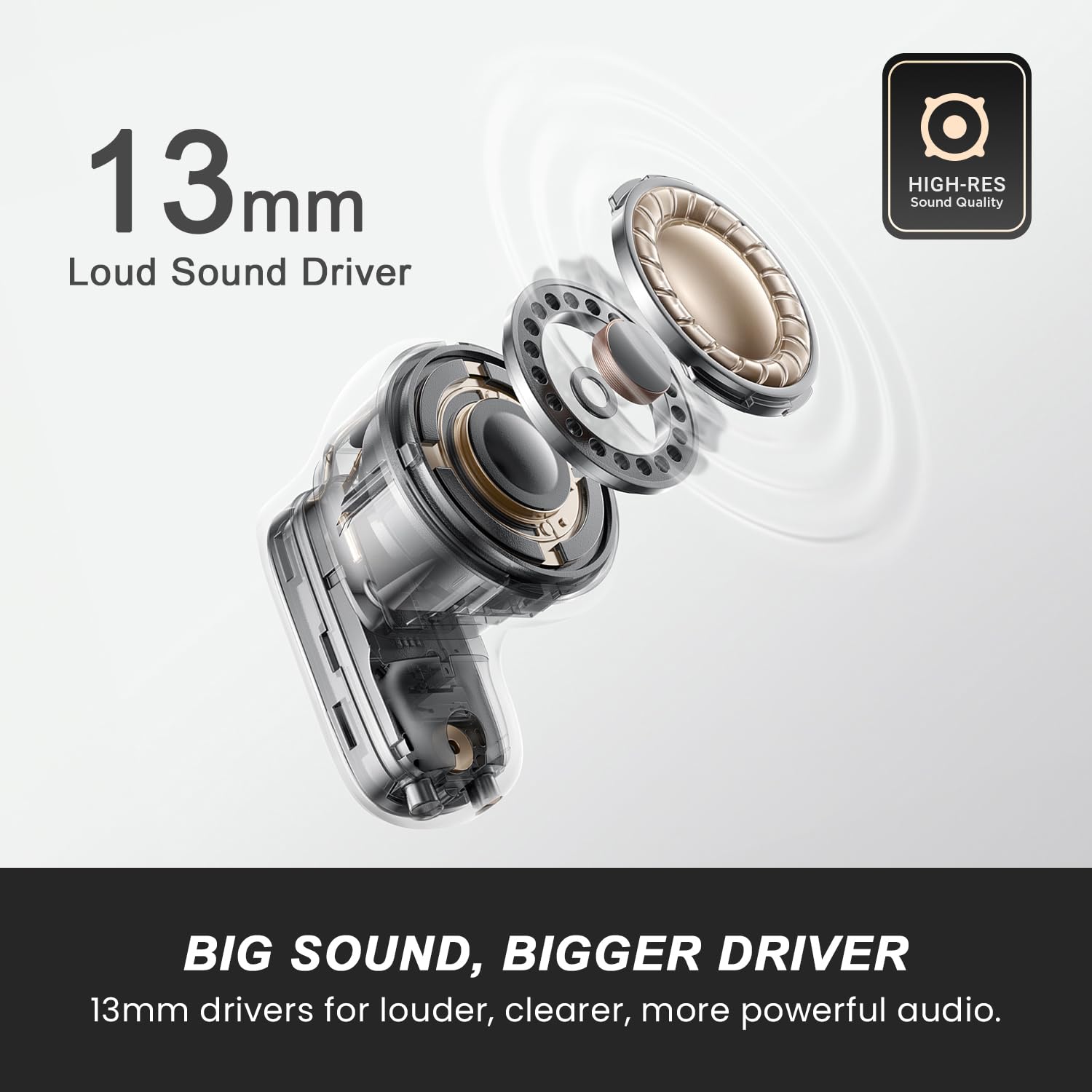
Image: 13mm Loud Sound Driver - Illustrates the internal components of the 13mm audio driver for powerful sound.
4. Impostazione
4.1 Ricarica degli auricolari e della custodia
Before first use, fully charge the earbuds and charging case. Connect the provided USB Type-C cable to the charging port on the case and a power source. The indicator light on the case will show charging status.
- Tempo di ricarica: Circa 1.5 ore per una ricarica completa.
- Tempo di gioco: Up to 50 hours total playtime with the charging case, and up to 6 hours on a single earbud charge.

Image: 50 Hours Long Play Time - Details on battery life and Type-C fast charging.
4.2 Associazione Bluetooth
To pair your HAMMER Aura ANC Earbuds with your device:
- Aprire la custodia di ricarica. Gli auricolari entreranno automaticamente in modalità di associazione.
- Sul tuo dispositivo (smartphone, tablet, laptop), attiva il Bluetooth.
- Cercare available devices and select "HAMMER Aura" from the list.
- Una volta effettuata la connessione, sentirai un tono di conferma.
Gli auricolari utilizzano il Bluetooth 6.0 per una connettività stabile ed efficiente.

Image: Next-Gen Bluetooth V6 - Highlighting quick pairing and stable connection.
5. Istruzioni per l'uso
5.1 Comandi touch
The HAMMER Aura ANC Earbuds feature touch controls for easy management of music, calls, and modes. Specific touch functions may vary slightly, but common controls include:
- Riproduci/Pausa: Un solo tocco su uno degli auricolari.
- Traccia successiva: Tocca due volte l'auricolare destro.
- Traccia precedente: Tocca due volte l'auricolare sinistro.
- Rispondi/Termina chiamata: Un solo tocco su uno degli auricolari.
- Rifiuta chiamata: Premere a lungo uno dei due auricolari.
- Attiva l'assistente vocale: Triple tap on the right earbud (check specific model for confirmation).
5.2 ANC, Transparency, and Normal Modes
The earbuds offer three distinct audio modes:
- Cancellazione attiva del rumore (ANC): Blocks up to 32dB of external noise for an immersive listening experience.
- Modalità trasparenza: Ti consente di ascoltare l'ambiente circostante continuando a goderti l'audio.
- Modalità normale: Modalità audio standard senza cancellazione del rumore o trasparenza.
To switch between ANC On, Transparency, and ANC Off (Normal Mode):
- Auricolare destro: Long press for 2 seconds to toggle through ANC On → Transparency → ANC Off.

Image: Active Noise Cancellation - Instructions for switching ANC modes.
5.3 Modalità di gioco (bassa latenza)
For an optimized gaming experience, activate the low latency gaming mode (35ms).
- Attiva la modalità di gioco: Tocca tre volte l'auricolare sinistro.
Image: Gaming Mode - Activation instructions for 35ms low latency.
5.4 Calling with ENC
The earbuds are equipped with Environmental Noise Cancellation (ENC) and 4 microphones to ensure clear calls by reducing background noise.

Image: ENC with 4 Mic for Clear Calling - Ensures your voice stays clear by cutting background noise.

Image: ENC Noise Cancellation - Illustrates the 4-mic setup for ultra-clear calls.
6. Manutenzione
To ensure the longevity and optimal performance of your HAMMER Aura ANC Earbuds, follow these maintenance guidelines:
- Pulizia: Pulisci regolarmente gli auricolari e la custodia di ricarica con un panno morbido, asciutto e privo di lanugine. Non utilizzare prodotti chimici aggressivi o materiali abrasivi.
- Magazzinaggio: Quando non li usi, riponi gli auricolari nella custodia di ricarica per proteggerli da polvere e danni.
- Resistenza all'acqua: The earbuds are IPX4 water resistant, meaning they are protected against splashing water from any direction. Do not submerge them in water or expose them to heavy rain.
- Ricarica: Use only the provided charging cable or a certified USB-C cable. Avoid overcharging.
- Temperatura: Evitare di esporre gli auricolari a temperature estreme (calde o fredde).
7. Risoluzione Dei Problemi
If you encounter issues with your HAMMER Aura ANC Earbuds, refer to the following common solutions:
| Problema | Possibile soluzione |
|---|---|
| Gli auricolari non si accoppiano | Assicurati che gli auricolari siano carichi. Disattiva e riattiva il Bluetooth sul tuo dispositivo. Elimina il dispositivo dalle impostazioni Bluetooth e riesegui l'associazione. |
| Nessun suono da un auricolare | Place both earbuds back in the case, close it, then open again. Check device's audio balance settings. |
| Basso volume | Increase volume on both earbuds and your connected device. Clean earbud mesh to remove any obstructions. |
| L'ANC non funziona in modo efficace | Ensure earbuds are properly seated in your ears. Toggle ANC mode to ensure it's active. |
| Problemi di ricarica | Controllare il cavo di ricarica e l'adattatore. Assicurarsi che i contatti di ricarica sugli auricolari e sulla custodia siano puliti e asciutti. |
8. Specifiche
| Caratteristica | Dettaglio |
|---|---|
| Numero di modello | HTWS005 |
| Controllo del rumore | Cancellazione attiva del rumore (fino a 32 dB) |
| Microfoni | 4 Mics with Environmental Noise Cancellation (ENC) |
| Versione Bluetooth | 6.0 |
| Bassa latenza | 35ms Gaming Mode |
| Tempo di gioco | Fino a 50 ore (con custodia di ricarica) |
| Dimensioni del conducente | Driver dinamico in titanio da 13 mm |
| Resistenza all'acqua | Grado di protezione IPX4 |
| Porta di ricarica | USB di tipo C |
| Peso | 44.6 grammi |
| Materiale | Plastica |
9. Garanzia e supporto
Your HAMMER Aura ANC Earbuds come with a Garanzia di 6 mesi dalla data di acquisto. La presente garanzia copre i difetti di fabbricazione.
For warranty claims, technical support, or any product-related inquiries, please contact HAMMER customer service:
- Produttore: Hammer Lifestyle PVT LTD
- Indirizzo: SCO 4 Sector 25, Behind Malik Petrol Pump, G.T Road, Panipat-132103 INDIA
- E-mail: Info@hammeronline.in
- Telefono: 0180-4008081, 9991108081
- Supporto online: Per maggiori informazioni e supporto, visita https://bit.ly/3B1CNZU