
1. Introduzione
Thank you for choosing the Lefant M3L Robot Vacuum and Mop. This intelligent cleaning device is designed to simplify your home cleaning routine by efficiently vacuuming and mopping various floor types. Please read this manual thoroughly before using the product to ensure proper operation, maintenance, and safety.
For optimal performance, follow the instructions carefully and keep this manual for future reference.
2. Informazioni importanti sulla sicurezza
Before using the Lefant M3L, please observe the following safety precautions:
- Questo apparecchio può essere utilizzato da bambini di età pari o superiore a 8 anni e da persone con capacità fisiche, sensoriali o mentali ridotte o prive di esperienza e conoscenza, solo se sorvegliati o istruiti sull'uso sicuro dell'apparecchio e se comprendono i pericoli connessi.
- I bambini devono essere sorvegliati per assicurarsi che non giochino con l'apparecchio.
- La pulizia e la manutenzione da parte dell'utente non devono essere eseguite da bambini senza supervisione.
- Non utilizzare il robot in ambienti con fiamme libere, materiali infiammabili o sostanze esplosive.
- Ensure the charging dock is placed on a level surface against a wall, with no obstacles within 1 meter in front and 0.5 meters on either side.
- Non immergere il robot o i suoi componenti elettronici in acqua.
- Utilizzare esclusivamente l'adattatore di alimentazione e la base di ricarica originali forniti dal produttore.
- Prima dell'uso, rimuovere eventuali cavi allentati, piccoli oggetti o elementi fragili dal pavimento per evitare che si aggroviglino o si danneggino.
- Non utilizzare il robot per pulire liquidi, oggetti in fiamme o oggetti taglienti.
- Se il cavo di alimentazione è danneggiato, deve essere sostituito dal produttore, da un suo agente di assistenza o da personale qualificato per evitare rischi.
3. Contenuto della confezione
Si prega di verificare che tutti gli accessori siano presenti e in buone condizioni:
- Lefant M3L Robot Vacuum and Mop
- Stazione di ricarica
- Adattatore di alimentazione
- Pattumiera
- Serbatoio dell'acqua con panno per mocio
- Spazzole laterali (2 paia)
- Filtro HEPA (1 installato, 1 di riserva)
- Strumento di pulizia
- Manuale d'uso
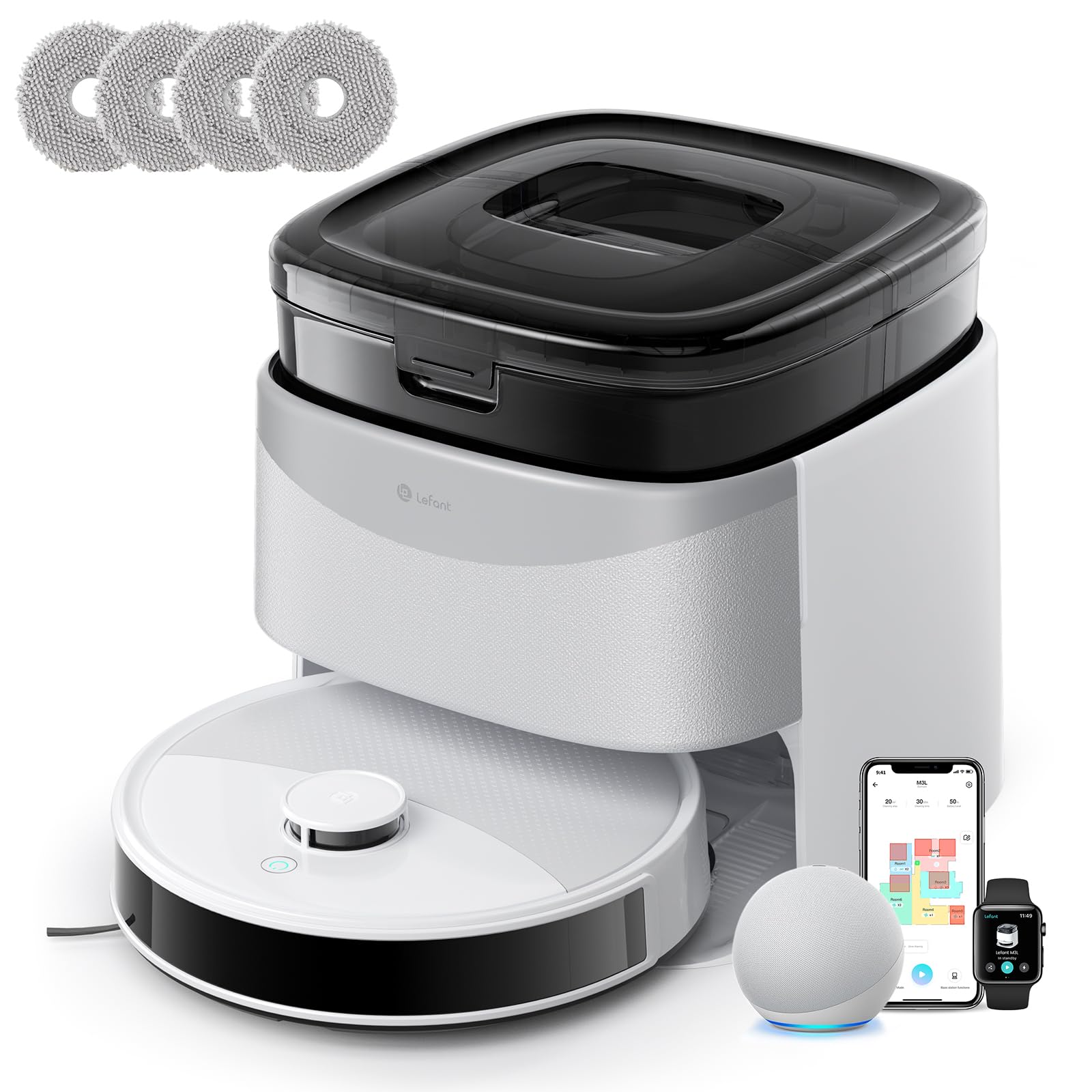
Image 1: Lefant M3L Robot Vacuum and Mop with its included accessories. This image shows the main unit, charging dock, power adapter, dustbin, water tank, mop pad, side brushes, and cleaning tool.
4. Prodotto finitoview
4.1 Robot in alto View
- Pulsante di accensione/pulizia: Premere per avviare/mettere in pausa la pulizia. Tenere premuto per accendere/spegnere.
- Spia luminosa: Shows battery status and working mode.
- Pulsante di rilascio del cestino: Press to remove the dustbin.
4.2 Fondo del robot View
- Spazzole laterali: Raccogli polvere e detriti dai bordi e dagli angoli.
- Ruote motrici: Consentire al robot di muoversi su diverse superfici.
- Ruota universale: Fornisce un movimento a 360 gradi.
- Contatti di ricarica: Connect with the charging dock for power.
- Sensori di caduta: Rileva i bordi e previene le cadute.
- Spazzola principale: Spazzola centrale per una pulizia profonda.
- Water Tank/Mop Pad Slot: Area for attaching the water tank and mop pad.
4.3 Dock di ricarica
- Indicatore di carica: Mostra lo stato di carica.
- Contatti di ricarica: Connect with the robot for power.
- Porta di alimentazione: Si collega all'alimentatore.
5. Guida all'installazione
5.1 Preparazione del robot
- Rimuovere le pellicole protettive: Rimuovere tutte le pellicole protettive dal robot e dalla base di ricarica.
- Installare le spazzole laterali: Press the side brushes onto the square posts at the bottom of the robot until they click into place. Ensure the 'L' and 'R' marks match.
- Installa Dustbin: Open the top cover of the robot and insert the dustbin until it locks securely.

Image 2: Illustration of attaching the side brushes to the underside of the robot. Align the brush with the corresponding post and push until it clicks.
5.2 Positioning the Charging Dock
- Posizionare la base di ricarica su una superficie dura e piana, contro una parete.
- Ensure there are no obstacles within 1 meter (3 feet) in front of the dock and 0.5 meters (1.5 feet) on either side.
- Collega l'adattatore di alimentazione alla base di ricarica e inseriscilo in una presa a muro. La spia sulla base si illuminerà.

Image 3: Diagram showing the recommended clear space around the charging dock for optimal robot navigation.
5.3 Carica iniziale
Place the robot onto the charging dock, ensuring the charging contacts on the robot align with those on the dock. The robot's indicator light will pulse during charging and turn solid when fully charged. For first-time use, charge the robot for at least 6 hours.
5.4 Connessione all'app Lefant
- Download the "Lefant" app from the App Store (iOS) or Google Play Store (Android).
- Registra un account e accedi.
- Tap "+" to add a device and select your Lefant M3L model.
- Follow the in-app instructions to connect the robot to your home Wi-Fi network (2.4GHz only).
- Once connected, you can control the robot, set schedules, and monitor cleaning status via the app.
6. Istruzioni per l'uso
6.1 Avvio di un ciclo di pulizia
- Avvio manuale: Press the Power/Clean button on the robot once. The robot will automatically start cleaning in Auto mode.
- Controllo app: Open the Lefant app, select your M3L robot, and tap "Start Cleaning".
- Controllo vocale: If integrated with a smart assistant (e.g., Alexa, Google Assistant), use voice commands like "Alexa, ask Lefant to start cleaning."
6.2 Sospensione/Ripresa della pulizia
Press the Power/Clean button on the robot or use the app to pause a cleaning cycle. Press again to resume.
6.3 Ritorno alla base di ricarica
The robot will automatically return to the charging dock when its battery is low or when a cleaning cycle is complete. You can also send it back manually via the app.
6.4 Utilizzo della funzione di lavaggio
- Riempire il serbatoio dell'acqua: Open the water tank cover and fill it with clean water. Do not use cleaning solutions that are not approved by Lefant.
- Applicare il panno per mocio: Securely attach the mop pad to the bottom of the water tank.
- Installare il serbatoio dell'acqua: Slide the filled water tank into the designated slot at the back of the robot until it clicks.
- Start a cleaning cycle. The robot will now vacuum and mop simultaneously.

Image 4: Steps for filling the water tank and attaching the mop pad before inserting it into the robot.
Nota: Remove the water tank before charging the robot or if it will be inactive for an extended period.
6.5 Modalità di pulizia (tramite app)
- Pulizia automatica: Il robot pulisce e naviga in modo intelligente in tutta la casa.
- Pulizia delle macchie: Pulisce in modo più intenso una zona specifica.
- Pulizia dei bordi: Pulisce lungo le pareti e i bordi dei mobili.
- Pulizia programmata: Imposta orari specifici per la pulizia automatica del robot.
7. Manutenzione
Una manutenzione regolare garantisce prestazioni ottimali e prolunga la durata del tuo robot aspirapolvere.
7.1 Cleaning the Dustbin and Filter (After each use)
- Premere il pulsante di sgancio del contenitore della polvere ed estrarlo.
- Aprire il coperchio del cestino e svuotarne il contenuto nel cestino della spazzatura.
- Rimuovere il filtro HEPA e il filtro in spugna. Picchiettarli delicatamente per rimuovere la polvere. Non lavare il filtro HEPA con acqua.
- Rinse the dustbin with water (ensure it's completely dry before reinstallation).
- Rimontare i filtri e il contenitore della polvere, quindi reinserirli nel robot.

Image 5: Visual guide on how to remove, empty, and clean the dustbin and its filters.
7.2 Cleaning the Side Brushes (Weekly)
Remove the side brushes by pulling them upwards. Use the cleaning tool to remove any hair or debris tangled around them. Rinse with water if necessary and allow to air dry completely before reattaching.
7.3 Cleaning the Water Tank and Mop Pad (After each mopping session)
Empty any remaining water from the tank. Remove the mop pad and wash it by hand or machine. Allow both to air dry completely before storage or next use.
7.4 Cleaning Sensors and Charging Contacts (Monthly)
Wipe the drop sensors (on the bottom of the robot) and the charging contacts (on the robot and charging dock) with a clean, dry cloth. This ensures proper navigation and charging.

Immagine 6: Primo piano view of the robot's underside, highlighting the locations of the drop sensors and charging contacts for cleaning.
8. Risoluzione Dei Problemi
| Problema | Possibile causa | Soluzione |
|---|---|---|
| Il robot non si accende. | Batteria scarica; interruttore di alimentazione spento. | Caricare il robot; assicurarsi che l'interruttore di alimentazione principale (solitamente sul lato/in basso) sia su ON. |
| Il robot non può caricare. | Charging contacts dirty; Dock not powered; Robot not properly aligned. | Clean charging contacts; Check power adapter connection; Manually place robot on dock. |
| Il robot si blocca spesso. | Too many obstacles; Loose cables; High thresholds. | Clear the cleaning area; Use virtual boundaries if available; Block off problematic areas. |
| Scarsa efficienza di pulizia. | Dustbin full; Filters clogged; Side brushes worn. | Svuotare il contenitore della polvere; pulire/sostituire i filtri; pulire/sostituire le spazzole laterali. |
| La funzione di lavaggio non funziona. | Water tank empty; Mop pad dirty/dry; Water outlet clogged. | Fill water tank; Clean/wet mop pad; Check water tank for blockages. |
| Problemi di connessione all'app. | Incorrect Wi-Fi password; Router too far; 5GHz Wi-Fi used. | Ensure 2.4GHz Wi-Fi; Re-enter password; Move robot closer to router; Restart router/robot. |
9. Specifiche
| Caratteristica | Dettaglio |
|---|---|
| Nome del modello | M3L |
| Marca | Sinistro |
| Dimensioni (L x P x A) | 32L x 32l x 9.7H centimetri |
| Peso dell'articolo | 9.7 chilogrammi |
| Tipo di batteria | Agli ioni di litio |
| Tipo di filtro | Filtro HEPA |
| Tipo di controllo | Controllo app, controllo vocale |
| Caratteristiche speciali | Dry and Wet Cleaning, Carpet Cleaning |
| Superficie consigliata | Hard floors, Wood floors, Tiles, Carpets |
| Fattore di forma | Girare |
| Fonte di alimentazione | Alimentato a batteria |
| Componenti inclusi | Testa del mocio, serbatoio dell'acqua |
10. Garanzia e assistenza clienti
Lefant products come with a standard manufacturer's warranty. For detailed warranty terms and conditions, please refer to the warranty card included in your package or visit the official Lefant websito.
If you encounter any issues or have questions regarding your Lefant M3L Robot Vacuum and Mop, please contact Lefant Customer Support. You can usually find contact information (email, phone, or online chat) on the official Lefant website or through the Lefant app.
Please have your model number (M3L) and purchase information ready when contacting support.