
Introduzione
The EcoVolt PowerMax 6000 is a high-capacity portable power station designed to provide reliable power for various applications, from home emergencies to outdoor activities. Featuring a 3600Wh capacity and 6000W AC output (9000W surge), it supports both 120V and 240V dual voltage output. This manual provides essential information for the safe and efficient operation of your PowerMax 6000.
Importanti istruzioni di sicurezza
Leggere e comprendere tutte le istruzioni di sicurezza prima di utilizzare PowerMax 6000. La mancata osservanza di queste istruzioni può causare scosse elettriche, incendi o lesioni gravi.
- Non smontare, riparare o modificare l'unità.
- Tenere l'unità lontana da fonti di calore, dalla luce solare diretta e da materiali infiammabili.
- Garantire un'adeguata ventilazione durante l'uso per evitare il surriscaldamento.
- Non esporre l'unità all'acqua o ad altri liquidi.
- Utilizzare solo accessori e cavi di ricarica approvati.
- Tenere fuori dalla portata dei bambini.
Contenuto della confezione
Verifica che tutti gli articoli elencati di seguito siano inclusi nel tuo pacchetto:
- PowerMax 6000 power station
- 4 × 200W solar panels
- Cavo di ricarica CA
- Cavo di ricarica per auto
- Cavo di ricarica solare
- Manuale d'uso
- Scheda di garanzia
Prodotto finitoview
The PowerMax 6000 is designed for versatility and ease of use. It features multiple output ports, a clear display, and a durable construction.
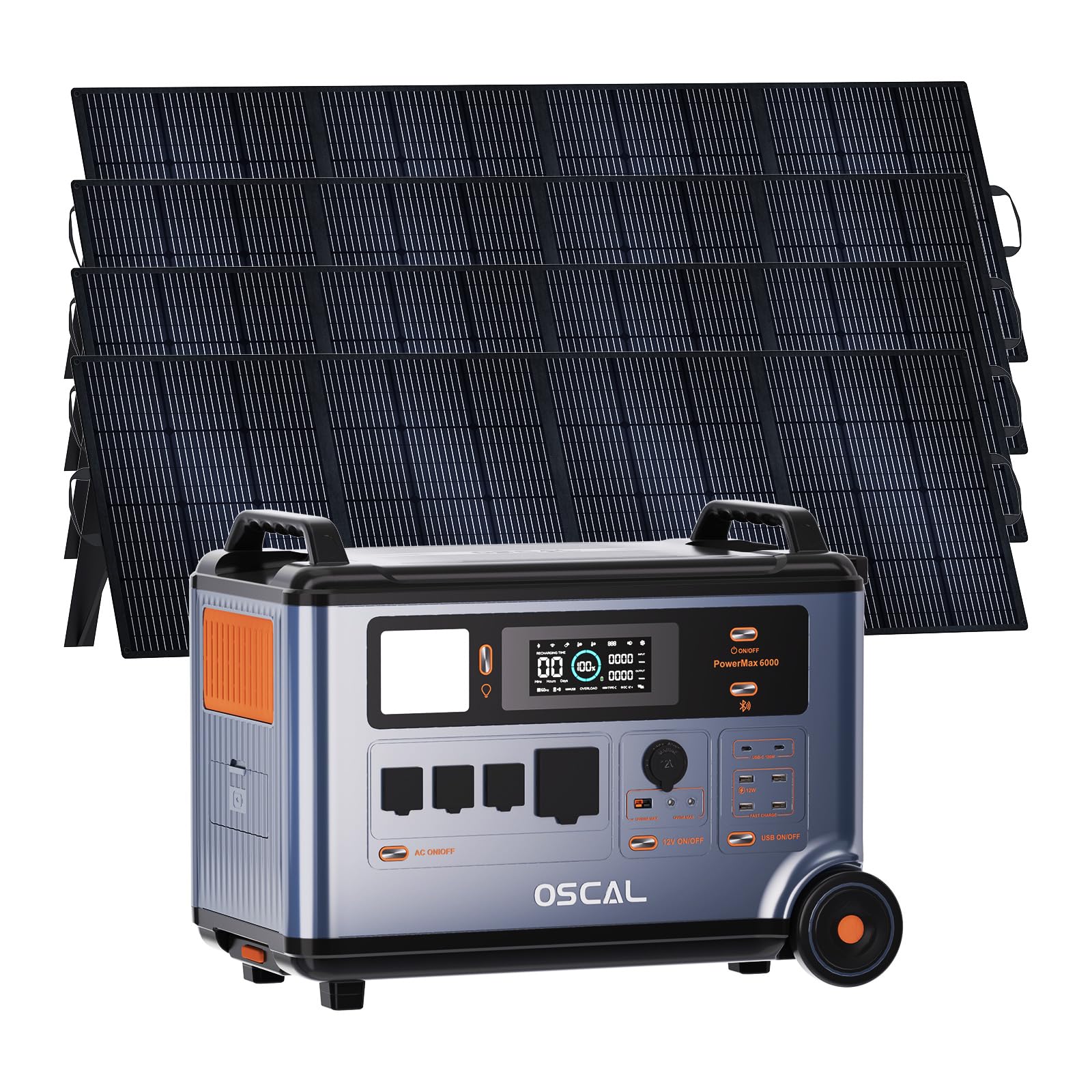
Image: The EcoVolt PowerMax 6000 solar generator shown with four 200W solar panels, highlighting its complete portable power solution.
Caratteristiche principali:
- Alta capacità: Batteria LiFePO4 da 3600 Wh per un'alimentazione prolungata.
- Uscita potente: 6000W AC output (9000W surge) with 120V/240V dual voltage supporto.
- Ricarica rapida: 2200W AC input and 2400W MPPT solar input for rapid recharging.
- Funzionalità dell'EPS: 5-8ms fast switchover for uninterruptible power supply during outages.
- Controllo intelligente: Monitor and control via a dedicated smartphone application.
- Batteria durevole: LiFePO4 battery with advanced BMS, offering up to 3500 cycles and a 25-year service life.

Immagine: Un dettaglio view of the PowerMax 6000's control panel, showing the display and various ports.
Guida all'installazione
1. Disimballaggio e ispezione:
Carefully remove all components from the packaging. Inspect the PowerMax 6000 and accessories for any signs of damage. If any items are missing or damaged, contact customer support immediately.
2. Ricarica iniziale:
Before first use, fully charge the PowerMax 6000. Connect the AC charging cable to the unit and a standard wall outlet. The display will indicate the charging status. A full charge typically takes approximately 1.96 hours using AC input.
3. Connecting Solar Panels:
For solar charging, connect the provided solar charging cables to the solar panels and then to the PowerMax 6000's solar input port. Ensure the solar panels are placed in direct sunlight for optimal charging efficiency.

Image: Illustration showing the connection of solar panels to the PowerMax 6000 for charging.
Istruzioni per l'uso
1. Accensione/spegnimento:
Tenere premuto il pulsante di accensione principale per accendere o spegnere l'unità. Il display si illuminerà all'attivazione.
2. Utilizzo delle uscite CA:
The PowerMax 6000 provides 4 AC output ports. Press the AC power button to activate the AC outlets. Plug your appliances into the appropriate 120V or 240V outlets. The unit automatically detects and supports dual voltage uscita.

Image: The PowerMax 6000 connected to a household, demonstrating its 120V/240V dual voltage output capability to power various home appliances.
3. Using DC and USB Outputs:
Activate the DC or USB power buttons to use the respective ports. The unit includes Anderson output, USB-A, USB-C, Car Power Output, and DC5521 ports for various devices.
4. Charging Methods:
- Ricarica CA: Connect to a wall outlet using the AC charging cable. Supports up to 2200W input.
- Ricarica solare: Connect solar panels to the solar input port. Supports up to 2400W MPPT solar input.
- Ricarica auto: Utilizza il cavo di ricarica per auto per ricaricare dalla presa da 12 V del tuo veicolo.
- Altri metodi: The PowerMax 6000 can also be recharged via wind turbine, water turbine, diesel generator, or EV charging station (accessories sold separately).
Video: This video demonstrates the various charging methods for the PowerMax 6000, including solar, wind, water, AC, diesel generator, and EV charging station, showcasing la sua versatilità.
5. EPS (Emergency Power Supply) Function:
In caso di mancanza di correntetage, the PowerMax 6000 automatically switches to battery power within 5-8 milliseconds, ensuring uninterrupted operation for connected devices. This feature is ideal for sensitive electronics and critical equipment.

Image: The PowerMax 6000 illustrating its 5-8ms fast UPS switchover, ensuring continuous power for essential devices like CPAP machines, home office setups, and emergency equipment.
6. Controllo app:
Download the OSCAL application on your smartphone to monitor and control the PowerMax 6000 remotely. The app allows you to check power usage, battery status, and activate/deactivate outputs.

Image: A smartphone screen showing the OSCAL application interface, used for monitoring and controlling the PowerMax 6000 power station.
Video: This video demonstrates the remote monitoring and control capabilities of the PowerMax 6000 via its smart app, including signal light communication.
Manutenzione
1. Pulizia:
Wipe the unit with a dry, soft cloth. Do not use abrasive cleaners or solvents. Ensure all ports are free from dust and debris.
2. Conservazione:
When not in use for extended periods, store the PowerMax 6000 in a cool, dry place, away from direct sunlight and extreme temperatures. It is recommended to charge the unit to 50-80% every 3-6 months to maintain battery health.
3. Cura della batteria:
The LiFePO4 battery is designed for longevity. Avoid fully discharging the battery frequently to prolong its lifespan. The integrated Battery Management System (BMS) protects against overcharge, over-discharge, over-voltage, sovracorrente, cortocircuito e fluttuazioni di temperatura.
Risoluzione dei problemi
| Problema | Possibile causa | Soluzione |
|---|---|---|
| L'unità non si accende. | La batteria è completamente scarica. | Collegare alla corrente alternata e caricare per almeno 30 minuti. |
| L'uscita CA non funziona. | Uscita CA non attivata; protezione da sovraccarico attivata. | Press the AC power button; Reduce the load on the AC outlets. |
| La ricarica solare è lenta o non funziona. | Insufficient sunlight; Incorrect panel connection; Dirty panels. | Ensure panels are in direct sunlight; Check cable connections; Clean solar panels. |
| Problemi di connessione all'app. | Bluetooth/Wi-Fi disabled; App not updated. | Ensure Bluetooth/Wi-Fi is enabled on your device; Update the OSCAL app to the latest version. |
If you encounter issues not listed here or if the problem persists, please contact EcoVolt customer support.
Specifiche tecniche
| Caratteristica | Dettaglio |
|---|---|
| Marca | Eco Volt |
| Nome del modello | Potenza Max 6000 |
| Cosatage | 6000 Watts (Running) / 9000 Watts (Starting) |
| Tipo di carburante | Solare |
| Fonte di alimentazione | Elettrico con cavo |
| Voltage | 110V / 120V / 240V Split Phase |
| Tipo di batteria | LiFePO4 |
| Capacità | 3600 Wh |
| Ingresso CA | 2200W max |
| Ingresso solare | 2400W MPPT Max |
| Totale prese di corrente | 14 |
| Materiale | Metallo |
| Caratteristica speciale | Fast Charging, EPS Uninterruptible Power Supply, App Control |
Garanzia e supporto
The EcoVolt PowerMax 6000 comes with a Garanzia di 5 anno. For technical support, warranty claims, or any questions regarding your product, please refer to the contact information provided on your warranty card or visit the official EcoVolt websito.
You can also find additional support and FAQs within the OSCAL smartphone application.