
1. Introduzione
Thank you for choosing the OMOTON WK209 Wireless Keyboard and Mouse Set. This manual provides detailed instructions for setting up, operating, and maintaining your new wireless peripheral set. Please read this manual carefully before use to ensure optimal performance and longevity of your product.
2. Contenuto della confezione
The OMOTON WK209 Wireless Keyboard and Mouse Set package includes the following items:
- 1 x OMOTON WK209 Wireless Keyboard
- 1 x OMOTON Wireless Mouse
- 1 x USB 2.4 GHz Receiver
Note: AAA batteries are required for operation but are not included in the package.
3. Guida all'installazione
3.1. Installazione delle batterie
Before using the keyboard and mouse, you need to install batteries.
- Individuare il vano batteria nella parte inferiore della tastiera e del mouse.
- Aprire i coperchi delle batterie.
- Insert two AAA batteries into the keyboard and one AAA battery into the mouse, ensuring correct polarity (+/-).
- Chiudere bene i coperchi delle batterie.

This image displays the battery compartments for the OMOTON WK209 keyboard and mouse. The keyboard requires two AAA batteries, and the mouse requires one AAA battery. Please note that batteries are not included with the product.
3.2. Collegamento del ricevitore USB
The OMOTON WK209 set uses a single USB receiver for both the keyboard and mouse.
- Locate the USB 2.4 GHz receiver, usually stored in the mouse's battery compartment or packaging.
- Plug the USB receiver into an available USB port on your computer (laptop or desktop PC).
- The system will automatically detect and install the necessary drivers. This is a Plug & Play process and typically requires no manual installation.
- Turn on the mouse using the ON/OFF switch located on its underside. The keyboard does not have a separate power switch; it activates when keys are pressed.

This image illustrates the 2.4 GHz wireless connection of the OMOTON WK209 keyboard and mouse set. It highlights features such as Plug & Play functionality, a stable 2.4G connection, and a wireless range of up to 10 meters (33 feet).
3.3. Compatibilità
The OMOTON WK209 set is compatible with a wide range of Windows operating systems.
- Sistemi operativi: Windows 11, Windows 10, Windows 8, Windows 7, Windows XP.
- Dispositivi: Laptop, Desktop PC.

This image demonstrates the broad compatibility of the OMOTON WK209 set with different Windows operating systems, including Windows 7, 8, 10, and 11, across desktop PCs and laptops.
4. Istruzioni per l'uso
4.1. Utilizzo della tastiera
The WK209 keyboard features a full-size QWERTZ layout with multimedia keys for enhanced productivity. Simply begin typing after successful connection.
- Tasti multimediali: Access functions like volume control, play/pause, and more directly from the keyboard.
- QWERTZ Layout: Standard German keyboard layout for familiar typing experience.
- Inclinazione di 8°: The keyboard is designed with a natural 8-degree tilt for ergonomic comfort during extended use.

This image provides the physical dimensions of the OMOTON WK209 full-size QWERTZ keyboard (43.8 cm x 12.4 cm) and mouse (10.3 cm x 6.6 cm x 3.6 cm). It also notes the keyboard's natural 8-degree tilt for comfortable typing.
4.2. Utilizzo del mouse
The WK209 mouse offers precise control and several functional buttons.
- Clic sinistro: Selezione e attivazione standard.
- Clic destro: Accede ai menu contestuali.
- Rotella di scorrimento: Per lo scorrimento verticale e la funzionalità del clic centrale.
- Pulsante Indietro: Torna indietro web browser o file esploratori.
- Pulsante Avanti: Naviga in avanti in web browser o file esploratori.
- Desktop Show/Hide Button: Quickly minimizes all open windows to show the desktop, and restores them with another press.

This image highlights the features of the OMOTON WK209 wireless mouse, including the scroll wheel, left-click button, right-click button, back button, forward button, and a button for showing/hiding the desktop. It also emphasizes its ergonomic design and quiet click functionality.
5 Caratteristiche
- Connessione wireless a 2.4 GHz: Fornisce una connessione stabile e affidabile con una portata fino a 10 metri (33 piedi).
- Collega e usa: Easy setup without the need for additional software or drivers.
- Full-size QWERTZ Layout: Comfortable and familiar typing experience.
- Tasti multimediali: Convenient access to media controls.
- Design ergonomico: The mouse is shaped for comfortable use, and the keyboard features a natural 8-degree tilt.
- Funzionamento silenzioso: Both the keyboard and mouse are designed for silent clicks and keystrokes, ideal for quiet environments.
- Indicatore di batteria scarica: The keyboard features an indicator light to alert you when batteries are running low.

This image illustrates the quiet operation of the OMOTON WK209 keyboard and mouse, highlighting its silent keys and noiseless mouse clicks, suitable for quiet environments.
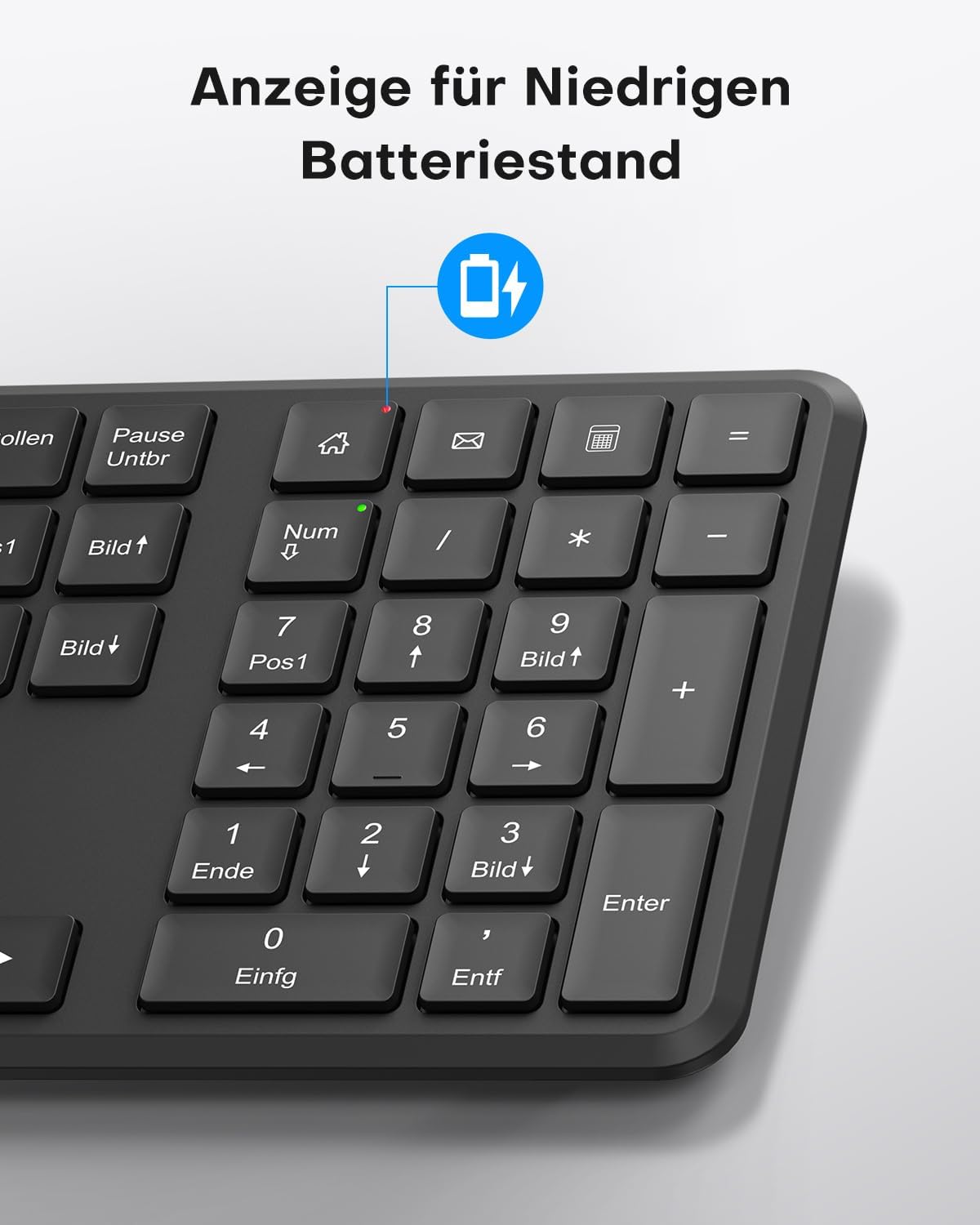
This image points out the low battery indicator on the OMOTON WK209 keyboard, which illuminates to alert the user when batteries need to be replaced.
6. Manutenzione
To ensure the longevity and optimal performance of your OMOTON WK209 set, follow these maintenance guidelines:
- Pulizia: Utilizzare un panno morbido e asciutto per pulire le superfici della tastiera e del mouse. Per lo sporco ostinato, un panno leggermenteamp è possibile utilizzare un panno, ma assicurarsi che non penetri umidità nei dispositivi.
- Sostituzione della batteria: Replace batteries promptly when the low battery indicator appears or when performance degrades. Always use fresh, high-quality AAA batteries.
- Magazzinaggio: Quando non vengono utilizzati per lunghi periodi, rimuovere le batterie per evitare perdite. Conservare i dispositivi in un luogo fresco e asciutto.
- Evitare i liquidi: Tenere la tastiera e il mouse lontani dai liquidi per evitare danni.
7. Risoluzione Dei Problemi
If you encounter issues with your OMOTON WK209 set, try the following troubleshooting steps:
- Nessuna risposta da tastiera/mouse:
- Assicurarsi che le batterie siano installate correttamente e non siano scariche. Sostituirle se necessario.
- Make sure the mouse's ON/OFF switch is in the 'ON' position.
- Verifica che il ricevitore USB sia collegato saldamente a una porta USB funzionante del computer. Prova una porta USB diversa.
- Riavvia il computer.
- Connessione ritardata o intermittente:
- Avvicinare la tastiera e il mouse al ricevitore USB.
- Ensure there are no large metal objects or other wireless devices (e.g., Wi-Fi routers, cordless phones) interfering with the 2.4 GHz signal.
- Try plugging the USB receiver into a front USB port or using a USB extension cable to bring it closer to the devices.
- Keys Not Working Correctly:
- Controllare che non ci siano detriti sotto i tasti.
- Ensure the keyboard layout setting on your computer matches the QWERTZ layout.
- Il cursore del mouse salta o non è preciso:
- Pulisci il sensore ottico sul lato inferiore del mouse.
- Utilizzare il mouse su una superficie pulita e non riflettente oppure su un tappetino per mouse.
8. Specifiche
| Caratteristica | Dettaglio |
|---|---|
| Marca | OMOTON |
| Modello | WK209 |
| Colore | Nero |
| Tecnologia di connettività | Wireless a 2.4 GHz |
| Disposizione della tastiera | Full-size QWERTZ (German Layout) |
| Caratteristiche speciali | 2.4 GHz, Full-size, QWERTZ-layout, Battery-operated, Multimedia keys |
| Dispositivi compatibili | Computer portatile, PC |
| Sistemi operativi compatibili | Sistema operativo Windows 11/10/8/7/XP |
| Fonte di alimentazione | Battery-Powered (2x AAA for keyboard, 1x AAA for mouse - not included) |
| Peso dell'articolo (circa) | 514 Grams (total set, including packaging) |
| Dimensioni del pacco | Dimensioni: 44.79 x 13.9 x 5.3 cm |
| ASIN | B0FQNS3FFB |
9. Garanzia e supporto
OMOTON products are designed for reliability and performance. For warranty information and customer support, please refer to the warranty card included with your purchase or visit the official OMOTON website. If you experience any issues that cannot be resolved using the troubleshooting guide, please contact OMOTON customer service for assistance.