
OHAYO X10 Max
OHAYO X10 Max Bluetooth Speaker Instruction Manual
Welcome to your new OHAYO X10 Max Portable Bluetooth Speaker.
1. Informazioni importanti sulla sicurezza
- Non esporre l'altoparlante a temperature estreme o alla luce solare diretta per periodi prolungati.
- Tenere l'altoparlante lontano da fonti di calore, oggetti appuntiti e materiali corrosivi.
- Non smontare, riparare o modificare l'altoparlante autonomamente. Se necessario, contattare personale di assistenza qualificato.
- Assicurarsi che il coperchio della porta di ricarica sia ben chiuso quando si utilizza l'altoparlante vicino all'acqua, per mantenere il grado di impermeabilità IPX7.
- Per la ricarica utilizzare solo il cavo di ricarica fornito o un cavo USB-C certificato.
2. Contenuto della confezione
- 1 x OHAYO X10 Max Bluetooth Speaker (White)
- 1 x USB-C Charging Cable (charging plug not contained)
- Cavo 1 x 3.5mm AUX
- 1 x Manuale utente
- 1 x cordino
3. Prodotto finitoview
The OHAYO X10 Max is a versatile portable Bluetooth speaker designed for high-quality audio and durability. It features a powerful 25W sound output with active bass, IPX7 waterproofing, and a long-lasting 24-hour battery. Enjoy dynamic sound with colorful RGB lighting effects, dual pairing for stereo sound, and multiple input modes.
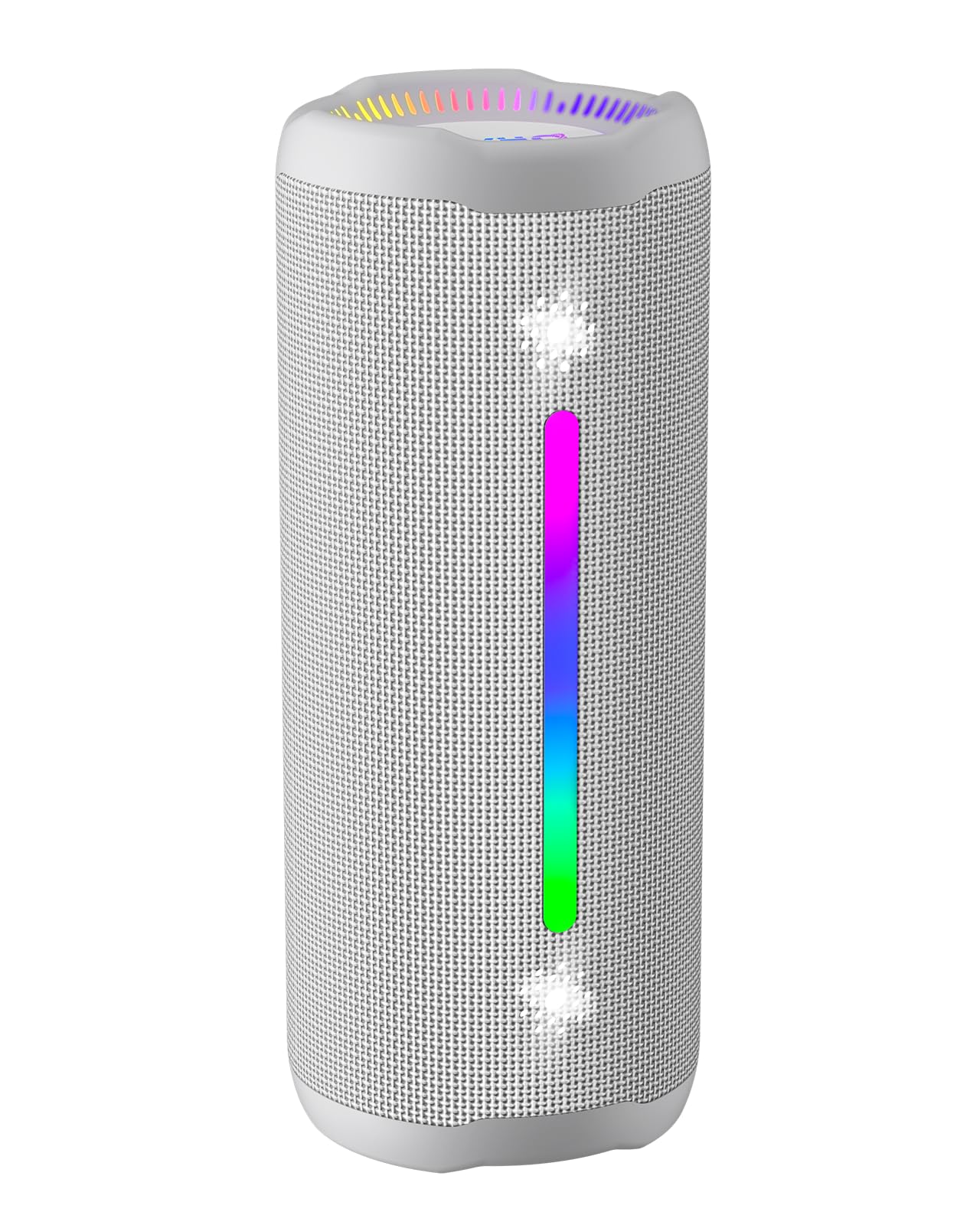
Figure 3.1: OHAYO X10 Max Bluetooth Speaker (White)

Figure 3.2: OHAYO X10 Max Bluetooth Speaker - Fully upgraded from appearance to performance.

Figure 3.3: 25W Deep Bass Sound - Independent channel design for accurate audio performance.

Figure 3.4: 6 Dazzling RGB Light Effects - Syncs with music for an immersive experience.

Figure 3.5: IPX7 Waterproof - Highly sealed design for use in various environments.

Figure 3.6: 24H Ultra-Long Battery Life - 6600mAh battery for extended playback.
4. Controlli e indicatori
The OHAYO X10 Max features intuitive controls for easy operation.

Figura 4.1: Pannello di controllo e porte
- Pulsante di accensione: Press and hold to power on/off. Short press to switch between input modes (Bluetooth, AUX, TF Card, USB-Audio).
- Volume Up (>): Premere brevemente per aumentare il volume. Premere a lungo per passare alla traccia successiva.
- Volume Down (<): Premere brevemente per diminuire il volume. Premere a lungo per tornare alla traccia precedente.
- Pulsante dei bassi: Press to activate/deactivate Bass Boost mode.
- Pulsante Riproduci/Pausa/Chiama: Short press to play/pause music. Short press to answer/end calls. Long press to reject calls. Double press to activate voice assistant.
- Indicatori luminosi della batteria: Four LED lights indicate battery level.
- Striscia luminosa RGB: Displays various colorful lighting effects.
- Porta di ricarica (USB-C): Per caricare l'altoparlante.
- Porta AUX-in: Per la connessione audio cablata.
- Slot per schede TF: Per riprodurre musica direttamente da una scheda MicroSD.
5. Impostazione
5.1 Ricarica dell'altoparlante
Before first use, fully charge the speaker. Connect the provided USB-C charging cable to the speaker's charging port and the other end to a 5V/2A USB power adapter (not included). The battery indicator lights will blink during charging and remain steady when fully charged.
5.2 Accensione/Spegnimento
Press and hold the Power button for approximately 3 seconds to turn the speaker on or off. A voice prompt will confirm the action.
5.3 Associazione Bluetooth
- Turn on the speaker. It will automatically enter Bluetooth pairing mode, indicated by a blinking blue LED.
- Abilita il Bluetooth sul tuo dispositivo (smartphone, tablet, ecc.).
- Cercare "X10 Max" in your device's Bluetooth list and select it to connect.
- Una volta effettuata la connessione, un messaggio vocale confermerà l'avvenuta associazione.
5.4 Accoppiamento True Wireless Stereo (TWS)
To achieve a true wireless stereo experience, you can pair two OHAYO X10 Max speakers together.

Figura 5.1: Accoppiamento stereo wireless reale
- Ensure both X10 Max speakers are powered on and not connected to any other Bluetooth device.
- Su uno speaker (che sarà quello principale), premere due volte il pulsante di accensione. Si entrerà in modalità di associazione TWS.
- I due altoparlanti si connetteranno automaticamente tra loro. Un messaggio vocale confermerà l'avvenuto abbinamento TWS.
- Ora collega il tuo dispositivo all'altoparlante principale tramite Bluetooth come descritto nella sezione 5.3.
5.5 Collegamento tramite AUX
Utilizzare il cavo AUX da 3.5 mm in dotazione per collegare l'altoparlante a dispositivi privi di funzionalità Bluetooth.
Figure 5.2: 4 Input Modes - Including AUX, TF, and USB-Audio.
- Connect one end of the AUX cable to the speaker's AUX-in port.
- Collegare l'altra estremità all'uscita audio del dispositivo.
- The speaker will automatically switch to AUX mode. If not, short press the Power button to cycle through modes until AUX mode is activated.
5.6 Utilizzo della scheda TF
Insert a MicroSD (TF) card with MP3/WAV/FLAC/WMA audio files into the TF card slot. The speaker will automatically switch to TF card mode and begin playback. Short press the Power button to cycle through modes if needed.
5.7 Using USB-Audio
Connect the speaker to a computer using the USB-C cable. The speaker can function as an external audio output device for your computer. Short press the Power button to cycle through modes if needed.
6. Istruzioni per l'uso
6.1 Riproduzione di musica
- Riproduci/Pausa: Short press the Play/Pause/Call button.
- Controllo del volume: Short press the Volume Up (>) or Volume Down (<) buttons.
- Traccia successiva: Long press the Volume Up (>) button.
- Traccia precedente: Long press the Volume Down (<) button.
6.2 Funzione Bass Boost
Press the 'BASS' button to activate or deactivate the enhanced bass mode. This feature provides deeper and richer low frequencies for a more impactful audio experience.
6.3 modalità di illuminazione RGB
The speaker features dynamic RGB lighting. The lights will automatically sync with the music beat. To turn the lights on/off, refer to the specific control instructions in your quick start guide or experiment with the mode button if available.
6.4 Chiamate in vivavoce
Se connesso tramite Bluetooth allo smartphone, l'altoparlante può essere utilizzato per chiamate in vivavoce.

Figura 6.1: Funzione di chiamata in vivavoce
- Rispondi/Termina chiamata: Short press the Play/Pause/Call button.
- Rifiuta chiamata: Long press the Play/Pause/Call button.
- Attiva l'assistente vocale: Double press the Play/Pause/Call button.
7. Manutenzione
- Pulizia: Pulisci l'altoparlante con un morbido, damp stoffa. Non utilizzare prodotti chimici aggressivi o detergenti abrasivi.
- Magazzinaggio: Quando non viene utilizzato per lunghi periodi, conservare l'altoparlante in un luogo fresco e asciutto, lontano dalla luce solare diretta e da temperature estreme.
- Cura della batteria: Per prolungare la durata della batteria, caricare l'altoparlante almeno una volta ogni tre mesi se non lo si utilizza regolarmente.
8. Risoluzione Dei Problemi
| Problema | Possibile causa | Soluzione |
|---|---|---|
| L'altoparlante non si accende. | Batteria scarica. | Caricare completamente l'altoparlante. |
| Impossibile effettuare l'associazione tramite Bluetooth. | Altoparlante non in modalità di associazione; Bluetooth del dispositivo disattivato; troppo lontano dal dispositivo. | Ensure speaker is in pairing mode (blinking blue LED). Turn on device Bluetooth. Move device closer to speaker (within 10 meters). |
| Nessun suono o volume basso. | Volume troppo basso sull'altoparlante o sul dispositivo; modalità di input errata. | Increase volume on both speaker and device. Check if the correct input mode (Bluetooth, AUX, TF) is selected. |
| L'associazione TWS non è riuscita. | Altoparlanti troppo distanti; un altoparlante è già collegato a un altro dispositivo. | Ensure speakers are close to each other. Disconnect any existing Bluetooth connections before TWS pairing. |
| Distorsione del suono. | Volume troppo alto; batteria scarica. | Ridurre il volume. Caricare l'altoparlante. |
9. Specifiche
| Caratteristica | Specificazione |
|---|---|
| Nome del modello | X10 max |
| Versione Bluetooth | 5.3 |
| Tecnologia di comunicazione wireless | Bluetooth |
| Potenza massima in uscita dell'altoparlante | 35 Watts (25W effective) |
| Capacità della batteria | 6600 mAh |
| Tempo di gioco | Up to 24 hours (varies with volume and light use) |
| Livello di resistenza all'acqua | IPX7 (impermeabile) |
| Ingresso volumetage | 5 Volt (CC) |
| Risposta in frequenza | 20KHz |
| Signal-to-Noise Ratio | 80 dB |
| Tipo di driver audio | Driver dinamico |
| Diametro del woofer | 75 millimetri |
| Diametro del tweeter | 26 millimetri |
| Dimensioni del prodotto | 2.95"P x 2.95"L x 7.28"A |
| Peso dell'articolo | 450 grammi (15.9 once) |
| Materiale | Acrilonitrile-butadiene-stirene (ABS), Alluminio |
| Metodo di controllo | Premere il pulsante |
| Caratteristiche speciali | Bass Boost, AUX, Hi-Res Audio, 24-Hour Playtime, IPX7 Waterproof, TF Card Port, Dual Passive Radiators, Hands-free, True Wireless Stereo Pairing, Shockproof |
10. Garanzia e supporto
The OHAYO X10 Max Bluetooth Speaker comes with an extended warranty. For specific warranty details and to register your product, please refer to the information provided in your quick start guide or contact OHAYO customer support.
For technical support or customer service inquiries, please contact OHAYO Direct. Contact information may be found in your product packaging or on the official OHAYO websito.
11. Video ufficiale del prodotto
Video 11.1: Official OHAYO Portable Bluetooth Speaker overview by OHAYO Direct. This video highlights key features and design elements of the speaker.
Ask a question about this manual
Ask about setup, troubleshooting, compatibility, parts, safety, or missing instructions. Manuals+ will review the question and use this page’s manual context to help answer it.