
1. Introduzione
This manual provides essential information for the safe and effective use of your TOPUTURE TP4 Foldable Walking Pad Treadmill with Incline. Please read this manual thoroughly before initial use and retain it for future reference. This treadmill is designed for walking and light running in home and office environments, offering a compact and versatile fitness solution.
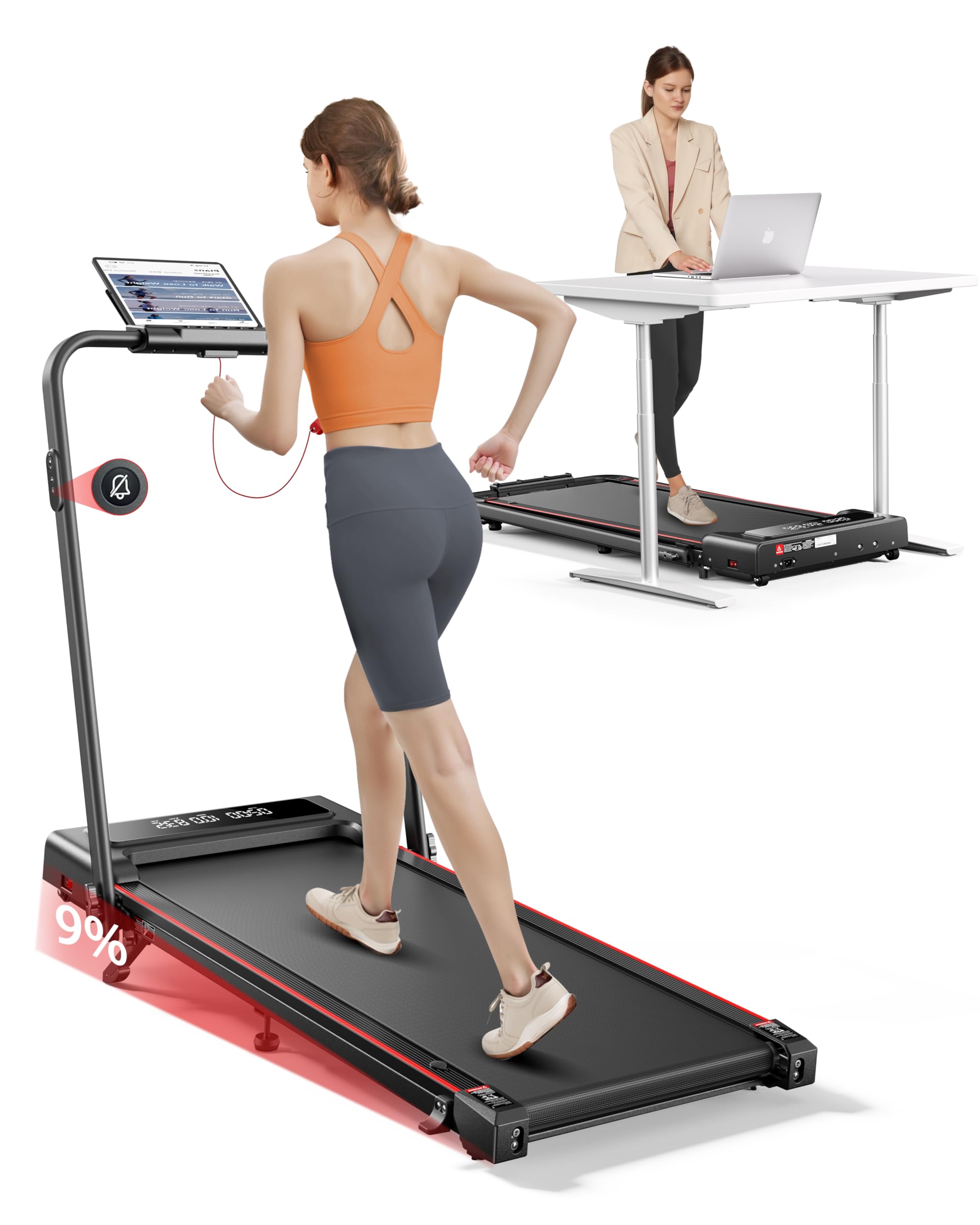
Image 1.1: The TOPUTURE TP4 Foldable Walking Pad Treadmill in both walking pad and treadmill configurations.
2. Importanti istruzioni di sicurezza
Per ridurre il rischio di lesioni gravi, leggere attentamente tutte le istruzioni prima di utilizzare questa apparecchiatura. Il produttore non si assume alcuna responsabilità per lesioni personali o danni materiali derivanti dall'uso di questo prodotto.
- Posizionare sempre il tapis roulant su una superficie piana e stabile.
- Assicurare uno spazio libero adeguato attorno al tapis roulant (almeno 2 metri dietro e 0.6 metri su ciascun lato).
- Tenere i bambini e gli animali domestici lontani dal tapis roulant durante il funzionamento.
- Do not use the treadmill if you weigh more than the maximum weight capacity (300 lbs / 136 kg).
- Indossare calzature sportive adatte.
- Se avverti dolore, vertigini o mancanza di respiro, interrompi immediatamente l'esercizio.
- Scollegare il tapis roulant dalla presa di corrente quando non è in uso o prima di pulirlo/manutenerlo.
- Non utilizzare il tapis roulant se il cavo di alimentazione o la spina sono danneggiati.
- Questo apparecchio non è destinato all'uso da parte di persone con capacità fisiche, sensoriali o mentali ridotte, o prive di esperienza e conoscenza, a meno che non siano supervisionate o abbiano ricevuto istruzioni riguardanti l'uso dell'apparecchio da una persona responsabile della loro sicurezza.

Image 2.1: Illustration of the multi-layer running belt designed for shock absorption and joint protection.
3. Contenuto della confezione
Carefully unpack the box and ensure all items are present and undamaged. If any parts are missing or damaged, contact customer support.
- TOPUTURE TP4 Walking Pad Treadmill
- Cavo di alimentazione
- Telecomando
- Chiave di sicurezza
- Tool Kit (for minor adjustments)
- Manuale dell'utente (questo documento)
- Olio lubrificante
4. Impostazione
4.1 Apertura del tapis roulant
The TOPUTURE TP4 comes pre-assembled. Simply remove it from the packaging and unfold it according to the following steps:
- Place the treadmill on a flat, hard surface.
- Gently lift the handle until it locks into the upright position.
- Prima dell'uso, assicurarsi che tutti i meccanismi di bloccaggio siano saldamente inseriti.

Image 4.1: Illustration of the treadmill's folding mechanism and compact storage dimensions.
4.2 Regolazione dell'inclinazione
The treadmill features a manual incline adjustment to simulate uphill walking, increasing calorie burn and workout intensity. The incline can be set up to 9%.
- Aprire il poggiapiedi: Locate the adjustable footpads at the rear of the treadmill.
- Inserisci il PIN: Use the provided pin to secure the footpad at the desired incline level.
- Regola il poggiapiedi centrale: Ensure the middle footpad is also adjusted to provide stable support.

Image 4.2: Visual representation of the 9% manual incline feature and its effect on calorie expenditure.

Image 4.3: Step-by-step instructions for adjusting the treadmill's manual incline.
5. Istruzioni per l'uso
5.1 Accensione/spegnimento
Connect the power cord to a grounded outlet. Flip the power switch located at the front of the treadmill to the 'ON' position. The LED display will illuminate.
5.2 Utilizzo del telecomando
The treadmill is operated via a silent remote control. Ensure the safety key is in place before starting. The remote allows you to:
- Start/Stop the treadmill.
- Adjust speed (increase/decrease).
- Switch between modes (Walking, Running, Climbing, Working).
- Activate mute function for quiet operation.

Image 5.1: The dual LED display showing real-time data and the remote control for easy adjustments.
5.3 Comprensione del display
Il doppio display LED fornisce dati di allenamento in tempo reale:
- Tempo: Durata del tuo allenamento.
- Velocità: Current speed in MPH or KM/H.
- Distanza: Distanza totale percorsa.
- Calorie: Calorie bruciate stimate.
Modalità operative 5.4
The TOPUTURE TP4 offers four distinct modes to suit various fitness needs:
- Modalità camminata (0.6-5 MPH): Ideale per passeggiate informali o per l'uso sotto la scrivania.
- Modalità di corsa (5-7.6 MPH): Per allenamenti cardio più intensi.
- Modalità salita (0.6-3 MPH): Utilizes the incline feature for uphill simulation.
- Modalità di lavoro (0.6-1.5 MPH): Low speed for active work at a standing desk.

Image 5.2: Demonstrates the versatility of the treadmill in both walking and running configurations.
5.5 Connessione Smart App
Enhance your workout experience by connecting the treadmill to the dedicated smart app via Bluetooth.
- Scarica l'app dall'app store del tuo dispositivo.
- Abilita il Bluetooth sul tuo smartphone o tablet.
- Apri l'app e segui le istruzioni sullo schermo per associarla al tuo tapis roulant.
L'app ti consente di:
- Sincronizza i dati degli esercizi in tempo reale.
- Accedi a piani di allenamento personalizzati.
- Track your progress and set goals.
- Participate in running challenges.

Image 5.3: The smart app interface displaying workout statistics and training programs.
6. Manutenzione
Una manutenzione regolare garantisce la longevità e le prestazioni ottimali del tuo tapis roulant.
6.1 Lubrificazione
The running belt requires periodic lubrication to reduce friction and wear. Use the provided lubricating oil.
- Scollegare il tapis roulant.
- Sollevare il bordo del nastro trasportatore.
- Apply a small amount of lubricating oil evenly under the belt, about 10-20ml.
- Run the treadmill at a low speed (e.g., 1 MPH) for 5 minutes to distribute the oil.
- Lubrificare ogni 3-6 mesi a seconda dell'utilizzo.

Image 6.1: Instructions for lubricating the running belt and adjusting its tension.
6.2 Pulizia
Pulisci le superfici del tapis roulant con un pannoamp panno dopo ogni utilizzo. Non utilizzare detergenti abrasivi o solventi.
6.3 Regolazione della cinghia
If the running belt shifts or slips, it may need adjustment. Use the included tool kit to adjust the tension bolts at the rear of the treadmill. Refer to the detailed instructions in the tool kit for precise adjustment.
7. Risoluzione Dei Problemi
Se riscontri problemi con il tuo tapis roulant, fai riferimento ai seguenti problemi comuni e alle relative soluzioni:
| Problema | Possibile causa | Soluzione |
|---|---|---|
| Il tapis roulant non si accende | Power cord not connected, power switch off, safety key not in place. | Check power cord connection, ensure power switch is ON, insert safety key. |
| Il nastro trasportatore scivola o si ferma | Cinghia troppo lenta, lubrificazione insufficiente. | Adjust belt tension (refer to 6.3), apply lubricating oil (refer to 6.1). |
| Rumore insolito durante il funzionamento | Parti allentate, problemi al motore, attrito della cinghia. | Check for loose screws, lubricate belt, contact support if noise persists. |
| Il telecomando non risponde | Battery low, interference. | Replace remote control battery, ensure no obstructions between remote and treadmill. |
8. Specifiche
| Caratteristica | Dettaglio |
|---|---|
| Numero di modello | TP4 |
| Dimensioni del prodotto (aperto) | 126 x 62 x 106.7 cm (50 x 23 x 42 pollici) |
| Dimensioni pieghevoli | 126 x 58.4 x 11.4 cm (50 x 23 x 4.5 pollici) |
| Peso dell'articolo | 25.4 kg (56 libbre) |
| Materiale | Acciaio legato |
| Potenza motore | 2.5 CV |
| Gamma di velocità | 0.6 - 7.6 MPH (circa 1 - 12.2 km/h) |
| Percentuale di inclinazione massimatage | 9% (manuale) |
| Peso massimo dell'utente | 300 libbre (136 kg) |
| Visualizza metriche | Calorie bruciate, distanza, velocità, tempo |
| Caratteristiche speciali | Compact Design, Foldable, Lightweight, Manual Incline, Shock Absorbent, App Control, Remote Control |
9. Garanzia e supporto
9.1 Informazioni sulla garanzia
The TOPUTURE TP4 Foldable Walking Pad Treadmill is covered by a TWO-YEARS warranty dalla data di acquisto. La presente garanzia copre difetti di fabbricazione e di lavorazione in condizioni di normale utilizzo. Non copre danni causati da uso improprio, incidenti, modifiche non autorizzate o manutenzione impropria.
9.2 Assistenza clienti
For any questions, technical assistance, or warranty claims, please contact our customer support team. To expedite your request, please have your order ID and product model number (TP4) ready.
Come contattare il venditore:
- Accedi al tuo account Amazon.
- Go to "Your Orders."
- Find the relevant order ID for your TOPUTURE TP4 Treadmill.
- Clicca su "Contatta il venditore".