
1. Introduzione
The Bushnell Spot On 22MP 1080p HD Trail Camera (Model 66063CCW) is designed for capturing high-resolution images and videos of wildlife and outdoor activities. Featuring a durable, weather-resistant design and advanced imaging capabilities, this camera is suitable for various outdoor monitoring needs. Its compact size and treebark camouflage pattern allow for discreet placement in natural environments.
2. Contenuto della confezione
Verifica che tutti gli articoli elencati di seguito siano inclusi nel tuo pacchetto:
- Bushnell Spot On 22MP 1080p HD Trail Camera
- Scheda SD da 16 GB
- Batterie AA (quantità: 8)
- Cinghia di montaggio

Figura 2.1: Included accessories with the Bushnell Spot On Trail Camera. This image shows the trail camera, a 16GB SD card, eight AA batteries, and a mounting strap, all essential for immediate use.
3. Caratteristiche principali
- Immagini ad alta risoluzione: Captures 22 MP still images for clear and detailed photos.
- Video Full HD: Records 1080p HD video footage.
- Advanced Auto Exposure: Prevents overexposed or "white out" images, ensuring better clarity.
- Velocità di attivazione rapida: A rapid 0.4-second trigger speed minimizes missed shots of fast-moving subjects.
- Low Glow IR Night Vision: Features 80-foot (24.4 meters) Low Glow Infrared illumination for discreet night-time recording without startling wildlife.
- Design compatto e discreto: Slim construction with a treebark camouflage pattern for easy concealment.
- Resistenza alle intemperie: Durable construction designed to withstand various outdoor elements and conditions.
4. Impostazione
4.1. Installazione della batteria
- Open the camera housing latch located on the side of the unit.
- Locate the battery compartment. Insert eight (8) AA batteries, ensuring correct polarity (+/-) as indicated inside the compartment.
- Chiudere saldamente il coperchio del vano batterie.
4.2. Inserimento della scheda SD
- Con l'alloggiamento della fotocamera aperto, individuare lo slot per la scheda SD.
- Insert the provided 16GB SD card into the slot with the label facing up, until it clicks into place.
- Per rimuovere la scheda SD, spingerla delicatamente finché non scatta, quindi rilasciarla e verrà espulsa.
4.3. Montaggio della fotocamera
The camera can be mounted using the included mounting strap or a tripod (not included).
- Utilizzo della cinghia di montaggio: Thread the strap through the slots on the back of the camera. Secure the camera to a tree or post at the desired height and angle. Ensure the camera is stable and pointed towards the area you wish to monitor.
- Utilizzo di un treppiede: The camera features a standard 1/4"-20 tripod mount on the bottom for alternative mounting options.

Figura 4.1: Posteriore view of the Bushnell Spot On Trail Camera. This image highlights the mounting strap slots and the product information label, which includes the model number and regulatory marks.
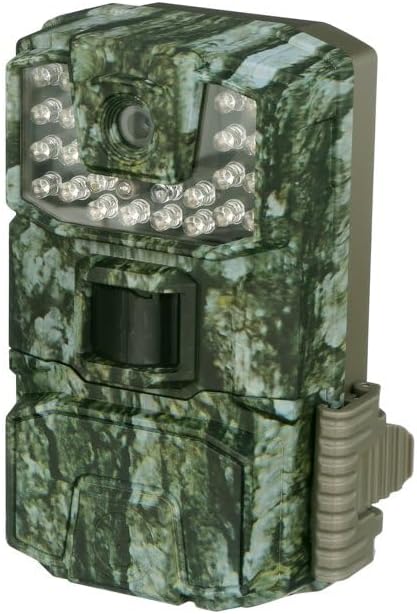
Figura 4.2: Davanti view of the Bushnell Spot On Trail Camera. This image displays the camera lens, the motion sensor, and the array of Low Glow IR LEDs for night vision.
5. Utilizzo della fotocamera
5.1. Accensione/Spegnimento
To power on the camera, slide the power switch to the "ON" position. To power off, slide the switch to "OFF".
5.2. Selezione della modalità
The camera typically features different operating modes, such as Photo, Video, and Setup. Use the internal controls (buttons and display) to navigate and select your desired mode.
5.3. Impostazione di data e ora
Access the "Setup" mode to configure the current date and time. This ensures accurate timestamps on your captured images and videos.
5.4. Cattura di immagini e video
Once configured and placed, the camera will automatically capture images or videos based on motion detection and your selected settings. The 0.4-second trigger speed ensures quick capture.
5.5. Viewing Media catturati
A view images and videos, remove the SD card from the camera and insert it into a compatible device (e.g., computer, card reader). Alternatively, some models may feature an internal display for review.
6. Manutenzione
- Pulizia: Use a soft, dry cloth to clean the camera lens and IR sensors. Avoid abrasive materials or harsh chemicals.
- Cura della batteria: Replace all batteries simultaneously with new ones. Do not mix old and new batteries or different battery types. Remove batteries if the camera will be stored for extended periods to prevent leakage.
- Gestione della scheda SD: Regularly format your SD card to maintain optimal performance and prevent data corruption. Back up important files prima della formattazione.
- Magazzinaggio: Conservare la fotocamera in un luogo fresco e asciutto quando non viene utilizzata.
7. Risoluzione Dei Problemi
| Problema | Possibile causa | Soluzione |
|---|---|---|
| La fotocamera non si accende. | Batterie scariche o esaurite; polarità della batteria errata. | Replace all batteries with fresh AA batteries, ensuring correct polarity. |
| Nessuna immagine/video catturato. | SD card full or corrupted; incorrect settings; motion sensor blocked. | Format the SD card; check camera settings (e.g., mode, sensitivity); ensure clear line of sight for the motion sensor. |
| Scarsa qualità delle immagini/video. | Dirty lens; low light conditions; subject too far or too close. | Clean the camera lens; adjust camera placement for optimal lighting and distance. |
| La visione notturna non funziona. | IR sensors blocked or dirty; insufficient power. | Clean IR sensors; ensure batteries are fully charged. |
8. Specifiche
| Nome del modello | Spot On |
| Numero di modello | 66063CCW |
| Risoluzione dell'immagine | 22 MP |
| Risoluzione video | Risoluzione 1080p |
| Trigger Speed | 0.4 secondi |
| Gamma di visione notturna | 80 feet (Low Glow IR) |
| Fonte di alimentazione | 8x batterie AA |
| Memoria | SDHC Card (up to 32GB, 16GB included) |
| Tecnologia di connettività | SDHC |
| Uso interno/esterno | All'aperto |
| Tipo di montaggio | Monte albero |
| Livello di resistenza all'acqua | Resistente all'acqua |
| Dimensioni articolo (L x P x A) | 14 x 10.2 x 7.6 centimetri |
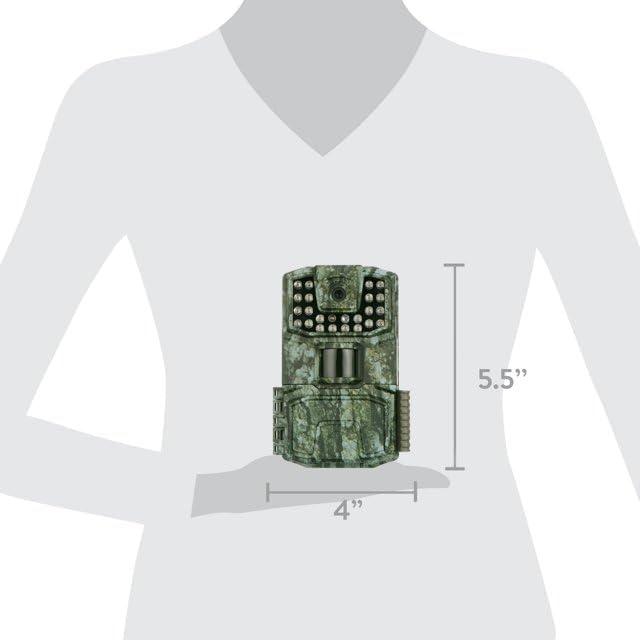
Figura 8.1: Dimensions of the Bushnell Spot On Trail Camera. The diagram indicates a height of 5.5 inches and a width of 4 inches, providing a visual reference for its compact size.
9. Informazioni sulla garanzia
The Bushnell Spot On 22MP 1080p HD Trail Camera is covered by a Garanzia del produttore di 1 anni from the date of purchase. This warranty covers defects in materials and workmanship under normal use. For specific terms, conditions, and claim procedures, please refer to the official Bushnell websito o contattare l'assistenza clienti.
10. Assistenza clienti
For technical assistance, troubleshooting beyond this manual, or warranty claims, please contact Bushnell Customer Support:
- Websito: Visita il sito ufficiale Bushnell websito per FAQ, registrazione del prodotto e risorse di supporto.
- Informazioni sui contatti: Fare riferimento a Bushnell website for current phone numbers and email addresses for your region.
When contacting support, please have your product model number (66063CCW) and proof of purchase readily available.